
Read-only database MCP proxy for AI — safe SELECT + MongoDB read access with 5-layer defense

Project description
dbread
Read-only database MCP proxy for AI — safe SELECT + MongoDB read access with 5-layer defense







Why · Quickstart · Tools · Security Model · Update · Docs
🤔 Why
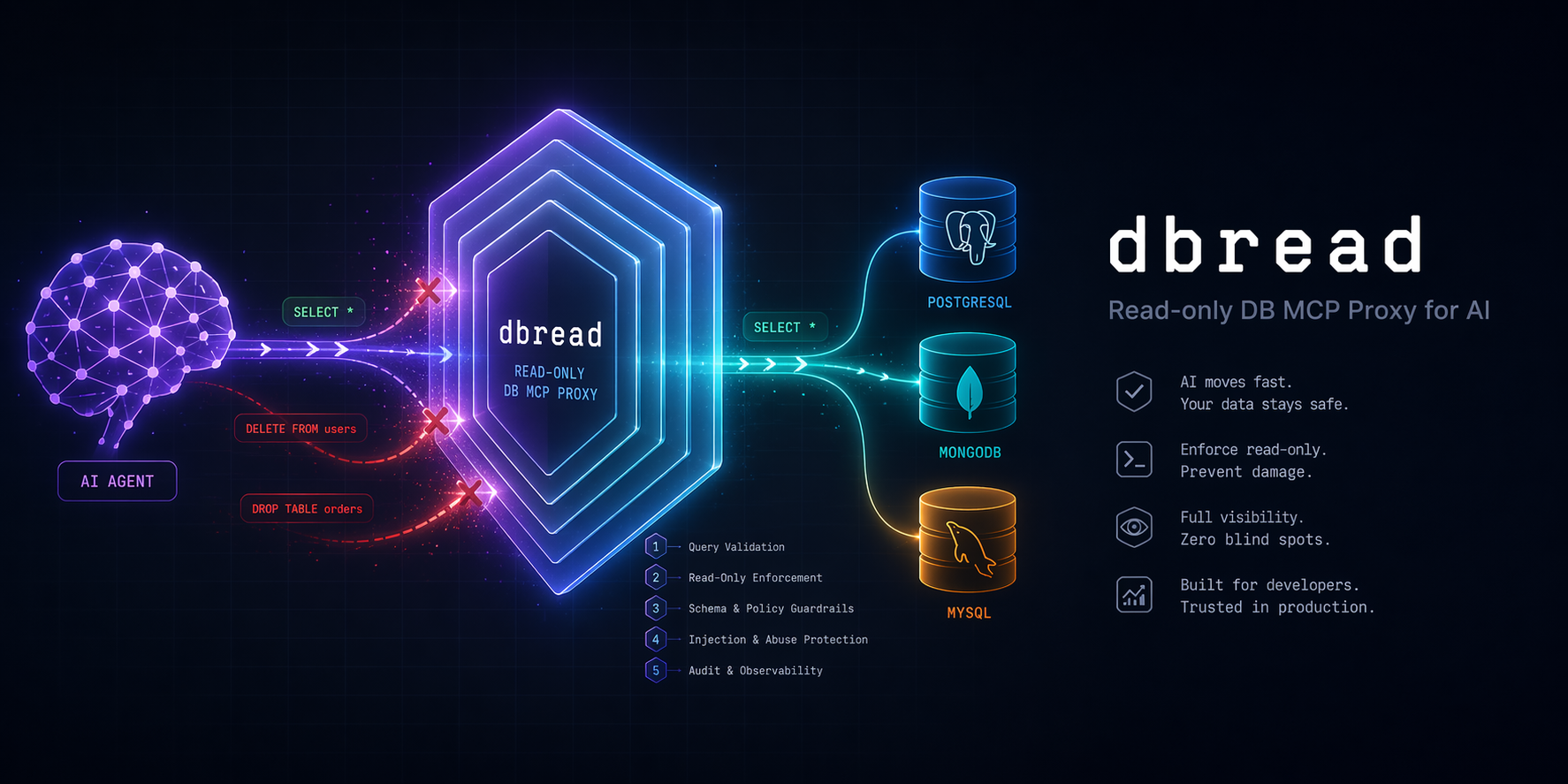
Handing a raw database connection string to an AI is like handing a stranger your car keys. They probably won't crash it, but you wouldn't bet the car on it.
dbread sits between your AI and your DBs and enforces read-only access through five independent layers — if one layer has a bug, the next one still blocks you.
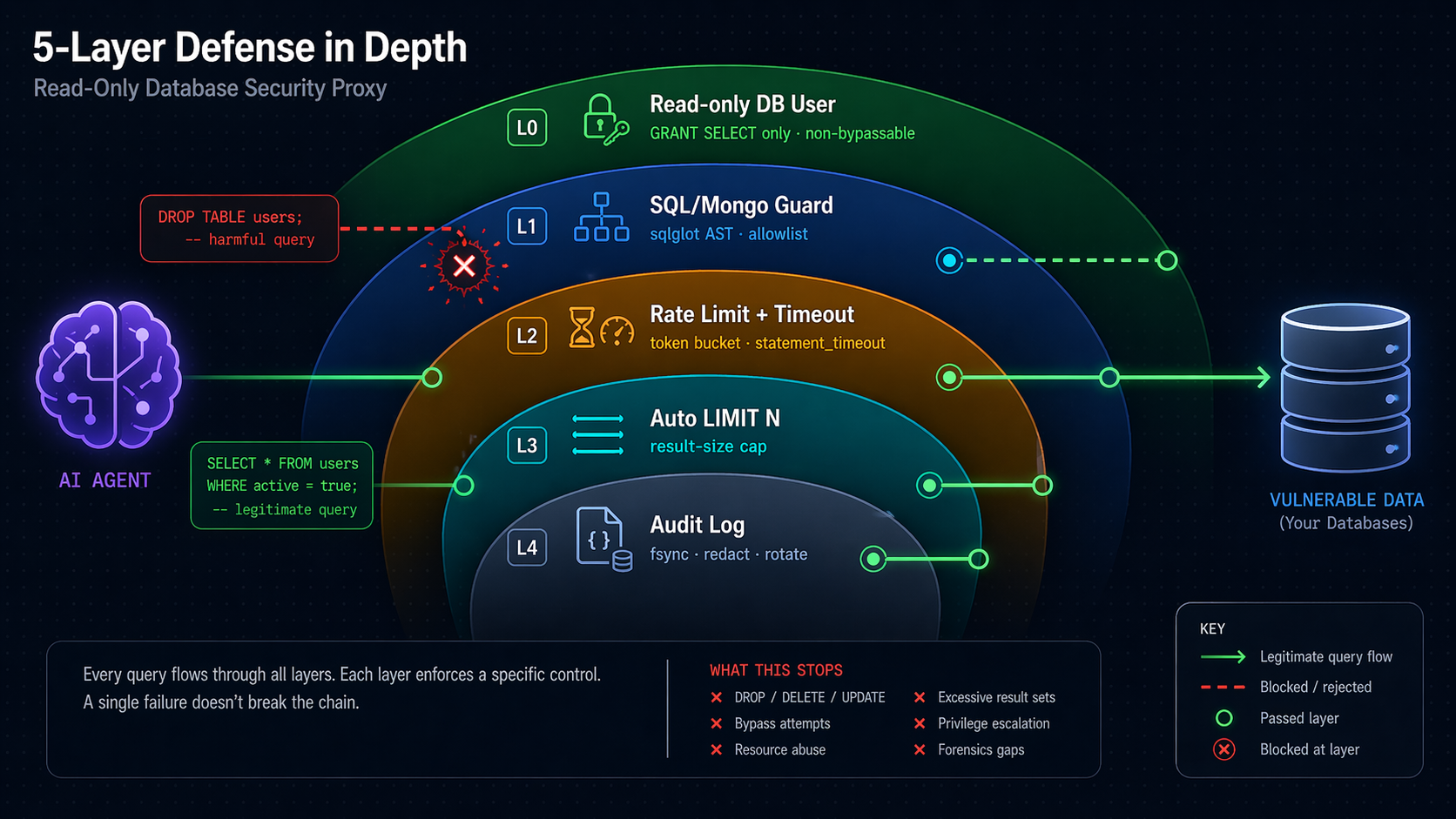
⚠️ Security note — do not skip. Layer 0 (a read-only DB user, step 2b) is the only non-bypassable guarantee. Layers 1–4 reduce blast radius and make attacks loud — they are not substitutes. If you point dbread at a DB where the configured user can write, a single sqlglot parser gap (past, present, or future) can let a write through. See Known Limitations.
⚡ Quickstart (2 minutes, no clone needed)
1. Install as a tool
# From PyPI (recommended):
uv tool install "dbread[postgres]"          # extras: postgres, mysql, mssql, oracle, duckdb, clickhouse, mongo

# OR straight from GitHub (no PyPI needed):
uv tool install "git+https://github.com/tvtdev94/dbread[postgres]"
2. Scaffold config (one command)
dbread init
Creates ~/.dbread/config.yaml, ~/.dbread/.env, and ~/.dbread/sample.db (a tiny read-only SQLite demo so everything works immediately). Prints the exact claude mcp add line to paste in step 4. Skip to step 4 if you only want the demo; otherwise edit config.yaml / .env first (step 3).
2b. Create a read-only DB user (when pointing at a real DB)
See docs/setup-db-readonly.md — copy-paste SQL/Mongo snippets for PostgreSQL / MySQL / MSSQL / Oracle / SQLite / DuckDB / ClickHouse / MongoDB, plus compat notes for CockroachDB · Timescale · Aurora · SingleStore · PlanetScale · Yugabyte · DocumentDB · CosmosDB.
3. Create config.yaml + .env
# ~/.dbread/config.yaml
connections:
  mydb:
    url_env: MYDB_URL
    dialect: postgres
    rate_limit_per_min: 60
    statement_timeout_s: 30
    max_rows: 1000

  # Optional: MongoDB (requires `uv tool install "dbread[mongo]"`)
  # analytics_mongo:
  #   url_env: MONGO_URL
  #   dialect: mongodb
  #   rate_limit_per_min: 60
  #   statement_timeout_s: 30    # becomes maxTimeMS=30000 per command
  #   max_rows: 1000
  #   mongo:
  #     sample_size: 100         # docs sampled by describe_table (10-1000)

audit:
  path: ~/.dbread/audit.jsonl   # ~ expansion supported
  rotate_mb: 50                  # rotates current → .1 → .2 → .3 (oldest dropped)
  timezone: UTC                  # IANA name; default UTC
  redact_literals: false         # true → SQL literals become "?" in log (PII hardening)
# ~/.dbread/.env
MYDB_URL=postgresql+psycopg2://ai_readonly:password@host:5432/mydb
# MONGO_URL=mongodb://ai_ro:password@host:27017/analytics?tls=true
4. Register with Claude Code
claude mcp add --scope user dbread \
  --env DBREAD_CONFIG=/path/to/config.yaml \
  -- dbread
Or without install (one-shot via uvx):
claude mcp add --scope user dbread \
  --env DBREAD_CONFIG=/path/to/config.yaml \
  -- uvx --from "dbread[postgres]" dbread
5. Use it
Restart Claude Code → /mcp → dbread appears. Ask Claude: "list connections in dbread, then count rows per status in the orders table."
Alternative: clone the repo (for development)
git clone https://github.com/tvtdev94/dbread && cd dbread
uv sync --extra postgres --extra dev
cp config.example.yaml config.yaml && cp .env.example .env
claude mcp add --scope user dbread -- uv --directory $(pwd) run dbread
Ask Claude: "List connections in dbread, then count rows per status in the orders table."
🏗️ Architecture
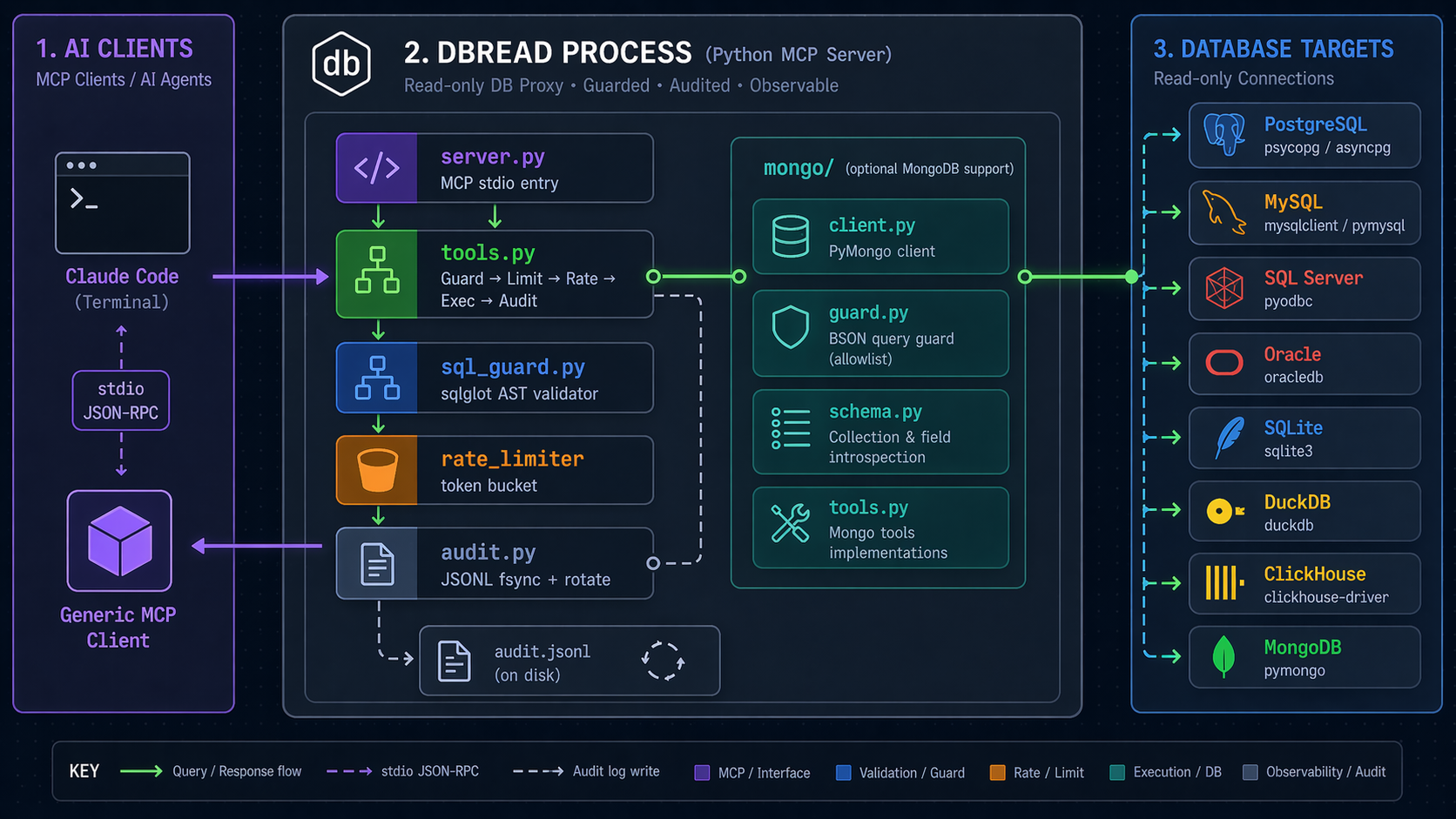
Data flow for a query call:
sequenceDiagram
    participant AI as Claude
    participant T as tools.query
    participant G as SqlGuard
    participant R as RateLimiter
    participant D as Database
    participant A as Audit

    AI->>T: query(sql, connection)
    T->>G: validate(sql, dialect)
    alt SQL is DML/DDL
        G-->>T: rejected
        T->>A: log(rejected, reason)
        T-->>AI: ❌ sql_guard error
    else SQL is SELECT
        G->>T: ✓ plus inject LIMIT N
        T->>R: acquire(connection)
        alt Rate limit hit
            R-->>T: denied
            T->>A: log(rejected, rate_limit)
            T-->>AI: ❌ rate_limit_exceeded
        else Rate limit OK
            R->>T: ✓
            T->>D: execute(sql)
            D-->>T: rows
            T->>A: log(ok, rows, ms)
            T-->>AI: ✅ rows JSON
        end
    end
🧰 Tools
| Tool | Purpose | Input |
|---|---|---|
list_connections |
Configured connections + dialects | — |
list_tables |
Tables in a connection | connection, schema? |
describe_table |
SQL: columns/types/PKs/indexes. Mongo: sampled field schema + indexes | connection, table, schema? |
query |
Run SELECT/WITH/EXPLAIN/SHOW (SQL) or Mongo command (find/count/distinct/aggregate). Auto-limited. Rate-limited. Audited. |
connection, sql | command, max_rows? |
explain |
Query execution plan | connection, sql | command |
🛡️ Security Model
| Layer | Mechanism | What it rejects |
|---|---|---|
| 0 | DB user with GRANT SELECT only |
All writes — mandatory, non-bypassable |
| 1 | sqlglot AST validation (SQL) · allowlist validator (Mongo) |
SQL: INSERT · UPDATE · DELETE · MERGE · CREATE · ALTER · DROP · TRUNCATE · GRANT · REVOKE · multi-statement (SELECT 1; DROP...) · PG CTE-DML trick (WITH d AS (DELETE...) SELECT...) · time-based DoS (pg_sleep*, sleep, benchmark, MSSQL WAITFOR DELAY/TIME) · function blacklist (pg_read_file, xp_cmdshell, load_file, dblink_exec, ClickHouse url/s3/remote, DuckDB read_csv/read_parquet, …). Mongo: only find/count/distinct/aggregate; blocks $out · $merge · $function · $accumulator · $where · mapReduce · $unionWith · cross-DB $lookup · recursively walks $facet/$lookup.pipeline. |
| 2 | Rate limit + statement_timeout |
Runaway loops · long-running queries |
| 3 | Auto-inject LIMIT N |
Oversized result sets |
| 4 | JSONL audit log (fsync each write, 3-backup rotate, opt-in PII redact) |
(detection, not prevention — grep-friendly forensics) |
💡 Principle: Never rely on a single layer. Layer 0 is the guarantee; Layers 1–4 make attacks loud and rare.
Full threat model: docs/security-threat-model.md (STRIDE analysis).
⚡ Overhead
dbread adds guard + limit-injection work on every query. Rough p95 per call, measured in-process (no DB round-trip):
| Workload | guard.validate | guard.inject_limit | total overhead |
|---|---|---|---|
SELECT 1 |
~0.17 ms | ~0.44 ms | ~0.6 ms |
| Realistic WHERE + ORDER BY | ~0.65 ms | ~1.28 ms | ~1.9 ms |
| 5-CTE 10-table join | ~3.1 ms | ~4.8 ms | ~7.9 ms |
Rate-limit acquire: ~1 µs. Run uv run python scripts/benchmark_overhead.py on your box. Full methodology: docs/benchmarks.md.
📋 Example Prompts
💬 "List connections in dbread."
💬 "Describe the schema of the orders table in analytics_prod."
💬 "Top 10 customers by lifetime value — use dbread."
💬 "Run EXPLAIN on: SELECT ... ORDER BY created_at"
💬 "Count orders by status in analytics_mongo (use aggregate)."
💬 '{"find": "users", "filter": {"status": "active"}}'   (Mongo command form)
💬 "Update user 1 to 'hacked'."
   → ❌ sql_guard: node_rejected: Update

💬 "WITH d AS (DELETE FROM users RETURNING *) SELECT * FROM d"
   → ❌ sql_guard: node_rejected: Delete   (PG CTE-DML blocked)

💬 "SELECT 1; DROP TABLE users;"
   → ❌ sql_guard: multi_statement_not_allowed

💬 '{"aggregate": "users", "pipeline": [{"$out": "leak"}]}'
   → ❌ mongo_guard: blocked_operator: $out
📜 Audit Log
Every call lands in audit.jsonl — one JSON per line, append-only, fsync'd on each write (survives kill -9), auto-rotated at 50 MB through a 3-backup chain (.1 → .2 → .3).
{"ts":"2026-04-22T12:30:12+00:00","conn":"analytics","sql":"SELECT * FROM users LIMIT 100","rows":100,"ms":42,"status":"ok"}
{"ts":"2026-04-22T12:30:15+00:00","conn":"analytics","sql":"DELETE FROM users","rows":0,"ms":0,"status":"rejected","reason":"node_rejected: Delete"}
Default timezone is UTC; override with audit.timezone: Asia/Bangkok (IANA). Enable audit.redact_literals: true to rewrite SQL literals to ? before logging — handy when prompts may contain PII.
jq 'select(.status=="rejected")' audit.jsonl     # just rejections
jq 'select(.ms > 1000)' audit.jsonl              # slow queries
jq -s 'group_by(.status)|map({s:.[0].status,n:length})' audit.jsonl   # counts
No jq? Use the built-in analyzer:
dbread audit                     # summary: counts, top slow, top rejected
dbread audit --since 1h          # last hour only
dbread audit --conn analytics    # filter by connection
dbread audit --slow 1000         # queries >= 1000 ms
dbread audit --rejected          # only rejections, grouped by reason
dbread audit --tail              # follow new entries (like tail -f)
Rotated backups (.1 · .2 · .3) are aggregated automatically.
🗂️ Config
config.yaml (gitignored — safe to edit with real values):
connections:
  analytics_prod:
    url_env: ANALYTICS_PROD_URL        # credentials from .env
    dialect: postgres
    rate_limit_per_min: 60
    statement_timeout_s: 30
    max_rows: 1000

  local_mysql:
    url: mysql+pymysql://readonly:pw@localhost/shop
    dialect: mysql
    rate_limit_per_min: 120
    statement_timeout_s: 15
    max_rows: 500

  local_duckdb:
    url: duckdb:///./analytics.duckdb?access_mode=read_only
    dialect: duckdb
    rate_limit_per_min: 200
    statement_timeout_s: 30
    max_rows: 5000

  clickhouse_prod:
    url_env: CLICKHOUSE_URL            # clickhouse+http://readonly:pw@host:8123/db
    dialect: clickhouse
    rate_limit_per_min: 60
    statement_timeout_s: 30
    max_rows: 1000

audit:
  path: ~/.dbread/audit.jsonl         # ~ expansion supported
  rotate_mb: 50                        # rotate chain: current → .1 → .2 → .3
  timezone: UTC                        # IANA; default UTC
  redact_literals: false               # true → SQL literals → "?"
Supported dialects: postgres · mysql · mssql · sqlite · oracle · duckdb · clickhouse · mongodb.
Compat (no new dialect): CockroachDB, TimescaleDB, Aurora PG (use postgres) · Aurora MySQL, SingleStore, PlanetScale (use mysql). See docs/setup-db-readonly.md.
🧪 Testing
uv sync --extra dev
uv run pytest                          # 274 passing
uv run pytest --cov=dbread             # coverage report (87% overall)
uv run ruff check src/                 # lint

# Integration tests with real PG + MySQL + ClickHouse + MongoDB (needs Docker):
cd tests/integration && docker compose up -d
uv run pytest tests/integration/ -v
- 260+ unit tests cover config, connections, audit (fsync/tz/redact/rotate), SQL guard (57 evasion cases incl. WAITFOR & sleep variants), Mongo guard (22 adversarial cases — $out/$merge smuggling, JS exec, cross-DB $lookup, deep nesting), rate limiter, tools.
- 4 subprocess smoke tests drive
server.pyvia real stdio JSON-RPC. - 4 SQLite + 4 DuckDB E2E tests always run (no Docker).
- PG + MySQL + ClickHouse + MongoDB E2E tests skip gracefully without Docker.
- CI runs on GitHub Actions matrix: Python 3.11/3.12 × Ubuntu/Windows.
⚠️ Known Limitations
Honesty pass — what dbread does not do:
- sqlglot is best-effort, dialect-dependent. Coverage is strong for Postgres / MySQL / SQLite; medium for MSSQL / Oracle / ClickHouse / DuckDB. See the dialect coverage table. Function blacklists are deny-lists; new dialect features arrive between releases.
- Rate limit is single-process, in-memory. Multiple dbread processes (multi-user install) don't share buckets.
global_rate_limit_per_mincaps one process only. - Audit is reactive, not preventive. JSONL +
dbread audithelp you notice; they don't block. - No query cost estimator. Layer 2 has
statement_timeoutandLIMIT N, but an expensive index-less scan that finishes in time still runs. - Pre-1.0 project. Real-world adversarial testing accumulates over time. Treat dbread as one layer of defense, not the whole perimeter.
- MongoDB guard is new (v0.4). Allowlist-based, less battle-tested than sqlglot. Adversarial suite covers the known write-stage / JS-exec evasions; report new ones.
- Mongo schema is sampled, not authoritative (default 100 docs). Rare fields may be missed — bump
mongo.sample_size(max 1000) if needed. - No Atlas Search /
$search/$vectorSearchsupport. Deferred to v0.5+.
🔄 Update
Already installed and want the latest release?
# Installed via `uv tool install` — upgrade in place:
uv tool upgrade dbread

# Want to add extras at the same time (e.g. MongoDB support):
uv tool install --force "dbread[postgres,mongo]"

# Running one-shot via uvx — refresh the cache so it pulls the new version:
uvx --refresh --from "dbread[mongo]" dbread --version
Then in Claude Code: /mcp → pick dbread → Reconnect so the refreshed
tool list is fetched. Verify with:
dbread --version
Working from a git checkout (source install)? Run bash scripts/dev-install.sh
(or the .ps1 variant) — see the Development section.
📚 Docs
| Document | What's in it |
|---|---|
docs/setup-db-readonly.md |
Copy-paste SQL / Mongo for Layer 0 read-only user on PG / MySQL / MSSQL / Oracle / SQLite / DuckDB / ClickHouse / MongoDB |
docs/architecture.md |
Component diagram · 5-layer details · data flow · design decisions |
docs/security-threat-model.md |
Full STRIDE analysis · residual risks · response plan |
docs/benchmarks.md |
Overhead methodology + per-workload p95 numbers |
docs/manual-smoke-test.md |
Step-by-step checklist for verifying integration with Claude Code |
🧱 Project Layout
src/dbread/
├── server.py         # MCP stdio entry — registers 5 tools, dispatches to handlers
├── tools.py          # SQL tool handlers (guard → limit → rate → exec → audit)
├── sql_guard.py      # sqlglot AST validator + LIMIT injection
├── rate_limiter.py   # thread-safe token bucket per connection + global cap
├── connections.py    # SQLAlchemy engine manager (lazy, per-dialect)
├── config.py         # pydantic Settings (YAML + env)
├── audit.py          # append-only JSONL with fsync + size rotation + redaction
├── audit_cli.py      # `dbread audit` analyzer (since/conn/slow/rejected/tail)
├── cli.py            # `dbread init` scaffolding + --help / --version
└── mongo/
    ├── client.py     # MongoClient manager (one per connection name)
    ├── guard.py      # allowlist validator + limit injection for commands
    ├── schema.py     # sample-based schema inference
    └── tools.py      # Mongo tool handlers (list/describe/query/explain)
Every core runtime module stays small and single-purpose — most files sit under 200 LOC so the whole stack is readable end-to-end in a single sitting.
🛠️ Development
Working from source (no PyPI release yet, or iterating on a patch)? Use the
dev-install scripts — they reinstall the uv tool with a full wheel
rebuild even when the version hasn't changed (uv tool install --force
alone does NOT re-copy source when the version is unchanged).
# Bash (macOS, Linux, Git-Bash on Windows)
bash scripts/dev-install.sh            # installs [mongo] extras by default
bash scripts/dev-install.sh "mongo,postgres,mysql"
# PowerShell
.\scripts\dev-install.ps1
.\scripts\dev-install.ps1 -Extras "mongo,postgres,mysql"
Then in Claude Code: /mcp → pick dbread → Reconnect so the new tool
list is fetched.
🙏 Credits
Built with mcp · sqlglot · SQLAlchemy 2.x · pydantic · uv.
Release history Release notifications | RSS feed


Download files
Download the file for your platform. If you're not sure which to choose, learn more about installing packages.
Source Distribution
Built Distribution
Filter files by name, interpreter, ABI, and platform.
If you're not sure about the file name format, learn more about wheel file names.
Copy a direct link to the current filters
File details
Details for the file dbread-0.4.2.tar.gz.
File metadata
- Download URL: dbread-0.4.2.tar.gz
- Upload date:
- Size: 4.9 MB
- Tags: Source
- Uploaded using Trusted Publishing? No
- Uploaded via: uv/0.9.27 {"installer":{"name":"uv","version":"0.9.27","subcommand":["publish"]},"python":null,"implementation":{"name":null,"version":null},"distro":null,"system":{"name":null,"release":null},"cpu":null,"openssl_version":null,"setuptools_version":null,"rustc_version":null,"ci":null}
File hashes
| Algorithm | Hash digest | |
|---|---|---|
| SHA256 |
6585265810971fe742df86945d7fc8307c51b88da71aa5937f5bad8354fa0617
|
|
| MD5 |
241d4df61414bfe56a80a0a2acecc4ed
|
|
| BLAKE2b-256 |
7dedcfb29d276d2f2a7a37cce7a239b74a01f85215c42487b16b01ceabeef0ad
|
File details
Details for the file dbread-0.4.2-py3-none-any.whl.
File metadata
- Download URL: dbread-0.4.2-py3-none-any.whl
- Upload date:
- Size: 35.5 kB
- Tags: Python 3
- Uploaded using Trusted Publishing? No
- Uploaded via: uv/0.9.27 {"installer":{"name":"uv","version":"0.9.27","subcommand":["publish"]},"python":null,"implementation":{"name":null,"version":null},"distro":null,"system":{"name":null,"release":null},"cpu":null,"openssl_version":null,"setuptools_version":null,"rustc_version":null,"ci":null}
File hashes
| Algorithm | Hash digest | |
|---|---|---|
| SHA256 |
968e5411dab2e9f8ad2f5effd480bdfe52b807648ef74a7dff6b72cabd22cd5b
|
|
| MD5 |
c372d997f407da0fbd2927413b7ca2dc
|
|
| BLAKE2b-256 |
6889e7b98bfd8bbc1962ad06558d0e2a6bb6d53c58f2dabfdb14108813133b04
|






