
About


dbsetupmate is a Python package and CLI, which overtakes a role of a database mate. Primary purpose is to create and maintain database schemas and users.
Install
Installation using uv
uv pip install dbsetupmate
Copy sample.env to .env and adjust the POSTGRESQL_* values.
Using Python package as CLI
- Show the available commands and options
dbsetupmate --help - Create a database together with its owner and login user
dbsetupmate --env-file .env postgresql create-db --new-db-name course_db_01 --new-db-user course_user_01 - Next free generated database name
dbsetupmate --env-file .env postgresql show-next-db-name - Create the shared database
dbsetupmate --env-file .env postgresql create-shared-db - Read-only user for the shared database
dbsetupmate --env-file .env postgresql create-shared-user-readonly - Grant an existing user read-only access to the shared database
dbsetupmate --env-file .env postgresql grant-shared-access --user-name course_user_01 - Revoke that access again
dbsetupmate --env-file .env postgresql revoke-shared-access --user-name course_user_01 - List the databases, the users and the resolved settings
dbsetupmate --env-file .env postgresql show-dbs dbsetupmate --env-file .env postgresql show-users dbsetupmate --env-file .env postgresql show-config - Change a user password
dbsetupmate --env-file .env postgresql set-user-password --user-name course_user_01 - Drop a database together with its roles
dbsetupmate --env-file .env postgresql drop-db --db-name course_db_01 --db-user course_user_01 - Drop a user
dbsetupmate --env-file .env postgresql drop-user --user-name course_user_01 - There is also a
dry-runoption for all commandsdbsetupmate --env-file .env --dry-run postgresql create-db
P.S. The password is prompted for when --new-db-password or --password is omitted.
Commands exit 1 on failure. drop-db and drop-user ask for confirmation; pass --yes to skip it.
Example how to use it as a Python Package: basics
Here is a example how to use dbsetupmate as Python library.
from dbsetupmate import PostgresMate, PostgreSQLConfig, DBSetupMateException

mate = PostgresMate(PostgreSQLConfig(host="db.internal", admin_password="..."))

try:
    created = mate.create_db("course_db_01", "course_user_01", "s3cret")
except DBSetupMateException as ex:
    print(ex)
PostgreSQLConfig.from_env() reads the POSTGRESQL_* variables instead. Failures raise a
subclass of DBSetupMateException, never a bool.
Example how to use it as a Python Package: full workflow
A full workflow — create a user, ensure the shared database exists, and grant that user read-only access to it:
from dbsetupmate import PostgresMate, PostgreSQLConfig, DBSetupMateException
from dotenv import load_dotenv

load_dotenv()
mate = PostgresMate(PostgreSQLConfig.from_env())
config = mate.config
all_created = False

try:
    # 1. Create a user together with its own database.
    mate.create_db("course_db_01", "course_user_01", "s3cret")

    # 2. + 3. Create the shared database only if it is not there yet.
    if not mate.database_exists(config.shared_db):
        mate.create_shared_db()

    # 4. Give the new user read-only access to the shared database.
    result = mate.grant_shared_access("course_user_01")
    all_created = True
except DBSetupMateException as ex:
    print(ex)
    all_created = False
print(f'All created: {all_created}')
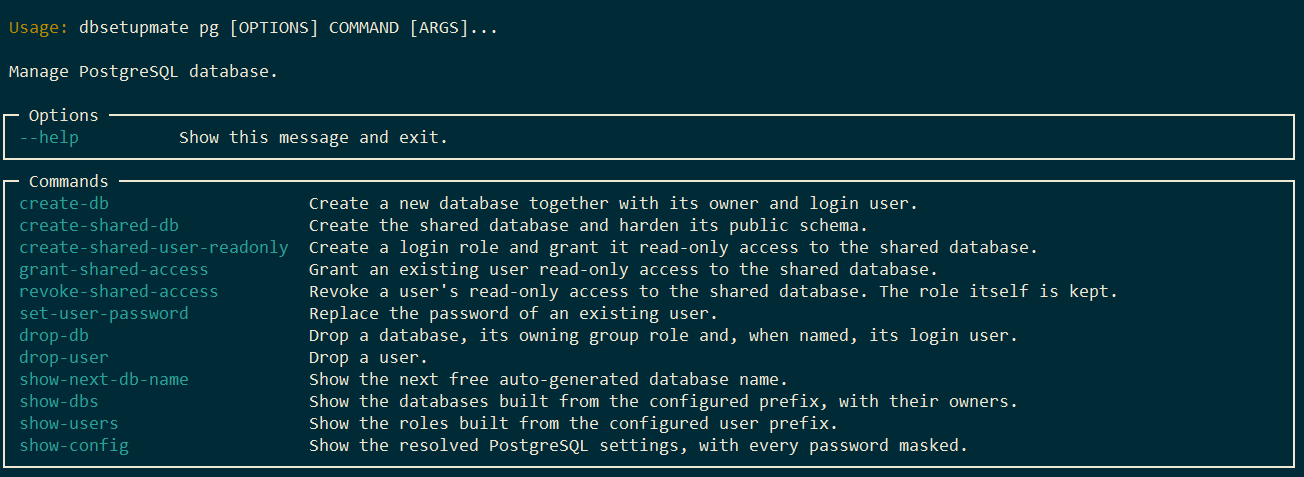
CLI UI
CLI features overview of the postgresql category:
dbsetupmate pg --help
Development: Setup
This guide walks through setting up the project for local development using uv.
- Create a new virtual environment in a
.venvdirectory and activates it.uv venv - Activate the environment (macOS/Linux):
source .venv/bin/activate - Activate the environment (Windows):
call .venv/Scripts/activate.bat - Install package in editable mode with dev dependencies
Installing the package in editable mode (
-e) is the key to development.uv pip install -e . --group dev
Development: Running Tests
task py:pytest              # unit tests, no database needed
task py:pytest-integration  # against live PostgreSQL 15..18 (see compose-tests.yaml)
License
1 maintainer

Download files
Download the file for your platform. If you're not sure which to choose, learn more about installing packages.
Source Distribution
Built Distribution
Filter files by name, interpreter, ABI, and platform.
If you're not sure about the file name format, learn more about wheel file names.
Copy a direct link to the current filters
File details
Details for the file dbsetupmate-0.8.1.tar.gz.
File metadata
- Download URL: dbsetupmate-0.8.1.tar.gz
- Upload date:
- Size: 35.4 kB
- Tags: Source
- Uploaded using Trusted Publishing? Yes
- Uploaded via: twine/7.0.0 CPython/3.13.14
File hashes
| Algorithm | Hash digest | |
|---|---|---|
| SHA256 |
272f524d96f6d0d7334e4f8ad63c1f1e0d7160f8a6b86621d95aea035b58eb3b
|
|
| MD5 |
238ccb4575a9ad9f4bf10070a97746a9
|
|
| BLAKE2b-256 |
53492e3c8ad50819fbdc1296fedbf59a5fd1c4c96f4d5ec9c30525280bec8fc4
|
Provenance
The following attestation bundles were made for dbsetupmate-0.8.1.tar.gz:
Publisher:
publish-to-pypi.yml on vdmitriyev/dbsetupmate
-
Statement:
-
Statement type:
https://in-toto.io/Statement/v1 -
Predicate type:
https://docs.pypi.org/attestations/publish/v1 -
Subject name:
dbsetupmate-0.8.1.tar.gz -
Subject digest:
272f524d96f6d0d7334e4f8ad63c1f1e0d7160f8a6b86621d95aea035b58eb3b - Sigstore transparency entry: 2414548504
- Sigstore integration time:
-
Permalink:
vdmitriyev/dbsetupmate@8e5033e2862f405681cf6d323eb801dc267886cb -
Branch / Tag:
refs/tags/0.8.1 - Owner: https://github.com/vdmitriyev
-
Access:
public
-
Token Issuer:
https://token.actions.githubusercontent.com -
Runner Environment:
github-hosted -
Publication workflow:
publish-to-pypi.yml@8e5033e2862f405681cf6d323eb801dc267886cb -
Trigger Event:
push
-
Statement type:
File details
Details for the file dbsetupmate-0.8.1-py3-none-any.whl.
File metadata
- Download URL: dbsetupmate-0.8.1-py3-none-any.whl
- Upload date:
- Size: 31.0 kB
- Tags: Python 3
- Uploaded using Trusted Publishing? Yes
- Uploaded via: twine/7.0.0 CPython/3.13.14
File hashes
| Algorithm | Hash digest | |
|---|---|---|
| SHA256 |
32f0770fe630dde00be2ea077f40b928a83523bde0c358f096d020cfd05d37d9
|
|
| MD5 |
06da36622acd694f10d7454a558ce269
|
|
| BLAKE2b-256 |
a27a5b86a0b3c2256254f9316a227ba813fda214e8bfd4027812729f19db51d8
|
Provenance
The following attestation bundles were made for dbsetupmate-0.8.1-py3-none-any.whl:
Publisher:
publish-to-pypi.yml on vdmitriyev/dbsetupmate
-
Statement:
-
Statement type:
https://in-toto.io/Statement/v1 -
Predicate type:
https://docs.pypi.org/attestations/publish/v1 -
Subject name:
dbsetupmate-0.8.1-py3-none-any.whl -
Subject digest:
32f0770fe630dde00be2ea077f40b928a83523bde0c358f096d020cfd05d37d9 - Sigstore transparency entry: 2414548603
- Sigstore integration time:
-
Permalink:
vdmitriyev/dbsetupmate@8e5033e2862f405681cf6d323eb801dc267886cb -
Branch / Tag:
refs/tags/0.8.1 - Owner: https://github.com/vdmitriyev
-
Access:
public
-
Token Issuer:
https://token.actions.githubusercontent.com -
Runner Environment:
github-hosted -
Publication workflow:
publish-to-pypi.yml@8e5033e2862f405681cf6d323eb801dc267886cb -
Trigger Event:
push
-
Statement type:







