
Extract minimal, referentially-intact database subsets for local development

Project description

dbslice


Extract minimal, referentially-intact database subsets for local development and debugging.
The Problem
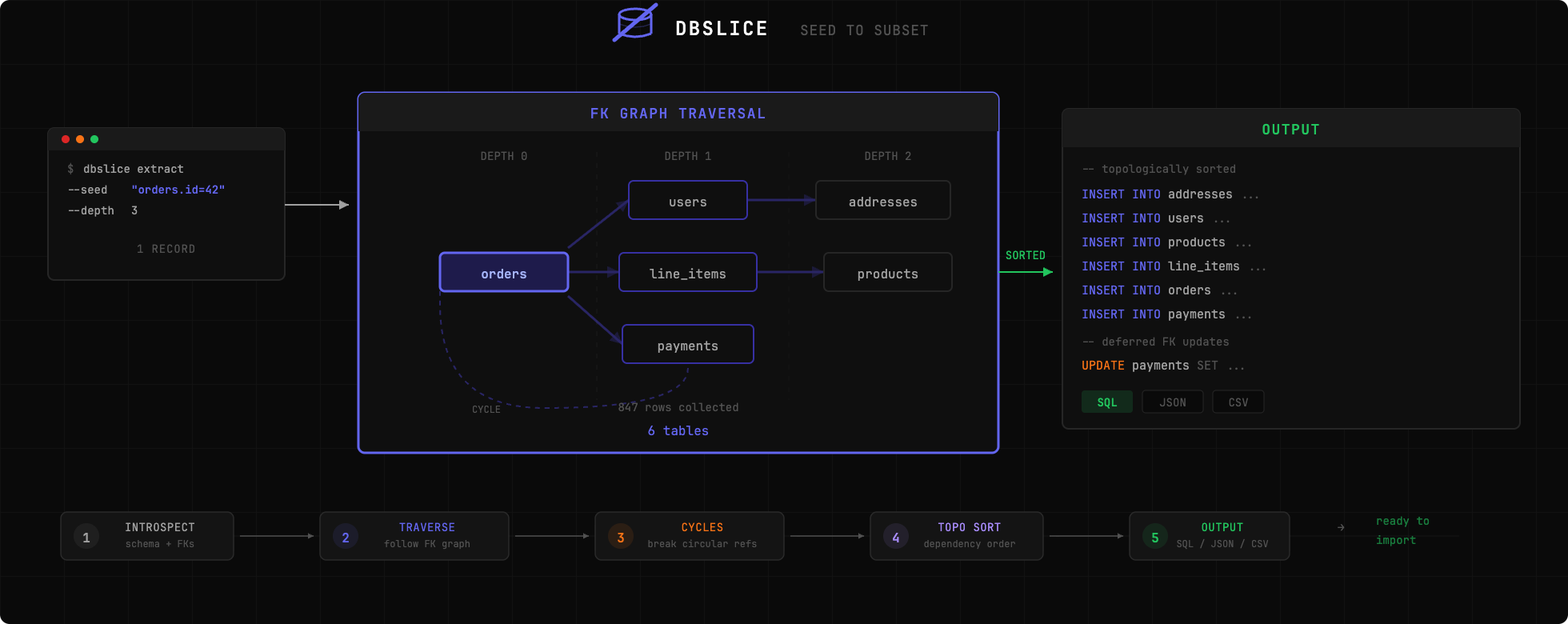
Copying an entire production database to your machine is infeasible. But reproducing a bug often requires having the exact data that caused it. dbslice solves this by extracting only the records you need, following foreign key relationships to ensure referential integrity.
Quick Start
# Install globally
uv tool install dbslice   # or: pip install dbslice

# Extract an order and all related records
dbslice extract postgres://localhost/myapp --seed "orders.id=12345" > subset.sql

# Import into local database
psql -d localdb < subset.sql
Features
- Zero-config start -- Introspects schema automatically, no data model file required
- Single command -- Extract complete data subsets with one CLI invocation
- Safe by default -- Auto-detects and anonymizes sensitive fields (emails, phones, SSNs, etc.)
- Compliance profiles -- Built-in GDPR, HIPAA Safe Harbor, and PCI-DSS profiles with two-phase PII scanning
- Column mapping UI -- Local browser UI to visually map columns, apply compliance profiles, and export config
- Multiple output formats -- SQL, JSON, and CSV
- Streaming -- Memory-efficient extraction for large datasets (100K+ rows)
- Virtual foreign keys -- Support for Django GenericForeignKeys and implicit relationships via config
- Config files -- YAML-based configuration for repeatable extractions
- Validation -- Checks referential integrity of extracted data
Database Support
| Database | Status |
|---|---|
| PostgreSQL | Fully supported |
| MySQL | Planned (not yet implemented) |
| SQLite | Planned (not yet implemented) |
Installation
# Install with uv (recommended)
uv add dbslice

# Try without installing
uvx dbslice --help

# Or with pip
pip install dbslice
Usage
Basic Extraction
# Extract by primary key
dbslice extract postgres://user:pass@host:5432/db --seed "orders.id=12345"

# Extract with WHERE clause
dbslice extract postgres://localhost/db --seed "orders:status='failed' AND created_at > '2024-01-01'"

# Multiple seeds
dbslice extract postgres://localhost/db \
  --seed "orders.id=100" \
  --seed "orders.id=101"
Control Traversal
# Limit depth (default: 3)
dbslice extract postgres://... --seed "orders.id=1" --depth 2

# Direction: up (parents only), down (children only), both (default)
dbslice extract postgres://... --seed "orders.id=1" --direction up
Anonymization
# Auto-anonymize detected sensitive fields
dbslice extract postgres://... --seed "users.id=1" --anonymize

# Redact additional fields
dbslice extract postgres://... --seed "users.id=1" --anonymize --redact "audit_logs.ip_address"
Column Mapping UI
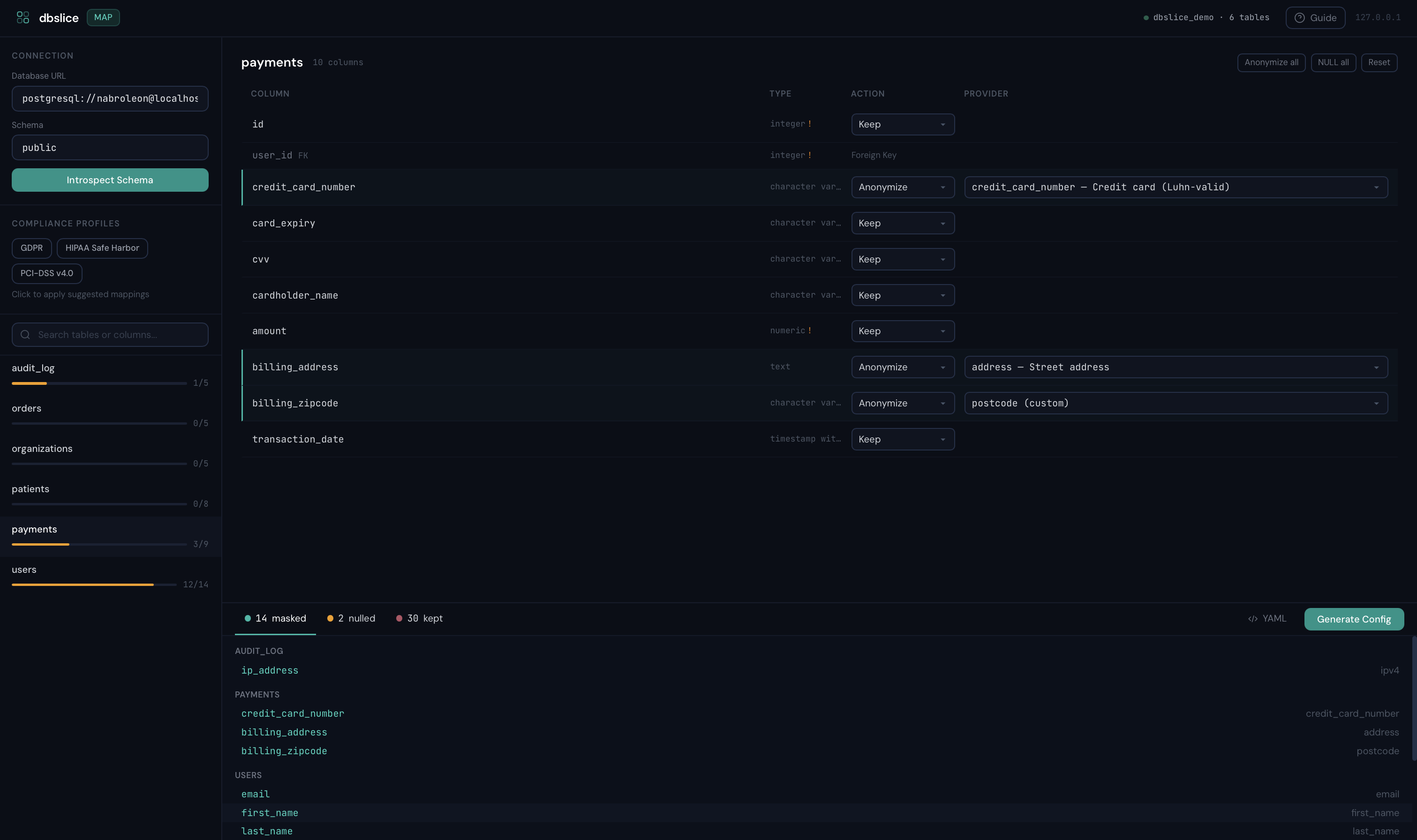
Map columns visually, apply compliance profiles, and generate a ready-to-use config — all from a local browser UI.
dbslice map postgres://localhost/myapp

# Custom port
dbslice map postgres://localhost/myapp --port 8888

# Also works with uvx (no install needed)
uvx dbslice map postgres://localhost/myapp
| Map columns to anonymization rules | Generate and export config |
 |
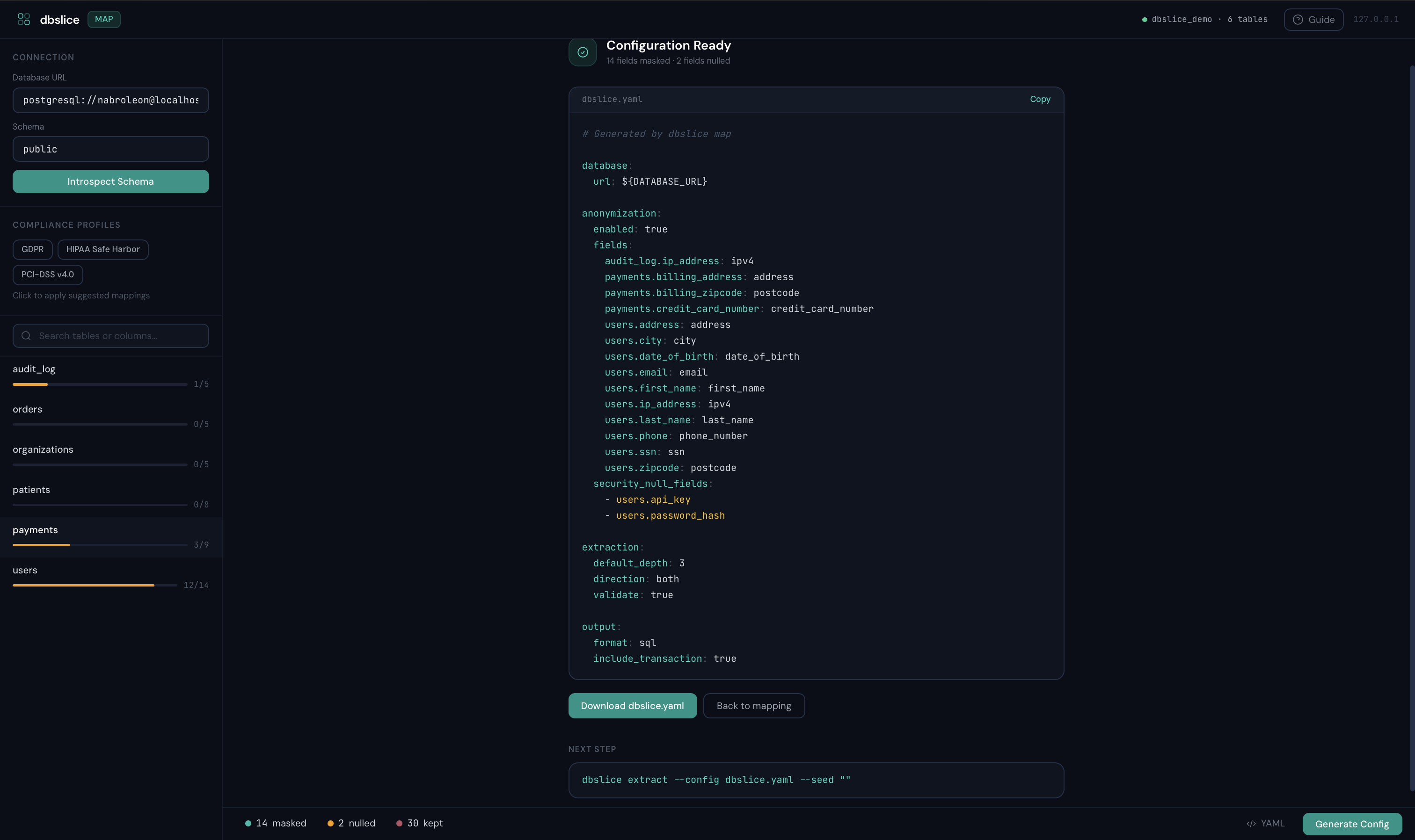 |
Runs on 127.0.0.1:9473 with a one-time session token — no data leaves your machine. Apply GDPR, HIPAA, or PCI-DSS profiles with one click, review what gets masked, then download the YAML.
Compliance Profiles
# HIPAA Safe Harbor — auto-masks all 18 identifier types
dbslice extract postgres://... --seed "patients.id=1" --compliance hipaa --compliance-strict

# Multiple profiles + audit manifest
dbslice extract postgres://... --seed "users.id=1" --compliance gdpr --compliance pci-dss -f subset.sql
# Produces subset.sql + subset.manifest.json
Output Formats
# SQL (default)
dbslice extract postgres://... --seed "orders.id=1" --output sql

# JSON fixtures
dbslice extract postgres://... --seed "orders.id=1" --output json --out-file fixtures/

# CSV
dbslice extract postgres://... --seed "orders.id=1" --output csv --out-file data/
Virtual Foreign Keys
For relationships not defined in the database schema (Django GenericForeignKeys, implicit relationships):
# dbslice.yaml
database:
  url: postgres://localhost:5432/myapp

virtual_foreign_keys:
  - source_table: notifications
    source_columns: [object_id]
    target_table: orders
    description: "Generic FK to orders via ContentType"

  - source_table: audit_log
    source_columns: [user_id]
    target_table: users
    description: "Implicit FK without DB constraint"
dbslice extract --config dbslice.yaml --seed "users.id=1"
Inspect Schema
dbslice inspect postgres://localhost/myapp
Configuration File
# Generate config from database
dbslice init postgres://localhost/myapp --out-file dbslice.yaml

# Use config
dbslice extract --config dbslice.yaml --seed "orders.id=12345"
How It Works
- Introspect -- Reads database schema to discover tables and foreign key relationships
- Traverse -- Starting from seed record(s), follows FK relationships via BFS
- Extract -- Fetches all identified records
- Sort -- Topologically sorts tables for correct INSERT order
- Output -- Generates SQL/JSON/CSV with proper escaping
Comparison
| Feature | dbslice | Jailer | Greenmask | slice-db |
|---|---|---|---|---|
| Language | Python | Java | Go | Ruby |
| Configuration | Zero-config | Requires model file | Config required | Manual YAML |
| Setup time | Seconds | Hours | Medium | Medium |
| Anonymization | Built-in (Faker) | Plugin-based | Advanced transformers | Not available |
| Compliance profiles | GDPR, HIPAA, PCI-DSS | None | None | None |
| Column mapping UI | Built-in (local) | None | None | None |
| PII value scanning | Two-phase (pre/post mask) | None | None | None |
| Subsetting | FK traversal | FK traversal | Limited | FK traversal |
| Output formats | SQL, JSON, CSV | SQL, XML, CSV | SQL | SQL only |
| Cycle handling | Automatic | Manual config | N/A | Manual |
| Streaming | Built-in | Configurable | Built-in | Not available |
| Maintenance | Active | Active | Active | Unmaintained |
dbslice is the lightweight, zero-config Python option: install and extract in under a minute.
Development
git clone https://github.com/nabroleonx/dbslice.git
cd dbslice
uv sync --dev
uv run pytest
License
MIT


Download files
Download the file for your platform. If you're not sure which to choose, learn more about installing packages.
Source Distribution
Built Distribution
Filter files by name, interpreter, ABI, and platform.
If you're not sure about the file name format, learn more about wheel file names.
Copy a direct link to the current filters
File details
Details for the file dbslice-0.5.0.tar.gz.
File metadata
- Download URL: dbslice-0.5.0.tar.gz
- Upload date:
- Size: 192.3 kB
- Tags: Source
- Uploaded using Trusted Publishing? No
- Uploaded via: twine/6.1.0 CPython/3.13.7
File hashes
| Algorithm | Hash digest | |
|---|---|---|
| SHA256 |
a8db6d093346bb642dc8ebc89cdc509bd776394cb8a5f36cb1307ab45872d572
|
|
| MD5 |
eb395da193264171efa5c196acd41eb3
|
|
| BLAKE2b-256 |
053d651309ead054eb2b5067425cf6505794e13ac24861be33397a4d481305b8
|
File details
Details for the file dbslice-0.5.0-py3-none-any.whl.
File metadata
- Download URL: dbslice-0.5.0-py3-none-any.whl
- Upload date:
- Size: 130.9 kB
- Tags: Python 3
- Uploaded using Trusted Publishing? No
- Uploaded via: twine/6.1.0 CPython/3.13.7
File hashes
| Algorithm | Hash digest | |
|---|---|---|
| SHA256 |
736c389385472c56c12f6f841f85a0bfac24d9bb66722a899d1f21e3099168da
|
|
| MD5 |
416d77c287358685006b09ace539cc67
|
|
| BLAKE2b-256 |
9b1c854a862e0f352ab5f614c048c53f82096f867b7e181b8b43aec8267c3d52
|






