
This release is a pre-release and may not be stable for production use.




A lightweight, developer-friendly CLI tool and self-hostable dashboard for extracting and visualizing column-level lineage from your dbt projects.
Built for data teams who want transparent, flexible lineage tracking without vendor lock-in or complex enterprise tooling.
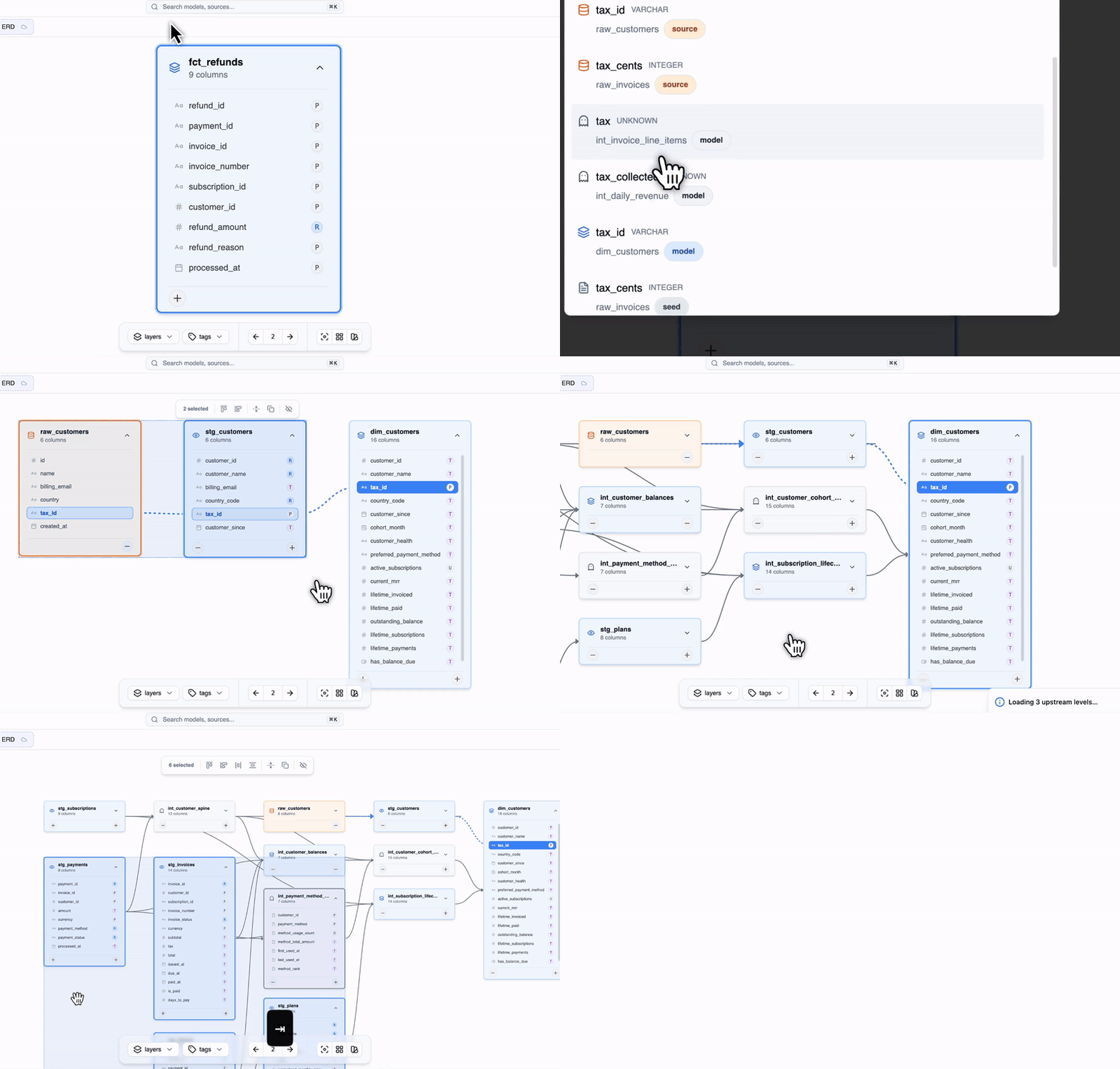
Why dbt-colibri?
- 🔍 Complete visibility: Easy UI, track how every column flows through your dbt transformations
- ⚡ Fast & lightweight: Generate reports in seconds from your existing dbt artifacts
- 🏠 Self-hosted: No cloud dependencies or external services required
Documentation site: https://www.docs.colibri-data.com
Quick Start
Installation
# Using uv (recommended)
uv add dbt-colibri

# Using pip
pip install dbt-colibri
Basic Usage
-
Run dbt to generate the required artifacts:
dbt compile
dbt docs generate
-
Generate lineage report:
colibri generate -
View results: Open
dist/index.htmlin your browser
That's it! Your column lineage dashboard is ready. Note you can also use dbt run/build, to generate the manifest.json.
Documentation
CLI Commands
colibri generate
Generates column lineage reports from your dbt project.
colibri generate [OPTIONS]
Options:
--manifest: Path to dbt manifest.json (default:target/manifest.json)--catalog: Path to dbt catalog.json (default:target/catalog.json)--output-dir: Output directory (default:dist/)--help: Show help message--light: For very big dbt projects, excludes attributes like compiled SQL and returns smaller HTML file.
Output Files
colibri-manifest.json: Lineage dataindex.html: Interactive (standalone) visualization dashboard
Project Structure
your-dbt-project/
├── target/
│   ├── manifest.json    # Generated by dbt
│   └── catalog.json     # Generated by dbt docs generate
└── dist/                # Generated by colibri
    ├── index.html       # Interactive dashboard
    └── colibri-manifest.json
Advanced Usage
CI/CD Integration
The easiest way to deploy your static html is through github/gitlab pages (if you are on enterprise license you can do this privately)
You can find the full example workflow at docs/github_pages_example.yml.
General idea
- After every change to the production dbt code (push the
mainbranch), GitHub Actions will:- Set up Python and install dependencies with
uv. - Compile and generate docs needed for colibri.
- Run
colibri generateto build the static HTML report in thedist/folder.
- Set up Python and install dependencies with
- The
dist/folder is uploaded as an artifact and deployed natively to GitHub Pages using the officialactions/deploy-pagesaction. - The result is available at your repository’s Pages URL.
Gitlab has similar functionality. Other options are writing the file to a bucket and mount it into a web server container (nginx).
Technical Details
Requirements
-
Python: tested on versions 3.9, 3.11, 3.13
-
Supported dbt Adapters:
- Snowflake,
- BigQuery,
- Redshift,
- duckDB,
- Postgres
- Vertica (not fully supported: SQLGlot has no Vertica dialect, so Colibri falls back to PostgreSQL parsing and lineage may be incomplete or incorrect)
- Databricks (limited to SQL models)
- Athena
- Trino
- SQL Server (TSQL)
- ClickHouse
- Oracle
- StarRocks
dbt Compatibility
| dbt-core Version | Status |
|---|---|
| 1.8.x | ✅ Tested |
| 1.9.x | ✅ Tested |
| 1.10.x | ✅ Tested |
| 1.11.x | ✅ Tested |
| 1.12.x | ✅ Tested |
| 2.0 (Fusion) | ✅ Tested (preview; generate catalog.json with dbt compile --write-catalog) |
Architecture
dbt-colibri leverages:
- SQLGlot for SQL parsing and column lineage extraction
- dbt artifacts (manifest.json, catalog.json) for metadata
- Static HTML/JS for zero-dependency dashboard deployment
Contributing
We welcome contributions! Raise an issue or request a feature, if you are open to contribute you can let us now in the issue.
- Issues: GitHub Issues
- Discussions: GitHub Discussions
Development Setup
# Clone the repository
git clone https://github.com/your-org/dbt-colibri.git
cd dbt-colibri

# Install development dependencies
uv sync --dev

# Run tests
pytest

# Format code
ruff format
License
This project is licensed under the MIT License - see the LICENSE file for details.
Acknowledgments
This project builds upon excellent open source work:
- dbt-column-lineage-extractor - Original column lineage extraction logic
- SQLGlot - SQL parsing and transformation
- elementary-data - Inspiration for static HTML report structure
1 maintainer

Metadata
1 maintainer
Release files for dbt-colibri 0.3.7b1
For a detailed explanation of source distributions (sdists) and built distributions (wheels), please see the package formats documentation.
Source distribution (sdist)
| File | Size | Uploaded | |
|---|---|---|---|
| dbt_colibri-0.3.7b1.tar.gz | 1.3 MB | Details |
Built distribution (wheel)
| File | Interpreter | ABI | Platform | Reset |
|---|---|---|---|---|
| dbt_colibri-0.3.7b1-py3-none-any.whl | Python 3 | none | any | Details |
Total release size: 2.5 MB
Release files / dbt_colibri-0.3.7b1.tar.gz
| Download URL | dbt_colibri-0.3.7b1.tar.gz |
|---|---|
| Size | 1.3 MB |
| Tags | Source |
|
SHA-256 checksum How to use checksums |
d107dee96b86ab80ef4eb7de684cd3f7ace46cb51f75762a1f832fa10a0e5a57
|
|
BLAKE2b-256 checksum How to use checksums |
09709d4d3975b9cbf6ded820068ad76a669fb65030971fa0b8347c60c0145f3d
|
| Upload date | |
|
Uploaded using Trusted Publishing? What is trusted publishing? |
No |
| Uploaded via |
uv/0.12.13 {"installer":{"name":"uv","version":"0.12.13","subcommand":["publish"]},"python":null,"implementation":{"name":null,"version":null},"distro":{"name":"Ubuntu","version":"24.04","id":"noble","libc":null},"system":{"name":null,"release":null},"cpu":null,"openssl_version":null,"setuptools_version":null,"rustc_version":null,"ci":true}
|
Release files / dbt_colibri-0.3.7b1-py3-none-any.whl
| Download URL | dbt_colibri-0.3.7b1-py3-none-any.whl |
|---|---|
| Size | 1.2 MB |
| Tags | Python 3 |
|
SHA-256 checksum How to use checksums |
612bf7f49d970a46b30d9a4299e57a31be377b6992760693c78f9965a0ae2a57
|
|
BLAKE2b-256 checksum How to use checksums |
f6027d5f56a909edf6f54cd629d84c95adbc4e838cfd5517613b6414659b550e
|
| Upload date | |
|
Uploaded using Trusted Publishing? What is trusted publishing? |
No |
| Uploaded via |
uv/0.12.13 {"installer":{"name":"uv","version":"0.12.13","subcommand":["publish"]},"python":null,"implementation":{"name":null,"version":null},"distro":{"name":"Ubuntu","version":"24.04","id":"noble","libc":null},"system":{"name":null,"release":null},"cpu":null,"openssl_version":null,"setuptools_version":null,"rustc_version":null,"ci":true}
|














