
dbt-multidocs





dbt-multidocs is a command-line tool that merges several independent dbt projects into a single, self-contained data-lineage page. Point it at any number of dbt projects — in unrelated directories, on unrelated repos — and it produces one HTML file with the whole graph: no network calls, no JavaScript dependencies, no dbt installation, and no warehouse connection.
It is built for the case dbt itself does not cover: cross-project lineage when
the projects do not share a manifest. If your dbt projects live in separate
repositories and are linked only by source() over a shared warehouse,
dbt docs generate shows them as disconnected islands. dbt-multidocs
reconnects them.
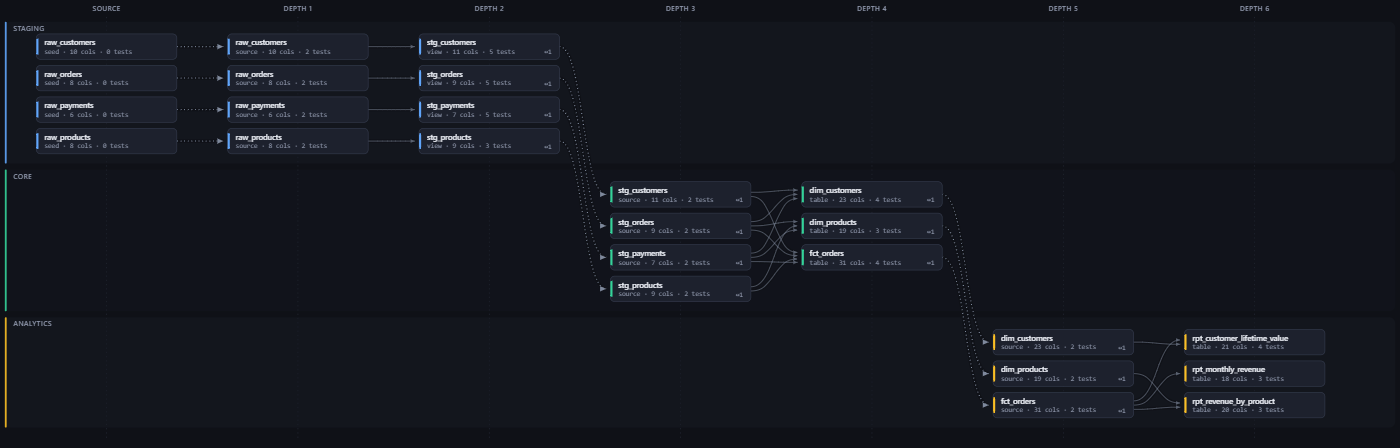
Three independent dbt projects — separate repos, separate manifests, no
cross-project ref(). The dotted edges are the links dbt-multidocs inferred by
matching warehouse relations.
Open the interactive version or read the
documentation.
dbt-multidocs build \
  --project /repos/dbt_staging \
  --project /repos/dbt_core \
  --project /mnt/data/dbt_analytics \
  --out docs/lineage.html
The projects need no common parent — on Windows, --project D:\repos\dbt_core
works the same way.
  dbt_staging                12 nodes   .../dbt_staging/target/manifest.json
  dbt_core                    7 nodes   .../dbt_core/target/manifest.json
  dbt_analytics               6 nodes   .../dbt_analytics/target/manifest.json
written  : .../docs/lineage.html  (153 KB)
graph    : 25 nodes / 30 edges across 3 projects
           10 models, 4 seeds, 11 sources, 61 tests
           7 cross-project edges (11 inferred from source() relations)
How do you get lineage across multiple dbt projects?
dbt gives you cross-project lineage only when the projects share a manifest —
dbt Mesh with dependencies.yml and two-argument ref(). Plenty of real setups
aren't like that: separate repos, separate dbt docs generate runs, separate
manifests, linked only by a downstream project's source() pointing at a table
an upstream project builds. Those show up as disconnected islands.
dbt-multidocs merges N independent manifests and infers the missing edges
by matching normalized warehouse relations — (database, schema, identifier) —
between one project's models and another's sources. Declared ref() edges are
still used where they exist, so dbt Mesh projects work too.
Inferred links are drawn dotted and labelled in the legend, so you can always tell a link the tool guessed from one dbt declared.
How it compares
dbt docs generate |
dbt Mesh (ref() across projects) |
dbt-multidocs | |
|---|---|---|---|
| Projects per page | one | many | many |
| Needs a shared manifest | — | yes | no |
Needs dependencies.yml |
— | yes | no |
Links projects joined only by source() |
no | no | yes |
| Needs a warehouse connection | yes, for the catalog | yes, for the catalog | no |
| Needs dbt installed | yes | yes | no |
| Output | multi-file site | multi-file site | one HTML file |
| Runtime dependencies | several | several | none |
dbt-multidocs does not replace dbt docs generate — it reads the artifacts that
command produces. Run dbt docs first, then point dbt-multidocs at the results.
When you should not use this
- One dbt project only.
dbt docs generatealready does this well; there is nothing for dbt-multidocs to merge. - You want column-level lineage. Columns, types and test coverage are shown per model, but there are no column-to-column edges.
- You want a live catalog with freshness, run history or ownership workflows. This is a static page built from artifacts. Look at DataHub, OpenMetadata, Atlan or dbt Cloud instead.
How do you install dbt-multidocs?
pip install dbt-multidocs
Python 3.9 or newer. There are no runtime dependencies, so nothing else is
pulled in. That puts a dbt-multidocs command on your PATH.
To work on the project instead, clone it and install the editable dev extra:
git clone https://github.com/raghuramsirigiri/dbt-multidocs.git
cd dbt-multidocs
python -m venv .venv
.venv/bin/pip install -e ".[dev]"    # Windows: .venv\Scripts\pip install -e ".[dev]"
Building from source needs setuptools >= 77 for the PEP 639 license metadata.
pip fetches that automatically; if you install offline or with
--no-build-isolation, upgrade setuptools first, or you will see
project.license must be valid exactly by one definition. Installing the
published wheel needs no build step at all.
What input does it need?
Artifacts only — target/manifest.json plus, optionally, target/catalog.json.
Run dbt docs generate in each project first. Nothing here runs dbt, opens a
connection, or reads profiles.yml.
--project accepts a project directory, its target/ directory, a
manifest.json path, or a dbt docs generate --static index.html.
A missing catalog is a warning (column data types come up blank); a missing manifest is an error that names the project and the command to fix it.
How do you point it at your dbt projects?
dbt-multidocs discover --search-root /repos          # what's out there?
dbt-multidocs discover --search-root /repos -v       # + resolved artifact paths
--search-root walks for dbt_project.yml (5 levels by default, --depth to
change), skipping dbt_packages/, target/, .venv/, node_modules/ and the
like. Repeat it for several unrelated roots. Explicit --project paths always
win. With neither, the current directory is swept.
How do you configure it?
Only needed for labels, lane ordering, or manual links.
title: Enterprise dbt Lineage
projects:
  - path: ../dbt_staging
    label: Staging
  - path: ../dbt_core
  - path: D:\repos\dbt_analytics
layers: ["raw|seed", "staging|stg", "core|int", "mart", "analytic|dashboard"]
links:
  - from: model.dbt_core.dim_customers          # force a link inference missed
    to:   source.dbt_analytics.core.dim_customers
  - from: model.a.x                             # or suppress one it got wrong
    to:   source.b.y
    remove: true
Relative paths resolve against the config file's own directory. layers is an
ordered list of regexes matched against project names; the first hit sets the
swimlane row. JSON config files work too.
Flags
| Flag | |
|---|---|
--project PATH |
repeatable; project dir, target/, or a manifest |
--search-root DIR / --depth N |
repeatable sweep, default depth 5 |
--config FILE |
dbt-multidocs.yml or .json |
--out FILE |
default dbt-docs/lineage.html |
--title TEXT |
page heading |
--template FILE |
replace the packaged HTML template |
--no-stitch |
declared ref() edges only, no inference |
--stitch-scope {all,cross} |
cross skips a project's own seed-to-source links (default all) |
--strict |
exit 2 if anything warned |
--compress auto|always|never |
gzip the embedded payload (default: auto, above ~1 MB) |
--json FILE |
also dump the graph payload |
What does the generated page look like?
Swimlane per project × dependency depth, plus: search across names, descriptions,
tags and column names; per-project and per-tag filters; a project-level rollup
map; a cross-project dependency report; a detail panel with columns, types, test
coverage and Source/Compiled SQL; deep links; PNG/SVG export; light and dark
themes. All of it offline, from file://.
It stays interactive at size. Only the slice of the graph inside the
viewport is ever in the DOM, so a 6000-node graph pans, zooms and filters as
cheaply as a small one. Flicks carry momentum and rubber-band at the edges;
programmatic moves (Fit, jumping to a selection) spring from wherever the canvas
currently is and can be grabbed mid-flight. prefers-reduced-motion is
honoured.
Frequently asked questions
Does dbt-multidocs require dbt Mesh?
No. dbt Mesh projects work — declared cross-project ref() edges are used where
they exist — but dbt-multidocs is specifically built for projects that are not
on Mesh and share no manifest. It needs no dependencies.yml and no
two-argument ref().
Does it connect to my data warehouse?
No. It reads target/manifest.json and target/catalog.json only. It never runs
dbt, never opens a database connection, and never reads profiles.yml. That
makes it safe to run in CI and on machines with no warehouse credentials.
How does it know two projects are connected?
It matches normalized warehouse relations. Every model, seed and snapshot is
indexed by (database, schema, identifier), and every source() is resolved to
the same key. When a downstream project's source names the exact relation an
upstream project builds, that is an edge. Ambiguous matches — one relation
produced by two models — are reported and skipped rather than guessed at.
Which data warehouses does it support?
Any adapter, in principle: it reads dbt artifacts rather than the warehouse, and
every adapter records the same relation_name field that the linking depends on.
Snowflake, BigQuery, Databricks, Redshift and Postgres should all behave
identically. Development and testing have been on DuckDB, so if you hit an
adapter-specific problem it is worth an issue.
How many dbt models can it handle?
Tested to 3,000 models across 12 projects (5,750 nodes, 9,700 edges). Only the part of the graph inside the viewport is rendered, so panning and filtering cost the same at 6,000 nodes as at 400. Large graphs are gzipped inside the page: that 5,750-node example is a 552 KB file.
Can I host the output on GitHub Pages?
Yes. The output is one self-contained HTML file with no external requests, so
GitHub Pages, S3, Netlify or any static host serves it as-is. It also opens
directly from file://.
Is it free and open source?
Yes — MIT licensed, with no runtime dependencies and no paid tier.
Documentation
| Getting started | install, first build, CI setup |
| How linking works | declared vs inferred edges, and when inference fails |
| CLI reference | every command and flag |
| Configuration | dbt-multidocs.yml |
| Architecture | the pipeline, the payload shape, library use |
| Troubleshooting | every warning, and what to do about it |
Documentation is also published at raghuramsirigiri.github.io/dbt-multidocs.
A rendered example page — a real build of three independent dbt projects, with working search, filters and the cross-project report — is live at raghuramsirigiri.github.io/dbt-multidocs/lineage.html (source: docs/lineage.html).
Contributing
See CONTRIBUTING.md. The short version:
python -m venv .venv && .venv/bin/pip install -e ".[dev]" && .venv/bin/pytest
Tests use synthetic manifests only — no dbt, no warehouse, no multi-megabyte fixtures in the repository. The suite runs in under a second.
Changes are held to the design constraints above; the ones most likely to catch you out are no runtime dependencies and nothing derived from a common parent directory or the working directory.
License
MIT — see LICENSE. The generated lineage page embeds this project's HTML template, so pages you produce carry no obligations of their own.
Maintainer
Built and maintained by Raghuram Sirigiri. Issues and pull requests are welcome — see CONTRIBUTING.md.
Credits
The page's HTML/JS and the SQL pretty-printer began life in an earlier, unpublished prototype of mine that rendered a single merged dbt manifest. This package keeps that rendering layer and generalizes the data layer around it to N independent projects.
1 maintainer

Metadata
1 maintainer
Release files for dbt-multidocs 0.2.0
For a detailed explanation of source distributions (sdists) and built distributions (wheels), please see the package formats documentation.
Source distribution (sdist)
| File | Size | Uploaded | |
|---|---|---|---|
| dbt_multidocs-0.2.0.tar.gz | 66.4 kB | Details |
Built distribution (wheel)
| File | Interpreter | ABI | Platform | Reset |
|---|---|---|---|---|
| dbt_multidocs-0.2.0-py3-none-any.whl | Python 3 | none | any | Details |
Total release size: 121.2 kB
Release files / dbt_multidocs-0.2.0.tar.gz
| Download URL | dbt_multidocs-0.2.0.tar.gz |
|---|---|
| Size | 66.4 kB |
| Tags | Source |
|
SHA-256 checksum How to use checksums |
30e9f081f20c7b1d9a0241da139e15ce03778e85932846e9e348b36c8f698405
|
|
BLAKE2b-256 checksum How to use checksums |
ab30d0b127a9957f49acf1e98ecc362e6d01a98dd3c383aa5d5b3d2f1570737d
|
| Upload date | |
|
Uploaded using Trusted Publishing? What is trusted publishing? |
Yes |
| Uploaded via |
twine/7.0.0 CPython/3.13.14
|
Provenance
Provenance describes where a file came from. On PyPI, provenance is shared via attestations, which provide a verifiable record of the build or publishing details. View details, limitations and caveats.


PyPI Publish Attestation
PyPI verified that this artifact, at this checksum, originated from the publisher listed below.
Signed by GitHub Actions, verified by PyPI on Aug 26, 2026.
Transparency logRelease files / dbt_multidocs-0.2.0-py3-none-any.whl
| Download URL | dbt_multidocs-0.2.0-py3-none-any.whl |
|---|---|
| Size | 54.8 kB |
| Tags | Python 3 |
|
SHA-256 checksum How to use checksums |
4225eda5b2f14db45262471cf5a38be476006e6d1ef4e3e9266a14f7c29f48b8
|
|
BLAKE2b-256 checksum How to use checksums |
8e50ab3bcc6588ffa7cf8412cbe8c51bb7872fcf77b46b9ceba5057a5bb0e24b
|
| Upload date | |
|
Uploaded using Trusted Publishing? What is trusted publishing? |
Yes |
| Uploaded via |
twine/7.0.0 CPython/3.13.14
|
Provenance
Provenance describes where a file came from. On PyPI, provenance is shared via attestations, which provide a verifiable record of the build or publishing details. View details, limitations and caveats.
PyPI Publish Attestation
PyPI verified that this artifact, at this checksum, originated from the publisher listed below.
Signed by GitHub Actions, verified by PyPI on Aug 26, 2026.
Transparency log













