



dbt-opiner
Tool for keeping dbt standards aligned across dbt projects.
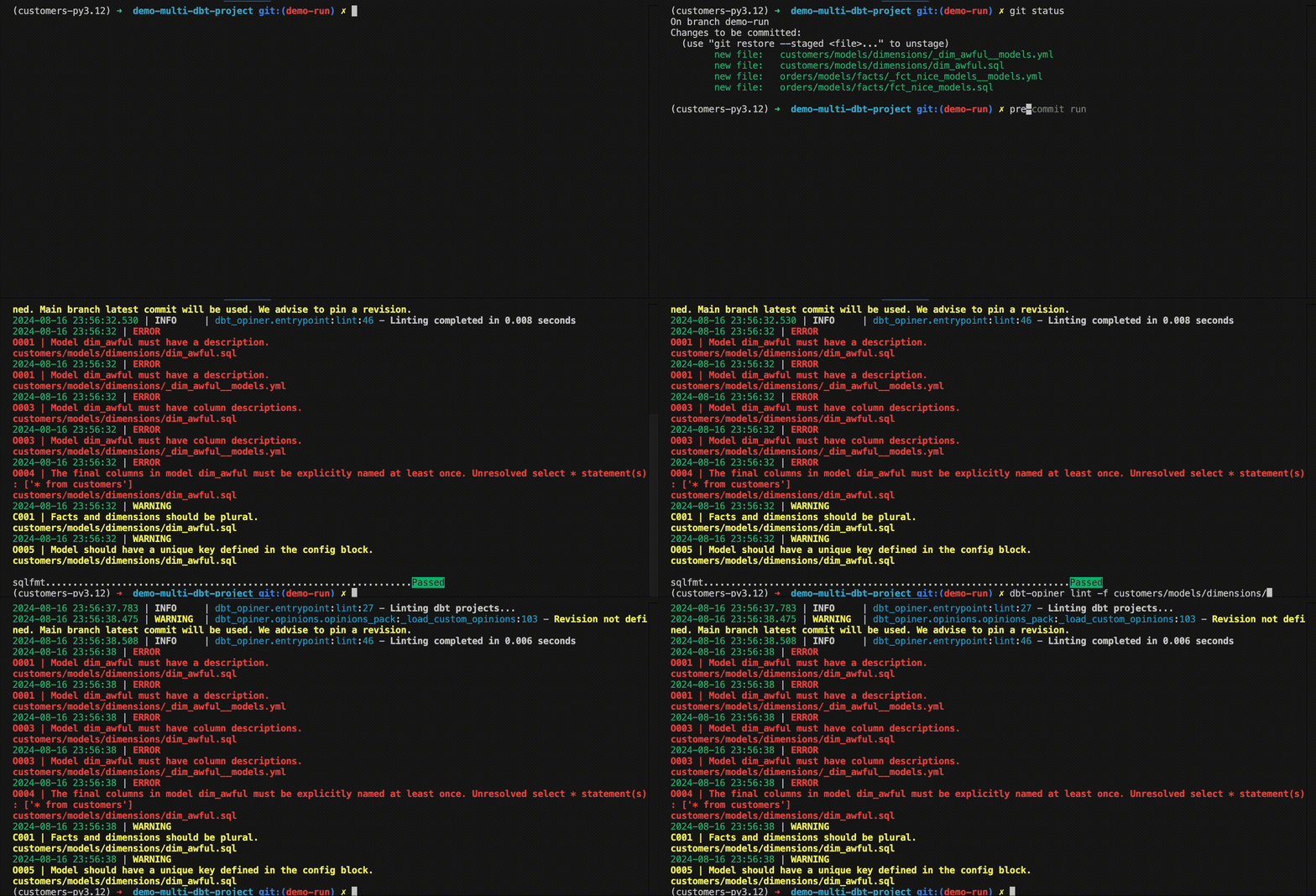
Or use it in a CI run! check out this or this demo PRs
Table of Contents
- Installation and usage
- Opinions
- Model metadata and configuration opinions
- Lineage opinions
- Documentation files opinions
- Privacy opinions
- BigQuery opinions
- BQ001 Bigquery targets used for development and testing must have maximum_bytes_billed
- BQ002 Models materialized as tables in BigQuery should have clustering defined
- BQ003 Views must have documented the partition and cluster of underlying tables
- BQ004 The persist_docs option for models must be enabled
- Adding custom opinions
- Ignoring opinions (noqa)
- Why?
- Contributing
Installation and usage
CLI
It can be installed as a python package (with pip pip install dbt-opiner, poetry poetry add dbt-opiner, etc.) and used as a cli. Run dbt-opiner -h to see the available commands and options.
Lint
dbt-opiner lint [ARGS] will run the linter on the changed files or dbt projects and return a non-zero exit code if any opinion with severity Must is not met. It will also return a summary of the opinions that failed.
Audit
dbt-opiner audit [ARGS] will run the linter on full dbt project(s) and log a summary of the opinions that failed and passed. It's customizable to log with different levels of detail and aggregation. It is especially useful to check for the quality of the dbt project(s).
Pre-commit hook
Also, it can be used as a pre-commit hook. To use it as a pre-commit hook, add the following to your .pre-commit-config.yaml file:
repos:
  - repo: https://github.com/dbt-opiner/dbt-opiner
    rev: 0.1.0 # Tag or commit sha
    hooks:
      - id: dbt-opiner-lint
        args: ["--force-compile", "-f"] # -f is mandatory. We recommend to use --force-compile to force the compilation of the dbt manifest in each run.
        additional_dependencies: [dbt-duckdb == 1.8.2] # Add the dbt connector you are using.
Make sure to list in additional dependencies the dbt connector you are using. In this case, duckdb.
Usage in CI pipelines
The tool can be used in CI pipelines. It will return a non-zero exit code if any opinion with severity Must is not met.
An environment variable DBT_TARGET can be set to specify the target to use when compiling the dbt manifest. If not set, the default target will be used. The target can also be set using the --target option.
Check this github action example where a CI run is implemented. Or see it in action in this PR.
Important notes and additional configurations
The tool expects all the linted files to belong to a git repository: it won't work with files that are not part of a git repository.
Extra configs can be set using a .dbt-opiner.yaml file, that should be anywhere in the repository.
If more than one .dbt-opiner.yaml file is found, the tool will use the one in the highest path of the repository. If the file is not provided, an empty configuration will be used and default behavior will be applied.
The .dbt-opiner.yaml file should have the following structure:
sqlglot_dialect: duckdb # The dialect to use when parsing the sql files with sqlglot.

shared_config: # Load config from a repository.
  repository: https://github.com/dbt-opiner/dbt-opiner-custom-opinions.git
  rev: 0.1.0 # Tag or commit sha, not branches. Revision is optional but encouraged. If not provided default main branch will be used.
  overwrite: false # If true, all configurations will be overwritten by the shared configuration.
  # If false, only new configurations will be added.
  # Empty defaults to true.

opinions_config: # Extra config for opinions. Check the opinions documentation for more info.
  ignore_opinions: "O001" # To ignore some opinions list the opinion codes. Optional.
  ignore_files:
    # The opinion is ignored in all the files that match the regex.
    # Use the opinion code as key and a regex as value.
    - O002: ".*/models/dimensions/.*"
  extra_opinions_config:
    O002:
      keywords:
      - summary
      - granularity
  custom_opinions: # To set custom opinions. Optional.
    source: git # git or local. If local, it will load opinions from "the directory where this config file is"/custom_opinion/ directory.
    repository: https://github.com/dbt-opiner/dbt-opiner-custom-opinions.git # Only required if the source is git.
    rev: 0.1.0 # Tag or commit sha, not branches. Revision is optional but encouraged. If not provided default main branch will be used.

files: #Regex to match the files to lint. Optional.
  sql: ".*/(models|macros|tests)/.*"
  yaml: ".*/(models|macros|tests)/.*"
  md: ".*/(docs)/.*"
Check this repo as an example: demo-multi-dbt-project.
The configuration file also accepts simple environment variables filling. The only supported environment variables are string types and must be set with ${{ env_var_name }} syntax.
Load configuration from a github repository
Guided by the federated governance principle of the Data Mesh architecture, the tool allows to load the configuration from a github repository. This is useful to adhere to a common set of standards and practices and share the same configuration across multiple dbt projects. The configuration can be loaded from a public or private repository. The repository should have a .dbt-opiner.yaml file with the configuration.
Warning Only use trusted repositories to load the configuration to prevent any security issues.
Opinions
The opinions are defined in the opinions directory. They apply to certain dbt nodes (models, macros, or tests) and/or type of files (yaml, sql, md). The opinions have a code, a description, a severity, and a configuration.
The severity levels are: Must (it's mandatory) and Should (it's highly recommended).
The configuration is optional and can be used to set extra parameters for the opinion.
Model metadata and configuration opinions
O001 Model must have a description [source]
Applies to: dbt models when either sql or yaml files are changed.
Models must have descriptions. Empty descriptions are not allowed.
Descriptions are important for documentation and understanding the purpose of the model. A good description makes data more obvious. Include a description for the model in a yaml file or config block.
O002 Model description must have keywords [source]
Applies to: dbt models when either sql or yaml files are changed.
Models descriptions must have keywords.
Keywords help standarizing the description of the models, and ensure that all the important information is present in the description. Make sure the description of the model has all the required keywords.
The keywords can be set in the configuration like this:
opinions_config:
  O002:
    keywords:
      - summary
      - granularity
Keywords are case insensitive.
O003 All columns must have description [source]
Applies to: dbt models when either sql or yaml files are changed.
All columns in the model should have a description. Empty descriptions are not allowed.
Descriptions are important for documentation and understanding the purpose of the columns. A good description disambiguates the content of a column and helps make data more obvious.
This opinion has some caveats. The only way of really knowing the columns of a model is by running the model and checking the columns in the database or catalog.json. However we don't want to depend on the execution of the model.
This opinion checks if:
- all defined columns in yaml files have a non empty description in the manifests.json.
- the columns extracted by the sqlglot parser have a description in the manifest.json.
If the model is constructed in a way that not all columns are extracted by
the sqlglot parser, this opinion will omit those columns from the check.
Rule O004 will check against this condition and will fail if
unresolved select * are found.
O004 All columns in model must be explicitly named at least once [source]
Applies to: dbt models when sql files are changed.
The final columns of the model must be explicitly named at least once.
This makes it easier to understand what columns are being selected at the end of the model, without needing to check the lineage and the sources columns.
Ideally, all the columns should be named in the final select statement or CTE.
This rule doesn't check for that condition, but it checks if there is any
unresolved select * statement in the model.
For example
- Good:
with customers as (select * from {{ref('customers')}}),
orders as (select * from {{ref('orders')}}),
joined as (
    select
        customers.customer_id,
        customers.customer_name,
        orders.order_id,
        orders.order_date
    from customers
    join orders on customers.customer_id = orders.customer_id
)
select * from joined
- Also good:
with customers as (select customer_id, customer_name from {{ref('customers')}}),
orders as (select * from {{ref('orders')}}),
joined as (
    select
        customers.*, -- These are named in the CTE
        orders.order_id,
        orders.order_date
    from customers
    join orders on customers.customer_id = orders.customer_id
)
select * from joined
- Bad:
with customers as (select * from {{ref('customers')}}),
orders as (select * from {{ref('orders')}}),
joined as (
    select
        customers.*, -- We can't know the final columns that this model uses without checking dim_customers table
        orders.order_id,
        orders.order_date
    from customers
    join orders on customers.customer_id = orders.customer_id
)
select * from joined
O005 Model should have unique key [source]
Applies to: dbt models when sql files are changed.
Models should have a unique key defined in the config block of the model.
This is useful to enforce the uniqueness of the model and to make the granularity of the model explicit.
O006 Models names must start with a prefix [source]
Applies to: dbt models when sql files are changed.
Models must start with a prefix that specifies the layer of the model.
Creating a consistent pattern of file naming is crucial in dbt.
File names must be unique and correspond to the name of the model when selected and created in the warehouse.
We recommend putting as much clear information into the file name as possible, including a prefix for the layer the model exists in, important grouping information, and specific information about the entity or transformation in the model.
See file names secion: https://docs.getdbt.com/best-practices/how-we-structure/2-staging#staging-files-and-folders
Extra configuration:
You can specify these under opinions_config>extra_opinions_config>O006 key in your .dbt-opiner.yaml file.
- accepted_prefixes: list of prefixes that are accepted. If not specified, the opinion will use: ['base', 'stg', 'int', 'fct', 'dim', 'mrt', 'agg']
Note:
Layers can be excluded using a regex pattern under the ignore_files>O006 key in your .dbt-opiner.yaml file.
Lineage opinions
L001 Sources must only be used in staging layer [source]
Sources must only be used in staging layer.
Staging models are the entrypoint for raw data in dbt projects, and it is the only place were we can use the source macro. See more here
This opinion checks if the source macro is only used in staging models.
Extra configuration:
Sometimes when dbt is run in CI all models end up in the same schema.
By specifying a node alias prefix we can still enforce this rule.
You can specify these under the opinions_config>extra_opinions_config>L001 key in your .dbt-opiner.yaml file.
- staging_schema: schema name for staging tables (default: staging)
- staging_prefix: prefix for staging tables (default: stg_)
L002 layer x must not select from layer y [source]
Applies to: dbt models when sql files are changed.
Layer directionality must be respected.
Maintaining a good lineage crucial for any dbt project, and layer directionality is a key part of it. If the layer directionality is not respected, it can lead to circular dependencies between layers and make the data model harder to understand and to schedule.
This opinion checks if the layer directionality is respected.
For example:
- layer
stgshould not select from a layerfctormrt. - layer
fctshould not select from a layermrt. - layer
mrtshould not select from a layerstg.
Required extra configuration:
You must specify these under the opinions_config>extra_opinions_config>L002 key in your .dbt-opiner.yaml file.
  - layer_pairs: #list of forbidden layer pairs
    - "staging,stg selects from facts,fct"
    - "staging,stg selects from marts,mrt"
    - "facts,fct selects from marts,mrt"
The first value is the schema layer name and the second the prefix.
If by some case your models are all in the same schema (for example in CI) and that schema is not found, a check by prefixes will be used. Prefixes can't be ommited. If you don't use prefixes, use a generic one like foo.
If no pairs are specified, the opinion will be skipped.
Documentation files opinions
yaml files should have n docs [source]
Applies to yaml files that contain dbt nodes documentation.
Yaml files used for documentation should have a limited number of models or sources.
Although dbt allows to put multiple nodes inside the same yaml file, having a limited ammount of nodes per yaml file makes it easier to find the documentation for a specific element and keeps the files short.
This opinion checks if each yaml file containing models or sources contains more than a specified number(default 1).
You can specify these under the opinions_config>extra_opinions_config>D001 key in your .dbt-opiner.yaml file.
- max_n_allowed: number of docs allowed per yaml file
Privacy opinions
P001 Columns that contain Personal Identifiable Information (PII) must be tagged in the yaml file [source]
Applies to: dbt models when either sql or yaml files are changed.
Columns that contain Personal Identifiable Information (PII) must be tagged in the yaml file.
A common practise in data engineering is to tag columns that contain PII. This allows to easily identify which columns contain sensitive information and to apply the necessary security measures (e.g. masking, access control, etc.).
This opinion will check the existence in the model of any PII column name from a dictionary and verify if it is tagged in the yaml file.
In BigQuery is a common practise to tag columns using policy tags instead of regular dbt tags. Make sure that policy_tag = True extra configuration is set if this applies to your case.
Required extra configuration:
You must specify these under the extra_opinions_config>P001 key in your .dbt-opiner.yaml file.
- pii_columns: dictionary of column names + list of pii tags. For example:
pii_columns:
  email: ["pii_email", "pii_external"]
- policy_tag: bool (default: false) if true, the opinion will check for the presence of a policy tag instead of tags.
If no pii_columns are specified, the opinion will be skipped.
P002 dbt project must not send anonymous statistics [source]
Applies to: dbt_project.yml and profiles.yml files. Sending anonymous statistics is enabled by default (opt-out). Although is a good way to help the dbt team improve the product, for privacy reasons we recommend to disable this feature.
This opinion checks if the send_anonymous_usage_stats flag is set to False in the dbt_project.yml file.
Previous to dbt 1.8 this flag was set in profiles.yml. This opinion will also check if it's present there.
BigQuery Opinions
Opinions with the code starting in BQ are specific to BigQuery. They will only evaluate files if the sqlglot dialect is set to bigquery in .dbt-opiner.yaml file.
BQ001 Bigquery targets used for development and testing must have maximum_bytes_billed [source]
Applies to: profiles.yml file changes.
Bigquery targets used for development and testing must have maximum_bytes_billed set to prevent unexpected costs.
This opinion checks if the maximum_bytes_billed parameter is set in the target.
An optional list of target names to ignore can be specified in the configuration. By default, it ignores the prod and production targets. To disable this and check all targets, set the ignore_targets configuration to an empty list.
Also, an optional maximum_bytes_billed parameter can be set to specify the maximum number of bytes billed allowed. By default it is not checked.
Extra configuration:
You can specify these under the opinions_config>extra_opinions_config>BQ001 key in your .dbt-opiner.yaml file.
- ignore_targets: list of target names to ignore (default: ['prod', 'production'])
- maximum_bytes_billed: maximum bytes billed allowed (optional)
BQ002 Models materialized as tables in BigQuery should have clustering defined [source]
Applies to: dbt models when sql files are changed.
Models materialized as tables in BigQuery should have clustering defined.
Clustering is a feature in BigQuery that allows you to group your data based on the contents of one or more columns in the table. This can help improve query performance, reduce costs, and optimize your data for analysis. A table with clustering also optimizes "limit 1" queries, as it can skip scanning.
This opinion checks if models materialized as tables in BigQuery have clustering defined.
BQ003 Views must have documented the partition and cluster of underlying tables [source]
Applies to: dbt models when either sql or yaml files are changed. Views must have documented the partition and cluster of underlying tables.
Views that select underlying tables must have a description that explains the partition and clustering that will impact view usage performance. Since BigQuery does not show the partition and clustering information for views, it is important to document this information in the view description in dbt.
This opinion checks if the description of the view has the keywords 'partition' and 'cluster'.
The check is case insensitive.
BQ004 The persist_docs option for models must be enabled [source]
Applies to: dbt_project.yml file changes
The persist_docs option for models must be enabled to ensure that the documentation is shown in the BigQuery console.
Add
models:
  +persist_docs:
    relation: true
    columns: true
To your dbt_project.yml file to enable this option.
Adding custom opinions
Opinions are like assholes, everyone has one. Popular wisdom
If you want to add your own opinions, you can do so by creating new opinion classes in a custom_opinion directory in the same directory where the .dbt-opiner.yaml file is located or in a github repository (see for example: this repo)
The opinion class should inherit from dbt_opiner.opinions.BaseOpinion and implement the _eval method. This method should check for file and node types (to avoid running the opinion in the wrong files or nodes) and evaluate the opinion. It can return a single or a list of dbt_opiner.linter.LintResult
If the custom opinion is in a repository and requires extra dependencies, define a class variable required_dependencies with the required dependencies in a list (e.g. ["numpy==2.0.1", "pandas==2.0"]).
The _eval method will receive a file handler to lint. Familiarize with these file handlers in the source code. In general, the file handlers contain the file raw content, dbt node(s) with manifest metadata, and the parent dbt project to which it belong. All these are useful to create and evaluate opinions.
The custom opinion can use the configuration set in the .dbt-opiner.yaml file. The config dictionary is injected when the class is instantiated. To access it, define a __init__ method with a config parameter (see for example this])
All the configurations for ignoring opinions (noqa) will also apply to the custom opinions. Make sure you don't create conflicting opinion codes. As a best practice, use a prefix for the opinion code specific to your organization (e.g. C001).
We use loguru for logging. We encourage to use the same for the custom opinions. See how to use it, here.
Warning Only use trusted repositories to load opinions to prevent any security issues.
Ignoring opinions (noqa)
Strong opinions, weakly held. Paul Saffo
Opinions can be ignored at the global level, at the node level, or by regex matching file paths.
To ignore an opinion at the global level, add the opinion code to the ignore_opinions list in the .dbt-opiner.yaml file.
To ignore an opinion at the node (model, macro, or test) level, add a comment with the format: noqa: dbt-opiner OXXX at the beginning of the sql or yaml file, where OXXX is the opinion code. Use a comma separated list if you want to ignore more than one opinion (e.g. noqa: dbt-opiner O001, O002). You can also ignore all opinions in a node by using noqa: dbt-opiner all.
Note that if multiple nodes are defined in the same yaml file, the noqa comment will apply to all the nodes defined in that file.
To ignore opinions for certaing regex matching file paths, add the opinion code as key and a regex as value to the ignore_files list in the .dbt-opiner.yaml file.
Why?
Inspired by Benn Stancil's blog post where he says:
My suspicion is that dbt [...] needs something that aggressively imposes [...] opinions on its users. It needs dbt on Rails: A framework that builds a project’s scaffolding, and tells us how to expand it—and not through education, but through functional requirements. Show where to put which bits of logic. Prevent me from doing circular things. Blare warnings at me when I use macros incorrectly. Force me to rigorously define “production.”
Far from being a dbt framework, this less ambitious tool aims to help enforce standards and best practices in dbt projects at scale, as part of the data mesh architecture’s federated governance principle.
Although other similar tools exist, they fall short in some aspects:
- dbt-project-evaluator doesn't work well as a pre-commit hook and in a multi project repo. Also it's a nightmare of jinja macros and dbt_project configs that need to be set up in every exisiting dbt project that you want to evaluate.
- dbt-checkpoint doesn't work well with multi projects repositories and doesn't provide a way to define custom opinions (with different levels of severity).
- dbt-score doesn't work as a pre-commit hook and it's oriented to check mainly the metadata of the nodes. Other checks like one model per yml file or explicit column selection are not easy to integrate.
dbt-opiner tries to fill this gap. It can be used as a CLI, pre-commit hook, and in CI pipelines. It allows the definition of custom opinions for checking multiple aspects of dbt projects such as:
- Naming conventions
- Data and unit tests checks
- Documentation checks
- Dependency checks
- Security/Privacy checks
- etc.
dbt-opiner is designed to be extensible and easy to configure so that it can be adapted to the specific needs of each organization. Furthermore, the opinion approach allows to suggest and educate the users about why something is a must (or why it is just suggested).
This tool doesn't replace linters and formaters for sql code (SQLFluff, sqlftm) that are highly encouraged.
Contributing
Check the CONTRIBUTING.md file for more information.
1 maintainer

Metadata
1 maintainer
Release files for dbt-opiner 1.5.0
For a detailed explanation of source distributions (sdists) and built distributions (wheels), please see the package formats documentation.
Source distribution (sdist)
| File | Size | Uploaded | Provenance | Actions |
|---|---|---|---|---|
| dbt_opiner-1.5.0.tar.gz | 46.7 kB | Without provenance | Details for dbt_opiner-1.5.0.tar.gz |
Built distribution (wheel)
| File | Interpreter | ABI | Platform | Actions Reset |
|---|---|---|---|---|
| dbt_opiner-1.5.0-py3-none-any.whl | Python 3 | none | any | Details for dbt_opiner-1.5.0-py3-none-any.whl |
Total release size: 101.9 kB
Release files / dbt_opiner-1.5.0.tar.gz
| Download URL | dbt_opiner-1.5.0.tar.gz |
|---|---|
| Size | 46.7 kB |
| Tags | Source |
|
SHA-256 checksum How to use checksums |
55eebee55b1a49cad5f246b86aee88441e290e8d8532c9bb9561a1bc6dfdc2e5
|
|
BLAKE2b-256 checksum How to use checksums |
dc886e2227c289a0f2fbe980dc11e6c5620d852c1285944470b97c3f2c29e6f3
|
| Upload date | |
|
Uploaded using Trusted Publishing? What is trusted publishing? |
No |
| Uploaded via |
twine/6.1.0 CPython/3.9.21
|
Release files / dbt_opiner-1.5.0-py3-none-any.whl
| Download URL | dbt_opiner-1.5.0-py3-none-any.whl |
|---|---|
| Size | 55.2 kB |
| Tags | Python 3 |
|
SHA-256 checksum How to use checksums |
c8a18da4a9428a90a6160ce29ccd5d0b30a0c27f0ab3cbd2d026e34e74cc6229
|
|
BLAKE2b-256 checksum How to use checksums |
910da82df0da2615f7a8f1854ae05a32c62d8e5a952cc1df0b6cbf92b6b060b5
|
| Upload date | |
|
Uploaded using Trusted Publishing? What is trusted publishing? |
No |
| Uploaded via |
twine/6.1.0 CPython/3.9.21
|
Security for dbt-opiner 1.5.0
Provenance
Provenance describes where a file came from. On PyPI, provenance is shared via attestations, which provide a verifiable record of the build or publishing details. View details, limitations and caveats.
No provenance found
None of the files in this release were uploaded with provenance metadata.
A note on package security
PyPI is a repository for distributing packages, not a service for auditing them. While third-party security researchers and our staff do their best to detect and remove malicious packages, PyPI cannot guarantee the quality, security or suitability of any given package.
To learn more about protecting yourself from malicious actors, visit our package security documentation.














