
dbt-polars
dbt-polars integrates the flexibility and performance of Polars with the data governance and lineage capabilities of dbt.
Why dbt-polars
Bring dbt to your Polars code
- Organize Polars code in a familiar dbt project structure.
- Get lineage and documentation for every model out of the box.
- Test your models with dbt tests, written in SQL or Python.
See dbt compatibility for the full list of supported features.
Combine SQL and Python models
- Freely mix SQL and Python models, even when they are ephemeral.
- Minimize data transfer by delaying model execution until write.
- Python models provide an escape hatch for complex SQL logic.
SQL and Python models both compile to a Polars LazyFrame, so they can ref() each other freely. The same model, written both ways:
SQL: models/revenue_per_country.sql |
Python: models/revenue_per_country.py |
|---|---|
select
    country,
    sum(amount) as revenue
from {{ ref('orders') }}
where status = 'paid'
group by country
|
import polars as pl

def model(dbt, session):
    orders = dbt.ref("orders")
    paid = orders.filter(
        pl.col("status") == "paid"
    )
    return paid.group_by("country").agg(
        revenue=pl.col("amount").sum()
    )
|
Python ephemeral models
Unlike most dbt adapters, dbt-polars supports ephemeral Python models thanks to Polars' lazy frames. This is how it works:
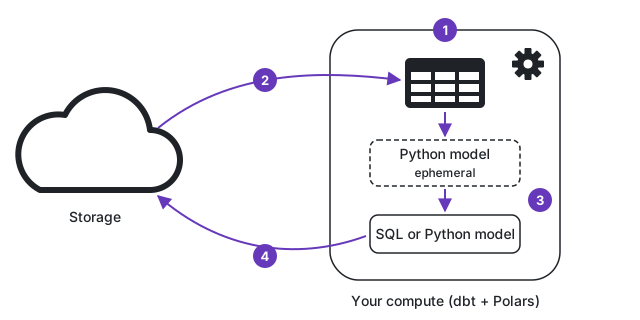
- Polars runs inside the dbt process, so Python models need no separate compute.
ref()returns a LazyFrame: a reference to storage. No data is read yet.- The ephemeral Python model returns a LazyFrame, which the downstream SQL or Python model uses like any other table. Both add to one query plan.
- On write, Polars optimizes the full plan, reads only the data it needs, and streams the result to storage.
Adaptable to your platform
- Run Polars on any compute, avoiding lock-in to a costly warehouse.
- Write to Databricks, Snowflake, Azure Blob Storage, Fabric, ...
- Or write a custom catalog extension to perfectly fit your platform.
dbt-polars uses catalogs to define where data is stored. Each catalog maps to a storage backend. You can configure multiple catalogs in a single profile and reference them from your models. See the Catalog overview.
Supported catalogs
Catalog extensions define where dbt-polars reads and stores data.
| Target | Catalog |
|---|---|
| Local filesystem | local |
| Azure Blob Storage / ADLS Gen2 | azure |
| Databricks Unity Catalog | databricks (Delta, Iceberg) |
| Microsoft Fabric OneLake | fabric (Delta, Iceberg) |
| Snowflake Horizon Catalog | snowflake (Iceberg) |
| Other Iceberg catalogs | iceberg (any pyiceberg backend, e.g. SQLite, REST, Glue) |
| Other platforms | Write your own catalog extension |
To support another platform, you can write your own catalog. See Custom catalogs.
Limitations
- Views are not supported, as there is no database to hold them. Use
tableorephemeralinstead. - The
hashmacro is not supported. Use a Python model for hashing instead.
See dbt compatibility for the full overview, including supported macros.
Getting started
The first steps are below. For the full walkthrough, see the Getting started guide.
Install dbt-polars and create a new dbt project:
pip install dbt-polars
dbt init
When prompted, choose polars as the database and local as the catalog type. This creates a profile that writes tables to your local disk:
my_project:
  target: dev
  outputs:
    dev:
      type: polars
      schema: main
      catalog_type: local
      root: ./data
dbt-polars does not support views, so replace the models: block in dbt_project.yml with:
models:
  my_project:
    +materialized: table
Then build the example models:
dbt run
The Getting started guide continues from here with other catalogs, seeds, ephemeral models, docs, tests and incremental ingestion.
Documentation
The full documentation is available at datamindedbe.github.io/incubator-dbt-polars.
1 maintainer

Metadata
1 maintainer
Release files for dbt-polars-catalog-s3 0.5.0
For a detailed explanation of source distributions (sdists) and built distributions (wheels), please see the package formats documentation.
Source distribution (sdist)
| File | Size | Uploaded | Provenance | |
|---|---|---|---|---|
| dbt_polars_catalog_s3-0.5.0.tar.gz | 8.5 kB | Without provenance | Details |
Built distribution (wheel)
| File | Interpreter | ABI | Platform | Reset |
|---|---|---|---|---|
| dbt_polars_catalog_s3-0.5.0-py3-none-any.whl | Python 3 | none | any | Details |
Total release size: 14.7 kB
Release files / dbt_polars_catalog_s3-0.5.0.tar.gz
| Download URL | dbt_polars_catalog_s3-0.5.0.tar.gz |
|---|---|
| Size | 8.5 kB |
| Tags | Source |
|
SHA-256 checksum How to use checksums |
83f0b240d1054f994fa22d40f2d6e102c5676a0c8cffc8afe3c2814c9a2043e7
|
|
BLAKE2b-256 checksum How to use checksums |
7d5b5e95457cf5a44dc98cffb2578b40c35dcdd8cbc0a55edeee0fad43b18dfe
|
| Upload date | |
|
Uploaded using Trusted Publishing? What is trusted publishing? |
Yes |
| Uploaded via |
uv/0.13.5 {"installer":{"name":"uv","version":"0.13.5","subcommand":["publish"]},"python":null,"implementation":{"name":null,"version":null},"distro":{"name":"Ubuntu","version":"26.04","id":"resolute","libc":null},"system":{"name":null,"release":null},"cpu":null,"openssl_version":null,"setuptools_version":null,"rustc_version":null,"ci":true}
|
Release files / dbt_polars_catalog_s3-0.5.0-py3-none-any.whl
| Download URL | dbt_polars_catalog_s3-0.5.0-py3-none-any.whl |
|---|---|
| Size | 6.2 kB |
| Tags | Python 3 |
|
SHA-256 checksum How to use checksums |
17b7431768f966ccff99d84331d7f1c6f2c9bd2f6c5f98242800e92290eef749
|
|
BLAKE2b-256 checksum How to use checksums |
93b6de3a86a21f9dd76d0b6ef21c474c865055c86a82e795d3e7bf425d418441
|
| Upload date | |
|
Uploaded using Trusted Publishing? What is trusted publishing? |
Yes |
| Uploaded via |
uv/0.13.5 {"installer":{"name":"uv","version":"0.13.5","subcommand":["publish"]},"python":null,"implementation":{"name":null,"version":null},"distro":{"name":"Ubuntu","version":"26.04","id":"resolute","libc":null},"system":{"name":null,"release":null},"cpu":null,"openssl_version":null,"setuptools_version":null,"rustc_version":null,"ci":true}
|
Security for dbt-polars-catalog-s3 0.5.0
Provenance
Provenance describes where a file came from. On PyPI, provenance is shared via attestations, which provide a verifiable record of the build or publishing details. View details, limitations and caveats.
No provenance found
None of the files in this release were uploaded with provenance metadata.
A note on package security
PyPI is a repository for distributing packages, not a service for auditing them. While third-party security researchers and our staff do their best to detect and remove malicious packages, PyPI cannot guarantee the quality, security or suitability of any given package.
To learn more about protecting yourself from malicious actors, visit our package security documentation.














