
With dbt, data analysts and engineers can build analytics the way engineers build applications.

Project description

[!WARNING] dbt Core v1 development has moved to the
1.latestbranch. Themainbranch now hosts dbt Core v2.0 (alpha) — a ground-up rewrite in Rust that is the foundation of the Fusion engine. If you're looking for the Python implementation of dbt Core, switch to1.latest.
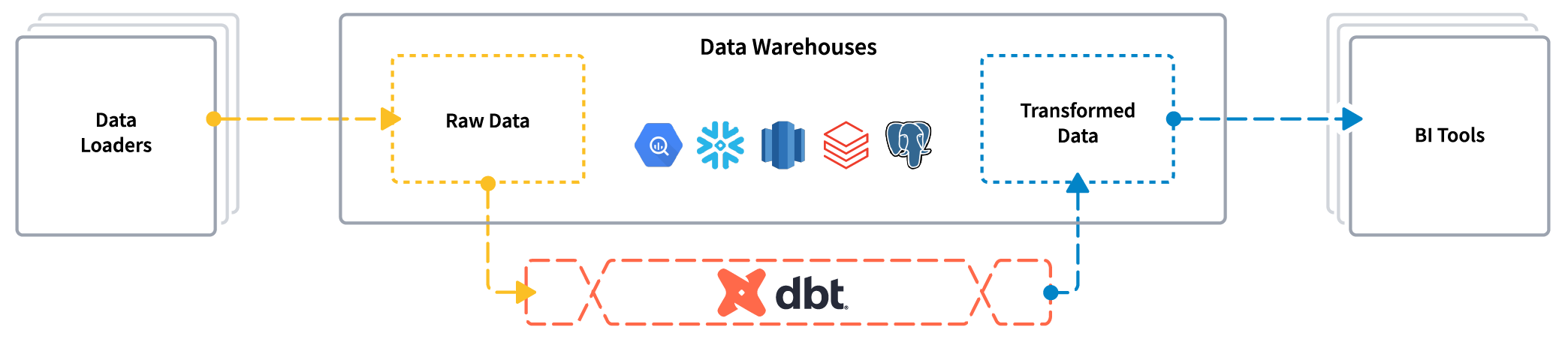
dbt enables data analysts and engineers to transform their data using the same practices that software engineers use to build applications.
About dbt Core v2.0
🚧 dbt Core v2.0 is in alpha. Behavior, APIs, and on-disk formats may change before the stable release.
dbt Core v2.0 is engineered for performance at scale — parsing, compiling, and running projects in a fraction of the time compared to v1. It's released under the Apache 2.0 license and is the foundation of the Fusion engine.
The big shifts from v1:
- Faster — parse and compile times are dramatically improved, especially on the largest dbt projects.
- Stricter — a tightly-defined language specification enforces correctness at parse time.
- More scalable artifacts — v2.0 produces Parquet artifacts that can be easily queried, joined, and analyzed to understand your dbt project. The artifacts encompass everything in the JSON artifacts (e.g.
manifest.json), which continue to be produced for backwards compatibility. - Easier to install — distributed as a single self-contained binary, with no Python runtime or dependency management required.
- A completely revamped local documentation experience — dbt docs is now powered by those new artifacts and capable of scaling to large projects.
Supported operating systems and architectures
dbt Core v2.0 and its drivers are compiled per operating system and architecture.
Legend:
- 🟢 — Supported today
- 🟡 — Not yet supported
| Operating system | x86-64 | ARM |
|---|---|---|
| macOS | 🟢 | 🟢 |
| Linux | 🟢 | 🟢 |
| Windows | 🟢 | 🟡 |
Understanding dbt
Analysts using dbt can transform their data by simply writing select statements, while dbt handles turning these statements into tables and views in a data warehouse.
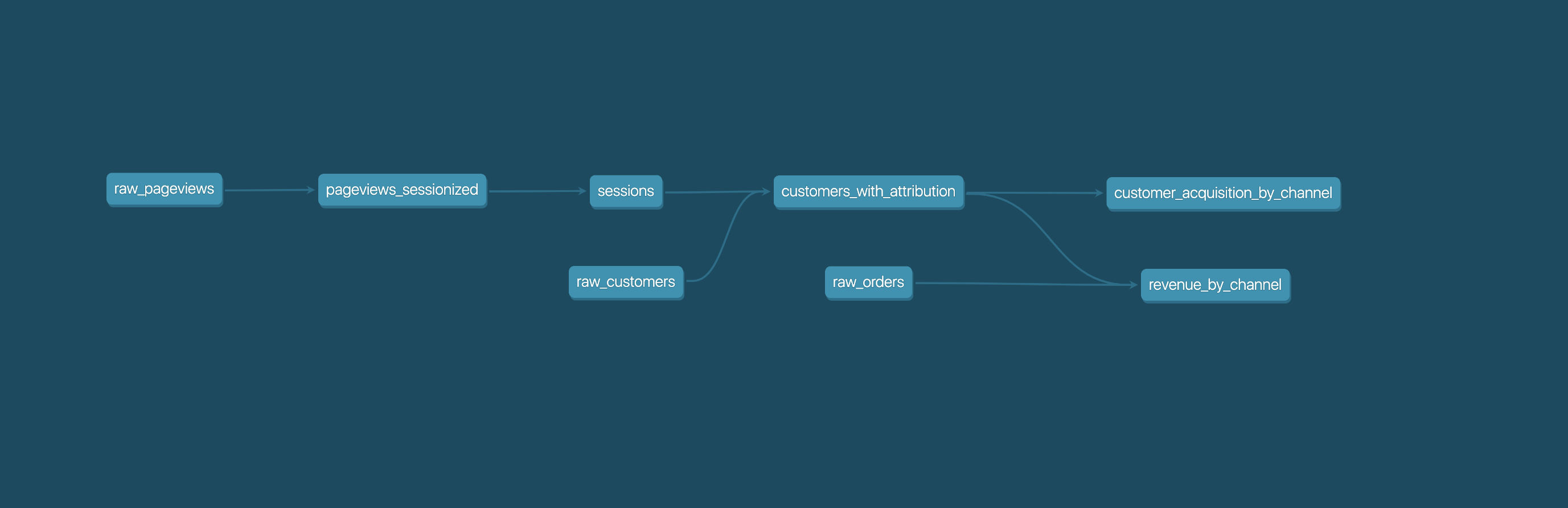
These select statements, or "models", form a dbt project. Models frequently build on top of one another – dbt makes it easy to manage relationships between models, and visualize these relationships, as well as assure the quality of your transformations through testing.
Getting started
Start by choosing a distribution. dbt Core is the baseline distribution of dbt. Fusion extends dbt Core with additional SQL comprehension abilities. Both distributions are free to install and can run locally.
- If you need an Apache 2.0 licensed tool and the ability to review every line of code inside of it, install dbt Core.
- If you need a free CLI you can use locally, install Fusion. It can do more than dbt Core out of the box and you can seamlessly enable other advanced features over time if you choose to.
Regardless of the distribution you choose, each is part of a single framework with a single language specification, meaning your business logic is portable in both directions.
Explore the dbt platform for an enhanced collaboration experience. Read the introduction and viewpoint
Join the dbt Community
- Be part of the conversation in the dbt Community Slack
- Read more on the dbt Community Discourse
Reporting bugs and contributing code
- Want to report a bug or request a feature? Let us know and open an issue
- Want to help us build dbt? Check out the Contributing Guide
Code of Conduct
Everyone interacting in the dbt project's codebases, issue trackers, chat rooms, and mailing lists is expected to follow the dbt Code of Conduct.
License
dbt Core is licensed under the Apache License 2.0.
Release history Release notifications | RSS feed


Download files
Download the file for your platform. If you're not sure which to choose, learn more about installing packages.
Source Distributions
Built Distributions
Filter files by name, interpreter, ABI, and platform.
If you're not sure about the file name format, learn more about wheel file names.
Copy a direct link to the current filters
File details
Details for the file dbt_core-2.0.0a1-py3-none-win_amd64.whl.
File metadata
- Download URL: dbt_core-2.0.0a1-py3-none-win_amd64.whl
- Upload date:
- Size: 53.9 MB
- Tags: Python 3, Windows x86-64
- Uploaded using Trusted Publishing? No
- Uploaded via: dbt-ci/2.0.0-alpha.1
File hashes
| Algorithm | Hash digest | |
|---|---|---|
| SHA256 |
0a6d03060c1c038fd989f6befa6687767ff47d1144ce8086691be690bf078328
|
|
| MD5 |
aaa50ed66bca5f5e862313dabad4ae79
|
|
| BLAKE2b-256 |
00bd7b57a7d4899b0ec798070c9aa368670f21a40b2be64f620f5f6c5ae24140
|
File details
Details for the file dbt_core-2.0.0a1-py3-none-manylinux_2_28_x86_64.whl.
File metadata
- Download URL: dbt_core-2.0.0a1-py3-none-manylinux_2_28_x86_64.whl
- Upload date:
- Size: 48.4 MB
- Tags: Python 3, manylinux: glibc 2.28+ x86-64
- Uploaded using Trusted Publishing? No
- Uploaded via: dbt-ci/2.0.0-alpha.1
File hashes
| Algorithm | Hash digest | |
|---|---|---|
| SHA256 |
cc2b98a0631cf7f1d43683d08fe0e096824b3ffe7aef82b0a474d0ff1f703c9e
|
|
| MD5 |
283539b640cb8990ec93294946390a6e
|
|
| BLAKE2b-256 |
0602983e8f593a1a5e656914860807c063ee75b38f9d07c7bcc3cdf93a9290d6
|
File details
Details for the file dbt_core-2.0.0a1-py3-none-manylinux_2_28_aarch64.whl.
File metadata
- Download URL: dbt_core-2.0.0a1-py3-none-manylinux_2_28_aarch64.whl
- Upload date:
- Size: 44.5 MB
- Tags: Python 3, manylinux: glibc 2.28+ ARM64
- Uploaded using Trusted Publishing? No
- Uploaded via: dbt-ci/2.0.0-alpha.1
File hashes
| Algorithm | Hash digest | |
|---|---|---|
| SHA256 |
10c0b7fa85f0e329b68d853b8d95c160c8bd185e151e528244abf7ec55e240c9
|
|
| MD5 |
42f0ee06a4d733735ec7b9abb6342050
|
|
| BLAKE2b-256 |
a20998c49997eed89f19ac3316a394d69a332b9eb55ec06d8fc0cc7c3e48531f
|
File details
Details for the file dbt_core-2.0.0a1-py3-none-macosx_11_0_arm64.whl.
File metadata
- Download URL: dbt_core-2.0.0a1-py3-none-macosx_11_0_arm64.whl
- Upload date:
- Size: 43.6 MB
- Tags: Python 3, macOS 11.0+ ARM64
- Uploaded using Trusted Publishing? No
- Uploaded via: dbt-ci/2.0.0-alpha.1
File hashes
| Algorithm | Hash digest | |
|---|---|---|
| SHA256 |
824eb4f08a86e2b1368f846c58f6fe460dc62e90f228234a876a78b5da372b93
|
|
| MD5 |
8b5e2bc334f5876f208570a8b11857f1
|
|
| BLAKE2b-256 |
b131ad986f597d2b14e97ce492865913d4b808cd04530eda28f4d72687041ea8
|
File details
Details for the file dbt_core-2.0.0a1-py3-none-macosx_10_12_x86_64.whl.
File metadata
- Download URL: dbt_core-2.0.0a1-py3-none-macosx_10_12_x86_64.whl
- Upload date:
- Size: 48.1 MB
- Tags: Python 3, macOS 10.12+ x86-64
- Uploaded using Trusted Publishing? No
- Uploaded via: dbt-ci/2.0.0-alpha.1
File hashes
| Algorithm | Hash digest | |
|---|---|---|
| SHA256 |
4e21f6bb35314af115704b1cb81bee33ad36087ec1db7b2c39dacfaa27bb2bef
|
|
| MD5 |
7bc3e478502a15175228d21101f630ed
|
|
| BLAKE2b-256 |
1400ab67145bcfb7ac433358dc8747a41cff8613ad8ad0c770e648bed862f7ea
|






