
DBTK - Data Benders Toolkit

Control and Manipulate the Flow of Data - A lightweight Python toolkit for data integration, transformation, and movement between systems.
Like the elemental benders of Avatar, this library gives you precise control over data, the world's most rapidly growing element. Extract data from various sources, transform it through powerful operations, and load it exactly where it needs to go. This library is designed by and for data integrators.
DBTK aims to be fast and memory-efficient at every turn. But it was designed to boost your productivity first and foremost. You have dozens, possibly hundreds, of interfaces, impossible deadlines, and multiple projects all happening at once. Your environment has different relational databases, each has its own quirks. You just want to get stuff done instead of writing the same boilerplate code over and over.
Design philosophy: Modern databases excel at aggregating and transforming data at scale. DBTK embraces this by focusing on what Python does well: flexible record-by-record transformations, connecting disparate systems, and orchestrating data movement.
If you need to pivot, aggregate, or perform complex SQL operations - write SQL and let your database handle it. If you need dataframes and heavy analytics - reach for Pandas or polars. DBTK sits in between: getting your data where it needs to be, cleaned and validated along the way.
Why DBTK?
Most data integration tools make you run infrastructure.
Airbyte, Boomi, Pentaho — powerful tools, but you're deploying Docker containers, configuring connectors through a UI, and maintaining a platform just to move data between systems. A slow job needs scheduling, monitoring, failure recovery, a maintenance window. When something breaks, you're debugging someone else's abstraction layer.
The alternative — SQLAlchemy + pandas + custom batch loops — means writing the same boilerplate across every interface, slowly accreting defensive code for every edge case. And when you finally write the database load, you're still doing row-at-a-time inserts through an ORM that knows nothing about COPY or bcp.
DBTK is a library, not a platform.
pip install dbtk and you have native bulk loading for PostgreSQL, Oracle, MySQL, and
SQL Server — in a cron job, a Lambda function, a Jupyter notebook, or embedded in your
application. No Docker. No daemon. No server. The pipeline is Python.
This matters more than it sounds. In real-world comparisons, DBTK pipelines have completed in seconds where enterprise ETL tools took hours on the same data — because platform tools process row-by-row through a visual graph engine while DBTK uses native database COPY protocols, bcp, and SQL*Loader. That isn't just a performance win. A job that runs in seconds happens on demand. A job that takes hours becomes infrastructure.
It handles the formats everyone else ignores.
Finance, healthcare, logistics, and government move enormous data volumes in fixed-width text and EDI formats. The modern Python data stack has largely ignored these because they're unglamorous. DBTK handles them with the same clean API as CSV and JSON — because real integration work lives there.
DBTK threads the needle between power and control.
It's declarative enough to eliminate repetition, explicit enough that you stay in control. When something breaks, you know exactly where to look.
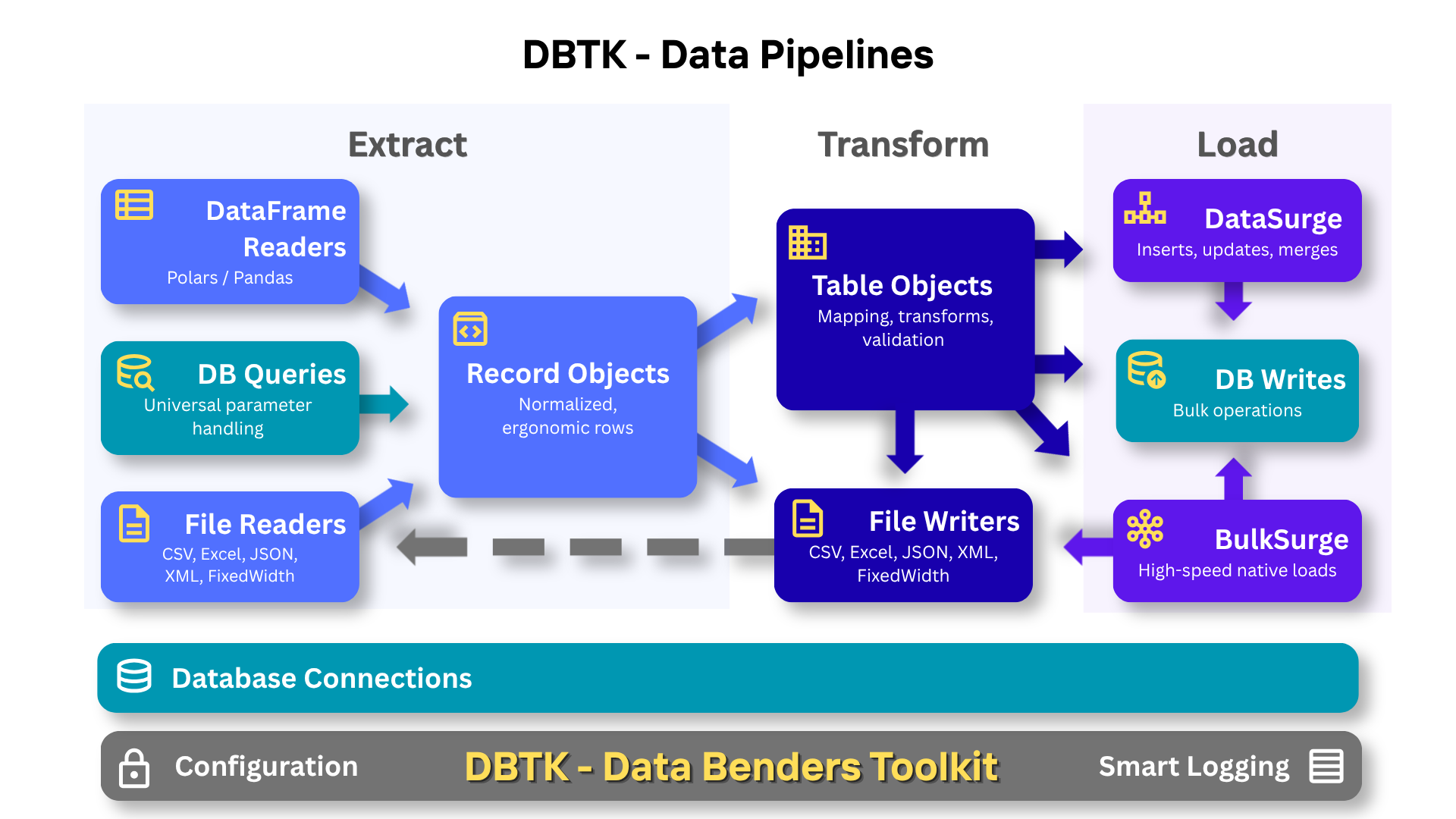
The architecture is intentionally layered — use what you need, skip what you don't:
Configuration   → encrypted YAML, env vars, named connections, driver overrides, smart logging
Connection      → consistent connection and parameter handling; `:named` and `%(pyformat)s` SQL works everywhere
Record          → ergonomic row handling, memory-efficient at scale; returned by all cursors and readers
Table           → field mapping, transforms, validation, row-wise CRUD operations
Transformations → built-in functions for dates, phones, emails, lookups and validations; simple string shorthand
DataSurge       → batched CRUD + merge/upsert with progress tracking, logging and stats
BulkSurge       → direct bulk loads (SQL*Loader, BCP, COPY) for maximum throughput
Readers/Writers → consistent API across every file format and compression type
When developers convert existing jobs to DBTK, the result can be half to a quarter the original code. That reduction comes from specific things DBTK just handles:
- Key column validation — DBTK throws a clear error if a key field is missing from the source. No more writing null-guards before every upsert.
- Safe partial updates — if a field is missing from the source, DBTK excludes it from the UPDATE rather than overwriting with NULL. No more "did I just wipe a column?" paranoia.
- Batch loop elimination — DataSurge handles chunking, committing, retries, and statistics. No more hand-rolled batch loops.
- Zero-config logging — one line sets up timestamped log files with auto-cleanup and a global error flag. No logging boilerplate scattered through your pipeline.
- TableLookup shorthand — define a lookup or validation in ~40 characters:
'fn': 'validate:ranks:rank_code:preload'. Thepreloadhint pre-caches the table before processing starts. What would otherwise be a custom class or 30-line function is a string.
The code that remains is shorter, clearer, and still has all the functionality and checks. You finish the job and think "that was satisfyingly elegant" — not because corners were cut, but because the tool was collaborating with you instead of making you fight it.
Speed and Memory BulkSurge streaming from polars and doing direct loads to PostgreSQL will process 1M rows in 3-4 seconds. Even with a standard Python CSV reader and numerous column transforms, DataSurge writes 1M rows to every supported database in 5-10 seconds. These aren't toy benchmarks — they include field mapping, type conversions, validation, and real database constraints. The same pipeline that takes seconds in DBTK can take hours in a drag-and-drop ETL platform.
Installation
pip install dbtk

# installs keyring, lxml, openpyxl, phone address and date helpers
pip install dbtk[recommended]

# For reading/writing XML and Excel files
pip install dbtk[formats]     # lxml and openpyxl

# Full functionality
pip install dbtk[all]         # all optional dependencies - database adapters

# Database adapters (install as needed)
pip install psycopg2          # PostgreSQL
pip install oracledb          # Oracle
pip install mysqlclient       # MySQL
Quick Start
Sample Outbound Integration - Export Data
Extract data from your database and export to multiple formats with portable SQL queries:
import dbtk

# One-line setup creates timestamped log - all operations automatically logged
dbtk.setup_logging()

with dbtk.connect('fire_nation_db') as db:
    cursor = db.cursor()

    # SQL with named parameters - works on ANY database
    # Supports both :named and %(pyformat)s parameter styles!
    params = {
        'min_rank': 'Captain',
        'start_date': '2024-01-01',
        'region': 'Western Fleet',
        'status': 'active'
    }

    # DBTK transforms the query and parameters to match your database's style
    cursor.execute_file('queries/monthly_report.sql', params)
    monthly_data = cursor.fetchall()

    cursor.execute_file('queries/officer_summary.sql', params)
    summary_data = cursor.fetchall()

    # Export to multiple formats trivially
    dbtk.writers.to_csv(monthly_data, 'reports/soldiers_monthly.csv')
    dbtk.writers.to_excel(summary_data, 'reports/officer_summary.xlsx',
                          sheet='Officer Stats')

# Check for errors
if dbtk.errors_logged():
    print("⚠️  Export completed with errors - check log file")
What makes this easy:
- Write SQL once with named (
:param) or pyformat (%(param)s) parameters - works on any database - Pass the same dict to multiple queries - extra parameters are ignored, missing params are set to NULL
- DBTK handles parameter conversion automatically - no manual string formatting needed
- Export to CSV/Excel/JSON/NDJSON/XML with one line of code
Sample Inbound Integration - Import Data
Import data with field mapping, transformations, and validation:
import dbtk
from dbtk.etl import Table
from dbtk.etl.transforms import email_clean

dbtk.setup_logging()  # Timestamped logs with auto-cleanup

with dbtk.connect('fire_nation_db') as db:
    cursor = db.cursor()

    # Define table schema with field mapping and transformations
    soldier_table = Table('soldiers', {
        'soldier_id': {'field': 'id', 'key': True},  # Maps CSV 'id' to DB 'soldier_id', marks as primary key
        'name': {'field': 'full_name', 'nullable': False},  # Required field, will error if missing
        'rank': {'field': 'officer_rank', 'nullable': False,
                 'fn': 'validate:ranks:rank_code:preload'},  # Validates against 'ranks' table, preloads cache
        'email': {'field': 'contact_email', 'default': 'intel@firenation.com',
                  'fn': email_clean},  # Cleans/validates email, uses default if missing
        'enlistment_date': {'field': 'join_date', 'fn': 'date'},  # Parses various date formats
        'missions_completed': {'field': 'mission_count', 'fn': 'int'},  # Converts to integer, NULL if fails
        'status': {'default': 'active'}  # Sets default, no source field needed
    }, cursor=cursor)

    # Process incoming compressed CSV
    with dbtk.readers.get_reader('incoming/new_recruits.csv.gz') as reader:  # Auto-detects .gz, decompresses
        # DataSurge batches inserts, uses fastest method for this database driver
        surge = dbtk.etl.DataSurge(soldier_table, use_transaction=True)  # Wraps in transaction
        surge.insert(reader)  # Auto-shows progress bar for large files

if dbtk.errors_logged():  # Check global error flag
    # send notification email or call 911
    print("⚠️  Export completed with errors - check log file")
What makes this easy:
- Field mapping separates database schema from source data format - change one without touching the other
- Built-in transforms (dates, emails, integers) with string shorthand -
'fn': 'date'instead of importing functions - Table class auto-validates required data before operations - no silent failures or cryptic database errors
- Built-in table lookups and validation with deferred cursor binding and intelligent caching
- Readers auto-detect file size and show progress on large files - never wonder if your pipeline has stalled
- Automatic statistics tracking - records processed, skipped, inserted, etc.
- Automatic logging with sensible global defaults - override per-pipeline when needed
- Error tracking built-in -
dbtk.errors_logged()tells you if anything went wrong
The Record Class
Every cursor query and file reader in DBTK returns Record objects - a hybrid data structure that works like a dict, tuple, and object simultaneously.
Why not just use dicts? Dicts are optimized for n=1: one object with many keys you look up dynamically. But ETL pipelines process hundreds of thousands or millions of rows, all with the same columns. Record stores column names once on a shared class, not on every row - giving you dict-like flexibility with tuple-like memory efficiency.
for row in cursor:
    row['name']           # Dict-style access
    row.name              # Attribute access
    row[0]                # Index access (dicts can't do this)
    row[1:3]              # Slicing (dicts can't do this)
    id, name, email = row # Tuple unpacking (dicts can't do this)
    row.get('phone', '')  # Safe access with default
    dict(row)             # Convert to dict when needed
Normalized field names let you write resilient code. Whether your source column is Employee_ID, EMPLOYEE ID, or employee_id, you can always access it as row.employee_id. This means your Table field mappings work regardless of how the source system names its columns.
Polars and pandas integrate seamlessly in both directions. Records are dict-compatible, so pl.from_dicts(cursor) and pd.DataFrame(cursor) just work with no conversion needed — giving you access to every output format polars and pandas support (parquet, avro, Arrow IPC, and more). Going the other way, DataFrameReader wraps any polars or pandas DataFrame as a DBTK reader, so you can use polars to read and transform parquet, avro, or any other format and feed the result straight into a Table or DataSurge.
See Record Objects for complete documentation.
Documentation
Getting Started
- Getting Started Guide - 5-minute tutorial with complete examples
- API Reference - Complete method and function reference
Core Features
- Record Objects - DBTK's universal data structure with dict, tuple, and attribute access
- Configuration & Security - Set up encrypted passwords, YAML config files, and command-line tools
- Database Connections - Connect to any database, use smart cursors, SQL file execution, manage transactions
- File Readers - Read from CSV, Excel, JSON, XML, and fixed-width files
- Data Writers - Write to CSV, Excel, JSON, XML, fixed-width files, and between databases
ETL Framework
- ETL: Table & Transforms - Field mapping, column config, data transforms, database lookups
- ETL: DataSurge & BulkSurge - High-performance bulk loading for any database
- ETL: Tools & Logging - IdentityManager, ValidationCollector, and integration script logging
Advanced Topics
- Advanced Features - Custom drivers, multiple config locations, and performance tuning
- Troubleshooting - Common issues and solutions
Performance Highlights
Driver optimizations enabled automatically - If your database driver supports faster batch operations (psycopg2, pyodbc), DBTK detects and uses them automatically.
Real-world benchmarks from production systems:
- DataFrameReader: 1.3M rec/s reading compressed CSV with polars + transforms
- BulkSurge (Postgres/Oracle): 200-300K rec/s transforming, validating, and bulk loading
- DataSurge (Oracle/SQL Server/MySQL): 90-150K rec/s with native executemany
- IMDB Dataset: 130K rec/s loading 12M titles with transforms and validation
- Examples: See the Examples folder for scripts you can run against the IMDB Dataset
See the examples in the /examples folder for scripts you can run against the IMDB dataset.
License
MIT License - see LICENSE file for details.
Acknowledgments
Documentation, testing and architectural improvements assisted by Claude (Anthropic). Architectural review and witty banter by Grok (xAI). DataBender imagery ChatGPT (OpenAI).
Support
- Issues: GitHub Issues
- Discussions: GitHub Discussions
- Documentation: Full Documentation
Contributing
Contributions are welcome! Please feel free to submit a Pull Request.
1 maintainer

Metadata
1 maintainer
Release files for dbtk 0.8.9
For a detailed explanation of source distributions (sdists) and built distributions (wheels), please see the package formats documentation.
Source distribution (sdist)
| File | Size | Uploaded | |
|---|---|---|---|
| dbtk-0.8.9.tar.gz | 256.9 kB | Details |
Built distribution (wheel)
| File | Interpreter | ABI | Platform | Reset |
|---|---|---|---|---|
| dbtk-0.8.9-py3-none-any.whl | Python 3 | none | any | Details |
Total release size: 464.5 kB
Release files / dbtk-0.8.9.tar.gz
| Download URL | dbtk-0.8.9.tar.gz |
|---|---|
| Size | 256.9 kB |
| Tags | Source |
|
SHA-256 checksum How to use checksums |
c69553e7769921ec90c512fa5ddade90840554fb49460b4b1e246e782e58590a
|
|
BLAKE2b-256 checksum How to use checksums |
c8cb92939e8859489f2c0d9d477c5c2ff7fb48ca44d97250e360a847e29e99f7
|
| Upload date | |
|
Uploaded using Trusted Publishing? What is trusted publishing? |
No |
| Uploaded via |
twine/6.2.0 CPython/3.14.4
|
Release files / dbtk-0.8.9-py3-none-any.whl
| Download URL | dbtk-0.8.9-py3-none-any.whl |
|---|---|
| Size | 207.6 kB |
| Tags | Python 3 |
|
SHA-256 checksum How to use checksums |
44b49ffdf7b9ebba3b91ee6e40582865d50c1cb534c462cff170bcc2aade1638
|
|
BLAKE2b-256 checksum How to use checksums |
245779a2a401a04f3fbca41b295ec6522fd5a5c91a8129b3056cd1f3e5a15368
|
| Upload date | |
|
Uploaded using Trusted Publishing? What is trusted publishing? |
No |
| Uploaded via |
twine/6.2.0 CPython/3.14.4
|














