
Database migration system for Python/SQLAlchemy projects

Project description

DBWarden
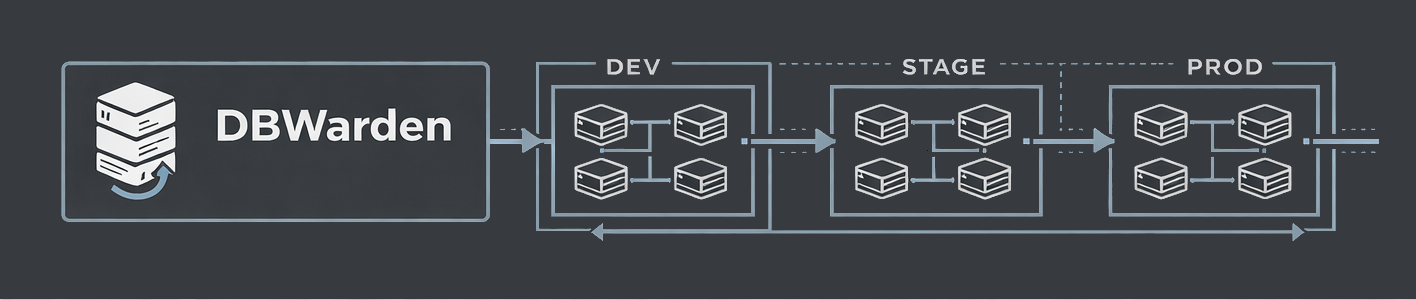
A database migration system for Python/SQLAlchemy projects.


Installation
pip install dbwarden
Configuration
⚠️ Warning
This is an experimental package. Your fuckups are not mine to fix. You have been warned.
Even though this is an experimental package, I added lots of failsafes to protect the connected DB as to avoid issues.
Create warden.toml in your project:
# Default database
default = "primary"

# Database configurations
[database.primary]
database_type = "sqlite"
sqlalchemy_url = "sqlite:///./development.db"

[database.analytics]
database_type = "postgresql"
sqlalchemy_url = "postgresql://user:password@localhost:5432/analytics"
Basic Commands
| Command | Description |
|---|---|
dbwarden init |
Initialize migrations directory |
dbwarden database list |
List all configured databases |
dbwarden database add <name> |
Add a new database |
dbwarden make-migrations "name" |
Generate SQL from SQLAlchemy models |
dbwarden migrate |
Apply pending migrations |
dbwarden migrate -d <name> |
Migrate specific database |
dbwarden migrate --all |
Migrate all databases |
dbwarden rollback |
Revert the last migration |
dbwarden history |
Show migration history |
dbwarden status |
Show current status |
Multi-Database Support
Manage multiple databases from a single configuration:
# Add databases
dbwarden database add analytics --url "postgresql://user:pass@localhost:5432/analytics"
dbwarden database add legacy --url "mysql://user:pass@localhost:3306/legacy"

# List all databases
dbwarden database list

# Migrate specific database
dbwarden migrate -d analytics

# Migrate all databases (sequentially)
dbwarden migrate --all
SQLAlchemy Models
DBWarden automatically detects models in models/:
# models/user.py
from sqlalchemy import Column, Integer, String
from sqlalchemy.orm import declarative_base

Base = declarative_base()

class User(Base):
    __tablename__ = "users"
    id = Column(Integer, primary_key=True)
    name = Column(String(100))
    email = Column(String(255), unique=True)
Complete Example
# 1. Initialize
dbwarden init

# 2. Create models in models/

# 3. Add more databases
dbwarden database add analytics --url "postgresql://user:pass@localhost:5432/analytics"

# 4. Generate migration from models
dbwarden make-migrations "create users table"

# 5. Apply
dbwarden migrate --verbose

# 6. Migrate all databases
dbwarden migrate --all

# 7. View history
dbwarden history
Supported Databases
| Database | Type Value | Features |
|---|---|---|
| PostgreSQL | postgresql |
SERIAL, TIMESTAMP, BYTEA |
| MySQL | mysql |
AUTO_INCREMENT, ENUM |
| SQLite | sqlite |
Built-in, zero config |
| ClickHouse | clickhouse |
Analytics, MergeTree |
| MariaDB | mariadb |
MySQL-compatible |
Docs
For more information, see DBWarden Docs or DBWarden DeepWiki page
License
This Project is Licensed under the MIT License. See LICENSE
Release history Release notifications | RSS feed


Download files
Download the file for your platform. If you're not sure which to choose, learn more about installing packages.
Source Distribution
Built Distribution
Filter files by name, interpreter, ABI, and platform.
If you're not sure about the file name format, learn more about wheel file names.
Copy a direct link to the current filters
File details
Details for the file dbwarden-0.3.2.1.tar.gz.
File metadata
- Download URL: dbwarden-0.3.2.1.tar.gz
- Upload date:
- Size: 452.4 kB
- Tags: Source
- Uploaded using Trusted Publishing? No
- Uploaded via: twine/6.2.0 CPython/3.14.3
File hashes
| Algorithm | Hash digest | |
|---|---|---|
| SHA256 |
64cb2ee638986cb9bb0ba8453a52416d4c07658ace00cfbb169009509d00431d
|
|
| MD5 |
9c72cd23d0796d4f3f24879ed72328b7
|
|
| BLAKE2b-256 |
439bbc9840b7e037434f7272733fd41470a24326297bbbfb8358d93006cd521a
|
File details
Details for the file dbwarden-0.3.2.1-py3-none-any.whl.
File metadata
- Download URL: dbwarden-0.3.2.1-py3-none-any.whl
- Upload date:
- Size: 45.0 kB
- Tags: Python 3
- Uploaded using Trusted Publishing? No
- Uploaded via: twine/6.2.0 CPython/3.14.3
File hashes
| Algorithm | Hash digest | |
|---|---|---|
| SHA256 |
d18db78efb8883a4d9b9d1d08d81adc7132d481919c594b4e64f4ed16c60be87
|
|
| MD5 |
0041a3508831e7f1455df7497b40fd08
|
|
| BLAKE2b-256 |
c7e6a59b23a4571233ca318c1d1566a182d9f31bf4aa1c62f36c144c5e60966d
|






