
Slowly Changing Dimensions implementation with Azure Databricks Delta Lake

Installation
Install dbxscd package in Azure Databricks notebook
%pip install dbxscd
Run Example
-
Import example.py into workspace
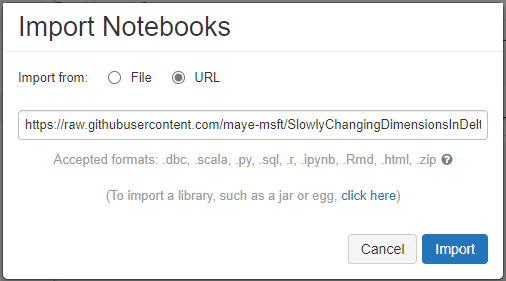
- Click "Run All" button
What is Slowly Changing Dimension
Slowly Changing Dimensions (SCD) are dimensions which change over time and in Data Warehouse we need to track the changes of the attributes keep the accuracy of the report.
And typically there are three types of SCD
- Type 1: SCD1, No history preservation
- Type 2: SCD2, Unlimited history preservation and new rows
- Type 3: SCD3, Limited history preservation
For example we have a dataset
| ShortName | Fruit | Color | Price |
|---|---|---|---|
| FA | Fiji Apple | Red | 3.6 |
| BN | Banana | Yellow | 1 |
| GG | Green Grape | Green | 2 |
| RG | Red Grape | Red | 2 |
If we change the price of "Fiji Apple" into 3.5, the dataset will be
with SCD1:
| ShortName | Fruit | Color | Price |
|---|---|---|---|
| FA | Fiji Apple | Red | 3.5 |
| BN | Banana | Yellow | 1 |
| GG | Green Grape | Green | 2 |
| RG | Red Grape | Red | 2 |
with SCD2:
| ShortName | Fruit | Color | Price | is_last |
|---|---|---|---|---|
| FA | Fiji Apple | Red | 3.5 | Y |
| FA | Fiji Apple | Red | 3.6 | N |
| BN | Banana | Yellow | 1 | Y |
| GG | Green Grape | Green | 2 | Y |
| RG | Red Grape | Red | 2 | Y |
with SCD3:
| ShortName | Fruit | Color | Price | Color_old | Price_old |
|---|---|---|---|---|---|
| FA | Fiji Apple | Red | 3.5 | Red | 3.6 |
| BN | Banana | Yellow | 1 | NULL | NULL |
| GG | Green Grape | Green | 2 | NULL | NULL |
| RG | Red Grape | Red | 2 | NULL | NULL |
SCD implementation in Databricks
In this repository, there are implementations of SCD1, SCD2 and SCD3 in python and Databricks Delta Lake.
- SCD1
dbxscd.SCD1(spark, df, target_table_name, target_partition_keys, key_cols, current_time):
Parameters:
- spark: instance of spark session
- df: source data frame
- target_table_name: target table name
- target_partition_keys: partition key of the target table
- key_cols: columns of the key for each row
- current_time: current timestamp
Here is the code to show an example of SCD1
from pyspark.sql import functions as F
from pyspark.sql import DataFrame
import datetime

# create sample dataset
df1 = spark.createDataFrame([('FA', 'Fiji Apple', 'Red', 3.5)
                           ,('BN', 'Banana', 'Yellow', 1.0)
                           ,('GG', 'Green Grape', 'Green', 2.0)
                           ,('RG', 'Red Grape', 'Red', 2.0)],
                           ['ShortName','Fruit', 'Color', 'Price'])
# prepare parameters
current_time = datetime.datetime.now().strftime("%Y-%m-%dT%H:%M:%S")
target_partition_keys = ['ShortName']
key_cols = "ShortName,Fruit"
target_table_name_scd1 = 'default.table_scd1'
# call the SCD1 function
dbxscd.SCD1(spark, df1, target_table_name_scd1, target_partition_keys, key_cols, current_time)
# display the result
display(spark.sql(f"select * from {target_table_name_scd1}"))

Change the price of "Fiji Apple" into 3.5 and run SCD1 again
df2 = spark.createDataFrame([('FA', 'Fiji Apple', 'Red', 3.6)
                           ,('BN', 'Banana', 'Yellow', 1.0)
                           ,('GG', 'Green Grape', 'Green', 2.0)
                           ,('RG', 'Red Grape', 'Red', 2.0)],
                           ['ShortName','Fruit', 'Color', 'Price'])
# call the SCD1 function again
dbxscd.SCD1(spark, df2, target_table_name_scd1, target_partition_keys, key_cols, current_time)
display(spark.sql(f"select * from {target_table_name_scd1}"))

- SCD2
dbxscd.SCD2(spark, df, target_table_name, target_partition_keys, key_cols, current_time):
Parameters:
- spark: instance of spark session
- df: source data frame
- target_table_name: target table name
- target_partition_keys: partition key of the target table
- key_cols: columns of the key for each row
- current_time: current timestamp
Here is the code to show an example of SCD2
from pyspark.sql import functions as F
from pyspark.sql import DataFrame
import datetime

# create sample dataset
df1 = spark.createDataFrame([('FA', 'Fiji Apple', 'Red', 3.5)
                           ,('BN', 'Banana', 'Yellow', 1.0)
                           ,('GG', 'Green Grape', 'Green', 2.0)
                           ,('RG', 'Red Grape', 'Red', 2.0)],
                           ['ShortName','Fruit', 'Color', 'Price'])
# prepare parameters
current_time = datetime.datetime.now().strftime("%Y-%m-%dT%H:%M:%S")
target_partition_keys = ['ShortName']
key_cols = "ShortName,Fruit"
target_table_name_scd2 = 'default.table_scd2'
# call the SCD1 function
dbxscd.SCD2(spark, df1, target_table_name_scd1, target_partition_keys, key_cols, current_time)
# display the result
display(spark.sql(f"select * from {target_table_name_scd2}"))

Change the price of "Fiji Apple" into 3.5 and run SCD2 again
df2 = spark.createDataFrame([('FA', 'Fiji Apple', 'Red', 3.6)
                           ,('BN', 'Banana', 'Yellow', 1.0)
                           ,('GG', 'Green Grape', 'Green', 2.0)
                           ,('RG', 'Red Grape', 'Red', 2.0)],
                           ['ShortName','Fruit', 'Color', 'Price'])
# call the SCD1 function again
dbxscd.SCD2(spark, df2, target_table_name_scd2, target_partition_keys, key_cols, current_time)
display(spark.sql(f"select * from {target_table_name_scd2}"))

- SCD3
dbxscd.SCD3(spark, df, target_table_name, target_partition_keys, key_cols, current_time):
Parameters:
- spark: instance of spark session
- df: source data frame
- target_table_name: target table name
- target_partition_keys: partition key of the target table
- key_cols: columns of the key for each row
- current_time: current timestamp
Here is the code to show an example of SCD3
from pyspark.sql import functions as F
from pyspark.sql import DataFrame
import datetime

# create sample dataset
df1 = spark.createDataFrame([('FA', 'Fiji Apple', 'Red', 3.5)
                           ,('BN', 'Banana', 'Yellow', 1.0)
                           ,('GG', 'Green Grape', 'Green', 2.0)
                           ,('RG', 'Red Grape', 'Red', 2.0)],
                           ['ShortName','Fruit', 'Color', 'Price'])
# prepare parameters
current_time = datetime.datetime.now().strftime("%Y-%m-%dT%H:%M:%S")
target_partition_keys = ['ShortName']
key_cols = "ShortName,Fruit"
target_table_name_scd3 = 'default.table_scd3'
# call the SCD3 function
dbxscd.SCD3(spark, df1, target_table_name_scd3, target_partition_keys, key_cols, current_time)
# display the result
display(spark.sql(f"select * from {target_table_name_scd3}"))

Change the price of "Fiji Apple" into 3.5 and run SCD3 again
df2 = spark.createDataFrame([('FA', 'Fiji Apple', 'Red', 3.6)
                           ,('BN', 'Banana', 'Yellow', 1.0)
                           ,('GG', 'Green Grape', 'Green', 2.0)
                           ,('RG', 'Red Grape', 'Red', 2.0)],
                           ['ShortName','Fruit', 'Color', 'Price'])
# call the SCD1 function again
dbxscd.SCD3(spark, df2, target_table_name_scd3, target_partition_keys, key_cols, current_time)
display(spark.sql(f"select * from {target_table_name_scd3}"))

1 maintainer

Release files for dbxscd 0.0.6
For a detailed explanation of source distributions (sdists) and built distributions (wheels), please see the package formats documentation.
Source distribution (sdist)
| File | Size | Uploaded | |
|---|---|---|---|
| dbxscd-0.0.6.tar.gz | 9.9 kB | Details |
Built distribution (wheel)
| File | Interpreter | ABI | Platform | Reset |
|---|---|---|---|---|
| dbxscd-0.0.6-py3-none-any.whl | Python 3 | none | any | Details |
Total release size: 19.1 kB
Release files / dbxscd-0.0.6.tar.gz
| Download URL | dbxscd-0.0.6.tar.gz |
|---|---|
| Size | 9.9 kB |
| Tags | Source |
|
SHA-256 checksum How to use checksums |
86729e133d1b7e642722b5bc4cd914c031cfdccda84f036cf9c58398f49c1614
|
|
BLAKE2b-256 checksum How to use checksums |
3be539e1f47cde5a17d8cd2e8b63854296c08a56b88445eef2dbcf420dd0ea14
|
| Upload date | |
|
Uploaded using Trusted Publishing? What is trusted publishing? |
No |
| Uploaded via |
twine/3.4.2 importlib_metadata/4.6.3 pkginfo/1.7.0 requests/2.25.1 requests-toolbelt/0.9.1 tqdm/4.61.0 CPython/3.8.8
|
Release files / dbxscd-0.0.6-py3-none-any.whl
| Download URL | dbxscd-0.0.6-py3-none-any.whl |
|---|---|
| Size | 9.2 kB |
| Tags | Python 3 |
|
SHA-256 checksum How to use checksums |
031eac5e2dd05b4912b89c051f153d316dc2efee08853dfe19478a199b3c0a06
|
|
BLAKE2b-256 checksum How to use checksums |
92c6b524d706d7b2b68cdb53cb9d471981e1ca624522738314f94e1875469a6c
|
| Upload date | |
|
Uploaded using Trusted Publishing? What is trusted publishing? |
No |
| Uploaded via |
twine/3.4.2 importlib_metadata/4.6.3 pkginfo/1.7.0 requests/2.25.1 requests-toolbelt/0.9.1 tqdm/4.61.0 CPython/3.8.8
|














