
Interactively fill dataclass instances via the command line.

Project description
dc-input


Interactively fill dataclass instances via the command line. Features include nested schemas, repeatable containers, undo support, defaults, optional fields, and custom parsers. Useful for quick data entry, prototyping, or structured configuration; integrates easily with your own CLI tools.
Why dc-input?
If you’ve ever written a script that prompts for input, validates values, and parses the result, you’ve probably noticed how boilerplate-y and bug-prone this can be.
dc-input replaces all that with a single function call.
Installation
pip install dc-input
Quick Start
from dataclasses import dataclass
from dc_input import get_input

@dataclass
class User:
    name: str
    age: int | None

user = get_input(User)
print(user)
Usage
Define your dataclasses as usual, then call get_input() to interactively collect values.
dc-input walks your dataclass schema and interactively prompts for values, handling nesting, repetition, defaults,
and validation automatically. At any prompt, type .. to undo the previous input: this even works across nested schemas.
Complete Example
Below is a full, self-contained script that:
- interactively collects data for a new music student
- validates and parses input
- appends the result to a JSON registry on disk
This is representative of how dc-input can be used in real projects.
Script
from __future__ import annotations

from dataclasses import dataclass, field, asdict
import datetime
import json
import os
from pathlib import Path
from pprint import pprint
import tempfile
from typing import Annotated, Any

from dc_input import get_input

STUDENTS_PATH = Path("students.json")


# ------------------------------------------------------------
# Schema
# ------------------------------------------------------------
@dataclass
class MusicStudent:
    id: int

    name: Name
    date_of_birth: Annotated[datetime.date, "DD/MM/YYYY"]
    address: Annotated[Address, "Must be a German address"]

    primary_instrument: Instrument
    secondary_instruments: Annotated[
        list[Instrument], "Other instruments the student may have experience with"
    ]

    comments: str | None


@dataclass
class Name:
    first: str
    middle: list[str]
    last: str

    full: str = field(init=False)

    def __post_init__(self):
        middle = f" {' '.join(name for name in self.middle)} " if self.middle else " "
        self.full = f"{self.first}{middle}{self.last}"


@dataclass
class Address:
    street: str
    street_number: int
    apartment: str | None
    zip_code: Annotated[int, "XXXXX"]
    city: str = "Berlin"


@dataclass
class Instrument:
    name: str
    start_date: Annotated[datetime.date | None, "DD/MM/YYYY"]
    comment: str | None


# ------------------------------------------------------------
# Helpers
# ------------------------------------------------------------
def parse_date_dmy(s: str) -> datetime.date:
    s = s.strip().replace(".", "/").replace("-", "/")
    try:
        day, month, year = map(int, s.split("/"))
    except Exception:
        raise ValueError("wrong format, must be DD/MM/YYYY")
    else:
        return datetime.date(year, month, day)


def json_default(obj: Any) -> Any:
    if isinstance(obj, datetime.date):
        return obj.isoformat()
    raise TypeError(f"Type not serializable: {type(obj)}")


# ------------------------------------------------------------
# Main function
# ------------------------------------------------------------
if __name__ == "__main__":
    # Get input
    parsers = {
        datetime.date: parse_date_dmy,
    }
    res = get_input(MusicStudent, parsers=parsers)
    res_dict = asdict(res)  # dataclasses → JSON-serializable dict

    # Deserialize student registry
    data: dict[str, list] = {"students": []}
    if STUDENTS_PATH.exists():
        with open(STUDENTS_PATH, "r", encoding="utf-8") as f:
            data = json.load(f)

    # Add session result to deserialized registry
    data.setdefault("students", [])
    data["students"].append(res_dict)

    # Serialize registry back to JSON and overwrite old file
    with tempfile.NamedTemporaryFile(
            "w", encoding="utf-8", delete=False, dir=STUDENTS_PATH.parent
    ) as tmp:
        json.dump(data, tmp, indent=2, default=json_default)
        tmp_name = tmp.name

    os.replace(tmp_name, STUDENTS_PATH)

    # Done
    print(f"\nNew student '{res.name.full}' added to {STUDENTS_PATH.name}:")
    pprint(res)
Interactive Session Example
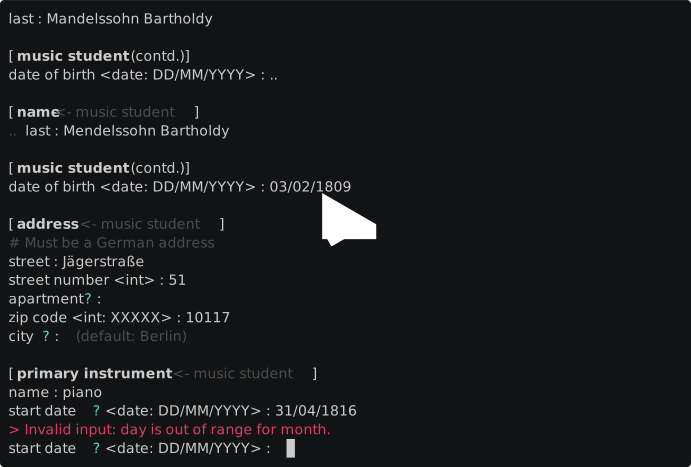
Final Result
New student 'Jakob Ludwig Felix Mendelssohn Bartholdy' added to students.json:
MusicStudent(id=14321,
             name=Name(first='Jakob',
                       middle=['Ludwig', 'Felix'],
                       last='Mendelssohn Bartholdy',
                       full='Jakob Ludwig Felix Mendelssohn Bartholdy'),
             date_of_birth=datetime.date(1809, 2, 3),
             address=Address(street='Jägerstraße',
                             street_number=51,
                             apartment=None,
                             zip_code=10117,
                             city='Berlin'),
             primary_instrument=Instrument(name='piano',
                                           start_date=datetime.date(1816, 4, 30),
                                           comment=None),
             secondary_instruments=[Instrument(name='violin',
                                               start_date=None,
                                               comment=None),
                                    Instrument(name='ukulele',
                                               start_date=None,
                                               comment='student proclaimed '
                                                       '"uke is life", find out '
                                                       'what that means')],
             comments='seems v. talented')
Roadmap
- Extensive testing (help welcome, see below!)
- Adapter for
attrs - Adapters for
pydanticandsqlalchemy(if feasible) - Translations
- User-customizable UX
Contributions
Testing
Help with testing is very welcome.
For anyone so inclined:
- create the craziest schema you can
- log the result
    logging.basicConfig(level="DEBUG")
    logger = logging.getLogger("dc_input")
- if things go boom or don't seem quite right: open an issue at https://github.com/jdvanwijk/dc-input/issues with the debug logs and a copy of the interactive session. Thanks!
Suggestions
Over here: https://github.com/jdvanwijk/dc-input/discussions
Pull Requests
This library is not open for PRs yet.
Donations
I do like coffee: https://buymeacoffee.com/janebelvanwijk
Release history Release notifications | RSS feed


Download files
Download the file for your platform. If you're not sure which to choose, learn more about installing packages.
Source Distribution
Built Distribution
Filter files by name, interpreter, ABI, and platform.
If you're not sure about the file name format, learn more about wheel file names.
Copy a direct link to the current filters
File details
Details for the file dc_input-0.2.3.tar.gz.
File metadata
- Download URL: dc_input-0.2.3.tar.gz
- Upload date:
- Size: 20.9 kB
- Tags: Source
- Uploaded using Trusted Publishing? No
- Uploaded via: twine/6.2.0 CPython/3.13.5
File hashes
| Algorithm | Hash digest | |
|---|---|---|
| SHA256 |
39db536864eb3a5e08379d0bde6642696a29c80ee70901e761a3fef057bda042
|
|
| MD5 |
b44475463878763708a42f94208e3223
|
|
| BLAKE2b-256 |
b70d47e09e8185854bdb2b998526a1fde6ccbf18e21100c12fb4b9c40c702be1
|
File details
Details for the file dc_input-0.2.3-py3-none-any.whl.
File metadata
- Download URL: dc_input-0.2.3-py3-none-any.whl
- Upload date:
- Size: 26.2 kB
- Tags: Python 3
- Uploaded using Trusted Publishing? No
- Uploaded via: twine/6.2.0 CPython/3.13.5
File hashes
| Algorithm | Hash digest | |
|---|---|---|
| SHA256 |
ce1ab012a9a9c5d876450a44e6cedac7ff3351fea3d18b9d6f54043e533a44e6
|
|
| MD5 |
5eba208b28660a3388f06a03d331e8ec
|
|
| BLAKE2b-256 |
56532baa352a869b4fcf76ad7c2221e3b03c3f0f006a9992e5253210f9ec965a
|






