
dicom2niix-webui
The web UI for dcm2niix (DICOM to NIfTI converter)
描述(Description)
安装(Install)
- 新建一个虚拟环境(Python 3.9.16),或使用已有的Python环境
- 例如
$ conda create -n env_name python=3.9
- 例如
- 使用 PIP 方式安装
$ pip install dcm2niix-webui
- 使用源码方式安装
- 下载本项目代码
- 点击本项目GitHub页面右上角的绿色的按钮
Code,再点击Download ZIP
- 点击本项目GitHub页面右上角的绿色的按钮
- 解压项目,进入到项目根目录
- 安装,执行
$ pip install -e ./ -i "https://pypi.doubanio.com/simple/"
- 安装,执行
- 下载本项目代码
- 注
- dcm2niix 库的当前版本为 1.0.20220715
- 卸载命令
$ pip uninstall dcm2niix-webui
启动服务(Start Service)
直接启动
- 由于安装时已经在当前 Python 环境中安装了 script
- 所以可以在任意位置直接执行
$ dcm2niix-gui,启动 WebUI
使用代码启动
- 进入到本项目的目录下,执行
$ cd src/dcm2niix_webui - 二选一
- 在本地电脑端启动,直接执行
$ python main.py - 在服务器端启动,执行
$ nohup python main.py 1>server_run.log 2>&1 &
- 在本地电脑端启动,直接执行
操作说明(Operating Instructions)
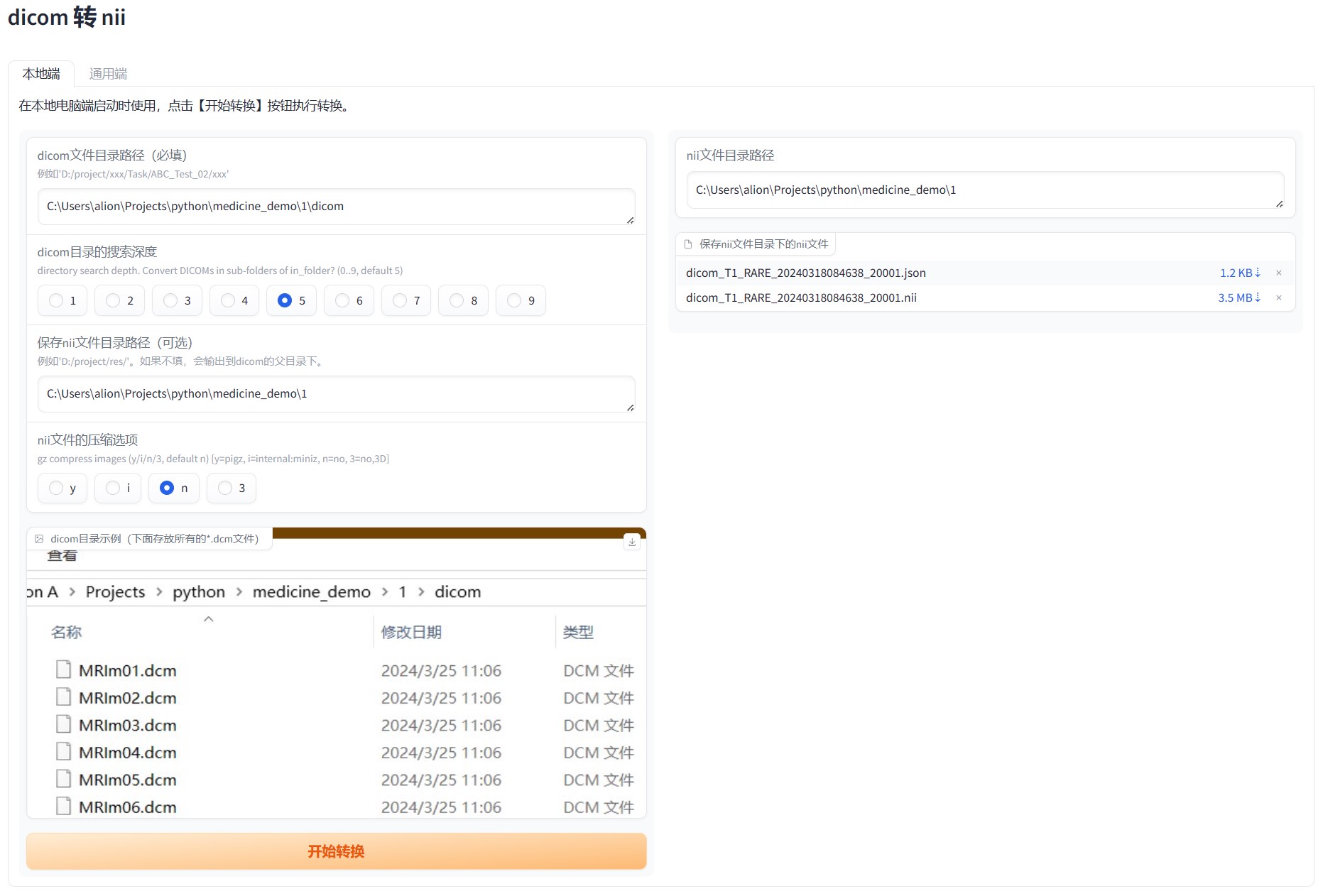
本地端(For Local)
- 在本地电脑端启动时使用(打开浏览器,访问 http://localhost:7860 )
- 说明:填入 dicom 文件目录路径、nii 文件保存路径,点击【开始转换】即可
通用端(For Universal)
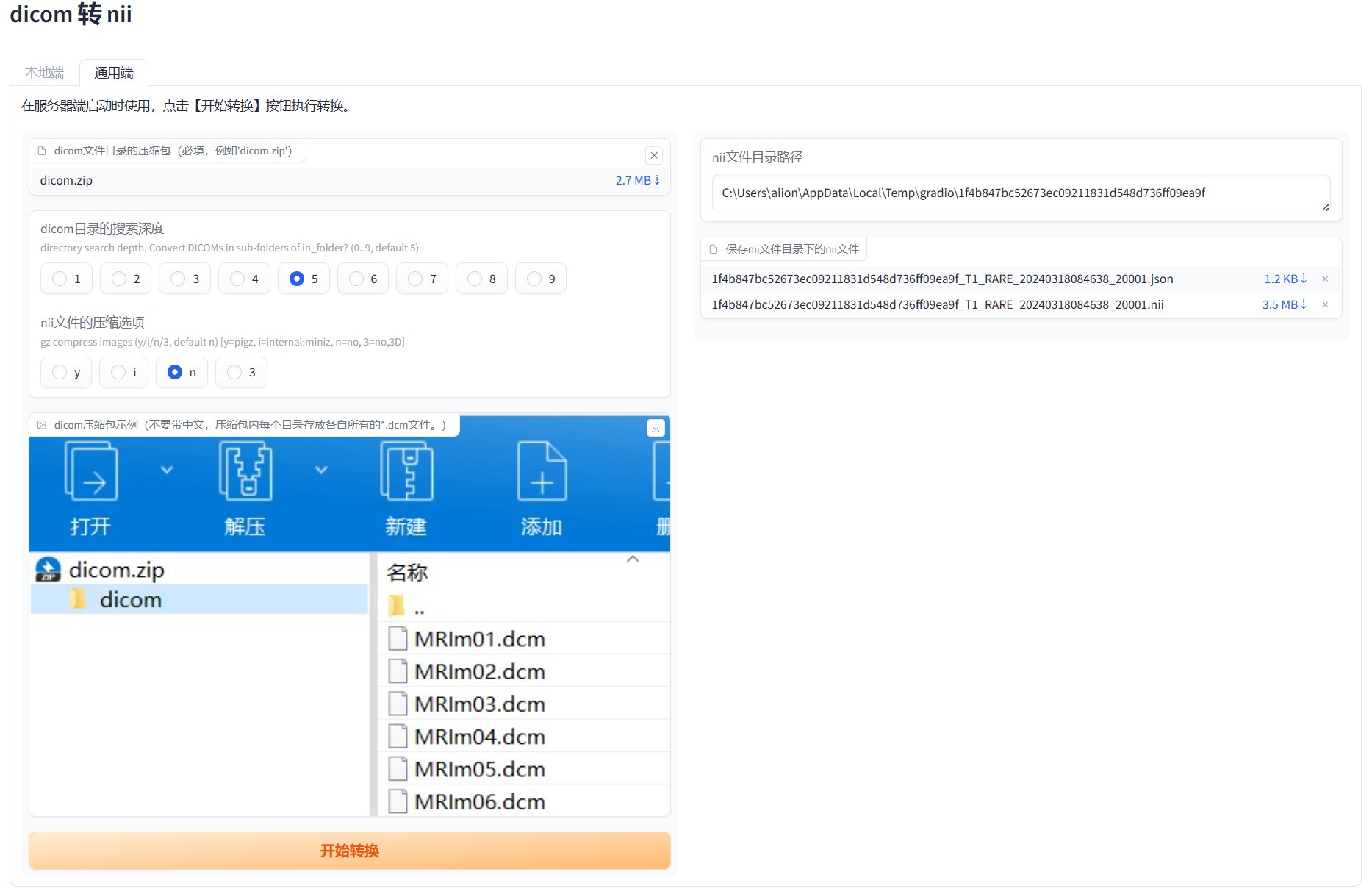
- 在本地电脑端、服务器端启动时皆可使用。
- 在服务端部署后,可供多人在线使用。(打开浏览器,访问 http://服务器IP:7860)
- 说明:上传 dicom 文件目录的压缩包(必填,例如 'dicom.zip'),点击【开始转换】即可
手动构建(Build)
- 更新、安装工具
$ pip install --upgrade setuptools$ pip install --upgrade build
- 进入到项目根目录下,执行
$ python -m build - 构建完成会在项目 dist 目录下,生成 tar.gz 和 whl 文件
- 直接使用 PIP 即可安装,如
pip install .\dist\dcm2niix_webui-0.1.0-py3-none-any.whl
1 maintainer

Metadata
1 maintainer
Release files for dcm2niix-webui 0.1.2
For a detailed explanation of source distributions (sdists) and built distributions (wheels), please see the package formats documentation.
Source distribution (sdist)
| File | Size | Uploaded | |
|---|---|---|---|
| dcm2niix_webui-0.1.2.tar.gz | 71.3 kB | Details |
Built distribution (wheel)
| File | Interpreter | ABI | Platform | Reset |
|---|---|---|---|---|
| dcm2niix_webui-0.1.2-py3-none-any.whl | Python 3 | none | any | Details |
Total release size: 140.9 kB
Release files / dcm2niix_webui-0.1.2.tar.gz
| Download URL | dcm2niix_webui-0.1.2.tar.gz |
|---|---|
| Size | 71.3 kB |
| Tags | Source |
|
SHA-256 checksum How to use checksums |
1f85872c50b9e9b520b5ce46b85f575ee1bc82a6d18e2782f995ba1c604978f0
|
|
BLAKE2b-256 checksum How to use checksums |
276b5bade3d1dc226c6f856e25eef83a7086dbd3dedb63ec132dd9dab934c5cb
|
| Upload date | |
|
Uploaded using Trusted Publishing? What is trusted publishing? |
No |
| Uploaded via |
twine/5.1.0 CPython/3.11.7
|
Release files / dcm2niix_webui-0.1.2-py3-none-any.whl
| Download URL | dcm2niix_webui-0.1.2-py3-none-any.whl |
|---|---|
| Size | 69.6 kB |
| Tags | Python 3 |
|
SHA-256 checksum How to use checksums |
1be933198a76d4917e0a67d824e2bd56be47a59506c3aa3ed067a2da1ddf70c1
|
|
BLAKE2b-256 checksum How to use checksums |
2aeeb97d1a35232e9161f40940fa6b08b38b96822dec716cbed5c6f952b88952
|
| Upload date | |
|
Uploaded using Trusted Publishing? What is trusted publishing? |
No |
| Uploaded via |
twine/5.1.0 CPython/3.11.7
|














