

dcmview
dcmview is a fast, temporary DICOM viewer for research and development work.
Point it at one or more DICOM files from the command line or Python, and it
starts a local browser viewer for images, tags, cine playback, and rectangular
ROI annotations. Stop the process and the server is gone.
The main problem it solves is remote-server inspection. Medical imaging research
often happens where the data already live: an SSH session, a shared compute
server, or a locked-down institutional network. Viewing those images usually
means choosing between slow notebook plots, setting up a web viewer on the
server, opening firewall ports, or uploading data and annotations into a
third-party cloud tool. dcmview keeps the workflow local to the machine with
the files: start the viewer, forward the loopback port over SSH when needed, and
inspect the study in seconds.
dcmview is intended for developer and research inspection on secure networks,
not clinical diagnosis. Avoid public-facing server binds; use the default
loopback binding and SSH forwarding for remote workflows.
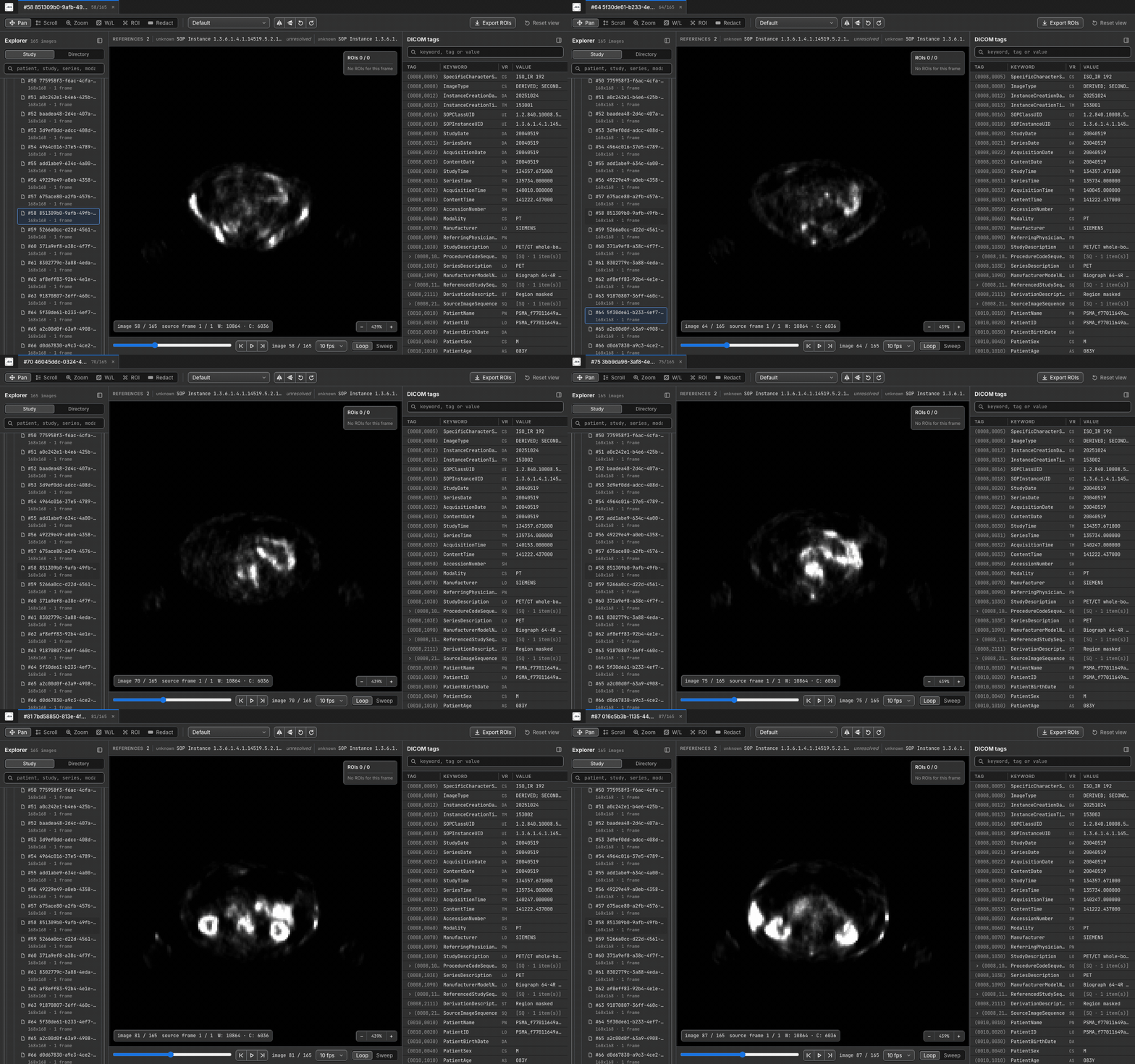
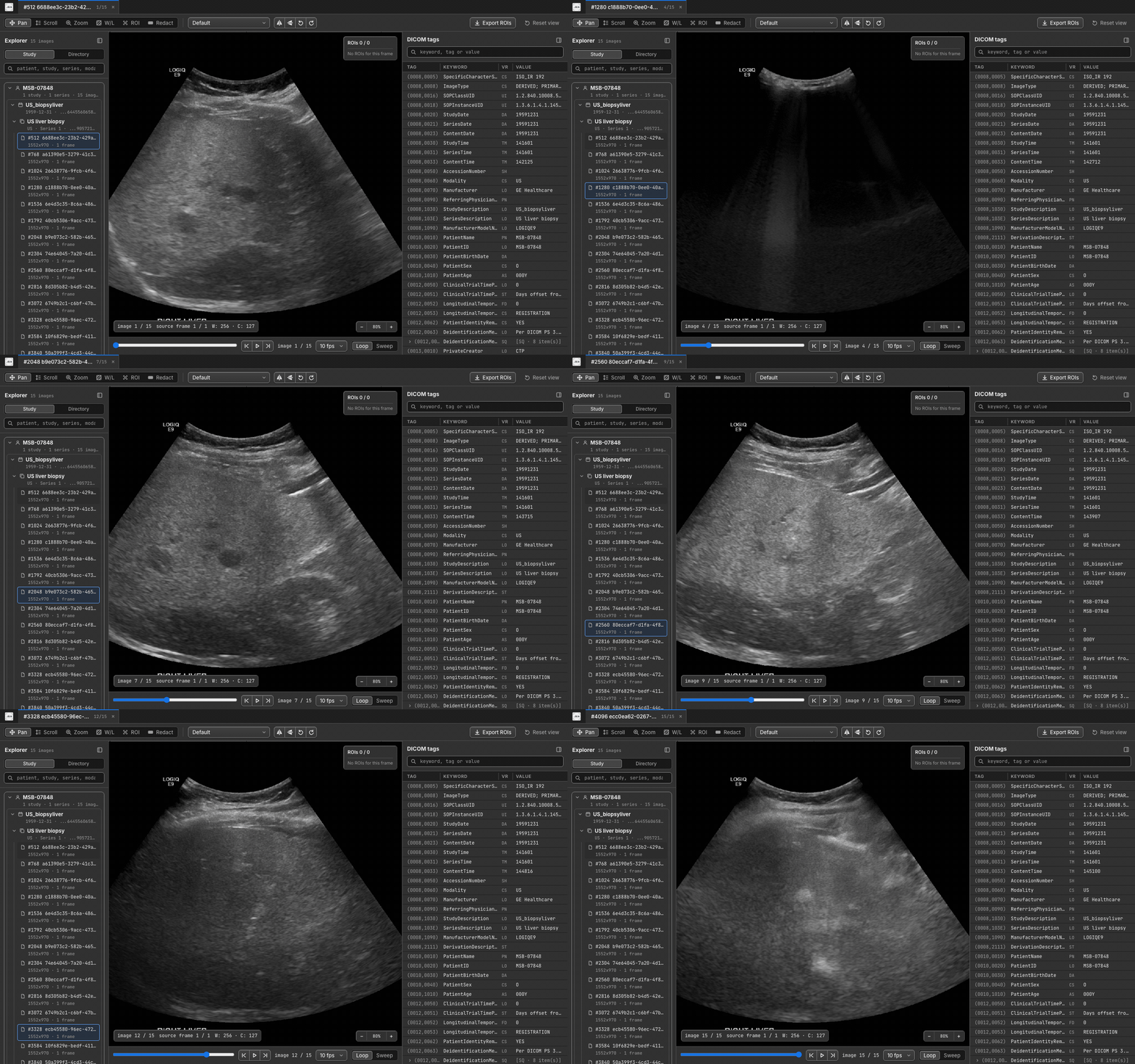
Viewer gallery
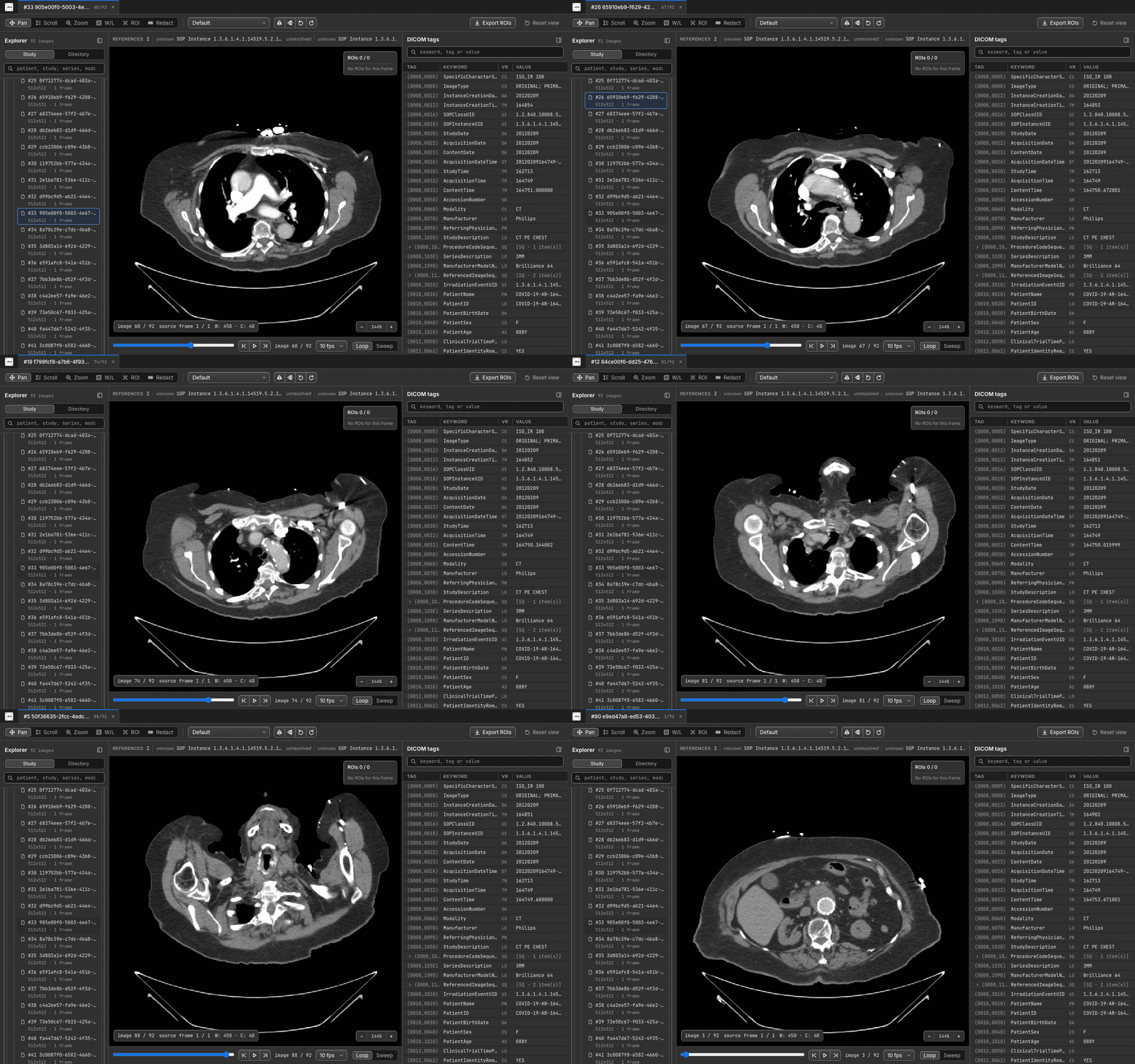
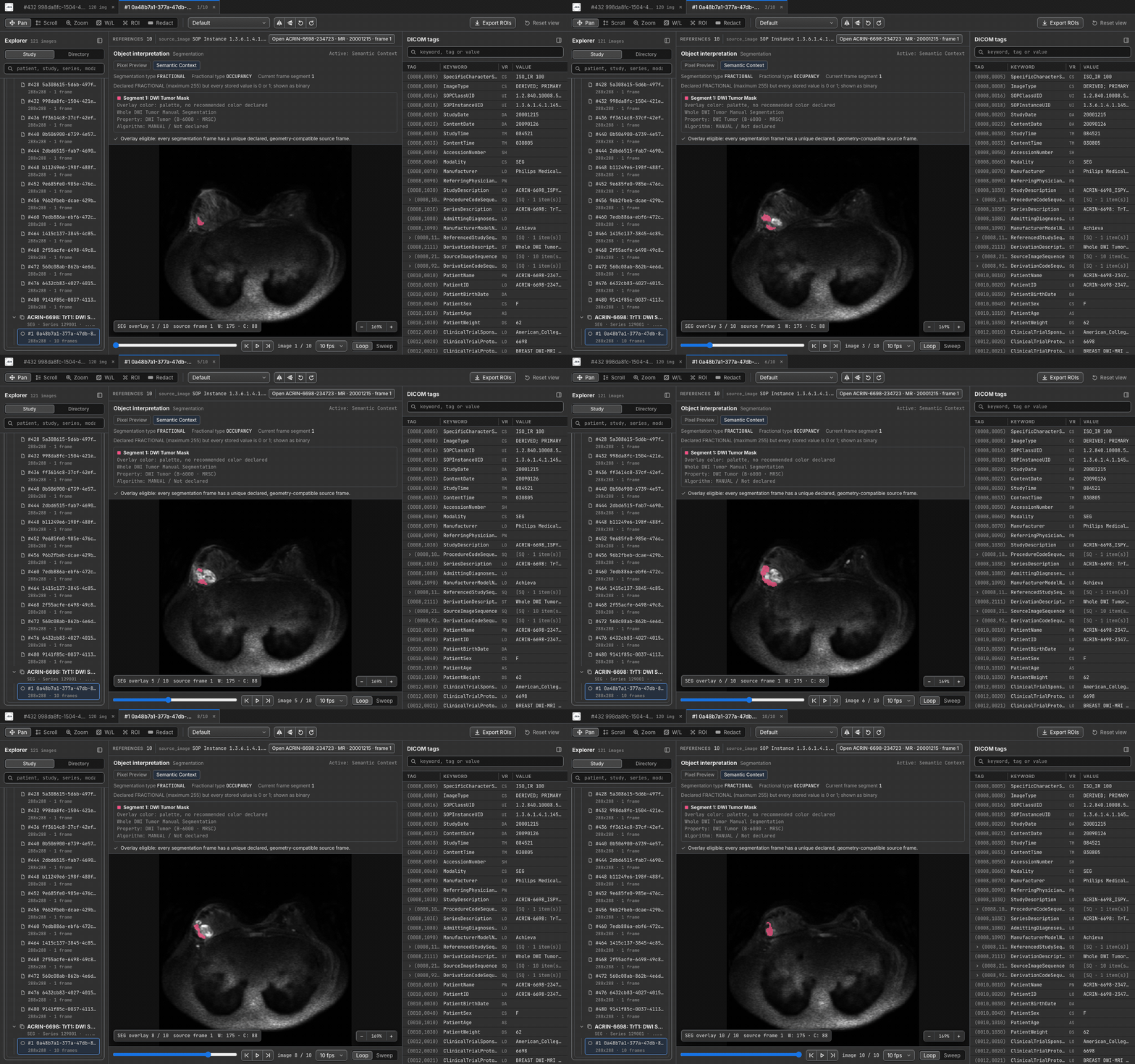
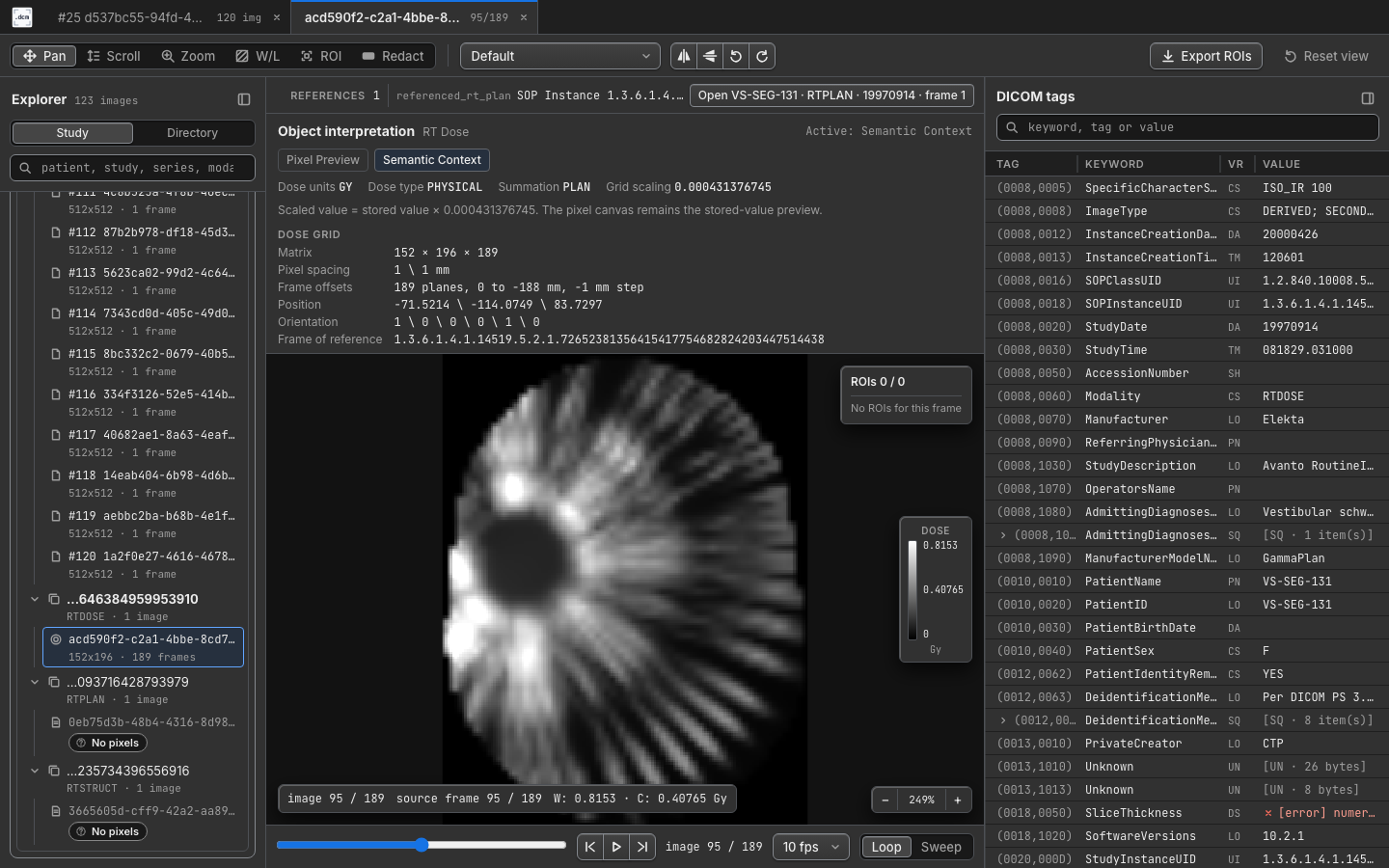
Cine playback and semantic context
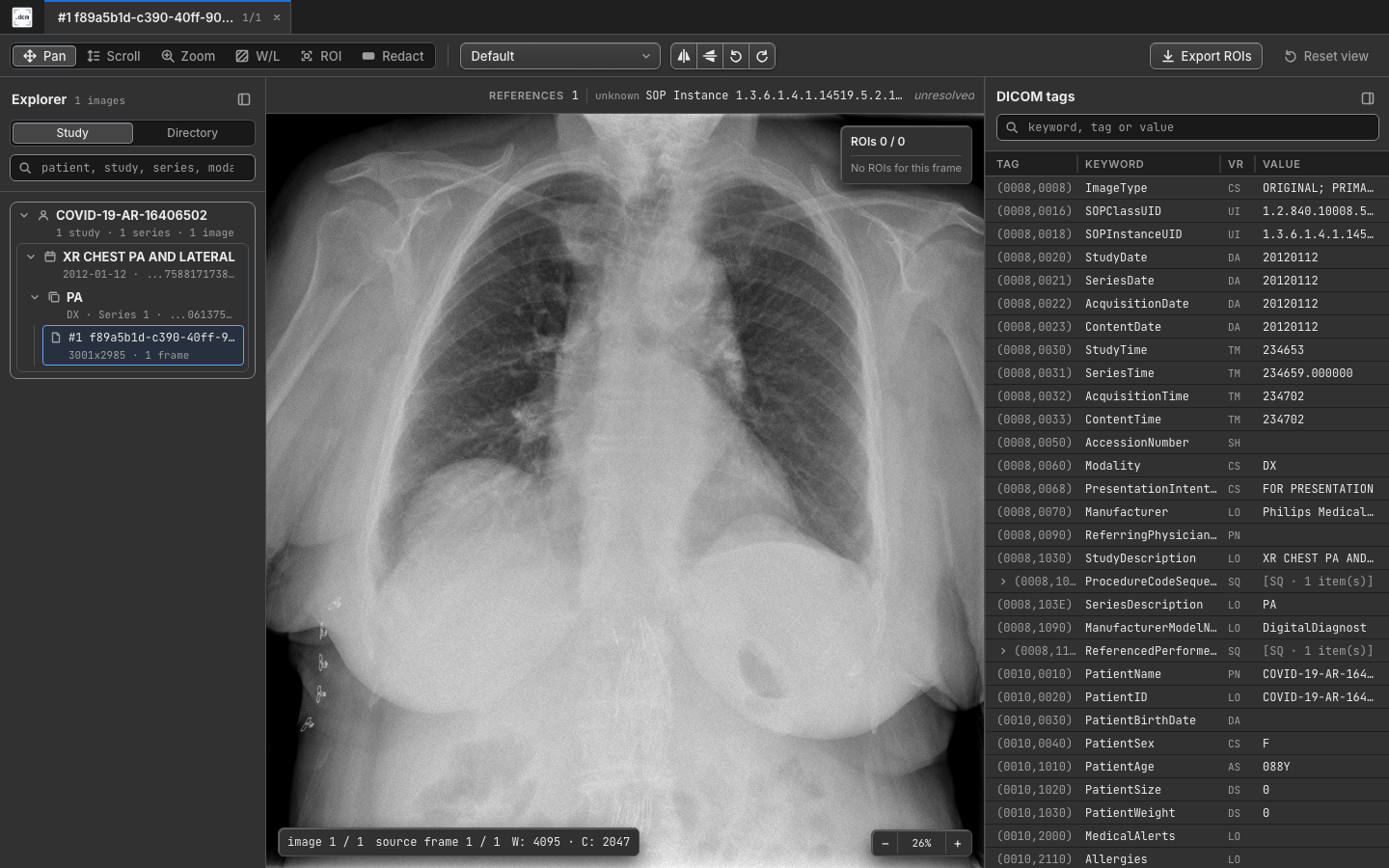
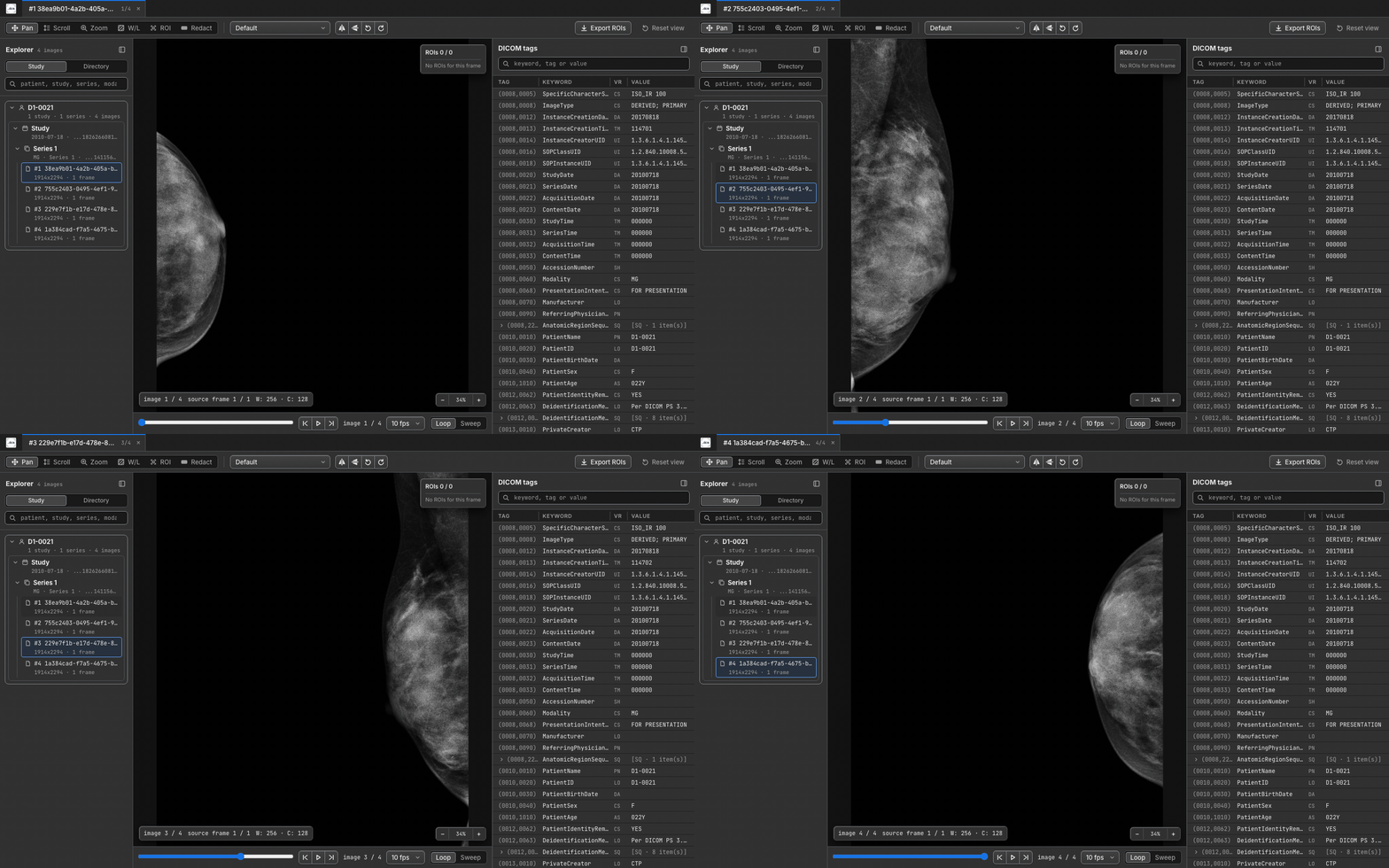
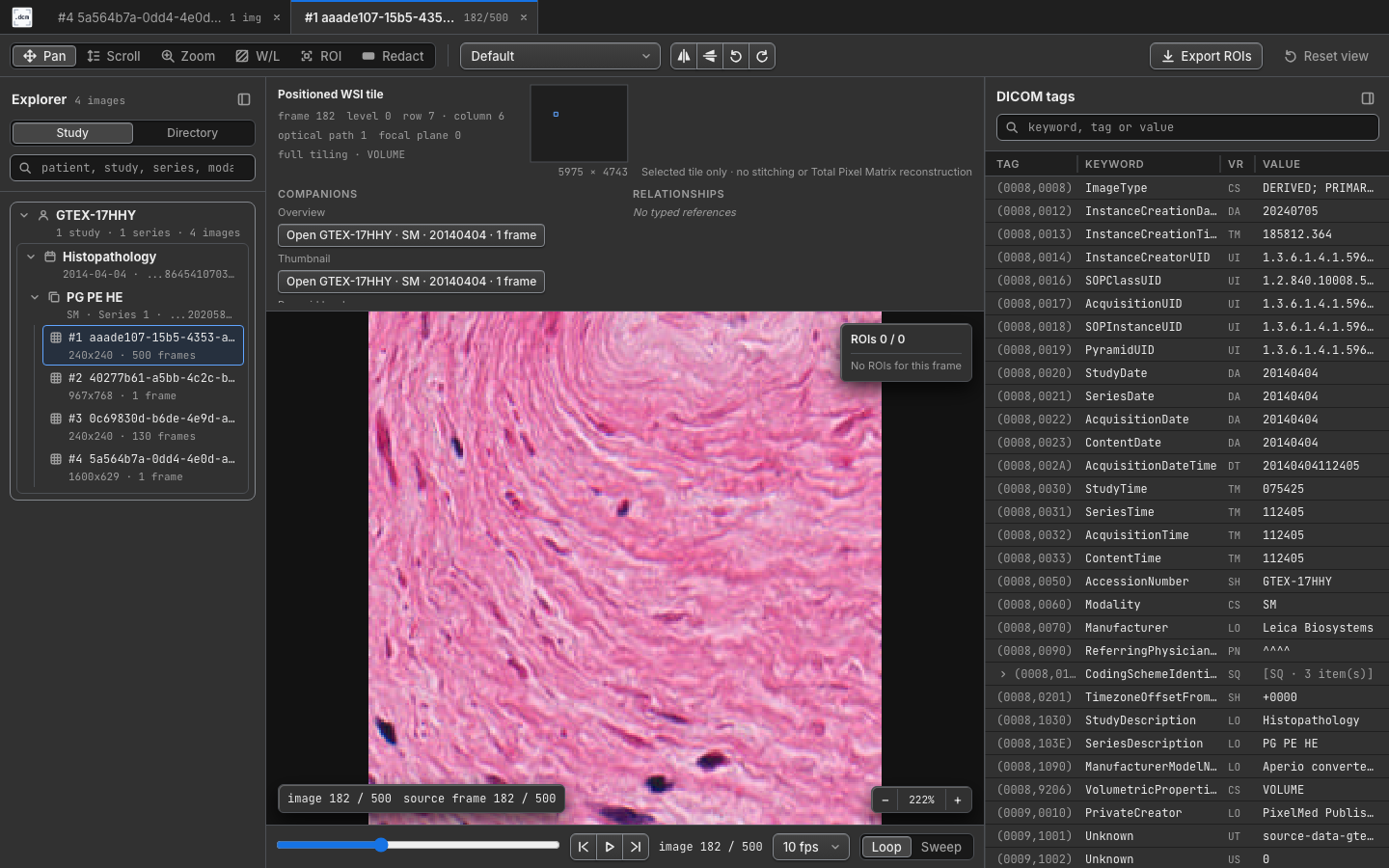
Modality coverage
Why use it?
- Inspect DICOM files where they already are, including remote servers.
- Avoid notebook-based frame rendering for multi-frame studies.
- Keep data off third-party viewers when all you need is quick review.
- Open a browser UI with familiar viewer tools: pan, zoom, scroll, window/level, flips, rotation, tags, and cine playback.
- Load, edit, and export rectangular ROI annotations without modifying source DICOM files.
- Use the same tool from a shell command, Python script, notebook, VS Code, or Cursor.
- Run as an ephemeral server with no database, config file, or persistent state.
Install
The current public install channels are the Python package, GitHub Releases, the VS Code Marketplace, and Open VSX for Cursor:
| Platform | Recommended channel | Notes |
|---|---|---|
| Linux x64 | dcmview-py or GitHub Releases |
PyPI wheels bundle the dcmview binary. |
| macOS x64 | dcmview-py or GitHub Releases |
PyPI wheels bundle the dcmview binary. |
| macOS arm64 | dcmview-py or GitHub Releases |
PyPI wheels bundle the dcmview binary. |
| Windows x64 | dcmview-py, GitHub Releases, or VS Code Marketplace |
PyPI wheels bundle dcmview.exe. |
| VS Code | VS Code Marketplace | The extension bundles platform-specific binaries for supported hosts. |
| Cursor | Open VSX | Cursor installs the same target-specific extension packages through its extension marketplace. |
| Other platforms | Source build | Build the Rust binary locally and point wrappers at it when needed. |
Install the Python package:
python -m pip install --user dcmview-py
dcmview --help
The package installs both dcmview and dcmview-py; dcmview is the primary
command. If you are using an unsupported platform or a local debug binary, set
DCMVIEW_BINARY to an absolute path to a compatible dcmview executable.
Tagged releases always include a generated Homebrew formula. Publishing that formula to a tap is conditional on the maintainers configuring a separate tap repository; this repository does not currently advertise a public tap command. Use PyPI, the VS Code or Cursor extension, GitHub Releases, or a source build unless a release announcement names a working tap.
Source builds are available for contributors and unsupported platforms:
cargo install --path .
Build prerequisites for source installs:
- Rust 1.88+
- Node.js 20.19+ and npm at build time
sshonPATHonly when using SSH forwarding helpers
If install or binary discovery fails, see the troubleshooting guide. For all CLI, Python, VS Code, and environment settings, see the configuration reference. For the full documentation map, see the documentation index.
Quick Start
Open one file:
dcmview ./scan.dcm
Scan a study directory recursively:
dcmview ./study_dir
Keep only matching files; fields take their snake_case name or DICOM keyword
(modality/Modality, patient_id/PatientID, ...):
dcmview --filter Modality=CT --filter patient_id=phantom ./study_dir
Run without opening a browser, useful on a remote server:
dcmview --no-browser ./study_dir
When ready, dcmview prints the launch URL. Its #token=... fragment is the
session's access token, so open the complete link:
dcmview: server running at http://127.0.0.1:<port>/#token=<session-token>
Press Ctrl+C to stop the server.
If startup reports skipped files, no valid DICOM files, a port conflict, or a browser launch failure, see the troubleshooting guide.
Remote Server Workflow
The safest default is to keep dcmview bound to loopback on the remote machine
and access it through SSH port forwarding. dcmview is intended for research
and development use on secure networks; do not expose the server directly to a
public network.
On the remote server:
dcmview --no-browser --port 8888 /path/to/dicom_or_study_dir
On your local machine:
ssh -L 8888:localhost:8888 user@remote-server
Then open the printed "then open" URL, including its #token=... fragment:
http://localhost:8888/#token=<session-token>
You can also let dcmview use an auto-assigned port by omitting --port; copy
the printed port into your SSH command.
The viewer also works behind a reverse proxy that serves it under a path
prefix, such as a Jupyter proxy route. The proxy must strip the prefix before
forwarding and serve the page with a trailing slash (.../8888/).
Every HTTP API request requires the session's bearer token by default. The
printed launch URL includes it; treat that link as a credential. Scripts can
read base_url and token from --startup-json and send
Authorization: Bearer <token> (see the API reference).
DCMVIEW_TOKEN fixes the value; --no-token explicitly disables the check
for use behind an authenticating proxy and prints a warning.
The server binds to 127.0.0.1 by default. If you bind to 0.0.0.0 or another
public interface, use your own network access controls: plain HTTP does not
encrypt tokens or DICOM data. Anyone with the token and access to the listener
can read image pixels, DICOM tags, file paths, patient identifiers, study
identifiers, and in-memory annotations.
Python Usage
dcmview-py is a small subprocess wrapper around the Rust binary. It is useful
when a script or notebook has already selected the cases to inspect. For the
full parameter reference, lifecycle details, VS Code bridge behavior, and
notebook-oriented examples, see the Python reference.
from dcmview_py import view

# Blocking call; returns when dcmview exits.
view(["./scan.dcm"], browser=False, timeout=300)

# Non-blocking call.
handle = view(["./study_dir"], browser=False, block=False)
print(handle.url)
handle.stop()
Context manager:
from dcmview_py import view

with view(["./study_dir"], browser=False, block=False) as handle:
    print(handle.url)
The module CLI mirrors the Rust options:
python -m dcmview_py --no-browser --timeout 120 ./study_dir
VS Code and Cursor
The editor extension opens DICOM files or folders in a webview backed by the
same local dcmview server in VS Code and Cursor. It can also intercept
dcmview, dcmview-py, and python -m dcmview_py launches from new integrated
terminals so terminal-based workflows appear inside the editor.
See the editor extension README for install channels, supported platforms, settings, terminal interception behavior, and local testing notes.
Viewer Features
The embedded browser viewer includes:
- File tabs labeled from
PatientID,Modality, andStudyDatewhen present. - Canvas-based image viewing with pan, zoom, scroll, window/level, reset, horizontal/vertical flips, and 90-degree rotation.
- Window presets including DICOM defaults, full dynamic range, and common CT presets.
- Multi-frame controls with previous/next, cine playback, FPS selection, loop, and sweep.
- Study and directory navigation with typed links between locally resolved referenced objects and frames.
- A pixel readout under the cursor: row, column, and frame, the stored sample (or color components), the Modality value (such as HU), and the real-world value with its unit (such as a Parametric Map's mapped value or an RT Dose in Gy), naming the mapping it used, plus the value of a dose or map overlay shown on the image.
- Window/level in real-world units, with a legend, for frames that carry a Real World Value Mapping (linear or LUT) or Dose Grid Scaling.
- RT Dose and Parametric Map colorwash overlays on the images they cover, with an opacity control and a color bar in Gy or the map's unit. Slices the volume does not reach say so instead of showing a layer.
- Graphic and text annotations of Grayscale and Color Softcopy Presentation States drawn on the images they reference: ellipses, circles, polylines, interpolated curves, points, and text in image pixel units. Choose a state from the Annotations bar and step through its annotation items; the current item is highlighted and the others dimmed. The state's window, shutter, displayed area, and rotation or flip are not applied, and objects in DISPLAY units are counted but not drawn.
- Default pixel preview plus opt-in declared semantic context for SEG, Parametric Map, and RT Dose. Validated SEG mappings can compose binary or fractional masks over referenced source images even when compatible patient geometry uses different matrix dimensions. Semantic panels identify missing, ambiguous, or incompatible geometry and do not claim clinical interpretation.
- Positioned single-tile WSI inspection with matrix, row/column, optical-path, focal-plane, and minimap context. Tiles are not stitched and the Total Pixel Matrix is not reconstructed.
- Lazy DICOM tag browsing with filtering, sequence expansion, binary length display, resizable columns, and click-to-copy values.
- Rectangular ROI annotation display and editing, including draw, select, move, resize, delete, frame scoping, and CSV export.
- Display masking (
--mask) for screen sharing: pseudonyms, shifted dates, hashed UIDs and masked identifiers in everything the viewer shows. - Redaction boxes drawn over burned-in pixel text, kept for the session and applied by the server to every frame it sends.
DICOMDIR inputs are recognized and skipped with a stable unsupported-media reason while recursive discovery continues for ordinary DICOM objects. The viewer does not parse the DICOM file-set hierarchy or advertise DICOM media support. Unsupported transfer syntaxes and out-of-scope object classes remain request- or object-scoped so a failure does not poison later viewing.
Common shortcuts:
| Action | Shortcut |
|---|---|
| Previous/next file in the active Explorer ordering | Up/Down arrows |
| Previous/next frame | Left/Right arrows or [ / ] |
| Previous/next annotation item of the shown presentation state | , / . |
| Play/pause cine | Space |
| Window/level tool | W |
| Pan tool | P |
| Zoom tool | Z |
| Scroll tool | S |
| ROI tool | R |
| Redact tool | X |
| Reset viewport | Double-click |
Middle-drag pans in every tool. The wheel zooms about the pointer, a two-finger trackpad scroll pans, and Ctrl/Cmd+wheel (a trackpad pinch) zooms. In the Scroll tool the wheel steps frames.
Annotations
--annotations loads an EMBED-style rectangular ROI CSV into memory:
dcmview --annotations ./embed_annotations.csv ./study_dir
dcmview never modifies the input CSV or DICOM files. Viewer edits stay in
memory and can be downloaded with Export ROIs. For the required columns,
coordinate format, frame scoping rules, validation behavior, and examples, see
the annotation reference.
Screen Sharing: Masking And Redaction
--mask starts a session that replaces patient identifiers in everything the
viewer displays, so files can be shown on a shared or recorded screen:
dcmview --mask ./study_dir
This is a display aid, not de-identification. Files are never modified,
nothing is persisted, and replacements differ on every run. A masked session
cannot be unmasked; start the viewer again without --mask for that.
In a masked session:
- Each patient is shown as
Patient 0001,Patient 0002, ... and files asFile 1,File 2, ... outside the directory tree. - Every date and date-time moves by one random offset per patient, within one year. Times of day are kept.
- Ages above 89 years show
089Y, and a birth date that implies an age over 89 is blank. - Person names, private elements and the attributes the DICOM PS3.15 Basic
Application Level Confidentiality Profile removes or replaces (institution,
addresses, accession number, operators, device serial numbers, ...) show
[masked]. Study Description, Series Description, and patient sex, size and weight are kept. - Study, series, instance and other instance-level UIDs are replaced by
hashed
2.25.UIDs, consistently, so references still resolve. - Presentation state text is not drawn, and slide label and overview images are not shown.
What masking does not cover:
- Pixels. Burned-in text stays visible. Files that declare Burned In Annotation show a "Burned-in text" badge; use redaction boxes for them.
- Free text inside values that are kept, such as descriptions.
- Folder and file names. The Directory view shows them as they are on
disk, under a "Not masked" note, and tabs follow that view while it is
showing. The Study view and everything else use
File N. - Anything outside the viewer page: the terminal, VS Code's own editor tab and Explorer, and the exported ROI CSV, which keeps real paths.
Redaction boxes cover burned-in text. Choose Redact (X), drag a
rectangle over the text, and the region turns black. A box covers every frame
of its file unless you limit it to the current frame, and Apply to series
copies a file's boxes to every file of the series with the same image size,
where a banner sits in the same place. Boxes are available with or without
--mask, stay in memory until the viewer exits, and are applied by the
server: a redacted region is never sent to the browser, in either the display
or the raw frame. Draw them before you share your screen, since you have to
see the text to cover it.
CLI Reference
dcmview [OPTIONS] <PATH> [PATH ...]
python -m dcmview_py [OPTIONS] <PATH> [PATH ...]
The Python module CLI forwards the same options to the underlying dcmview
binary. Run dcmview --help or python -m dcmview_py --help for command-line
help. For Python wrapper parameters, VS Code settings, environment variables,
filter fields, hidden integration flags, and binary resolution order, see the
configuration reference and
Python reference.
HTTP API
The browser UI uses a small local HTTP API. This API is internal to the viewer
and is not a stable public integration surface; use it only for dcmview
debugging, smoke tests, and local automation.
See the internal API reference for endpoint summaries, progressive scan fields, polling guidance, cache headers, transfer syntax behavior, raw-frame metadata headers, annotation endpoints, and error semantics.
Production builds do not enable cross-origin browser API access for external
debugging tools. To debug the viewer API from another browser origin, build with
cargo build --features debug-api; this enables permissive CORS and prints a
build warning. Do not enable debug-api outside dcmview debugging contexts.
Development
For local development, install frontend dependencies, run the Rust backend, and optionally start the standalone Vite frontend:
npm --prefix frontend ci
dcmview --no-browser --host 127.0.0.1 --port 8888 tests/fixtures
npm --prefix frontend run dev
The repository check driver mirrors CI profiles. For a fast development pass and the full local core suite:
python scripts/check.py quick --install
python scripts/check.py core --install
quick checks version parity, generated frontend contracts, frontend types and
behavior, the production frontend build, strict Rust formatting/lints, and
Python unit tests; it does not run the Rust test suite. core additionally
regenerates and verifies DICOM fixtures, runs the locked Rust suite, and
compiles the VS Code extension.
See the development reference for source builds, frontend
proxy behavior, fixture policy, test commands, architecture notes, and cache
budget guidance. On smaller machines, --cache-budget 256MiB reduces the
server's retained frame caches; it does not cap total process or browser
memory. See frame cache memory
for accepted sizes and limits.
Reporting Issues
Use GitHub issues for DICOM compatibility problems, install failures, and feature requests. Do not attach DICOM files, screenshots, logs, paths, patient identifiers, or other sensitive information unless you have fully de-identified them and have approval to share them publicly.
Before filing an issue, check the troubleshooting guide for common install, startup, decode, remote access, VS Code, and annotation CSV problems.
Report suspected security vulnerabilities privately to the maintainers before public disclosure; see SECURITY.md.
dcmview is not for clinical use, clinical diagnosis, or clinical
decision-making.
License
MIT
1 maintainer

Metadata
1 maintainer
Release files for dcmview-py 0.4.1
For a detailed explanation of source distributions (sdists) and built distributions (wheels), please see the package formats documentation.
Built distributions (wheels)
| File | Reset | |||
|---|---|---|---|---|
| dcmview_py-0.4.1-py3-none-win_amd64.whl | Python 3 | none | Windows x86-64 | Details |
| dcmview_py-0.4.1-py3-none-manylinux_2_28_x86_64.whl | Python 3 | none | Linux glibc 2.28+ x86-64 | Details |
| dcmview_py-0.4.1-py3-none-macosx_11_0_arm64.whl | Python 3 | none | macOS 11.0+ ARM64 | Details |
| dcmview_py-0.4.1-py3-none-macosx_10_13_x86_64.whl | Python 3 | none | macOS 10.13+ x86-64 | Details |
Total release size: 20.0 MB
Release files / dcmview_py-0.4.1-py3-none-win_amd64.whl
| Download URL | dcmview_py-0.4.1-py3-none-win_amd64.whl |
|---|---|
| Size | 5.2 MB |
| Tags | Python 3 Windows x86-64 |
|
SHA-256 checksum How to use checksums |
557cbd13270873627556ce06e062c856a5d6130af3b96b822f2655e4d8e8696d
|
|
BLAKE2b-256 checksum How to use checksums |
633bf46d0f07e151e3d11b0084326d2a6bbaf4a47e7bd46c3eaf59d12e12b2db
|
| Upload date | |
|
Uploaded using Trusted Publishing? What is trusted publishing? |
Yes |
| Uploaded via |
twine/7.0.0 CPython/3.13.14
|
Provenance
Provenance describes where a file came from. On PyPI, provenance is shared via attestations, which provide a verifiable record of the build or publishing details. View details, limitations and caveats.


PyPI Publish Attestation
PyPI verified that this artifact, at this checksum, originated from the publisher listed below.
Signed by GitHub Actions, verified by PyPI on Oct 9, 2026.
Transparency logRelease files / dcmview_py-0.4.1-py3-none-manylinux_2_28_x86_64.whl
| Download URL | dcmview_py-0.4.1-py3-none-manylinux_2_28_x86_64.whl |
|---|---|
| Size | 5.1 MB |
| Tags | Linux glibc 2.28+ x86-64 Python 3 |
|
SHA-256 checksum How to use checksums |
13a164441deb94f15487b0e6cfd44ba32660b6c48743b62309336ee7bf10e7a4
|
|
BLAKE2b-256 checksum How to use checksums |
347564fdfdf85f0401f2948b7a0c5853ff2a77695bb790927765ce65b67f43c9
|
| Upload date | |
|
Uploaded using Trusted Publishing? What is trusted publishing? |
Yes |
| Uploaded via |
twine/7.0.0 CPython/3.13.14
|
Provenance
Provenance describes where a file came from. On PyPI, provenance is shared via attestations, which provide a verifiable record of the build or publishing details. View details, limitations and caveats.
PyPI Publish Attestation
PyPI verified that this artifact, at this checksum, originated from the publisher listed below.
Signed by GitHub Actions, verified by PyPI on Oct 9, 2026.
Transparency logRelease files / dcmview_py-0.4.1-py3-none-macosx_11_0_arm64.whl
| Download URL | dcmview_py-0.4.1-py3-none-macosx_11_0_arm64.whl |
|---|---|
| Size | 4.6 MB |
| Tags | Python 3 macOS 11.0+ ARM64 |
|
SHA-256 checksum How to use checksums |
ba8d14a31f602f01cdc6e763f9d1b5dfe9540c433c92eb6c8eedc53309e8dbb5
|
|
BLAKE2b-256 checksum How to use checksums |
68ed285df358bb8eb7fba930056292b8fa37f413e6fd364037536a9b765474d9
|
| Upload date | |
|
Uploaded using Trusted Publishing? What is trusted publishing? |
Yes |
| Uploaded via |
twine/7.0.0 CPython/3.13.14
|
Provenance
Provenance describes where a file came from. On PyPI, provenance is shared via attestations, which provide a verifiable record of the build or publishing details. View details, limitations and caveats.
PyPI Publish Attestation
PyPI verified that this artifact, at this checksum, originated from the publisher listed below.
Signed by GitHub Actions, verified by PyPI on Oct 9, 2026.
Transparency logRelease files / dcmview_py-0.4.1-py3-none-macosx_10_13_x86_64.whl
| Download URL | dcmview_py-0.4.1-py3-none-macosx_10_13_x86_64.whl |
|---|---|
| Size | 5.0 MB |
| Tags | Python 3 macOS 10.13+ x86-64 |
|
SHA-256 checksum How to use checksums |
e1302234f1aeeac7ed6ce511dba2930ae7dac6835fbd523f0df42cfca63862cb
|
|
BLAKE2b-256 checksum How to use checksums |
f28a82b4e22bb3ae98ef634d34428cd850bb38cfc7390b2ef83d90a716aea0fb
|
| Upload date | |
|
Uploaded using Trusted Publishing? What is trusted publishing? |
Yes |
| Uploaded via |
twine/7.0.0 CPython/3.13.14
|
Provenance
Provenance describes where a file came from. On PyPI, provenance is shared via attestations, which provide a verifiable record of the build or publishing details. View details, limitations and caveats.
PyPI Publish Attestation
PyPI verified that this artifact, at this checksum, originated from the publisher listed below.
Signed by GitHub Actions, verified by PyPI on Oct 9, 2026.
Transparency logSecurity for dcmview-py 0.4.1
Provenance
Provenance describes where a file came from. On PyPI, provenance is shared via attestations, which provide a verifiable record of the build or publishing details. View details, limitations and caveats.
Full provenance
All 4 files in this release have been uploaded with provenance metadata.
Attestation for dcmview_py-0.4.1-py3-none-win_amd64.whl
PyPI Publish Attestation
PyPI verified that this artifact, at this checksum, originated from the publisher listed below.
Signed by GitHub Actions, verified by PyPI on Oct 9, 2026.
Transparency logA note on package security
PyPI is a repository for distributing packages, not a service for auditing them. While third-party security researchers and our staff do their best to detect and remove malicious packages, PyPI cannot guarantee the quality, security or suitability of any given package.














