
dcps
Control of DC Power Supplies through python
This is intended to be a generic package to control various DC power supplies using various access methods with a common API. It utilizes pyVISA and the SCPI command set. For now, this supports only the following DC power supplies:
- Rigol DP800 series (tested with DP832A)
- Aim TTi PL-P series (tested with PL303QMD-P)
- Aim TTi CPX series (tested by a contributor with CPX400DP)
- BK Precision 9115 series (tested with 9115)
- Agilent/Keysight E364xA series (tested with E3642A)
These DC power supplies are each part of a series of products. All products within the series that use a common programming language should be supported but only the indicated models were used for development and testing.
As new power supplies are added, they should each have their own sub-package.
Other contributors have added support for the following DC power supplies:
- ITECH 6500C/D series 2 quadrant DC Power Supply/load
- KORAD KA series (tested with Velleman PS3005D)
In addition to the above traditional power supplies, a few other instruments have been added that have a similar control paradigm such as current sources, volt meters and, perhaps in the future, source meters that can both source and measure voltages and currents. These all can either source a voltage or current and/or measure a voltage or current. They stub off unused functions so that common scripts can still be created with a common interface and they retain the ability to target any of these instruments. These alternative instruments that are supported are:
- Keithley/Tektronix 622x series Precision Current Source (tested with 6220)
- Keithley/Tektronix 2182/2182A Nanovoltmeter (tested with 2182A)
- Keithley/Tektronix 2400 series SourceMeter (tested with 2400)
- Keithley/Tektronix DMM6500 Multimeter
- Keithley/Tektronix DAQ6510 Data Acquisition and Multimeter System
Installation
You need to install the pyvisa and pyvisa-py packages.
To install the dcps package, run the command:
python setup.py install
Alternatively, can add a path to this package to the environment variable PYTHONPATH or even add the path to it at the start of your python script. Use your favorite web search engine to find out more details.
Even better, dcps is now on PyPi, so you can simply use the following and the required depedancies should get installed for you:
pip install dcps
Requirements
- python [Works with 2.7+ and 3+]
- Python 2 is now officially "end of life" so upgrade your code to Python 3
- pyvisa 1.9
- avoid 1.11.0 because it fails to work on Fedora/CentOS/etc.
- pyvisa-py 0.4.1
With the use of pyvisa-py, should not have to install the National Instruments NIVA VISA driver.
If using the USB communications method, must also install:
Ethernet to GPIB Interface
Several of these devices, such as the Agilent and Keithley models, have no Ethernet or USB interface. To make them easier to access in a lab environment, An Ethernet to GPIB or USB to GPIB interface can be used. The only such interfaces that have been tested so far are:
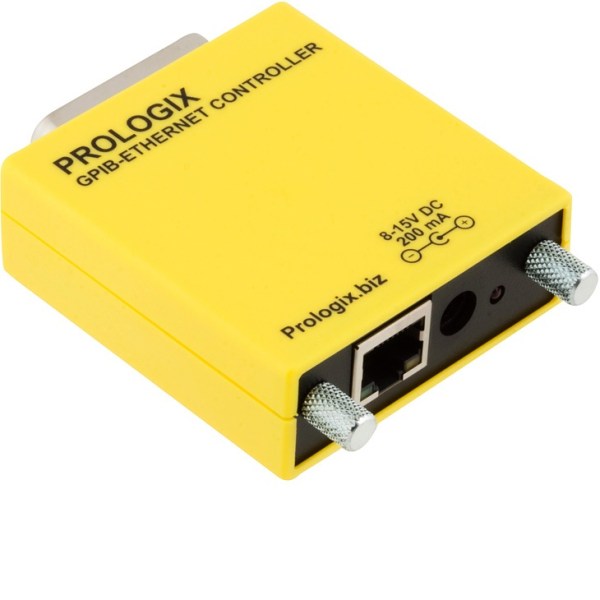
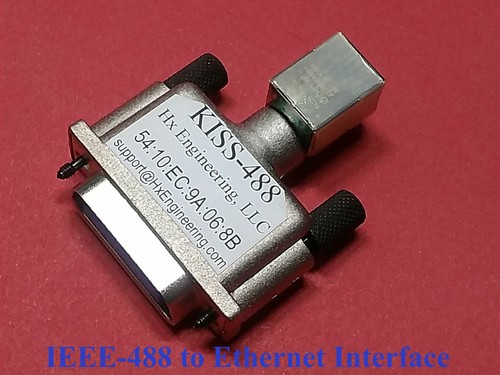
For the Agilent/Keysight E364xA, both the Prologix and KISS-488 have
been tested and work. For the Keithley 622x, 2182 and 2400, only the
Prologix interface works. If a TCPIP0 resource string is used for
these models, the code automatically determines which device is
used. See the code comments for these models to learn more.
WARNING!
Be really careful since you are controlling a power supply that may be connected to something that does not like to go to 33V when you meant to output 3.3V but a bug in your script commanded 33V. That device connected to the power supply may express its displeasure of getting 33V by exploding all over the place. So be sure to do ALL testing without a device connected, as much as possible, and make use of the protections built into the power supply. For example, you can often set voltage and current limits that the power supply will obey and ignore requests by these commands to go outside these allowable ranges. There are even SCPI commands to set these limits, although it may be safer that they be set manually.
Usage
The code is a very basic class for controlling and accessing the supported power supplies. Before running any example, be extra sure that the power supply is disconnected from any device in case voltsges unexpectedly go to unexpected values.
If running the examples embedded in the individual package source files, be sure to edit the resource string or VISA descriptor of your particular device. For many of the packages, an environment variable can be set and used as the VISA resource string.
- for RigolDP800.py, it is
DP800_IP - for AimTTiPLP.py, it is
TTIPLP_IP - for BK 9115, it is
BK9115_USB - for Keysight E364xA, it is
E364XA_VISA - for Keithley 622x, it is
K622X_VISA - for Keithley 2182, it is
K2182_VISA - for Keithley 24xx, it is
K2400_VISA - for Keithley DMM6500, it is
DMM6500_VISA - for Keithley DAQ6510, it is
DAQ6510_VISA
# Lookup environment variable DP800_IP and use it as the resource
# name or use the TCPIP0 string if the environment variable does
# not exist
from dcps import RigolDP800
from os import environ
resource = environ.get('DP800_IP', 'TCPIP0::172.16.2.13::INSTR')

# create your visa instrument
rigol = RigolDP800(resource)
rigol.open()

# set to channel 1
rigol.channel = 1

# Query the voltage/current limits of the power supply
print('Ch. {} Settings: {:6.4f} V  {:6.4f} A'.
         format(rigol.channel, rigol.queryVoltage(),
                    rigol.queryCurrent()))

# Enable output of channel
rigol.outputOn()

# Measure actual voltage and current
print('{:6.4f} V'.format(rigol.measureVoltage()))
print('{:6.4f} A'.format(rigol.measureCurrent()))

# change voltage output to 2.7V
rigol.setVoltage(2.7)

# turn off the channel
rigol.outputOff()

# return to LOCAL mode
rigol.setLocal()

rigol.close()
Taking it Further
This implements a small subset of available commands.
For information on what is possible with specific commands for the various supported power supplies and related equipment, see:
- Rigol DP8xx: Rigol DP800 Programming Guide
- Aim TTi PL-P: New PL & PL-P Series Instruction Manual
- Aim TTi CPX: CPX400DP PowerFlex Dual DC Power Supply Instruction Manual
- BK Precision 9115: 9115 Multi-Range DC Power Supply PROGRAMMING MANUAL
- ITECH IT6500C Series: IT6500C Series User Manual and IT6500C/D Series Programming Guide
- Agilent/Keysight E364xA: Keysight E364xA Single Output DC Power Supplies
- Keithley/Tektronix 622x: Model 6220 DC Current Source Model 6221 AC and DC Current Source User's Manual
- Keithley/Tektronix 2182/2182A Nanovoltmeter: Models 2182 and 2182A Nanovoltmeter User's Manual
- Keithley/Tektronix 2400 series SourceMeter: Series 2400 SourceMeter User's Manual
- Keithley/Tektronix DMM6500 Multimeter: DMM6500 Multimeter User's Manual
- Keithley/Tektronix DAQ6510 Data Acquisition and Multimeter System: DAQ6510 Reference Manual
For what is possible with general power supplies that adhere to the IEEE 488 SCPI specification, like the Rigol DP8xx, see the SCPI 1999 Specification and the SCPI Wikipedia entry.
Contact
Please send bug reports or feedback to Stephen Goadhouse
1 maintainer

Metadata
1 maintainer
Release files for dcps 0.9.1
For a detailed explanation of source distributions (sdists) and built distributions (wheels), please see the package formats documentation.
Source distribution (sdist)
| File | Size | Uploaded | |
|---|---|---|---|
| dcps-0.9.1.tar.gz | 69.8 kB | Details |
Built distribution (wheel)
| File | Interpreter | ABI | Platform | Reset |
|---|---|---|---|---|
| dcps-0.9.1-py3-none-any.whl | Python 3 | none | any | Details |
Total release size: 162.7 kB
Release files / dcps-0.9.1.tar.gz
| Download URL | dcps-0.9.1.tar.gz |
|---|---|
| Size | 69.8 kB |
| Tags | Source |
|
SHA-256 checksum How to use checksums |
596dd1365bb8e66aa2dcf6b61e7856391fa12b7531fef699131d49c986065e2d
|
|
BLAKE2b-256 checksum How to use checksums |
bee79f73c704c08771659e2ebf7105c3ec134109b8718cbb881d73174cc47b8a
|
| Upload date | |
|
Uploaded using Trusted Publishing? What is trusted publishing? |
No |
| Uploaded via |
twine/4.0.0 CPython/3.9.7
|
Release files / dcps-0.9.1-py3-none-any.whl
| Download URL | dcps-0.9.1-py3-none-any.whl |
|---|---|
| Size | 92.9 kB |
| Tags | Python 3 |
|
SHA-256 checksum How to use checksums |
fcb5d7159165c75594815e6d1795bf7813e3da34d89e347f8d77ea0ba7a261c7
|
|
BLAKE2b-256 checksum How to use checksums |
db6beff53e720ba9e54ded97fde4acd7cefd38c133f6622ed25e8b73d5606f59
|
| Upload date | |
|
Uploaded using Trusted Publishing? What is trusted publishing? |
No |
| Uploaded via |
twine/4.0.0 CPython/3.9.7
|














