
Open Source Data Quality Monitoring

Project description

Open Source Data Quality Monitoring.






| Documentations | Slack Community |
Why Data Monitoring?
APM (Application Performance Monitoring) tools are used to monitor the performance of applications. APM tools are mandatory part of dev stack. Without AMP tools, it is very difficult to monitor the performance of applications.
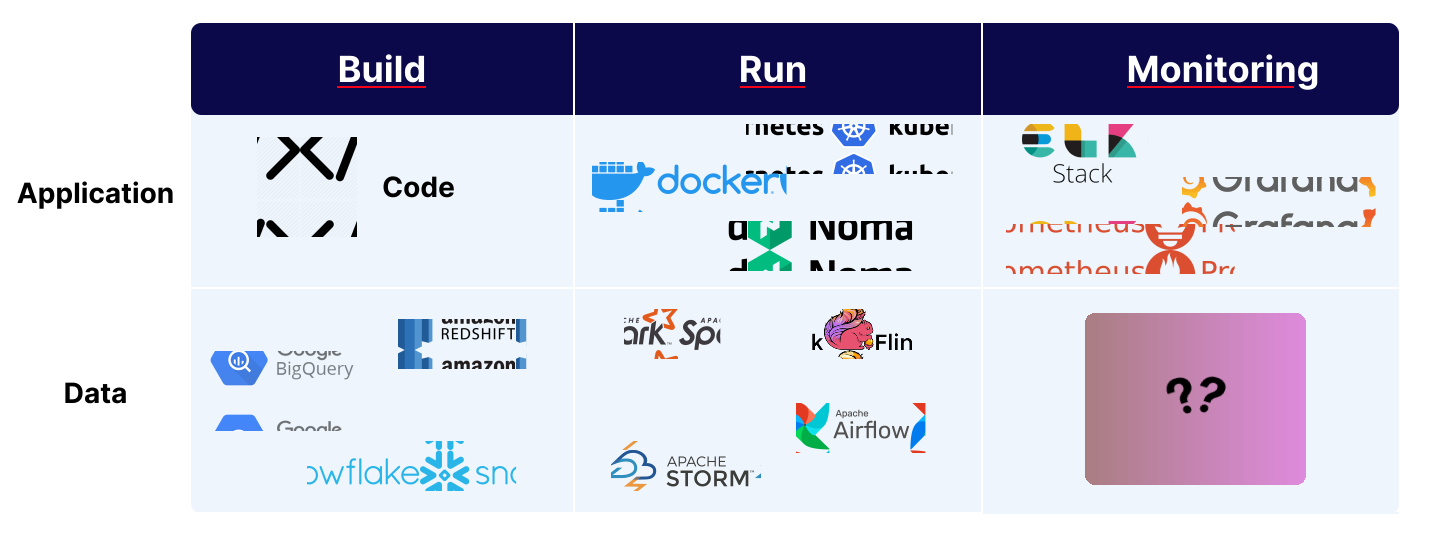
But for Data products regular APM tools are not enough. We need a new kind of tools that can monitor the performance of Data applications. Data monitoring tools are used to monitor the data quality of databases and data pipelines. It identifies potential issues, including in the databases and data pipelines. It helps to identify the root cause of the data quality issues and helps to improve the data quality.
What is datachecks?
Datachecks is an open-source data monitoring tool that helps to monitor the data quality of databases and data pipelines. It identifies potential issues, including in the databases and data pipelines. It helps to identify the root cause of the data quality issues and helps to improve the data quality.
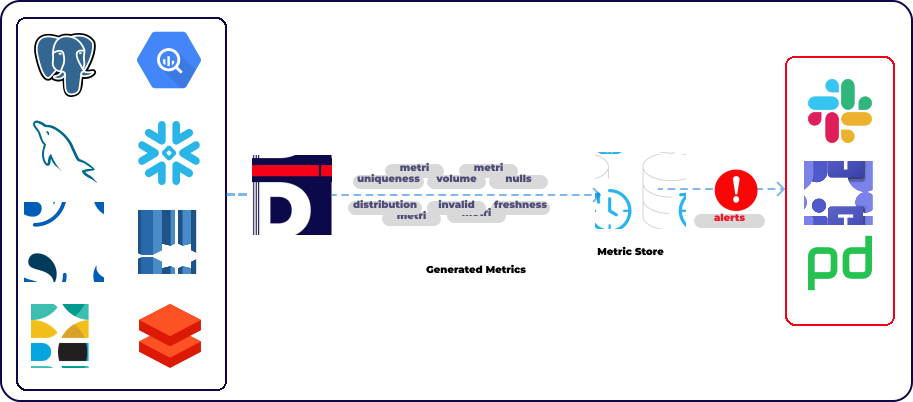
Datachecks can generate several reliability, uniqueness, completeness metrics from several data sources
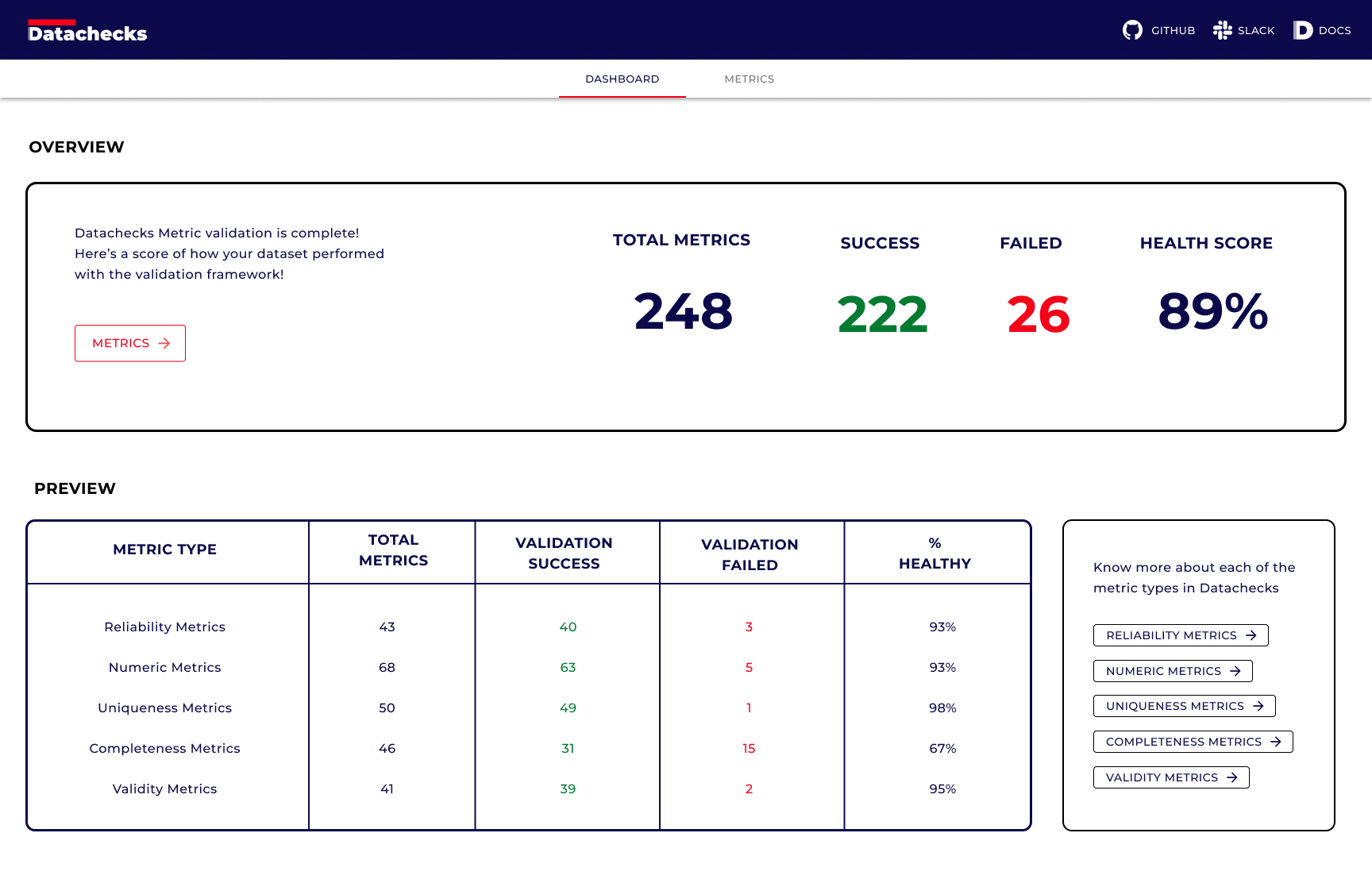
Reports: Data Quality Visualisation
You can generate with just one command. It generates a beautiful data quality report with all the metrics. This html report can be shared with the team.
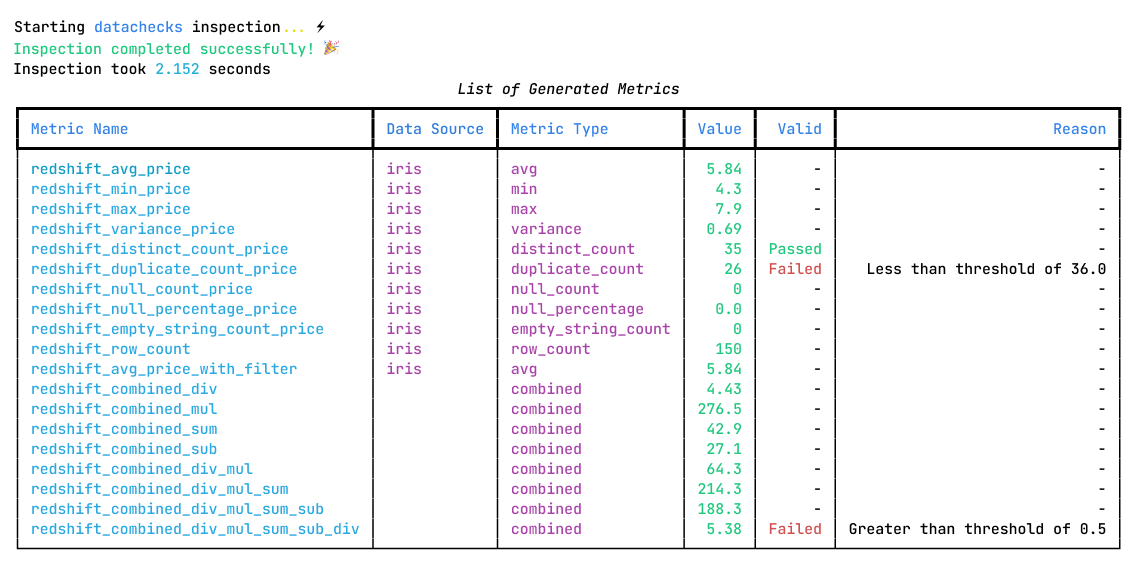
CLI: Data Quality Visualisation in Bash
Data quality report can be generated in the terminal. It is very useful for debugging. All it takes is one command.
Getting Started
Install datachecks with the command that is specific to the database.
Install Datachecks
To install all datachecks dependencies, use the below command.
pip install dcs-core -U
Create the config file
With a simple config file, you can generate data quality reports for your data sources. Below is the sample config example. For more details, please visit the config guide
Run from CLI
Generate Report in Terminal
dcs-core inspect -C config.yaml
Generate HTML Report
dcs-core inspect -C config.yaml --html-report
Please visit the Quick Start Guide
Supported Data Sources
Datachecks supports sql and search data sources. Below are the list of supported data sources.
| Data Source | Type | Supported |
|---|---|---|
| Postgres | Transactional Database | :thumbsup: |
| MySql | Transactional Database | :thumbsup: |
| MS SQL Server | Transactional Database | :thumbsup: |
| Oracle | Transactional Database | :thumbsup: |
| DB2 | Transactional Database | :thumbsup: |
| SAP Sybase | Transactional Database | :thumbsup: |
| OpenSearch | Search Engine | :thumbsup: |
| Elasticsearch | Search Engine | :thumbsup: |
| GCP BigQuery | Data Warehouse | :thumbsup: |
| DataBricks | Data Warehouse | :thumbsup: |
| Snowflake | Data Warehouse | :thumbsup: |
| AWS RedShift | Data Warehouse | :thumbsup: |
Metric Types
| Validation Funtions | Description |
|---|---|
| Reliability | Reliability functions detect whether tables/indices/collections are updating with timely data |
| Numeric Distribution | Numeric Distribution functions detect changes in the numeric distributions i.e. of values, variance, skew and more |
| Uniqueness | Uniqueness functions detect when data constraints are breached like duplicates, number of distinct values etc |
| Completeness | Completeness functions detect when there are missing values in datasets i.e. Null, empty value |
| Validity | Validity functions detect whether data is formatted correctly and represents a valid value |
Overview
What Datacheck does not do?

Community & Support
For additional information and help, you can use one of these channels:
- Slack (Live chat with the team, support, discussions, etc.)
- GitHub issues (Bug reports, feature requests)
Contributions
:raised_hands: We greatly appreciate contributions - be it a bug fix, new feature, or documentation!
Check out the contributions guide and open issues.
Datachecks contributors: :blue_heart:






Telemetry
Usage Analytics & Data Privacy
License
This project is licensed under the terms of the APACHE 2 License.
Release history Release notifications | RSS feed


Download files
Download the file for your platform. If you're not sure which to choose, learn more about installing packages.
Source Distribution
Built Distribution
Filter files by name, interpreter, ABI, and platform.
If you're not sure about the file name format, learn more about wheel file names.
Copy a direct link to the current filters
File details
Details for the file dcs_core-0.8.1.tar.gz.
File metadata
- Download URL: dcs_core-0.8.1.tar.gz
- Upload date:
- Size: 1.2 MB
- Tags: Source
- Uploaded using Trusted Publishing? No
- Uploaded via: poetry/1.8.3 CPython/3.9.11 Darwin/24.1.0
File hashes
| Algorithm | Hash digest | |
|---|---|---|
| SHA256 |
89d51e5900518954d951acb11cda50cc72290ed0552c3a8c135ba0dcf9ca62ed
|
|
| MD5 |
a6f7656574652afc657cb7192e7f6438
|
|
| BLAKE2b-256 |
e8c3edcdb99a667b698156db3f5762f8b6dc6da510a777cd63946d212bd4ebf9
|
File details
Details for the file dcs_core-0.8.1-py3-none-any.whl.
File metadata
- Download URL: dcs_core-0.8.1-py3-none-any.whl
- Upload date:
- Size: 1.2 MB
- Tags: Python 3
- Uploaded using Trusted Publishing? No
- Uploaded via: poetry/1.8.3 CPython/3.9.11 Darwin/24.1.0
File hashes
| Algorithm | Hash digest | |
|---|---|---|
| SHA256 |
16b13efe405dcfc90e7055fd56e7e0c0585e8b05445c108a95070ce008ef85af
|
|
| MD5 |
f1ad895e203b9b1208b5f3719f21151a
|
|
| BLAKE2b-256 |
fab9cd2905f78c7df1cfeb2c1cf64a5ecee1ac9d15331bd8f14245db544322f3
|






