
DCT-Autoencoder
A PyTorch-based implementation of a 2D Discrete Cosine Transform (DCT) autoencoder for RGB images.

Overview
dct-autoencoder is a non-trainable, analytically defined autoencoder that reproduces the core ideas behind JPEG compression:
- Convert RGB to YCbCr to separate luminance from chrominance.
- Partition each channel into non-overlapping blocks and apply the 2-D DCT via strided convolution.
- Optionally zero high-frequency coefficients for lossy compression.
The transform is fully differentiable and integrates cleanly into PyTorch pipelines. Encoding is lossless by default; compression is opt-in at construction time.
Project structure
dct-autoencoder/
├── src/dct_autoencoder/       # Package source
│   ├── __init__.py            # Public API exports
│   ├── basis.py               # DCTBasis, get_dct_basis()
│   ├── core.py                # DCTAutoencoder (nn.Module)
│   └── utils.py               # RGB ↔ YCbCr conversions
├── notebooks/
│   ├── quick_start.ipynb      # Minimal getting-started example
│   ├── full_tutorial.ipynb    # In-depth walkthrough
│   ├── visualization.py       # DCT basis-function plotting helpers
│   └── test_images/           # Sample images for notebooks
├── assets/figures/            # Diagrams and figures
├── pyproject.toml
└── README.md
Installation
Requires Python 3.12+.
1. Install PyTorch
Install PyTorch and torchvision first, following the official PyTorch installation guide. Choose the build that matches your hardware (CPU, CUDA, ROCm, etc.).
2. Install this package
Then install dct-autoencoder from PyPI:
pip install dct-autoencoder
PyTorch is required to use DCTAutoencoder but is not bundled so you can pick the correct build for your system.
Development setup
This project uses uv for dependency management:
git clone https://github.com/dariush-bahrami/dct-autoencoder.git
cd dct-autoencoder
uv sync --group dev
Quick start
import torch
from dct_autoencoder import DCTAutoencoder

model = DCTAutoencoder(
    block_size=8,
    num_luminance_compressed_channels=10,   # optional low-pass on Y
    num_chrominance_compressed_channels=5,  # optional low-pass on Cb/Cr
)

# Input: (batch, 3, H, W), values in [0, 1]; H and W must be divisible by block_size
images = torch.rand(1, 3, 256, 256)

encoded = model.encode(images)
compressed = model.compress(encoded)
reconstructed = model.decode(model.decompress(compressed))
Public API
| Symbol | Module | Description |
|---|---|---|
DCTAutoencoder |
core |
Encode/decode RGB images; optional frequency-domain compression |
DCTBasis |
basis |
Named tuple of precomputed DCT basis data for a block size |
get_dct_basis |
basis |
Build a DCTBasis for a given block size |
Notebooks
| Notebook | Description |
|---|---|
| notebooks/quick_start.ipynb | Minimal example: load an image, encode, compress, decode |
| notebooks/full_tutorial.ipynb | Full tutorial covering math, API details, and interactive exploration |
Visualizations
Computation graph
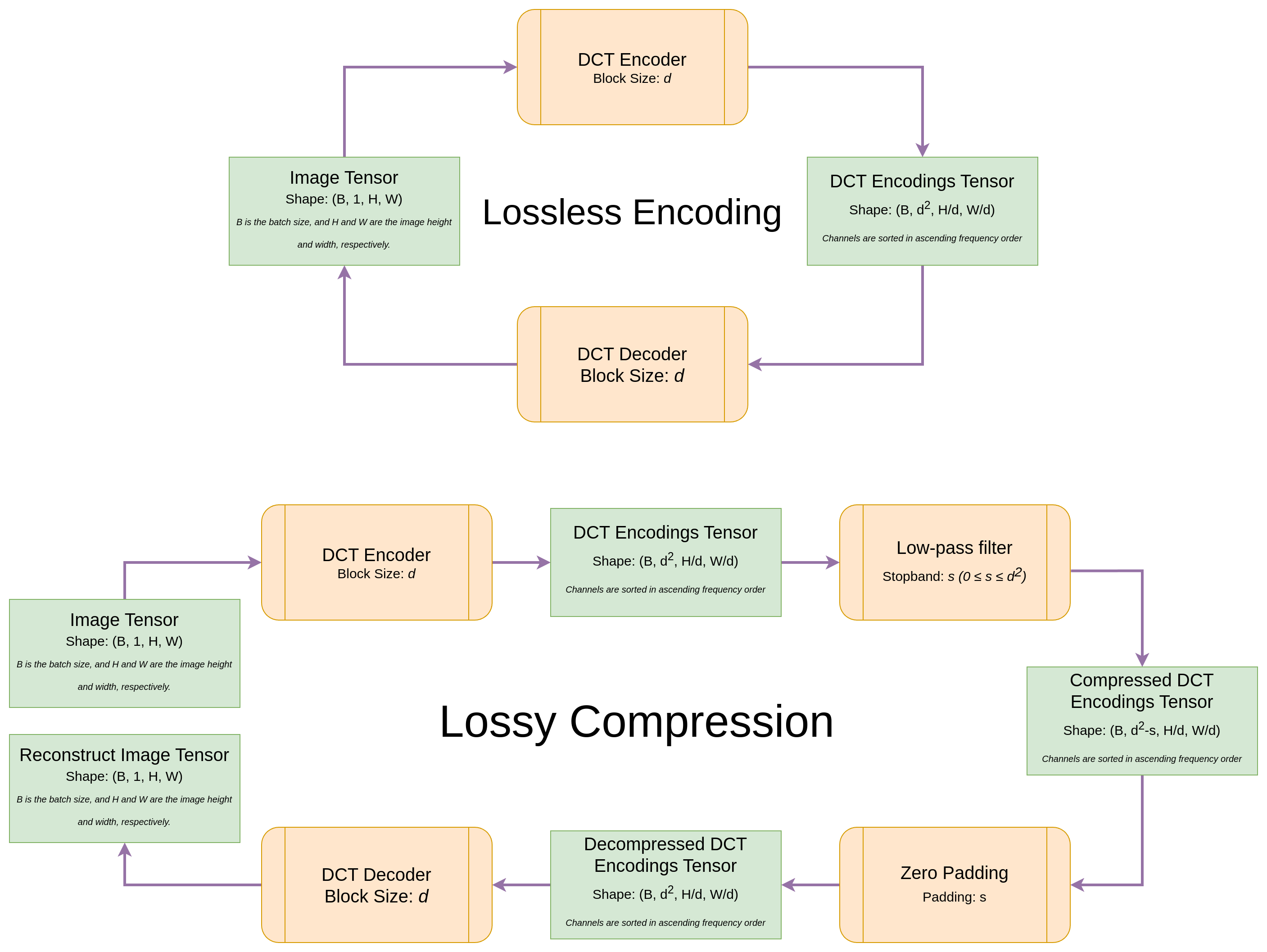
DCT basis functions
DCT basis functions for a block size of 16:
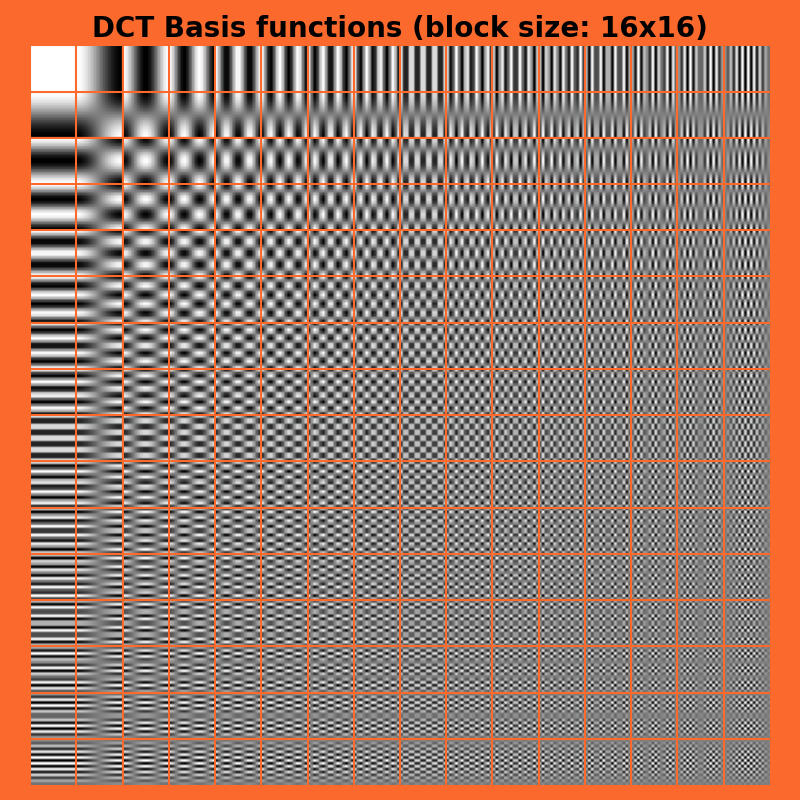
You can regenerate basis-function plots locally with notebooks/visualization.py and get_dct_basis().
License
MIT — see LICENSE.
1 maintainer

Download files
Download the file for your platform. If you're not sure which to choose, learn more about installing packages.
Source Distribution
Built Distribution
Filter files by name, interpreter, ABI, and platform.
If you're not sure about the file name format, learn more about wheel file names.
Copy a direct link to the current filters
File details
Details for the file dct_autoencoder-1.2.0.tar.gz.
File metadata
- Download URL: dct_autoencoder-1.2.0.tar.gz
- Upload date:
- Size: 6.2 kB
- Tags: Source
- Uploaded using Trusted Publishing? No
- Uploaded via: uv/0.11.21 {"installer":{"name":"uv","version":"0.11.21","subcommand":["publish"]},"python":null,"implementation":{"name":null,"version":null},"distro":{"name":"Ubuntu","version":"26.04","id":"resolute","libc":null},"system":{"name":null,"release":null},"cpu":null,"openssl_version":null,"setuptools_version":null,"rustc_version":null,"ci":null}
File hashes
| Algorithm | Hash digest | |
|---|---|---|
| SHA256 |
17634bda953515834dfcc02557b75714458d227aaa05f53a9fbccf78a44b33dc
|
|
| MD5 |
9e5cab11c3242bc9333012e21eec766c
|
|
| BLAKE2b-256 |
aab6e4ede1dc1caa399e17fb9ceed92900054863e9358747acc034f44ab42de0
|
File details
Details for the file dct_autoencoder-1.2.0-py3-none-any.whl.
File metadata
- Download URL: dct_autoencoder-1.2.0-py3-none-any.whl
- Upload date:
- Size: 7.6 kB
- Tags: Python 3
- Uploaded using Trusted Publishing? No
- Uploaded via: uv/0.11.21 {"installer":{"name":"uv","version":"0.11.21","subcommand":["publish"]},"python":null,"implementation":{"name":null,"version":null},"distro":{"name":"Ubuntu","version":"26.04","id":"resolute","libc":null},"system":{"name":null,"release":null},"cpu":null,"openssl_version":null,"setuptools_version":null,"rustc_version":null,"ci":null}
File hashes
| Algorithm | Hash digest | |
|---|---|---|
| SHA256 |
d902017711723aa015850c2cf00f0574bd8231e5b9e3616024d95d6998f43aa1
|
|
| MD5 |
41ed9ef6c4252e8b8b749bfa06087209
|
|
| BLAKE2b-256 |
bfc2caf86f32654f489f5b4e8bac96fd613ff9e7d2a2e483ca7ce2e4a2b689fd
|







