
dct — Deterministic Context Tracker


dct makes your work state queryable: what is open, which checkpoints block completion, what was decided, and where the next session should resume. One user-scoped database connects issues, todos, changelog entries, plans, sprints, decisions, and session handoffs across your projects. Assistants and scripts retrieve that state through 76 MCP tools or the CLI instead of reconstructing it from a conversation.
Claude Code has the established integration. DCT 1.6.0 packages both clients with 14 slash-command skills, 4 Claude automation hooks and experimental native Codex hooks; availability and limits differ by client. See the capability matrix.
Part of the dc tools family (dctools.dev) — deterministic context for AI-assisted development.
Why dct?
You have a dozen side projects. Every AI coding session starts cold — the assistant has no memory of what you decided last week, which bug you were mid-fix on, or why you picked SQLite over Postgres. So you re-explain, or it guesses.
A conversation explains the work, but does not provide a reliable query for its current state. dct stores typed items, explicit checkpoint outcomes, sprint membership, decisions, and handoffs in a shared ledger. Markdown plans remain files; their indexed state links planning to execution. The next assistant can read the same records as your CLI or dashboard.
dct is built for exactly this:
- One user-scoped database across all your projects — one place to ask "what's open everywhere?" Local-first: SQLite by default, so your tracking data stays on your machine, with first-class PostgreSQL support when you want a server-grade backend.
- A full tracking model — issues, todos, features, ideas, and improvements, each with priority, notes, and per-item checkpoints; gate checkpoints (dogfood, security, review, approval) keep an item open until they pass.
- Your markdown plans, indexed — specs, roadmaps, and ADRs stay plain markdown files; dct anchors their sections and checkpoints in the database, so plan state is queryable and promotable to items and sprints.
- MCP-native — the assistant queries and updates the tracking ledger through structured tools.
- Changelog-first releases — entries accumulate as you work (your assistant writes them); release day is one command.
- Soft-delete ledger — notes, checkpoints, and handoffs are removed from view at most; nothing is ever hard-deleted.
- Session handoffs — end a session with a handoff prompt; the next one picks up where you left off.
With a configured client, you can ask your assistant to "track this", "record what changed", or "show the next checkpoint". Packaged skills explain when to use DCT and how to interpret the results. Their availability depends on the client; generic MCP integrations require you to supply equivalent workflow instructions.
What a session looks like
Tracking happens in the conversation you're already having — one working session, and the morning after:
> track this: parser crashes on empty frontmatter
Created issue #12 in myproj (P2, open)

> I fixed the frontmatter crash
Changelog entry added (unreleased) — issue #12 resolved

> /handoff
Sprint preserved; handoff prompt stored for the next session

# next morning, new session
> /pickup
Handoff: "Frontmatter crash is fixed; release when CI is green."
Proposed first action: /release
No forms, no context switch. Handoff and pickup workflows are packaged as skills for Claude Code and Codex; other MCP clients can use the handoff_work and pickup_work tools directly. The example uses Claude Code skills, including /release; Codex currently packages clog, commit, dct-import, dct-init, handoff, pickup, plan-resolve-uncertain, plan-status, release, track, track-list, track-resolve, track-update, triage. The tracking, session, and release workflows are described below.
Installation
Release availability: DCT 1.6.0 includes the shared CLI/MCP surface, Claude Code and Codex integration installers, dct integrate, dct doctor, and packaged workflow skills for both clients. Native Codex hooks remain experimental and require the host capabilities and explicit trust described below.
Pick one — whichever matches your Python workflow. The distribution is named dctracker (PyPI); the installed command is dct. Prerequisites: Python 3.11+. Client-specific skills and hooks require the corresponding host. The CLI and MCP server work independently of either client.
# Option A: uv tool (recommended — isolated, upgradable)
uv tool install 'dctracker[mcp,pg]'
# Extras: mcp = the MCP server (you want this), pg = the PostgreSQL driver
# (skip it if you stay on the SQLite default), web = the local dashboard.

# From source (dev):
uv tool install --editable '/path/to/dct[mcp,pg]'
# Or straight from GitHub, no clone (e.g. to try main before a release):
uv tool install 'dctracker[mcp,pg] @ git+https://github.com/fotodeveloper/dct'

# Option B: pipx (classic isolated install)
pipx install 'dctracker[mcp,pg]'

# Option C: uvx (zero-install, fetches per-invocation) — server-only: pair it
# with Option A/B if you want `dct init`, the CLI, and the hooks (they need
# `dct` on PATH). CLI equivalent: uvx --from 'dctracker[mcp,pg]' dct init
# In ~/.claude.json:  { "command": "uvx", "args": ["--from", "dctracker[mcp,pg]", "dct", "server"] }

# Option D: pip into your venv (not recommended for global CLI)
pip install 'dctracker[mcp,pg]'
After installing, dct must be on your PATH. Verify:
dct --version    # -> dct <version>
dct server --help
dct plan --help  # plan subcommands
First run with Claude Code
dct init
The interactive wizard walks through the one-time global bootstrap. In DCT 1.6.0, dct init without a terminal refuses before setup effects; run it in a terminal, or use the explicit integration/project commands for automation:
- Database backend —
sqlite(default, zero setup at the platform data dir, e.g.~/.local/share/dctools/dct.db) orpostgresql(you supply the URL). It test-connects before saving. - Register projects — for each project it asks slug / path / name, then auto-detects the version from
VERSION,pyproject.toml,package.json,Cargo.toml, orsrc-tauri/tauri.conf.json. If none matches, you get an interactive prompt (0.0.1/0.1.0/1.0.0shortcuts). Register more any time withdct project add; that separate command can run without a terminal, storingcurrent_version=NULLwhen no version is detected and reminding you to set it later. - MCP server — registered at user scope in
~/.claude.json(viaclaude mcp add --scope user, with a direct-edit fallback), so/track,/clog,/release, and the MCP tools are available in every Claude Code session, from any directory. - Skills + hooks — symlinks the skills into
~/.claude/skills/and the four hooks into~/.claude/hooks/. Both ship inside the package; with an editable/dev install the symlinks point at the repo, so a fix goes live without reinstall. - Hook wiring — with your consent, merges the hooks into
~/.claude/settings.json. The merge is idempotent, backs up the file before the first write, and never touches hooks you already have. Re-run any time withdct hooks wire. - dct reference + CLAUDE.md pointer — installs the on-demand dct reference and offers a short managed pointer in your personal
~/.claude/CLAUDE.md. DCT 1.6.0 places the shared reference in the platform config directory (~/.config/dctools/dct-reference.mdon POSIX, honoringXDG_CONFIG_HOME) and preserves Claude's owned~/.claude/dct-reference.mdcompatibility alias. The pointer renders the actual resolved path. Re-runs preserve bytes outside its markers, and upgrades refresh only an existing block. An edited or foreign reference is preserved and reported before any pointer is rewritten. The reference is installed even when attaching the pointer is declined.
The wizard closes with a reminder to start a new Claude Code session — skills, hooks, and MCP tools all load at session start. Steps 3–6 are the Claude Code integration; without Claude Code, use the wizard for steps 1–2 and register the server in your own client instead — next section.
dct init writes the config to the platform config dir (~/.config/dctools/dct.toml; existing ~/.claude/dct.toml installs keep working — dct migrate-home moves them), ~/.claude.json (MCP entry), the skill/hook symlinks, and (opt-in) the settings.json wiring — see docs/architecture.md for the full config reference and scope model.
Codex
Install DCT 1.6.0 or later, then configure the Codex integration:
uv tool install 'dctracker[mcp]>=1.6.0'
dct integrate install codex
dct doctor --client codex --json
Reconnect/start a fresh Codex session. The adapter installs MCP configuration,
clog, commit, dct-import, dct-init, handoff, pickup, plan-resolve-uncertain, plan-status, release, track, track-list, track-resolve, track-update, triage skills, and managed AGENTS.md
instructions. It preserves existing configuration and reports conflicting
files. The 14 packaged workflows share complete contracts; their availability is separate from client/runtime acceptance evidence. dct-init, dct-import and plan-resolve-uncertain require explicit invocation. Both clients receive their complete workflow contracts from one authored source.
Native hooks are experimental: changelog checks, stop reminders and
apply-patch autoscan require the supported host events, runtime dependencies,
and review/trust through /hooks. Plan mirroring additionally requires the
client to expose and emit update_plan; it records observed snapshots rather
than synchronizing task status. It is not available merely because the assistant
describes a plan in chat. Current runtime validation targets the local POSIX client.
See the integration guide and capability matrix
for repair, upgrade, uninstall, runtime diagnostics and limitations.
Fresh Claude → Codex handoff and the installed pickup skill were exercised on an isolated database without passing the previous transcript. A controlled nine-session comparison measured median main-model input of 24,926 tokens for one DCT pickup tool versus 23,006 for exactly the same response bytes read from a file, an increase of approximately 8.35%. All trials returned the correct answer; cache behavior varied, and separate guardian work means these main-task figures are not complete billing totals. DCT's demonstrated benefit here is recovering structured work state, not token savings. See the acceptance evidence and controlled benchmark results.
Other MCP clients: manual setup
The 14 Claude Code skills, 4 Claude hooks and 14 Codex skills are host integrations. The 76 MCP tools and CLI provide the common tracking surface. Other clients use generic MCP support with manual setup; no client-specific skills, hook parity or acceptance test is implied. Register dct server as a stdio server using the configuration format required by your client. A common JSON shape is:
{ "mcpServers": { "dct": { "command": "dct", "args": ["server"] } } }
Provide workflow instructions for your assistant to select and combine these tools. Relevant starting points: /track → create_item, /track-list → list_items, /pickup → pickup_work, /handoff → handoff_work, /clog → add_changelog, /release → the local dct release workflow (the ledger tools release_changelog / advance_release serve a project's own release tool). These tool mappings are not substitutes for complete commit/release workflows. To teach your assistant when to reach for them, adapt the dct reference for your client and point its rules file at it, as the CLAUDE.md pointer does for Claude Code.
Troubleshooting
dct: command not foundafter install — the install location isn't on yourPATH. Foruv tool/pipx, run theirensurepathhelper (uv tool update-shellorpipx ensurepath) and restart the shell.- PostgreSQL connection fails at
dct init— either start your local Postgres and re-run, or just pick the SQLite default (the answer to the backend prompt) — it needs no server and works everywhere. If the error mentionspsycopgor a missing module instead, reinstall with thepgextra:uv tool install 'dctracker[mcp,pg]'. - MCP tools don't show up in your client — the MCP server is a per-session subprocess, so newly registered tools (or a reinstall) appear only after you restart the session — in Claude Code and any other MCP client alike. Start a fresh session and they'll be there.
- Plans/decisions tools fail with
No module named 'ulid'— your installed tool environment predates thepython-uliddependency. Upgrade it:uv tool upgrade dctracker(or reinstall via your chosen option above).
Updating
dct runs a passive, offline-safe update check — a cached PyPI probe (refreshed at most once a day, never blocking) surfaces a one-line "newer release available" nudge on the CLI and in the MCP server instructions. Opt out with [update] check = false in the dct config file (dct config path shows where it lives). When a newer version exists:
dct upgrade # detects install method (uv tool / pipx / pip), upgrades, re-links skills + hooks
dct upgrade refreshes the skill/hook symlinks and prunes any that the new package dropped. Editable/dev checkouts print git pull guidance instead (no package to upgrade). Run it at a session boundary — skill descriptions and the MCP server pick up the new code on the next session, migrations on the next engine bootstrap.
The tracking loop: /track → work → /track-resolve
The foundation everything else builds on. An item is one unit of work —
an issue, todo, feature, idea, or improvement — with a priority
(P1–P3, future), append-only notes, and checkpoints: acceptance
criteria your assistant sketches before coding and checks off in real time
as it works. Say "track this: parser crashes on empty frontmatter" and the
item exists; say "done with #12" and it resolves, with a resolution note in
the ledger. Because every project writes to the same database, "what's open
everywhere?" is one query, not a tour of a dozen TODO.md files. Illustrative
cross-project view:
> /track-list P1
myproj   #12 issue P1 in_progress [2/4]  parser crashes on empty frontmatter
website  #31 todo  P1 open               rotate API keys before launch
Checkpoints can also be gates — dogfood, security, review,
approval, or any custom kind you invent — that block an item from
resolving until each is done or consciously rejected: a feature is finished
when the database says so, not when the conversation has moved on.
The session loop: /handoff → /pickup
AI coding sessions end; your context shouldn't.
Ending a session — /handoff stores a short prompt for whoever comes next
(usually you, tomorrow). Sprint membership changes only when explicitly
requested; otherwise it is preserved. Starting a session — /pickup reads the newest unconsumed
handoff, shows the sprint with checkpoint progress, and proposes the first
action, so the session starts in the middle of the work rather than from a
cold "what were we doing?" The sprint is the durable set of what's in flight
right now: it survives between sessions. Resolving an item removes it from the open-work
view while retaining its sprint membership as completion history. Illustrative session start:
> /pickup
Handoff (2026-07-05, scope: sprint-15):
  "Theme tokens are merged; wire the toggle into settings next.
   The Safari session fix (#12) still awaits review."
Sprint: 3 items — #12 in_progress [2/4], #31 open, #7 open
Proposed first action: #12 — wire the theme toggle into settings.
Handoffs live in the database: several can coexist per project
(scope tags disambiguate parallel workstreams), consuming one preserves it
in the ledger, and an unconsumed one can be amended in place. Available as
skills in Claude Code and the Codex integration, MCP tools, and
the CLI — full catalogue in
docs/mcp-tools.md.
The release loop: /clog → /commit → /release
A changelog reconstructed from git log on release day is archaeology —
dct makes it a side effect of working. Each time a change lands, your
assistant records a one-line entry in the database (the /clog skill,
add_changelog over MCP, dct clog add in scripts). A Claude Code hook —
wired with your consent at dct init, then on by default for every
registered project — can even hold back git commit until the entry exists
(dct project changelog <slug> off opts a project out). By release day the
changelog is already written:
> /release
15 unreleased entries proven by commit trailers → plan approved as 1.4.0
version files prepared (pyproject.toml) → approved, push target origin/main
stamped · changelog.md section · version files · release: v1.4.0 · tag · pushed
One workflow plans the release from commit proof, shows the version files and the push target for approval, then stamps the version, writes the Keep a Changelog section, makes the release commit and the tag and pushes them — each step verified and resumable.
Plans: your markdown, indexed
You already write plans — specs, roadmaps, ADRs — in markdown. dct indexes
them instead of replacing them: prose stays in the file (still the source of
truth), while sections, checkpoints, and inline decisions get stable ULID
anchors and live state (pending/done/rejected) in the database. In Claude
Code a background hook re-scans the file on every edit; elsewhere, run
dct plan rescan <file>. Local classification rules are the default and leave unknown headings
unresolved; a configured command can optionally enrich them. A plan checkpoint
can be promoted to a tracked item, a section to an item or a whole sprint —
planning and tracking stay one system.
Full guide — concepts, ULID anchors, ingest pipeline, classification rules, and promotion to items/sprints: docs/plans.md.
Features
- Centralized tracking — one database for all your projects
- Session handoffs — end a session with a stored prompt;
/pickupresumes the next one mid-work - Hybrid changelog — entries in DB, export to Keep a Changelog markdown at release; enforcement hook wired at init with your consent, then on by default per project (opt out via
dct project changelog <slug> off) + per-project changelog location (repo root by default, or a subdir likepkg/changelog.md) - Plans, specs, roadmaps, ADRs — index markdown plans with stable ULID anchors; state in DB, content stays in markdown
- First-class sprints — a named, goal-scoped current work set with persistent membership and completion history
- Decision records — ADRs, sprint amendments, inline plan decisions with multi-anchor linkage
- Plan classification — deterministic heading rules by default; optional configured-command enrichment
- Passive autoscan hook — Claude Code PostToolUse hook re-scans plan-like files in background on every edit
- MCP server — 76 tools over stdio via the official MCP SDK 2.x; client configuration and supported workflow features vary
- CLI — fast
dctcommand for hooks and scripts - Skills — Claude Code slash commands (
/track,/clog,/triage,/dct-import,/plan-status, …); 14 Codex workflows - Soft deletes — ledger pattern, nothing is ever hard-deleted
- DB portable — SQLite (zero setup) or PostgreSQL
Usage
CLI
# Items
dct add myproj todo "Fix parser crash" --priority P1 --tags "parser,crash"
dct list                              # All open items, all projects
dct list myproj --priority P1         # P1 items in myproj
dct list myproj --tag parser          # Items carrying the "parser" tag
dct show 42                           # Full item details with notes
dct update 42 --status in_progress
dct update 42 --tags "perf,arch"      # Full replace of the tag set (--tags "" clears)
dct note 42 "Found root cause in tokenizer"
dct resolve 42 --resolution "Fixed in commit abc123"

# Tags (global dictionary, shared by every project)
dct tags list
dct tags add perf --description "performance work"
dct tags merge test tests             # Fold "test" into "tests"

# Changelog (project auto-detected from CWD; --project overrides)
dct clog add added "New Python parser support" --project myproj
dct clog list --project myproj --unreleased
dct clog count --project myproj       # Used by hooks
dct clog count --branch feat/x --include-unbranched   # This branch + unbranched/server-detected
dct clog release 1.1 --project myproj --proposal-digest <p> --push-remote origin --push-branch main --push-url <url> --confirm  # Alias of `dct release apply` that derives the plan itself (after `dct release prepare`): commit, tag, push to the approved target (run from a checkout)
dct clog release --patch --entries 12,15 --proposal-digest <p> --confirm --no-push   # Only these (proven) entries; a local release
dct clog update 12 --branch feat/x    # Amend an unreleased entry
dct clog delete 12                    # Soft-delete an unreleased entry
dct clog export --project myproj --output changelog.md

# Release workflow (each subcommand also takes --json)
dct release plan --patch              # Read-only: proven / unproven entries, range, index state
dct release attest --entries 16 --confirm             # Empty attestation commit for unproven entries
dct release plan --patch --entries 12,15 --json       # The snapshot to approve (snapshot_digest)
dct release prepare --patch --entries 12,15 --plan-digest <digest>         # Isolated version sync → the file list and the push target to approve
dct release apply --patch --entries 12,15 --plan-digest <digest> --proposal-digest <p> --push-remote origin --push-branch main --push-url <url> --confirm  # Stamp, changelog, files, commit, tag, push to the approved target (or --no-push: local)
dct release resume                    # Finish an interrupted release (verifies every effect; the stored consent, no new approval)
dct release abandon --version 1.1 --reason "broken build" --confirm
dct release reconstruct --version 1.0 --confirm       # Record a release made before release records
dct release takeover --version 1.0 --no-push          # Preview: hand a record without consent to dct (then --takeover-digest <d> --confirm, resume)
dct release version-files                             # Show the version-file contract (--set a,b | --none, --confirm)

# Projects
dct project add myproj /path/to/myproj --name "My Project"    # Version auto-detected
dct project list
dct project detect                                            # Print current project slug (for hooks)
dct project rename myproj --slug myproj2 --name "Rebranded"   # Rename in-place, project_id stable
dct project set-version myproj 1.1                            # Post-factum version fix
dct project changelog myproj off      # Opt out of changelog enforcement (on by default)
dct project changelog-path myproj docs/CHANGELOG.md           # Explicit Markdown changelog path (--detect: detect the tracked one again)

# Plans
dct plan rescan /path/to/docs/plans/2026-04-17-feature.md     # Idempotent rescan; hook entrypoint
dct plan rescan $FILE --quiet --resolve-uncertain             # Hook-mode flags

# Checkpoints (item-level)
dct checkpoint add 42 "Write parser"
dct checkpoint list 42
dct checkpoint done 3                 # Mark CP #3 as done
dct checkpoint reject 4               # Scope-change, keep in ledger

# Sprints (first-class, named units of work; /handoff manages the current-sprint set)
dct sprint list --status active
dct sprint create "Payments hardening" --code pay-1 --goal "Close the P1 backlog"
dct sprint show 3                     # Details + linked items
dct sprint activate 3                 # Shortcuts: activate / complete / defer

# Session edges (same composed ops the /pickup and /handoff skills use)
dct pickup                            # Snapshot: sprint, handoffs, gates, decisions
                                      # (read-only — --consume defaults to never)
dct handoff create --prompt-file - --add-items 22,6   # Sprint change + handoff, one transaction
                                      # --remove-items cuts scope, --items replaces;
                                      # omit all three to leave the sprint untouched
dct handoff update 12 --prompt "Wire the toggle into settings next"

# Config
dct config get integrations.claude.task_mirror   # Read a dotted config key
dct config path                       # Show resolved config/data locations
MCP Tools
dct ships 76 MCP tools. Zero-arg calls auto-detect the project from the session's working directory; pass project=<slug> to override. Write ops return a minimal ack (id + a few post-state fields); fetch full context with get_item(id) / get_handoff(id). In Claude Code the tools register at user scope (callable as mcp__dct__<name>), with thirteen daily drivers always loaded and the rest fetched on demand; other clients control tool discovery and loading according to their own MCP implementation. Whatever the client, start with create_item, list_items, pickup_work, and handoff_work:
| Tool | Purpose |
|---|---|
create_item |
Create a tracked item (issue / todo / feature / idea / improvement) |
get_item |
Full item dict — fields, notes, checkpoints, progress |
list_items |
List / search items in compact {cols, rows} form |
update_item |
Update fields on an existing item |
resolve_item |
Close an item (terminal status), with gate-checkpoint guard |
add_note |
Append a note to an item (append-only ledger) |
add_checkpoint |
Add an acceptance criterion to an item |
complete_checkpoint |
Mark a checkpoint done (real-time, never batched) |
reject_checkpoint |
Mark a checkpoint rejected (scope change) — ledger-preserving |
add_changelog |
Add an unreleased changelog entry |
Session-edge tools stay deferred: get_handoff (full handoff dict — untruncated prompt + context_summary), create_handoff, set_sprint, release_changelog, and more. Full categorized catalogue: docs/mcp-tools.md.
Web viewer
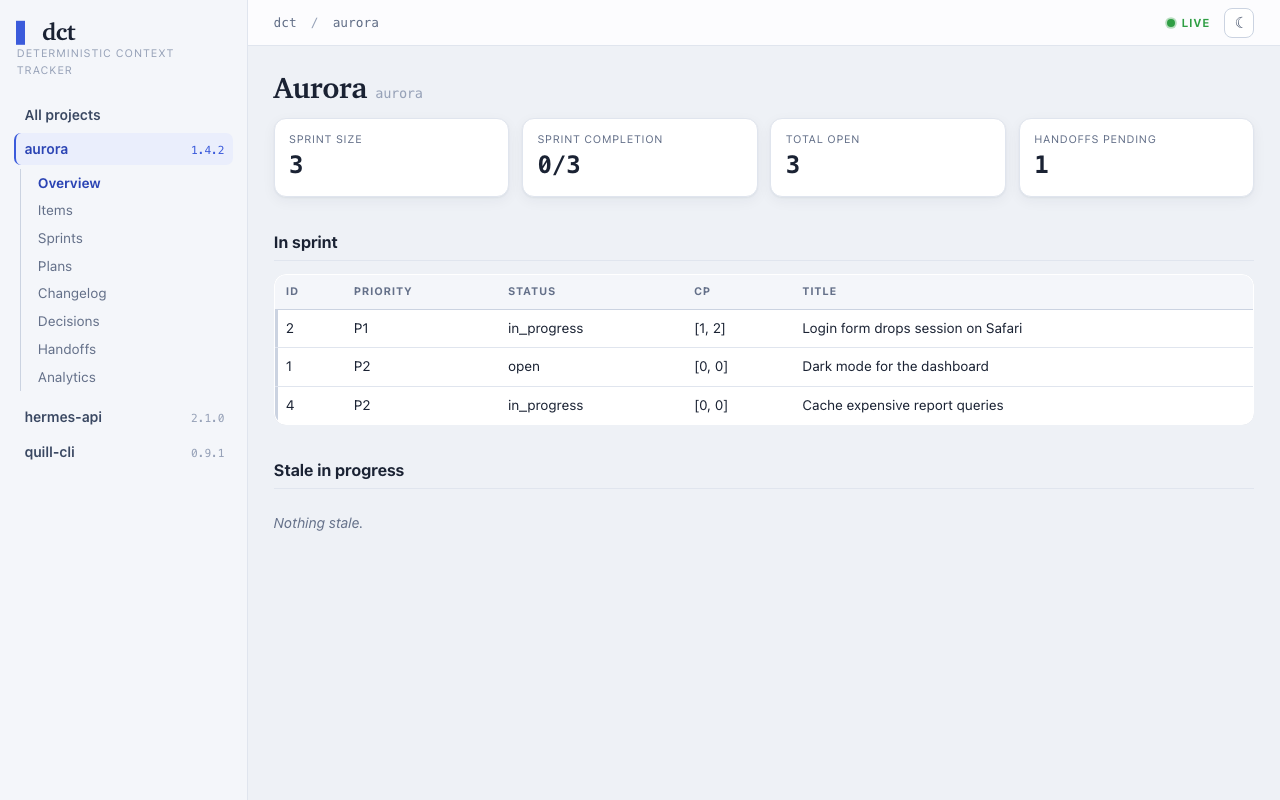
dct web runs a localhost-only, read-only browser dashboard over all registered projects (items, sprints, plans, changelog, decisions, handoffs, plus Radar / Backlog-Health / Velocity analytics) with live SSE refresh. It binds 127.0.0.1 only — no auth, single-user. Install the optional extra first:
uv tool install 'dctracker[web,mcp,pg]'   # or: pipx install 'dctracker[web]' — adds flask + markdown
dct web start               # start the daemon → prints http://localhost:8787
dct web start --open        # open the browser after starting
dct web status              # show pid + URL
dct web stop                # SIGTERM the daemon
If the preferred port (default 8787) is busy, the daemon auto-selects the next free port (disable with --no-fallback). Configure defaults under [web] in the dct config file.
Integration with Claude Code
Claude Code has the established packaged integration. DCT 1.6.0 generates both clients' 14 skills, the full fallback and the concise reference from dct/skill_sources, with freshness checks in CI and package builds. dct init installs the shared reference and offers a short pointer in ~/.claude/CLAUDE.md; the pointer names the actual resolved platform config path. Claude's owned legacy alias remains usable. Use the installer to render the pointer template; its {{reference_path}} slot is filled at installation. Both clients read the reference on demand, and per-client uninstall retains it for other clients. See reference lifecycle details.
Skills
| Skill | Purpose |
|---|---|
/track |
Create a tracked item |
/track-list |
List/search items |
/track-update |
Update item fields |
/track-resolve |
Resolve/close items |
/clog |
Add changelog entry |
/commit |
Conventional commit with version suffix + changelog gate |
/release |
One workflow: proof plan → version files + push target approved → stamp, changelog.md section, version bump, commit, tag, push |
/pickup |
Session start — read handoff, show sprint, propose first action |
/handoff |
Session end — flag sprint items, write handoff prompt |
/dct-import |
Discover + multi-select + ingest plan-like markdown files |
/dct-init |
Bootstrap dct + register the current project (interactive) |
/plan-status |
Cross-plan progress dashboard |
/plan-resolve-uncertain |
Classify uncertain plan sections with configured rules/command or explicit manual choices |
/triage |
Review findings through the triage ledger — record the consolidated findings, build and publish the page from the ledger, take an agent's proposals, close with the owner's answers |
Global Hooks
dct init symlinks four hooks into ~/.claude/hooks/ (→ the packaged dct/hooks/; an editable/dev install keeps them live-editable from the repo) and — with your consent — wires them into ~/.claude/settings.json automatically. The wiring is an idempotent merge: hooks you already have (dct or your own, in any placement) are never touched, and the file is backed up before the first write. Re-run any time:
dct hooks wire # idempotent; safe after upgrades or manual edits
| Hook | Event | Purpose |
|---|---|---|
dct-check-changelog.sh |
PreToolUse (Bash) |
blocks git commit when app code changed but no unreleased changelog entry exists — once the hook is wired, enforcement is on by default per project; opt out via dct project changelog <slug> off |
dct-check-changelog-on-stop.sh |
Stop | session-end reminder about pending unreleased entries (same per-project gate) |
dct-plan-autoscan.sh |
PostToolUse (Edit|Write|MultiEdit) |
background rescan of plan-like MD files; fire-and-forget |
dct-task-mirror.sh |
PreToolUse (TodoWrite|TaskCreate) |
mirrors Claude Code tasks into dct as cc-task checkpoints |
Manual wiring reference (full JSON) and the five rules every dct hook follows: docs/hooks.md.
Configuration
dct reads its config from the platform config dir — ~/.config/dctools/dct.toml on Linux and macOS, %LOCALAPPDATA%\dctools\dct.toml on Windows — with a permanent fallback to a legacy ~/.claude/dct.toml (run dct migrate-home to move an old install). The minimal config is just the database URL:
[database]
url = "sqlite:////path/to/dct.db"
# or: url = "postgresql+psycopg://localhost:5432/dct"
The DCT_DATABASE_URL environment variable overrides [database].url. For the full reference ([classification], [integrations.claude], [web] sections), the database schema, MCP scope precedence, and project auto-detection mechanics, see docs/architecture.md.
Testing
.venv/bin/pytest -q                    # All tests
.venv/bin/pytest tests/test_plan_parser.py -v          # Parser only
.venv/bin/pytest tests/test_plan_ingest.py -v          # Ingest + sticky-resolved semantics

# MCP server smoke (boot + tool list)
uv run --no-project --with 'mcp' --with sqlalchemy --with 'psycopg[binary]' \
  python -c "import asyncio; from dct.mcp.server import mcp; \
  print(len(asyncio.run(mcp.list_tools())), 'tools')"
Contributing
Bug reports, feature ideas, and PRs are welcome — see CONTRIBUTING.md for dev setup (uv venv + pytest), commit conventions, and how to add MCP tools or skills.
License
MIT — see LICENSE.
1 maintainer

Metadata
1 maintainer
Release files for dctracker 1.6.0
For a detailed explanation of source distributions (sdists) and built distributions (wheels), please see the package formats documentation.
Source distribution (sdist)
| File | Size | Uploaded | |
|---|---|---|---|
| dctracker-1.6.0.tar.gz | 1.8 MB | Details |
Built distribution (wheel)
| File | Interpreter | ABI | Platform | Reset |
|---|---|---|---|---|
| dctracker-1.6.0-py3-none-any.whl | Python 3 | none | any | Details |
Total release size: 2.8 MB
Release files / dctracker-1.6.0.tar.gz
| Download URL | dctracker-1.6.0.tar.gz |
|---|---|
| Size | 1.8 MB |
| Tags | Source |
|
SHA-256 checksum How to use checksums |
fb6002a5c6b3d2c2a495f3d272b7f6636eddc648e2d0202c13b38de3dc1c185f
|
|
BLAKE2b-256 checksum How to use checksums |
b16bd5ab818b9e83e0730bac90eaf0ab9b5ea9ba03024783059c7daa5dae62ad
|
| Upload date | |
|
Uploaded using Trusted Publishing? What is trusted publishing? |
Yes |
| Uploaded via |
twine/7.0.0 CPython/3.13.14
|
Provenance
Provenance describes where a file came from. On PyPI, provenance is shared via attestations, which provide a verifiable record of the build or publishing details. View details, limitations and caveats.


PyPI Publish Attestation
PyPI verified that this artifact, at this checksum, originated from the publisher listed below.
Signed by GitHub Actions, verified by PyPI on Oct 16, 2026.
Transparency logRelease files / dctracker-1.6.0-py3-none-any.whl
| Download URL | dctracker-1.6.0-py3-none-any.whl |
|---|---|
| Size | 1.0 MB |
| Tags | Python 3 |
|
SHA-256 checksum How to use checksums |
2a43a91e92a8e2522a37869e8e4de934c0aea1358d35384145fb5541c5c0b18d
|
|
BLAKE2b-256 checksum How to use checksums |
950a488d3da54ead6cfa968ed6c1ca6c4cdf8e74c2745f6aa32a2297579df4b2
|
| Upload date | |
|
Uploaded using Trusted Publishing? What is trusted publishing? |
Yes |
| Uploaded via |
twine/7.0.0 CPython/3.13.14
|
Provenance
Provenance describes where a file came from. On PyPI, provenance is shared via attestations, which provide a verifiable record of the build or publishing details. View details, limitations and caveats.
PyPI Publish Attestation
PyPI verified that this artifact, at this checksum, originated from the publisher listed below.
Signed by GitHub Actions, verified by PyPI on Oct 16, 2026.
Transparency log













