
Data-Driven Multitask Optimization Laboratory

Project description
Data-Driven Multitask Optimization Laboratory





📖 Overview
DDMTOLab (Data-Driven Multitask Optimization Laboratory) is a comprehensive Python platform for optimization research, featuring 110+ algorithms, 180+ benchmark problems, and powerful experiment tools for problem definition, algorithm development, and performance evaluation.
Whether you're working on expensive black-box optimization, multiobjective optimization, or complex multitask scenarios, DDMTOLab provides a flexible and extensible framework to accelerate your research and support real-world applications.
✨ Features
- 🚀 Comprehensive Algorithms - 110+ algorithms for expensive/inexpensive, single/multitask, single/multiobjective, unconstrained/constrained optimization
- 📊 Rich Problem Suite - 180+ benchmark problems and real-world applications
- 🤖 Data-Driven Optimization - Surrogate modelling for expensive optimization
- 🔧 Flexible Framework - Simple API and intuitive workflow for rapid prototyping
- 🔌 Fully Extensible - Easy to add custom algorithms and problems
- ⚡ Parallel Computing - Multi-core support for batch experiments
- 📈 Powerful Analysis Tools - Built-in visualization and statistical analysis
- 📝 Complete Documentation - Comprehensive documentation and API reference
🚀 Quick Start
Installation
pip install ddmtolab
Requirements:
- Python 3.10+
- PyTorch 2.5+ (supports CPU, GPU optional for acceleration)
- NumPy 2.0+, SciPy 1.15+, scikit-learn 1.7+
- Matplotlib 3.10+, Pandas 2.3+
For detailed installation instructions, see Installation Guide.
Basic Usage
import numpy as np
from ddmtolab.Methods.mtop import MTOP
from ddmtolab.Algorithms.MTSO.MTBO import MTBO

# Step 1: Define objective function
def forrester(x):
    """Forrester function: (6x-2)^2 * sin(12x-4)"""
    return (6 * x - 2) ** 2 * np.sin(12 * x - 4)

# Step 2: Create optimization problem
problem = MTOP()
problem.add_task(forrester, dim=1)

# Step 3: Run optimization
results = MTBO(problem).optimize()

# Step 4: Display results
print(f"Best solution: {results.best_decs}")
print(f"Best objective: {results.best_objs}")

# Step 5: Analyze and visualize
from ddmtolab.Methods.test_data_analysis import TestDataAnalyzer
TestDataAnalyzer().run()
Batch Experiment
from ddmtolab.Methods.batch_experiment import BatchExperiment
from ddmtolab.Methods.data_analysis import DataAnalyzer
from ddmtolab.Algorithms.STSO.BO import BO
from ddmtolab.Algorithms.MTSO.MTBO import MTBO
from ddmtolab.Problems.MTSO.cec17_mtso_10d import CEC17MTSO_10D

if __name__ == '__main__':
    # Step 1: Create batch experiment manager
    batch_exp = BatchExperiment(
        base_path='./Data',      # Data save path
        clear_folder=True        # Clear existing data
    )

    # Step 2: Add test problems
    prob = CEC17MTSO_10D()
    batch_exp.add_problem(prob.P1, 'P1')
    batch_exp.add_problem(prob.P2, 'P2')

    # Step 3: Add algorithms with parameters
    batch_exp.add_algorithm(BO, 'BO', n_initial=20, max_nfes=100)
    batch_exp.add_algorithm(MTBO, 'MTBO', n_initial=20, max_nfes=100)

    # Step 4: Run batch experiments
    batch_exp.run(n_runs=20, verbose=True, max_workers=8)

    # Step 5: Run data analysis
    analyzer = DataAnalyzer()
    results = analyzer.run()
Optimization Process Visualization
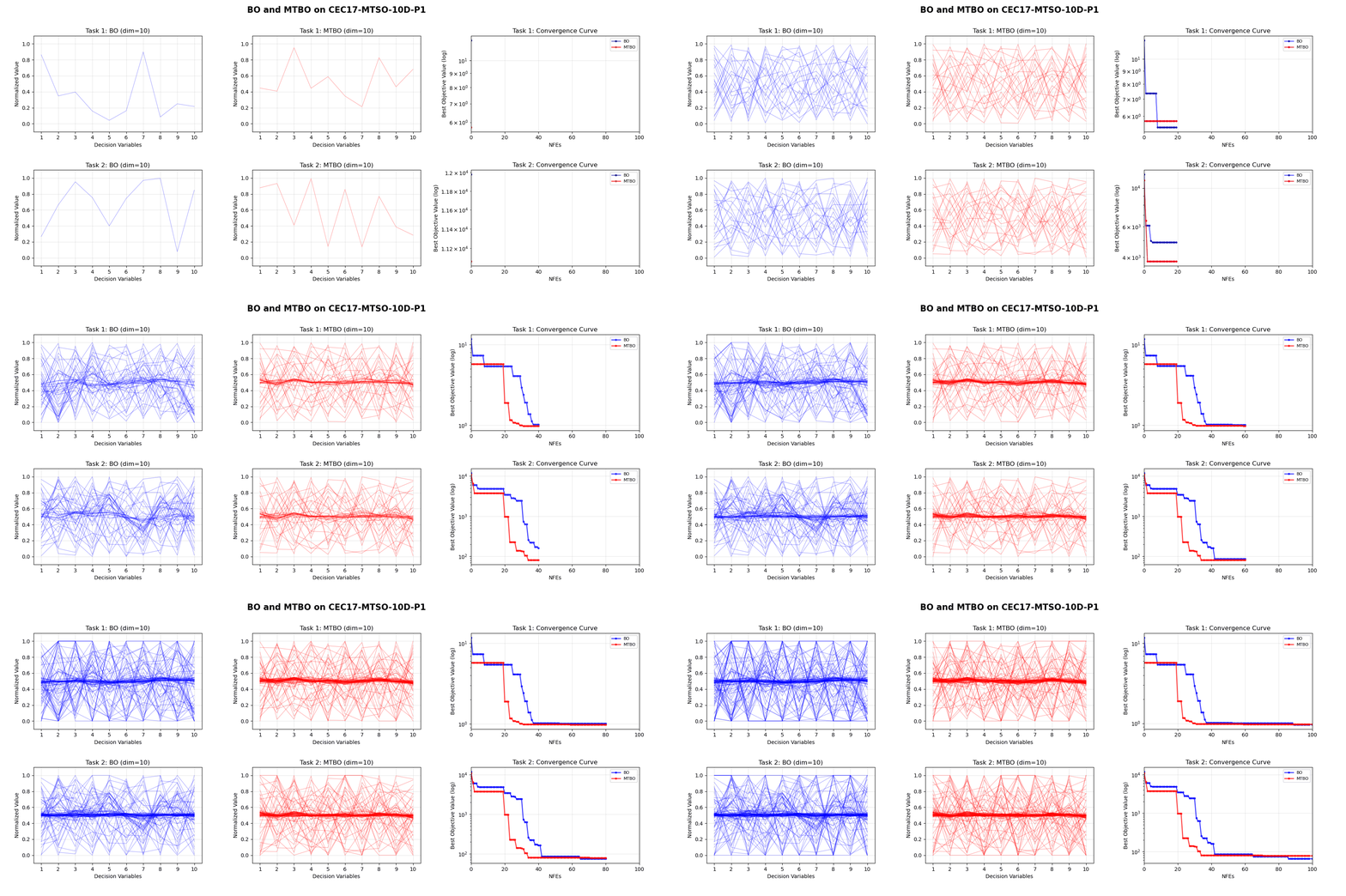
DDMTOLab provides built-in animation tools to visualize the optimization process:
from ddmtolab.Problems.MTSO.cec17_mtso_10d import CEC17MTSO_10D
from ddmtolab.Algorithms.STSO.BO import BO
from ddmtolab.Algorithms.MTSO.MTBO import MTBO
from ddmtolab.Methods.animation_generator import create_optimization_animation

# Define problem
problem = CEC17MTSO_10D().P1()

# Run algorithms
BO(problem, n_initial=20, max_nfes=100, name='BO').optimize()
MTBO(problem, n_initial=20, max_nfes=100, name='MTBO').optimize()

# Generate animation
animation = create_optimization_animation(max_nfes=100, merge=2, title='BO vs MTBO')
🎯 Key Components
Algorithms (110+)
| Category | Description | Algorithms |
|---|---|---|
| STSO | Single-task single-objective | GA, DE, PSO, SL_PSO, KLPSO, CSO, CMA_ES, IPOP_CMA_ES, sep_CMA_ES, MA_ES, xNES, OpenAI_ES, AO, GWO, EO, BO, EEI_BO, ESAO, SHPSO, SA_COSO, TLRBF, GL_SADE, AutoSAEA, DDEA_MESS, LSADE |
| STMO | Single-task multiobjective | NSGA_II, NSGA_III, NSGA_II_SDR, SPEA2, MOEA_D, MOEA_DD, MOEA_D_FRRMAB, MOEA_D_STM, RVEA, IBEA, TwoArch2, MSEA, C_TAEA, CCMO, MCEA_D, CPS_MOEA, ParEGO, K_RVEA, DSAEA_PS, KTA2, REMO, ADSAPSO, CSEA, DISK, DRLSAEA, DirHV_EI, EDN_ARMOEA, EIM_EGO, EM_SAEA, KTS, MGSAEA, MMRAEA, MOEA_D_EGO, MultiObjectiveEGO, PCSAEA, PEA, PIEA, SAEA_DBLL, SSDE, TEA |
| MTSO | Multitask single-objective | MFEA, MFEA_II, EMEA, EBS, G_MFEA, MTEA_AD, MKTDE, MTEA_SaO, SREMTO, LCB_EMT, MTBO, RAMTEA, SELF, EEI_BO_plus, MUMBO, BO_LCB_CKT, BO_LCB_BCKT, BLKT_DE, DTSKT, EMTO_AI, MFEA_AKT, MFEA_DGD, MFEA_SSG, MFEA_VC, MTDE_ADKT, MTEA_HKTS, MTEA_PAE, MTES_KG, SaEF_AKT, SSLT_DE, TNG_SNES |
| MTMO | Multitask multiobjective | MO_MFEA, MO_MFEA_II, MO_EMEA, MO_MTEA_SaO, MTDE_MKTA, MTEA_D_DN, EMT_ET, EMT_PD, ParEGO_KT, EMT_GS, MO_MTEA_PAE, MO_SBO, MTEA_D_TSD, MTEA_DCK |
Problems (180+)
| Category | Problem Suites |
|---|---|
| STSO | CLASSICALSO (8 functions), CEC10_CSO (20 functions) |
| STMO | ZDT (6), DTLZ (9), WFG (9), UF (10), CF (10), MW (14) |
| MTSO | CEC17_MTSO (9), CEC17_MTSO_10D (9), CEC19_MaTSO (many-task), CMT (9), STOP (12) |
| MTMO | CEC17_MTMO (9), CEC19_MTMO (10), CEC19_MaTMO (many-task), CEC21_MTMO (10), MTMO_DTLZ, MTMOInstances |
| Real-World | PEPVM, PINN_HPO (12), SOPM, SCP, MO_SCP, PKACP, NN_Training, TSP (6) |
Methods
- MTOP Class: Flexible problem definition supporting single/multitask and single/multiobjective
- Batch Experiments: Parallel execution framework for large-scale experiments
- Data Analysis: Statistical analysis (mean, std, ranking) and visualization tools
- Performance Metrics: IGD, GD, IGD+, HV, DeltaP, Spacing, Spread, FR, CV
- Animation Generator: Optimization process visualization
- Algorithm Utilities: Reusable components (initialization, selection, operators)
📚 Documentation
📄 Citation
If you use DDMTOLab in your research, please cite:
@software{ddmtolab2025,
  author = {Jiangtao Shen},
  title = {DDMTOLab: A Python Platform for Data-Driven Multitask Optimization},
  year = {2025},
  url = {https://github.com/JiangtaoShen/DDMTOLab}
}
🤝 Contributing
Contributions are welcome! Please feel free to submit a Pull Request. For major changes, please open an issue first to discuss what you would like to change.
📧 Contact
- Author: Jiangtao Shen
- Email: j.shen5@exeter.ac.uk
- Documentation: https://jiangtaoshen.github.io/DDMTOLab/
- Issues: GitHub Issues
📜 License
This project is licensed under the MIT License - see the LICENSE file for details.
Made with ❤️ by Jiangtao Shen


Download files
Download the file for your platform. If you're not sure which to choose, learn more about installing packages.
Source Distribution
Built Distribution
Filter files by name, interpreter, ABI, and platform.
If you're not sure about the file name format, learn more about wheel file names.
Copy a direct link to the current filters
File details
Details for the file ddmtolab-1.0.8.tar.gz.
File metadata
- Download URL: ddmtolab-1.0.8.tar.gz
- Upload date:
- Size: 2.0 MB
- Tags: Source
- Uploaded using Trusted Publishing? No
- Uploaded via: twine/6.2.0 CPython/3.10.18
File hashes
| Algorithm | Hash digest | |
|---|---|---|
| SHA256 |
c7994d1fb16fdb512c10efd086d14fca02f67b04dcec9958656eb52f7d210bf1
|
|
| MD5 |
5e88d95f4734e8f64d1962f94073caf0
|
|
| BLAKE2b-256 |
3e1a02a624d20db012827d7c8ba5e0c02ab7fea3466bd0130f2533db93463cae
|
File details
Details for the file ddmtolab-1.0.8-py3-none-any.whl.
File metadata
- Download URL: ddmtolab-1.0.8-py3-none-any.whl
- Upload date:
- Size: 2.4 MB
- Tags: Python 3
- Uploaded using Trusted Publishing? No
- Uploaded via: twine/6.2.0 CPython/3.10.18
File hashes
| Algorithm | Hash digest | |
|---|---|---|
| SHA256 |
873c98369c64da091b099875a45edf587b40752447d731b00274328d65831a4c
|
|
| MD5 |
7610a7b34b81d12b6f76e854502af7e9
|
|
| BLAKE2b-256 |
155fbb7ac243a41eeb4b0056fdd0301ead687b6644a167d366bed7a0a00f6d88
|






