
Django Debug Requests & Responses (DDRR)
Inspect Django development traffic directly in your console. DDRR logs request and response metadata, headers, and available bodies, with optional JSON and XML pretty-printing. Supports Python 3.11–3.14 and Django 5.2–6.0.
Warning: DDRR is intended only for trusted development environments. It logs headers—including authorization and cookie headers—and bodies without redaction. Do not enable it where this data or the resulting logs may be exposed to untrusted users.
- Request and response headers
- Request and response bodies when available
- Optional JSON and XML pretty-printing
- Colored output
- Synchronous and asynchronous middleware support
- Minimal setup
- No extra dependencies
Installation
-
$ pip install ddrr
-
Add
"ddrr"toINSTALLED_APPS -
Insert
"ddrr.middleware.DebugRequestsResponses"first inMIDDLEWARE
Done! When you run runserver, you'll see requests and responses, including
headers and available bodies.
Example output
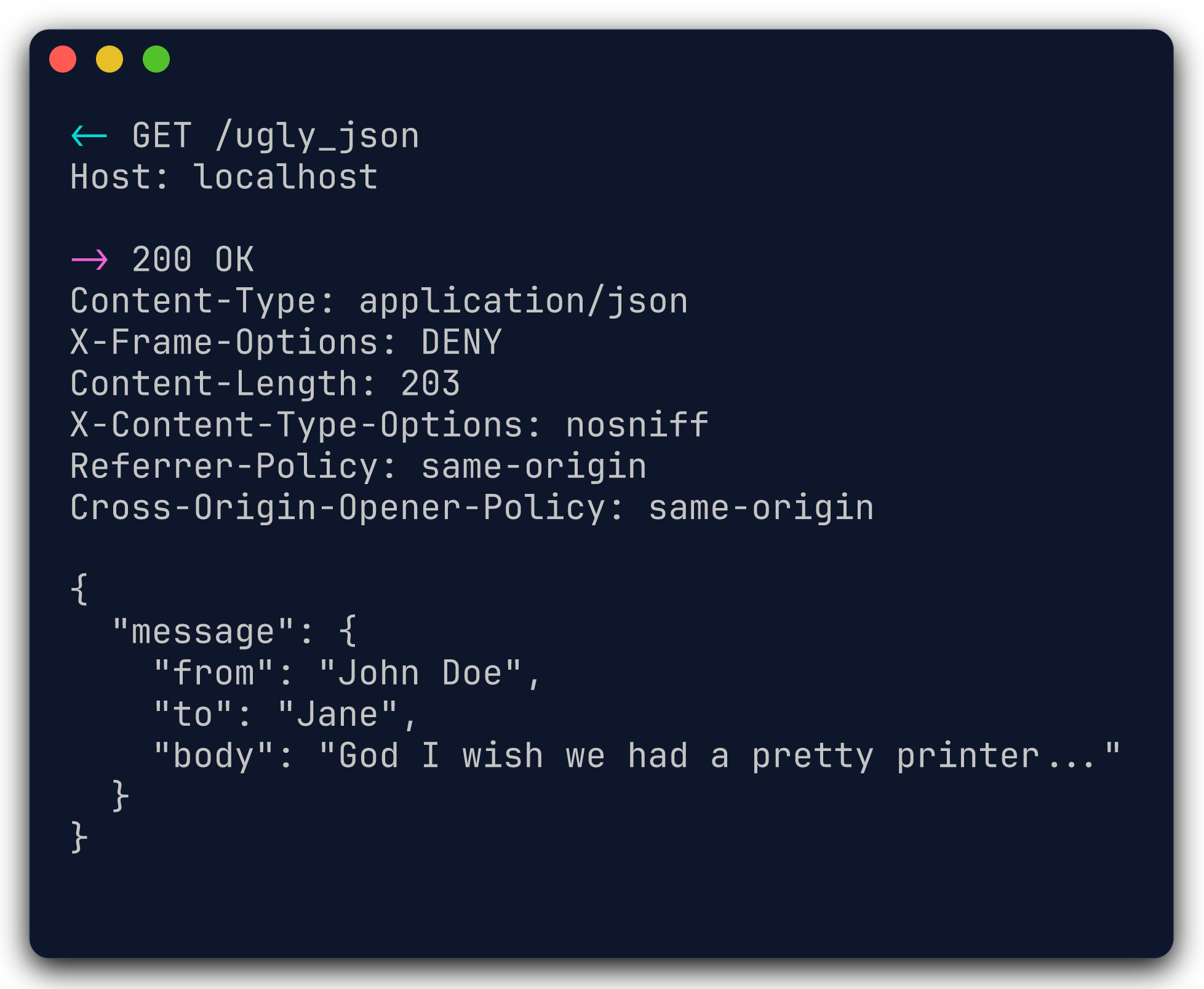
To adjust DDRR's logging behavior, read on...
Customization
import logging

DDRR = {
    "ENABLE_REQUESTS": True,  # enable request logging
    "ENABLE_RESPONSES": True,  # enable response logging
    "LEVEL": "DEBUG",  # ddrr log level
    "PRETTY_PRINT": False,  # pretty-print JSON and XML
    "REQUEST_HANDLER": logging.StreamHandler(),  # request log handler
    "RESPONSE_HANDLER": logging.StreamHandler(),  # response log handler
    "ENABLE_COLORS": True,  # enable colors if terminal supports it
    "LIMIT_BODY": None,  # limit request/response body output to X chars
}
Output safety
DDRR renders terminal control characters as visible escape sequences. Newlines
inside single-line fields such as paths and headers are escaped. Body text keeps
its original indentation for easy copying; lines beginning with DDRR's reserved
<- or -> markers receive a leading backslash to prevent forged log entries.
Pretty-printing
By default, pretty-printing is disabled. Set DDRR["PRETTY_PRINT"] to True
to enable it.
Pretty-printing of JSON and XML uses the Python standard library and requires no external dependencies.
Limitations
- Request bodies that Django has already consumed are shown as unavailable.
- Streaming response bodies are not consumed and are shown as
<streaming>. - Bodies that are not valid UTF-8 are shown using Python's bytes representation.
LIMIT_BODY, when configured, truncates request and response bodies.
How it works internally
The middleware ddrr.middleware.DebugRequestsResponses sends request and
response objects to separate loggers. DDRR's formatters turn them into fixed,
human-readable output. By default, this is shown in your console, but you can
configure the handlers to send it elsewhere.
Similar projects
Example application
Run the bundled example from the repository root:
$ uv run python example/manage.py runserver
The index page links to JSON, XML, binary, streaming, and terminal-control examples.
Development and contributions
PRs are always welcome!
For hacking on DDRR, make sure you are familiar with:
Set up environment
Install the locked tool versions using mise, sync the project environment using
uv, then install the pre-commit hooks. mise automatically creates and activates
the project's .venv when entering the repository.
$ mise install
$ uv sync
$ uv run pre-commit install
The pre-commit hooks will, among other things, use Ruff to lint and format Python code and ty to check types. The full pre-commit configuration exists in
.pre-commit-config.yaml.
GitHub Actions
With Docker running, run the GitHub Actions workflow locally using act:
$ mise run act
Pass additional act options after --, for example mise run act -- --list.
Workflow files are also checked with actionlint by pre-commit.
Type checking
Run ty using the current Python interpreter and project environment:
$ ty check
Running tests
Run tests using the current Python interpreter and currently installed Django version.
$ uv run pytest
Run tests with every supported Python and Django combination:
$ uv run tox --colored no
1 maintainer

Metadata
1 maintainer
Release files for ddrr 4.0.0
For a detailed explanation of source distributions (sdists) and built distributions (wheels), please see the package formats documentation.
Source distribution (sdist)
| File | Size | Uploaded | Provenance | |
|---|---|---|---|---|
| ddrr-4.0.0.tar.gz | 7.7 kB | Without provenance | Details |
Built distribution (wheel)
| File | Interpreter | ABI | Platform | Reset |
|---|---|---|---|---|
| ddrr-4.0.0-py3-none-any.whl | Python 3 | none | any | Details |
Total release size: 17.3 kB
Release files / ddrr-4.0.0.tar.gz
| Download URL | ddrr-4.0.0.tar.gz |
|---|---|
| Size | 7.7 kB |
| Tags | Source |
|
SHA-256 checksum How to use checksums |
08232d723a45ab46be2cbf920ec131b11fe23561ae9b87e4c08c83cc64f7c8c5
|
|
BLAKE2b-256 checksum How to use checksums |
2dd7a6330cb6542e16f7e158e177908d460189d9ac077785980997461393c74a
|
| Upload date | |
|
Uploaded using Trusted Publishing? What is trusted publishing? |
No |
| Uploaded via |
uv/0.11.29 {"installer":{"name":"uv","version":"0.11.29","subcommand":["publish"]},"python":null,"implementation":{"name":null,"version":null},"distro":{"name":"macOS","version":null,"id":null,"libc":null},"system":{"name":null,"release":null},"cpu":null,"openssl_version":null,"setuptools_version":null,"rustc_version":null,"ci":null}
|
Release files / ddrr-4.0.0-py3-none-any.whl
| Download URL | ddrr-4.0.0-py3-none-any.whl |
|---|---|
| Size | 9.7 kB |
| Tags | Python 3 |
|
SHA-256 checksum How to use checksums |
3d47e09a83515406f92c3c6b28e7211f365d63d2fdf6b8c9a2d03e217dc20305
|
|
BLAKE2b-256 checksum How to use checksums |
9d76f5acc7b8a720d1efa0351f53ad218ed51ff4dfd647d7edd9e72270eb8360
|
| Upload date | |
|
Uploaded using Trusted Publishing? What is trusted publishing? |
No |
| Uploaded via |
uv/0.11.29 {"installer":{"name":"uv","version":"0.11.29","subcommand":["publish"]},"python":null,"implementation":{"name":null,"version":null},"distro":{"name":"macOS","version":null,"id":null,"libc":null},"system":{"name":null,"release":null},"cpu":null,"openssl_version":null,"setuptools_version":null,"rustc_version":null,"ci":null}
|
Security for ddrr 4.0.0
Provenance
Provenance describes where a file came from. On PyPI, provenance is shared via attestations, which provide a verifiable record of the build or publishing details. View details, limitations and caveats.
No provenance found
None of the files in this release were uploaded with provenance metadata.
A note on package security
PyPI is a repository for distributing packages, not a service for auditing them. While third-party security researchers and our staff do their best to detect and remove malicious packages, PyPI cannot guarantee the quality, security or suitability of any given package.














