
methods for de-embedding process: T-R-L, L-L and T-VR-L

Project description
De-embedding in Free Space Using the T-VR-L Method:
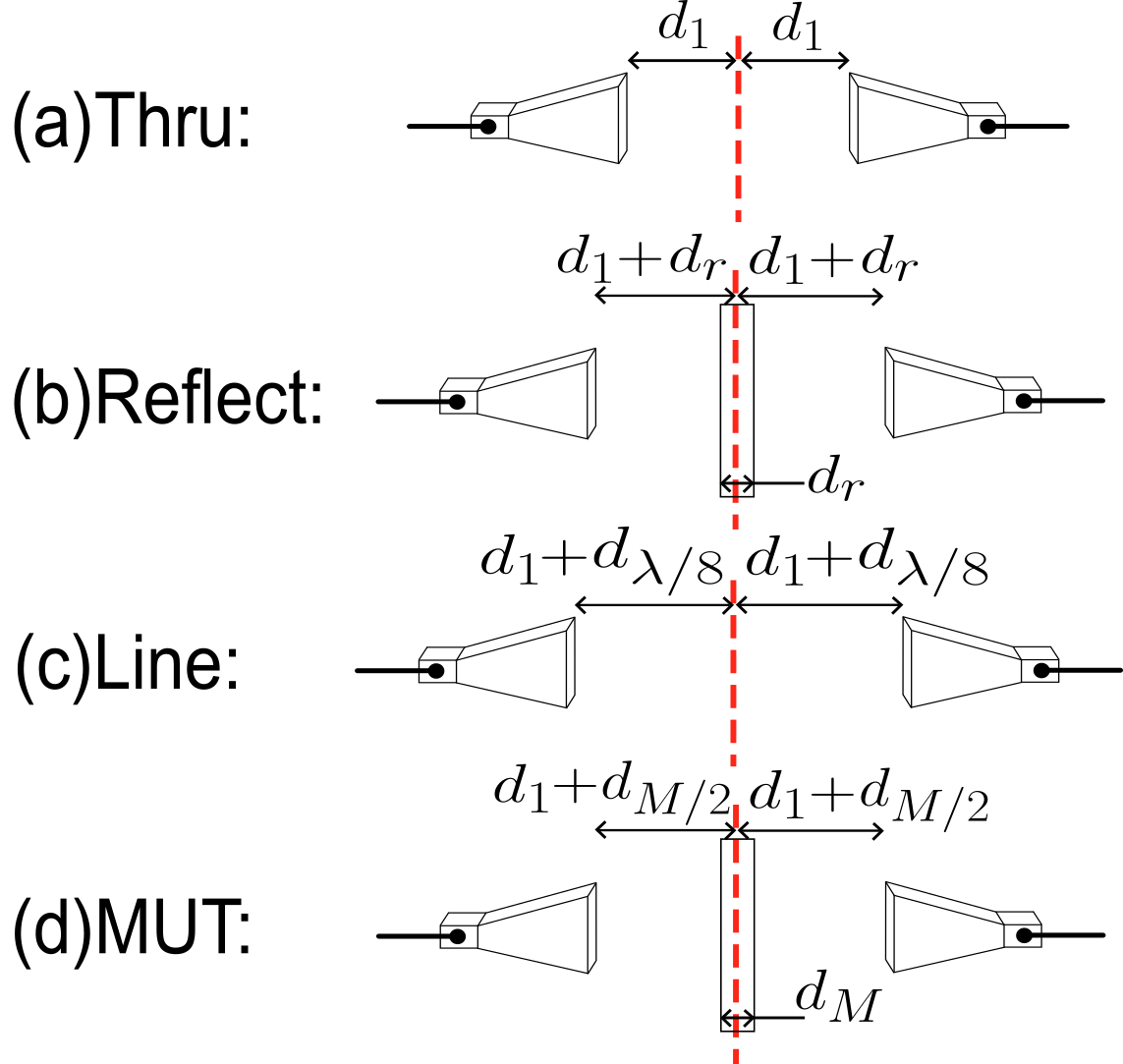
Table of Contents
Required Measurements
- Embedded DUT: It is necessary to save the data in a .s2p file.
- Thru: It is constructed by uniformly separating both antennas at a distance d1. It is necessary to save the data in a .s2p file.
- Line: It is constructed by moving the antennas backward by a distance of λ/4.It is necessary to save the data in a .s2p file.
- Reflect: It is constructed by placing a reflective plate at the Calibration plane. This measurement is required if the user intends to apply the T-R-L method. It is necessary to save the data in a .s1p file for each port.
The 'de-embedding-rf' program includes three example datasets ('Mut.s2p', 'Thru.s2p', and 'Line.s2p') designed for implementing the T-VR-L method. Additionally, it includes data for the reflection standard, 'Reflect_11.s1p' and 'Reflect_22.s1p', which enables the application of the conventional T-R-L method.
Glossary
- path_embedded_dut: embedded DUT measurement location
- path_thru: thru measurement location
- path_line: line measurement location
- path_reflect_11: Reflect measurement location for port 1
- path_reflect_22: Reflect measurement location for port 2
- CreateDict_TRL: Create a dictionary with all the measurement paths for the TRL method
- CreateDict_TVRL: Create a dictionary with all the measurement paths for the TVRL method
- CalibrationTRL: Implementation of the TRL method.
- CalibrationTVRL: Implementation of the TVRL method.
- Postprocessing: Application of Time-Domain Gating.
- plot_mut: Visualization of the S-parameters of the MUT.
Addicionally, in the functions "CreateDict_TRL" and "CreateDict_TVRL", the parameter "example = False" must be set to allow the program to read the user’s data. If the user wishes to use the example data provided in the package, the paths should remain unchanged and "example=True".
Installation
Instructions on how to install the project. For example:
pip install de-embedding-rf
Code Example
For instance, the following code can be executed in Google Colab. Simply copy and paste it into a new Colab notebook.
#--------------------------------------------------------------------------------
# 1) Load libraries:

from de_embedding import CalibrationTRL
from de_embedding import CalibrationTVRL
from de_embedding import CreateDict_TRL, CreateDict_TVRL
from de_embedding import plot_mut
from de_embedding import Postprocessing

#--------------------------------------------------------------------------------
#2) data:
path_embedded_dut = 'Mut.s2p'
path_thru = 'Thru.s2p'
path_line = 'Line.s2p'
path_reflect_11 = 'Reflect_11.s1p'
path_reflect_22 = 'Reflect_22.s1p'

#--------------------------------------------------------------------------------

# 3) Create Dictionary:
dicc_TRL = CreateDict_TRL(path_embedded_dut,path_thru,path_line,path_reflect_11,path_reflect_22,example=True)
dicc_TVRL = CreateDict_TVRL(path_embedded_dut,path_thru,path_line,example=True)

#--------------------------------------------------------------------------------

#4) Execute Calibration Methods:
ntwk_mut_TRL = CalibrationTRL(dicc_TRL).run()
ntwk_mut_TVRL = CalibrationTVRL(dicc_TVRL).run()

#--------------------------------------------------------------------------------
#5) Apply post-processing

freq_trl, mag_trl, deg_trl = Postprocessing(ntwk_mut_TRL).run(400,120)
freq_tvrl, mag_tvrl, deg_tvrl = Postprocessing(ntwk_mut_TVRL).run(400,120)

#--------------------------------------------------------------------------------
#6) show figure of S parameters
plot_mut(freq_trl, mag_trl, deg_trl)
plot_mut(freq_tvrl, mag_tvrl, deg_tvrl)
Release history Release notifications | RSS feed


Download files
Download the file for your platform. If you're not sure which to choose, learn more about installing packages.
Source Distributions
Built Distribution
Filter files by name, interpreter, ABI, and platform.
If you're not sure about the file name format, learn more about wheel file names.
Copy a direct link to the current filters
File details
Details for the file de_embedding_rf-0.3.6-py3-none-any.whl.
File metadata
- Download URL: de_embedding_rf-0.3.6-py3-none-any.whl
- Upload date:
- Size: 754.9 kB
- Tags: Python 3
- Uploaded using Trusted Publishing? No
- Uploaded via: twine/4.0.2 CPython/3.11.5
File hashes
| Algorithm | Hash digest | |
|---|---|---|
| SHA256 |
bd99cda99ce7d1ec8dec81036cf38a48340daca9a0c856f8cc51a3dc00db480d
|
|
| MD5 |
047e3b3c1f16e83bf4171773445d14db
|
|
| BLAKE2b-256 |
4b59e11d19a43cf15408b326aff7931a757f2b7b31d5a251b23054ad4295f3e0
|






