
🪤 Dead Man's Switch

A heartbeat watchdog that fires when you go silent.




"If I don't check in by tomorrow, the package ships itself."
What is it?
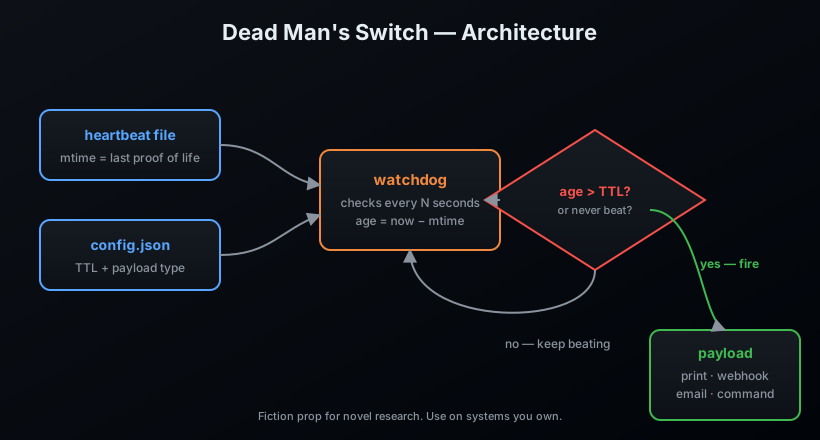
The Dead Man's Switch is the oldest trick in the espionage playbook, turned into a tiny command-line tool. You arm it with a TTL (time-to-live). You stamp a heartbeat file — a proof of life. If the heartbeat goes stale — if you're taken, you're cut off, or your cron just breaks — the switch fires its payload.
A natural fit for:
- Novel research — the scene where the captured hero can't touch the file and the countdown is real.
- Automation safety — if a scheduled task stops reporting, get an alert.
- Personal failsafes — a check-in ritual that escalates when it breaks.
Features
- ⏱️ Heartbeat file with configurable TTL
- 🔫 Four payload types:
print,webhook,email,command - 🌀 Watch mode — blocks and fires the moment the switch trips
- 🛡️
statuscommand tells you exactly how much slack you have left - 📦 Zero runtime dependencies, pure Python standard library
Install
pip install deadman-switch
From source:
git clone https://github.com/AnonymoDGH/deadman-switch
cd deadman-switch
pip install -e .
Quickstart
# 1. Arm it — 60 seconds of silence means fire
dms arm --ttl 60 --payload '{"type": "command", "command": "echo released the files"}'

# 2. Prove you're alive
dms heartbeat

# 3. How much slack is left?
dms status
# [+] Alive. Last beat 3s ago, 57s of slack left.

# 4. Block until the switch fires
dms watch
CLI reference
| Command | What it does |
|---|---|
dms init |
Create a default config and first heartbeat |
dms arm --ttl <s> --payload <json> |
Set TTL / payload, then beat |
dms heartbeat |
Stamp the heartbeat file |
dms status |
Report age and whether the switch is tripped |
dms watch [--interval <s>] |
Block until the payload fires |
dms disarm |
Neuter the payload (safe mode) |
All commands accept --config <path> to point at a different config file.
Payloads
{ "type": "webhook", "url": "https://example.com/hook", "data": "{\"op\":\"release\"}" }
{ "type": "email", "from": "agent@example.com", "to": "control@example.com",
  "subject": "SILENCE", "message": "The package is loose.",
  "smtp_host": "smtp.example.com", "smtp_user": "u", "smtp_pass": "p" }
{ "type": "command", "command": "python notify.py --urgent" }
How it works
Tests
pip install pytest
pytest
License
MIT — a fiction research prop. Use it on systems you own, and keep the fireworks in the novel where they belong.
1 maintainer

Release files for deadman-switch 0.1.0
For a detailed explanation of source distributions (sdists) and built distributions (wheels), please see the package formats documentation.
Source distribution (sdist)
| File | Size | Uploaded | |
|---|---|---|---|
| deadman_switch-0.1.0.tar.gz | 7.0 kB | Details |
Built distribution (wheel)
| File | Interpreter | ABI | Platform | Reset |
|---|---|---|---|---|
| deadman_switch-0.1.0-py3-none-any.whl | Python 3 | none | any | Details |
Total release size: 14.1 kB
Release files / deadman_switch-0.1.0.tar.gz
| Download URL | deadman_switch-0.1.0.tar.gz |
|---|---|
| Size | 7.0 kB |
| Tags | Source |
|
SHA-256 checksum How to use checksums |
d8285207bcba3b35e55d345bd533980cea2a686c4f47605ce69cd0fb02dc5562
|
|
BLAKE2b-256 checksum How to use checksums |
d276101746d19c48721c9dc5f920ca3af167c1f247a30fd7059595bfdbf80b59
|
| Upload date | |
|
Uploaded using Trusted Publishing? What is trusted publishing? |
No |
| Uploaded via |
twine/7.0.0 CPython/3.14.3
|
Release files / deadman_switch-0.1.0-py3-none-any.whl
| Download URL | deadman_switch-0.1.0-py3-none-any.whl |
|---|---|
| Size | 7.1 kB |
| Tags | Python 3 |
|
SHA-256 checksum How to use checksums |
367115a4917b2f769a5b456986f04f8847855e47aeadb317171f8cc39357cf3e
|
|
BLAKE2b-256 checksum How to use checksums |
95a1bd044c5f8cafbcf33d59f031f49aa3e63a1c9b11d20da0d5bc556dca6c16
|
| Upload date | |
|
Uploaded using Trusted Publishing? What is trusted publishing? |
No |
| Uploaded via |
twine/7.0.0 CPython/3.14.3
|














