
DeBCR
DeBCR is a Python-based framework for light microscopy data enhancement, including denoising and deconvolution.
As an enhancement core, DeBCR implements a multi-scale sparsity-efficient deep learning model m-rBCR.
As a framework, DeBCR provides user interfaces such as:
debcr- a Python-based API library for scripting, e.g. using Jupyter Notebook/Labnapari-debcr- an add-on GUI plugin for Napari viewer
License
This is an open-source project and is licensed under MIT license.
Contact
For any questions or bug-reports on debcr please use dedicated GitHub Issue Tracker.
Installation
There are two hardware-based installation options for debcr:
debcr[tf-gpu]- for a GPU-based trainig and prediction (recommended);debcr[tf-cpu]- for a CPU-only execution (note: training on CPUs might be quite slow!).
GPU prerequisites
For a GPU version you need:
- a GPU device with at least 12Gb of VRAM;
- a compatible CUDA Toolkit (recommemded: CUDA-11.7);
- a compatible cuDNN library (recommemded: v8.4.0 for CUDA-11.x from cuDNN archive).
For more info on GPU dependencies please check our GPU-advice page.
Create a package environment (optional)
For a clean isolated installation, we advice using one of Python package environment managers, for example:
micromamba/mamba(see mamba.readthedocs.io)conda-forge(see conda-forge.org)
Create an environment for debcr using
micromamba env create -n debcr python=3.9 -y
and activate it for further installation or usage by
micromamba activate debcr
Install DeBCR
Install one of the DeBCR versions:
- GPU (recommended; backend: TensorFlow-GPU-v2.11):
pip install 'debcr[tf-gpu]'
- CPU (limited; backend: TensorFlow-CPU-v2.11)
pip install 'debcr[tf-cpu]'
Test GPU visibility
For a GPU version installation, it is recommended to check if your GPU device is recognised by TensorFlow using
python -c "import tensorflow as tf; print(tf.config.list_physical_devices('GPU'))"
which for a single GPU device should produce a similar output as below:
[PhysicalDevice(name='/physical_device:GPU:0', device_type='GPU')]
If your GPU device list is empty, please check our GPU-advice page.
Install Jupyter
To use debcr as a Python library (API) interactively, please also install Jupyter Notebook/Lab, for example
pip install jupyterlab
Usage
To learn using debcr as a python library (API) interactively, follow our notebook tutorials:
| Notebook tutorial | Purpose | Hardware | Inputs |
|---|---|---|---|
| debcr_predict.ipynb | enhanced prediction | CPU/GPU | pre-processed input data (NPZ/NPY), trained DeBCR model. |
| debcr_train.ipynb | model training | GPU | training/validation data (NPZ/NPY). |
| debcr_preproc.ipynb | raw data pre-processing | CPU | raw data (TIF/TIFF, JPG/JPEG, PNG). |
To use these notebooks,
- activate
debcrenvironment, if was inactive, by
micromamba activate debcr
- start Jupyter session at the notebooks location (download them from the DeBCR GitHub)
jupyter-lab
Example data and trained model weights
Based on several previously published datasets (from CARE, DeepBacs, and TA-GAN), we prepared four example datasets and trained m-rBCR model weights to both evaluate our model and serve as the example data/weights for notebook tutorials.
The datasets are distributed as NumPy (.npz) arrays in three essential sets (train, validation and test), available along with the trained model weights on Zenodo: 10.5281/zenodo.12626121.
About model
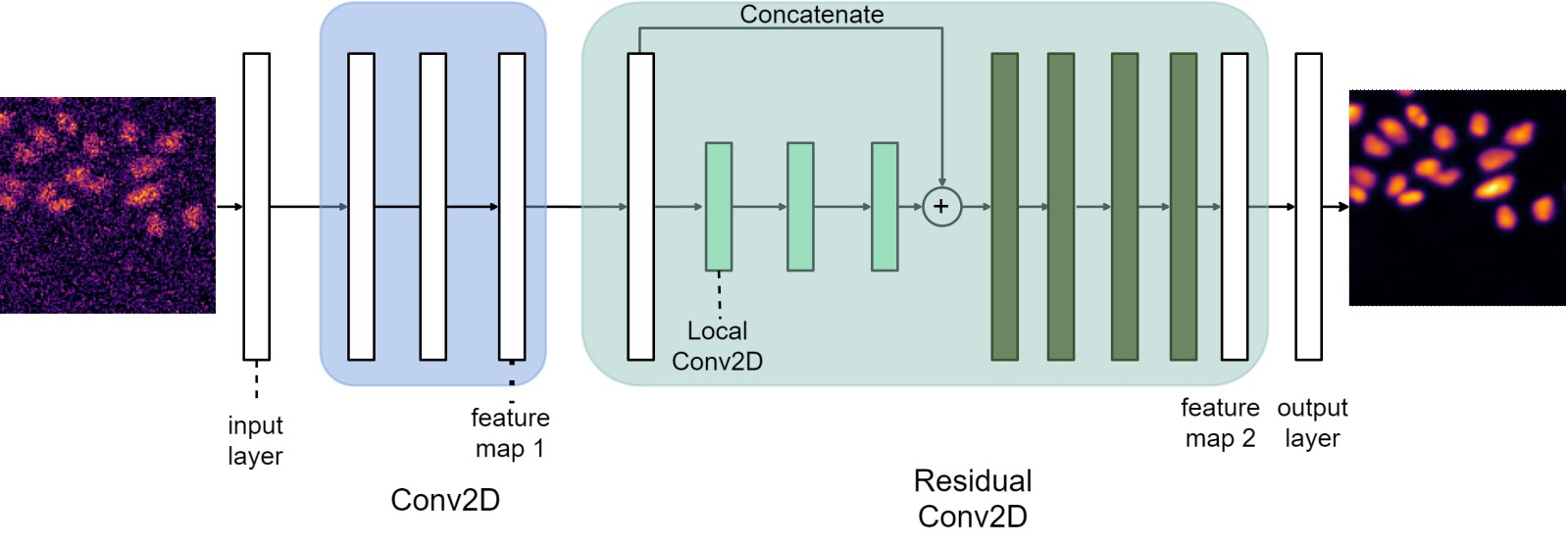
The core DeBCR enhancement model m-rBCR approximates imaging process inversion with deep convolutional neural network (DCNN), based on compact BCR-representation (Beylkin G. et al., Comm. Pure Appl. Math, 1991) for convolutions and its DCNN implementation as proposed in BCR-Net (Fan Y. et al., J. Comput. Phys., 2019):
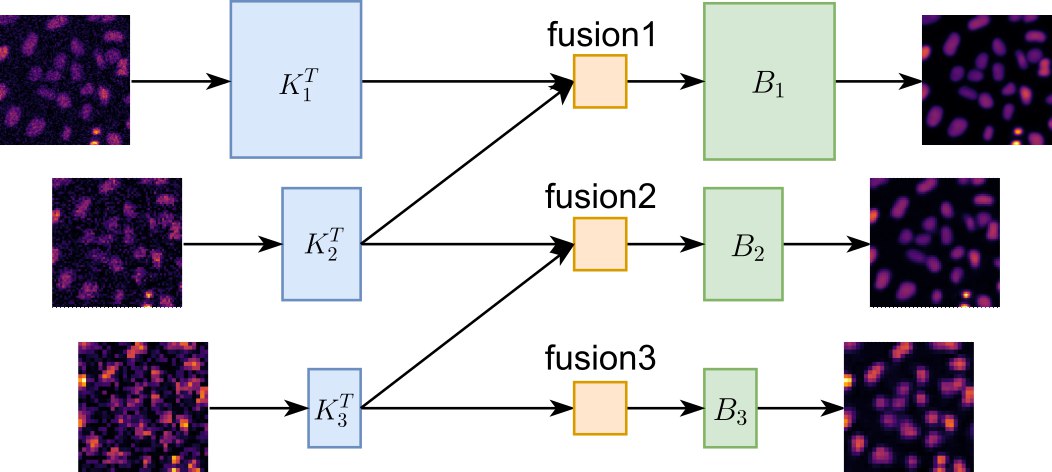
In contrast to the traditional single-stage residual BCR learning process, the core DeBCR model integrates feature maps from multiple resolution levels:
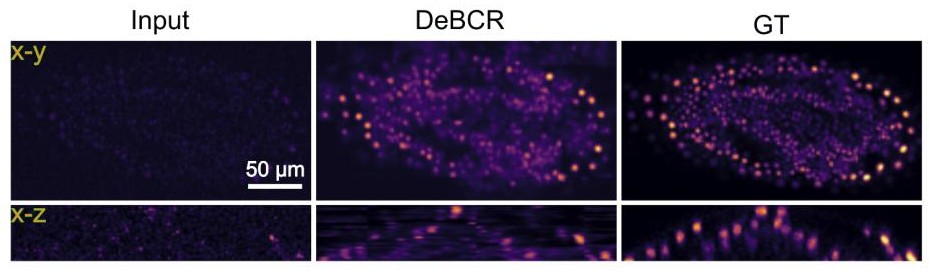
The example of the DeBCR performance on the low/high exposure confocal data of Tribolium castaneum sample from the CARE work (Weigert et al., Nat. Methods, 2018) is shown below:
For more details on the multi-stage residual BCR (m-rBCR) architechture implemented within DeBCR framework see:
Li, R., Kudryashev, M., Yakimovich, A. Solving the Inverse Problem of Microscopy Deconvolution with a Residual Beylkin-Coifman-Rokhlin Neural Network. ECCV 2024, Lecture Notes in Computer Science, vol 15133. Springer, Cham. https://doi.org/10.1007/978-3-031-73226-3_22
1 maintainer

Download files
Download the file for your platform. If you're not sure which to choose, learn more about installing packages.
Source Distribution
Built Distribution
Filter files by name, interpreter, ABI, and platform.
If you're not sure about the file name format, learn more about wheel file names.
Copy a direct link to the current filters
File details
Details for the file debcr-0.1.0.tar.gz.
File metadata
- Download URL: debcr-0.1.0.tar.gz
- Upload date:
- Size: 21.0 kB
- Tags: Source
- Uploaded using Trusted Publishing? No
- Uploaded via:
poetry/2.1.3 CPython/3.10.7 Linux/5.14.0-427.13.1.el9_4.x86_64
File hashes
| Algorithm | Hash digest | |
|---|---|---|
| SHA256 |
40b588b9a0a9b7e4987b0708bf7319443a791b02879236bd6d7c851c4b9827f4
|
|
| MD5 |
dc9ac2df992c3db7a96251c85120df1b
|
|
| BLAKE2b-256 |
f56e9adb86f90cc8eef04c9b9912bc0faf323f1ca031bd77989e177ea1a680a4
|
File details
Details for the file debcr-0.1.0-py3-none-any.whl.
File metadata
- Download URL: debcr-0.1.0-py3-none-any.whl
- Upload date:
- Size: 23.7 kB
- Tags: Python 3
- Uploaded using Trusted Publishing? No
- Uploaded via:
poetry/2.1.3 CPython/3.10.7 Linux/5.14.0-427.13.1.el9_4.x86_64
File hashes
| Algorithm | Hash digest | |
|---|---|---|
| SHA256 |
d0dfa507c59ab58b9faa6e8f650429804d8a040ffaa97e83e56772938898ef7f
|
|
| MD5 |
26438959942504c97b59a6863a7638db
|
|
| BLAKE2b-256 |
4d4c991c6b87bb22bbbe5260336b0cde17d2c9af28a7d7bdaf21f40b32fba286
|







