
DeBCR
DeBCR is a Python-based framework for light microscopy data enhancement, including denoising and deconvolution.
As an enhancement core, DeBCR implements a multi-scale sparsity-efficient deep learning model m-rBCR.
As a framework, DeBCR provides user interfaces such as:
debcr- a Python-based API library for scripting, e.g. using Jupyter Notebook/Labnapari-debcr- an add-on GUI plugin for Napari viewer
License
This is an open-source project and is licensed under MIT license.
Contact
For any questions or bug-reports on debcr please use dedicated GitHub Issue Tracker.
Installation
There are two hardware-based installation options for debcr:
debcr[tf-gpu]- for a GPU-based trainig and prediction (recommended);debcr[tf-cpu]- for a CPU-only execution (note: training on CPUs might be quite slow!).
GPU prerequisites
For a GPU version you need:
- a GPU device with at least 12Gb of VRAM;
- a compatible CUDA Toolkit (recommemded: CUDA-11.7);
- a compatible cuDNN library (recommemded: v8.4.0 for CUDA-11.x from cuDNN archive).
For more info on GPU dependencies please check our GPU-advice page.
Create a package environment (optional)
For a clean isolated installation, we advice using one of Python package environment managers, for example:
micromamba/mamba(see mamba.readthedocs.io)conda-forge(see conda-forge.org)
Create an environment for debcr using
micromamba env create -n debcr python=3.9 -y
and activate it for further installation or usage by
micromamba activate debcr
Install DeBCR
Install one of the DeBCR versions:
- GPU (recommended; backend: TensorFlow-GPU-v2.11):
pip install 'debcr[tf-gpu]'
- CPU (limited; backend: TensorFlow-CPU-v2.11)
pip install 'debcr[tf-cpu]'
Test GPU visibility
For a GPU version installation, it is recommended to check if your GPU device is recognised by TensorFlow using
python -c "import tensorflow as tf; print(tf.config.list_physical_devices('GPU'))"
which for a single GPU device should produce a similar output as below:
[PhysicalDevice(name='/physical_device:GPU:0', device_type='GPU')]
If your GPU device list is empty, please check our GPU-advice page.
Install Jupyter
To use debcr as a Python library (API) interactively, please also install Jupyter Notebook/Lab, for example
pip install jupyterlab
Usage
To learn using debcr as a python library (API) interactively, follow our notebook tutorials:
| Notebook tutorial | Purpose | Hardware | Inputs |
|---|---|---|---|
| debcr_predict.ipynb | enhanced prediction | CPU/GPU | pre-processed input data (NPZ/NPY), trained DeBCR model. |
| debcr_train.ipynb | model training | GPU | training/validation data (NPZ/NPY). |
| debcr_preproc.ipynb | raw data pre-processing | CPU | raw data (TIF/TIFF, JPG/JPEG, PNG). |
To use these notebooks,
- activate
debcrenvironment, if was inactive, by
micromamba activate debcr
- start Jupyter session at the notebooks location (download them from the DeBCR GitHub)
jupyter-lab
Example data and trained model weights
Based on several previously published datasets (from CARE, DeepBacs, and TA-GAN), we prepared four example datasets and trained m-rBCR model weights to both evaluate our model and serve as the example data/weights for notebook tutorials.
The datasets are distributed as NumPy (.npz) arrays in three essential sets (train, validation and test), available along with the trained model weights on Zenodo: 10.5281/zenodo.12626121.
About model
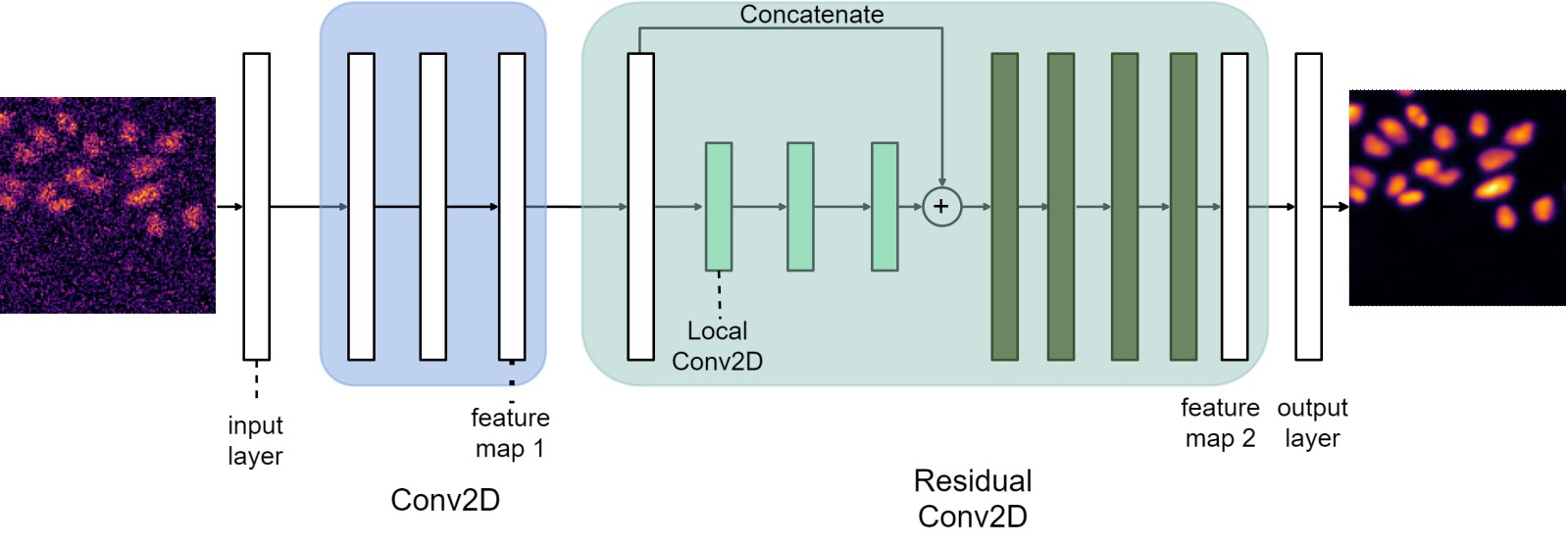
The core DeBCR enhancement model m-rBCR approximates imaging process inversion with deep convolutional neural network (DCNN), based on compact BCR-representation (Beylkin G. et al., Comm. Pure Appl. Math, 1991) for convolutions and its DCNN implementation as proposed in BCR-Net (Fan Y. et al., J. Comput. Phys., 2019):
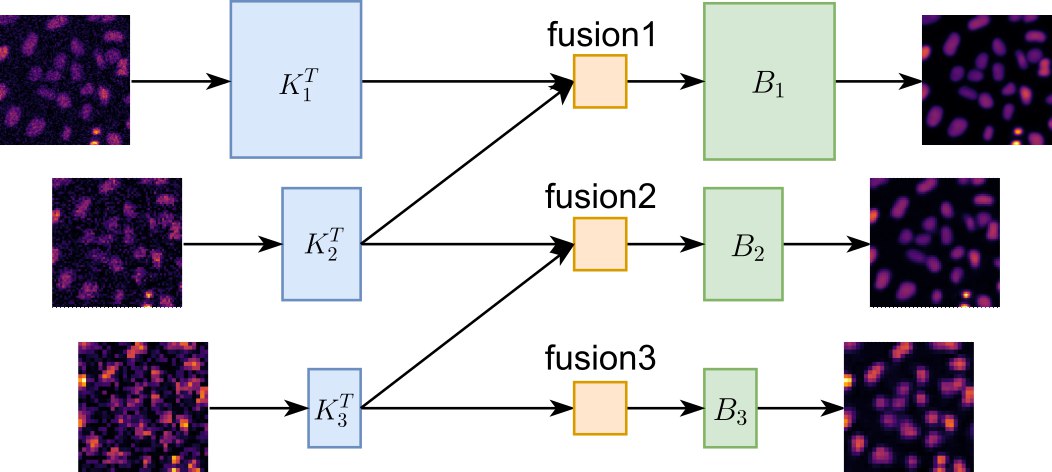
In contrast to the traditional single-stage residual BCR learning process, the core DeBCR model integrates feature maps from multiple resolution levels:
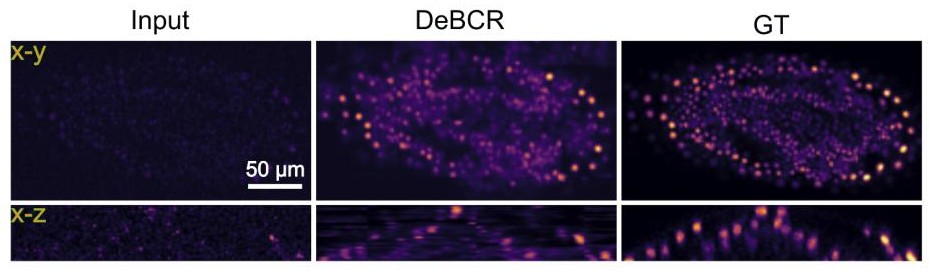
The example of the DeBCR performance on the low/high exposure confocal data of Tribolium castaneum sample from the CARE work (Weigert et al., Nat. Methods, 2018) is shown below:
For more details on the multi-stage residual BCR (m-rBCR) architechture implemented within DeBCR framework see:
Li, R., Kudryashev, M., Yakimovich, A. Solving the Inverse Problem of Microscopy Deconvolution with a Residual Beylkin-Coifman-Rokhlin Neural Network. ECCV 2024, Lecture Notes in Computer Science, vol 15133. Springer, Cham. https://doi.org/10.1007/978-3-031-73226-3_22
1 maintainer

Metadata
1 maintainer
Release files for debcr 0.1.0
For a detailed explanation of source distributions (sdists) and built distributions (wheels), please see the package formats documentation.
Source distribution (sdist)
| File | Size | Uploaded | Provenance | |
|---|---|---|---|---|
| debcr-0.1.0.tar.gz | 21.0 kB | Without provenance | Details |
Built distribution (wheel)
| File | Interpreter | ABI | Platform | Reset |
|---|---|---|---|---|
| debcr-0.1.0-py3-none-any.whl | Python 3 | none | any | Details |
Total release size: 44.7 kB
Release files / debcr-0.1.0.tar.gz
| Download URL | debcr-0.1.0.tar.gz |
|---|---|
| Size | 21.0 kB |
| Tags | Source |
|
SHA-256 checksum How to use checksums |
40b588b9a0a9b7e4987b0708bf7319443a791b02879236bd6d7c851c4b9827f4
|
|
BLAKE2b-256 checksum How to use checksums |
f56e9adb86f90cc8eef04c9b9912bc0faf323f1ca031bd77989e177ea1a680a4
|
| Upload date | |
|
Uploaded using Trusted Publishing? What is trusted publishing? |
No |
| Uploaded via |
poetry/2.1.3 CPython/3.10.7 Linux/5.14.0-427.13.1.el9_4.x86_64
|
Release files / debcr-0.1.0-py3-none-any.whl
| Download URL | debcr-0.1.0-py3-none-any.whl |
|---|---|
| Size | 23.7 kB |
| Tags | Python 3 |
|
SHA-256 checksum How to use checksums |
d0dfa507c59ab58b9faa6e8f650429804d8a040ffaa97e83e56772938898ef7f
|
|
BLAKE2b-256 checksum How to use checksums |
4d4c991c6b87bb22bbbe5260336b0cde17d2c9af28a7d7bdaf21f40b32fba286
|
| Upload date | |
|
Uploaded using Trusted Publishing? What is trusted publishing? |
No |
| Uploaded via |
poetry/2.1.3 CPython/3.10.7 Linux/5.14.0-427.13.1.el9_4.x86_64
|
Security for debcr 0.1.0
Provenance
Provenance describes where a file came from. On PyPI, provenance is shared via attestations, which provide a verifiable record of the build or publishing details. View details, limitations and caveats.
No provenance found
None of the files in this release were uploaded with provenance metadata.
A note on package security
PyPI is a repository for distributing packages, not a service for auditing them. While third-party security researchers and our staff do their best to detect and remove malicious packages, PyPI cannot guarantee the quality, security or suitability of any given package.













