
DebiAI easy start module, the standalone version of DebiAI

Project description









Why DebiAI Gui?
DebiAI Gui is an open source package that allows you to launch DebiAI in a standalone state. Thus by installing this module you can use quickly the DebiAI open-source web application that aims to facilitate the process of developing Machine Learning models, especially in the stage of the project data analysis and the model performance comparison.
DebiAI provides data scientists with features to:
- Identify biases and errors in your input, results, contextual or ground truth project data
- Make a comparison of the performance of your ML according to their contextual results
- Select and create sets of data graphically for further analysis or (re-)training purposes
- Quickly create and share statistical visualizations of your project data for your team or client
Documentation
The full documentation is available on the DebiAI website.
Dashboard
DebiAI has a Web Graphical User Interface with a complete data visualization toolkit offering many statistical analysis tools:
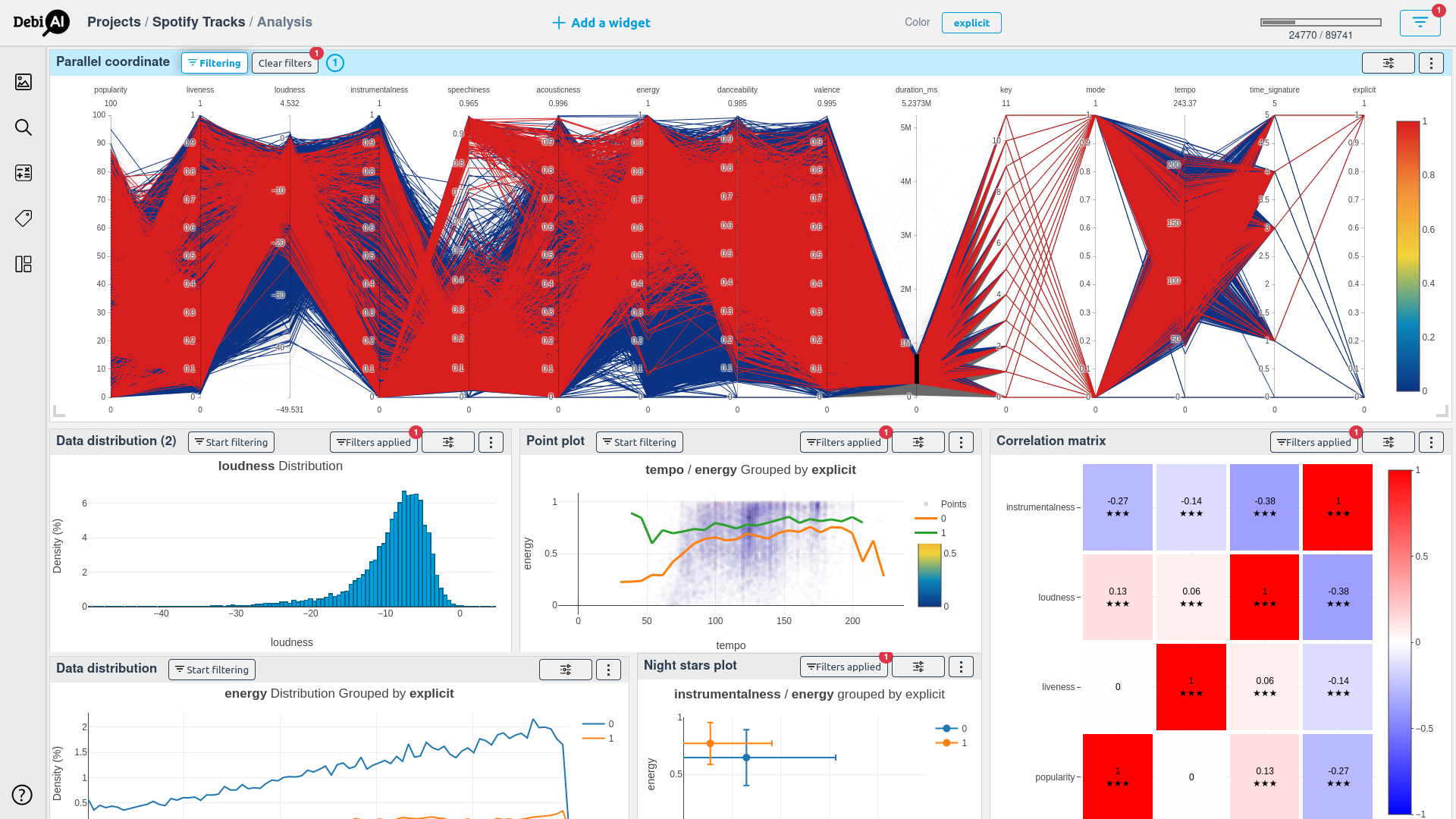
The dashboard is highly customizable and can be used for large and small projects. Learn more about the widgets and how to use them.
Data
DebiAI is designed to be used for any kind projects and data, it is particularly useful for projects that involve many contextual data.
DebiAI provide two main ways to import your data:
- A DebiAI Python module is provided to insert, directly from your Python workflow, the data and model results that you want to study.
- You can also create a Data Provider, a Web API that will allow DebiAI to reach your data and model results from any programming language and any data sources without duplication. Check out the DebiAI Data Provider NodeJs template for an example of a Data Provider.
Installation
DebiAI-GUI is available as a python module with pip. To install it, you can follow the installation guide.
Use cases
As part of the Confiance.ai program, we (the IRT SystemX) are using and developing DebiAI for a wide range of use cases.
One of them is the Valeo - WoodScape dataset:
Valeo - WoodScape
The Valeo - WoodScape dataset is an annotated image dataset taken from 4 fisheye cameras. DebiAI is used to analyze the dataset for biases and outliers in the data.
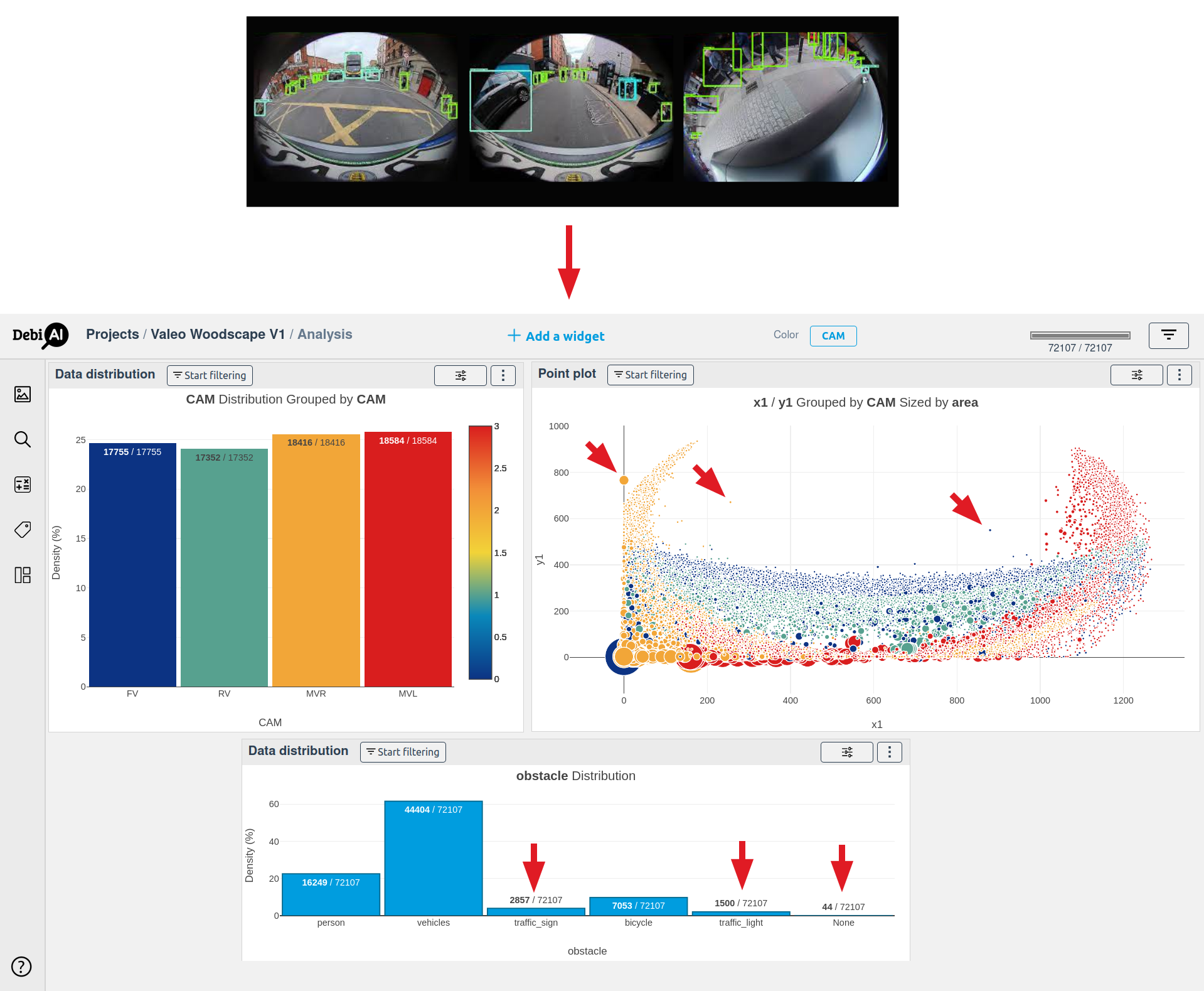
Withing the Confiance.ai program, DebiAI has been able to import the project data, detect biases, find annotations errors and export them to the project's image annotation tool.
DebiAI-GUI is developed by


Release history Release notifications | RSS feed


Download files
Download the file for your platform. If you're not sure which to choose, learn more about installing packages.
Source Distribution
Built Distribution
Filter files by name, interpreter, ABI, and platform.
If you're not sure about the file name format, learn more about wheel file names.
Copy a direct link to the current filters
File details
Details for the file debiai-gui-0.30.10.tar.gz.
File metadata
- Download URL: debiai-gui-0.30.10.tar.gz
- Upload date:
- Size: 7.1 MB
- Tags: Source
- Uploaded using Trusted Publishing? No
- Uploaded via: twine/6.1.0 CPython/3.9.21
File hashes
| Algorithm | Hash digest | |
|---|---|---|
| SHA256 |
acd5117a43bbc2c17cc7f003bdba645cd68d9fe5dfb25b89430190fadcccd4bf
|
|
| MD5 |
c135bd67e67fde61f75f2b5a3fe8bc3b
|
|
| BLAKE2b-256 |
80a2f73c709b5468c6fe9c81a7ce460d859c6ed11c8a49f4da565f471a0d6a93
|
File details
Details for the file debiai_gui-0.30.10-py3-none-any.whl.
File metadata
- Download URL: debiai_gui-0.30.10-py3-none-any.whl
- Upload date:
- Size: 7.2 MB
- Tags: Python 3
- Uploaded using Trusted Publishing? No
- Uploaded via: twine/6.1.0 CPython/3.9.21
File hashes
| Algorithm | Hash digest | |
|---|---|---|
| SHA256 |
d9a5a7926b5bccbae356732279e724bf173b2f93da374c121ad08703593c1d17
|
|
| MD5 |
6e6abe65137f9a3785ed07f510ff7c30
|
|
| BLAKE2b-256 |
fc6e7fb154893818c167803c1b724bde14309f2194920e054acb6adbdf27eb35
|






