
Local-first CLI that records the meaningful context of a debugging session and turns it into a useful markdown brief.

Project description
DebugBrief


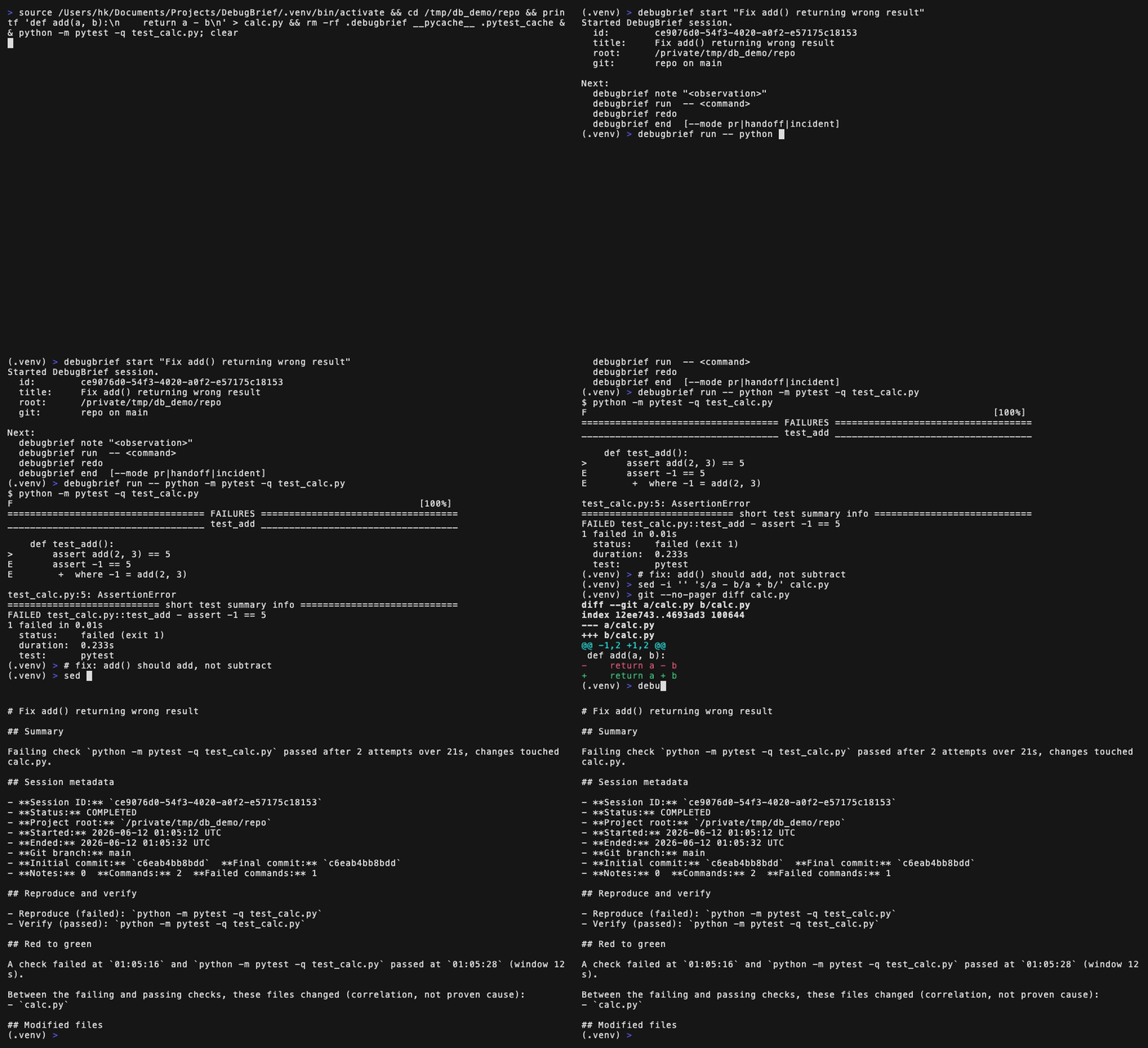
Turn a debugging session into an honest markdown brief for a PR, a handoff, or an incident note.
You record notes and run commands through DebugBrief while you work. When you are done, it writes a report built only from what actually happened: what you tried, what failed, what then passed, and which files changed in between. It never invents a root cause and never claims a test result you did not get.
It is local-first and dependency-free: standard library plus native git, no
network, no AI, no telemetry. Unix-like systems only.
See a real generated report: examples/sample-pr.md.
Install
pip install debugbrief
Or from a clone: pip install -e .. Needs Python 3.9+ and native git on a
Unix-like system (Linux, macOS, BSD).
Quickstart
debugbrief start "Fix add() returning wrong result"
debugbrief note "add() subtracts instead of adds; the test expects 5."
debugbrief run -- python -m pytest -q test_calc.py   # fails
# ... make your fix ...
debugbrief redo                                      # same test again: passes
debugbrief end                                       # writes the pr-style brief
Everything after -- runs exactly as you typed it, with its output streaming
live to your terminal; DebugBrief flags (--timeout, --shell, --no-redact)
go before the --. Quoting the whole command also works: debugbrief run "pytest -q". redo re-runs the last captured command, and end defaults to
the pr report mode.
Tip: a one-line alias makes the capture prefix disappear in daily use:
alias db="debugbrief run --"
db pytest -q
run and note auto-start a session if you forget to, so a capture is never
lost (and debugbrief cancel discards a session you did not mean to start).
The resulting report leads with a derived one-liner like:
Failing check
python -m pytest -q test_calc.pypassed after 2 attempts over 2s, changes touched calc.py.
How it works
runexecutes a command, records its real exit code, bounded output, duration, and a per-command git snapshot, then returns the command's own exit code.- Pass/fail comes only from the exit code. A command counts as "verified" only if
a recognized test/build/lint/typecheck command actually exited
0. - Recognized runners include pytest, unittest, tox, vitest, jest, bun test,
deno test, node --test, npm/pnpm/yarn test, go test, cargo test, make
test/check, dotnet test, ctest, phpunit, mix test, swift test, rspec, and
mvn/gradle test. For custom scripts, declare the check yourself:
debugbrief run --verify -- ./scripts/test.sh. endderives the report from those events: the red-to-green window, the reproduce/verify commands, a timeline, the observed error verbatim, and what was ruled out. Empty sections are omitted, never padded.- Redaction runs before anything reaches disk and catches common shapes:
sensitive
name=valuepairs, bearer and authorization headers, OpenAI/AWS/ GitHub style keys, connection-string passwords, and PEM private key blocks, each replaced with[redacted]. Best effort by design;--no-redactopts out per command.
Commands
| Command | What it does |
|---|---|
start "<title>" |
Start a session |
note <text ...> |
Record a note (quoting optional) |
run -- <command ...> |
Execute and capture a command |
redo |
Re-run the last captured command |
preview [--mode ...] |
Print the report without ending the session |
end [--mode pr|handoff|incident] |
Finalize and write a report (default pr) |
cancel [--yes] |
Discard the active session, no report |
status |
Show the active session |
doctor [--fix] |
Health-check the project and state |
last / open |
Find or open the most recent report |
list / show <id> |
Browse recorded sessions |
Full detail, flags, and the report modes: docs/COMMANDS.md.
Post a brief straight to a PR (GitHub CLI optional):
debugbrief end --stdout | gh pr comment --body-file -
Limitations
- Unix-like only; no Windows/PowerShell.
- Capture is explicit via
debugbrief run. There is no terminal transcript or PTY capture, and output is stored as bounded previews, not full logs. - Interactive and TUI commands (a pdb session, watch modes) will behave oddly
under
run, because output is piped for capture rather than attached to a terminal. Run those directly and record the outcome withnote. - Redaction is conservative and best effort; it does not catch every secret.
- Git sections need native
git; outside a repo they are omitted honestly.
Development
pip install -e ".[dev]"
pytest
License
MIT. See LICENSE.
Release history Release notifications | RSS feed


Download files
Download the file for your platform. If you're not sure which to choose, learn more about installing packages.
Source Distribution
Built Distribution
Filter files by name, interpreter, ABI, and platform.
If you're not sure about the file name format, learn more about wheel file names.
Copy a direct link to the current filters
File details
Details for the file debugbrief-1.2.0.tar.gz.
File metadata
- Download URL: debugbrief-1.2.0.tar.gz
- Upload date:
- Size: 70.6 kB
- Tags: Source
- Uploaded using Trusted Publishing? No
- Uploaded via: twine/6.2.0 CPython/3.9.6
File hashes
| Algorithm | Hash digest | |
|---|---|---|
| SHA256 |
8c80ab35b799cfeb16c30e47e5337c88fadee5f33ce6c843020578152df88200
|
|
| MD5 |
d8794460fc838c3b038d53a0446cc18b
|
|
| BLAKE2b-256 |
4054d2f9ced87f7b58ccc385e5fc654f1f56a56aa0e7db3568d1c475194334e3
|
File details
Details for the file debugbrief-1.2.0-py3-none-any.whl.
File metadata
- Download URL: debugbrief-1.2.0-py3-none-any.whl
- Upload date:
- Size: 53.0 kB
- Tags: Python 3
- Uploaded using Trusted Publishing? No
- Uploaded via: twine/6.2.0 CPython/3.9.6
File hashes
| Algorithm | Hash digest | |
|---|---|---|
| SHA256 |
281ba62c019651c951adfbbcaf5030de50a8339d94169c948a3ad262a74ab667
|
|
| MD5 |
1c806e417fc7592433e2b9c7e230db7e
|
|
| BLAKE2b-256 |
cba7f553747081e41e20eb71a559ed1ea28e5301d0ea7b5f0d4d7ff0d357d68c
|






