
deckcheck
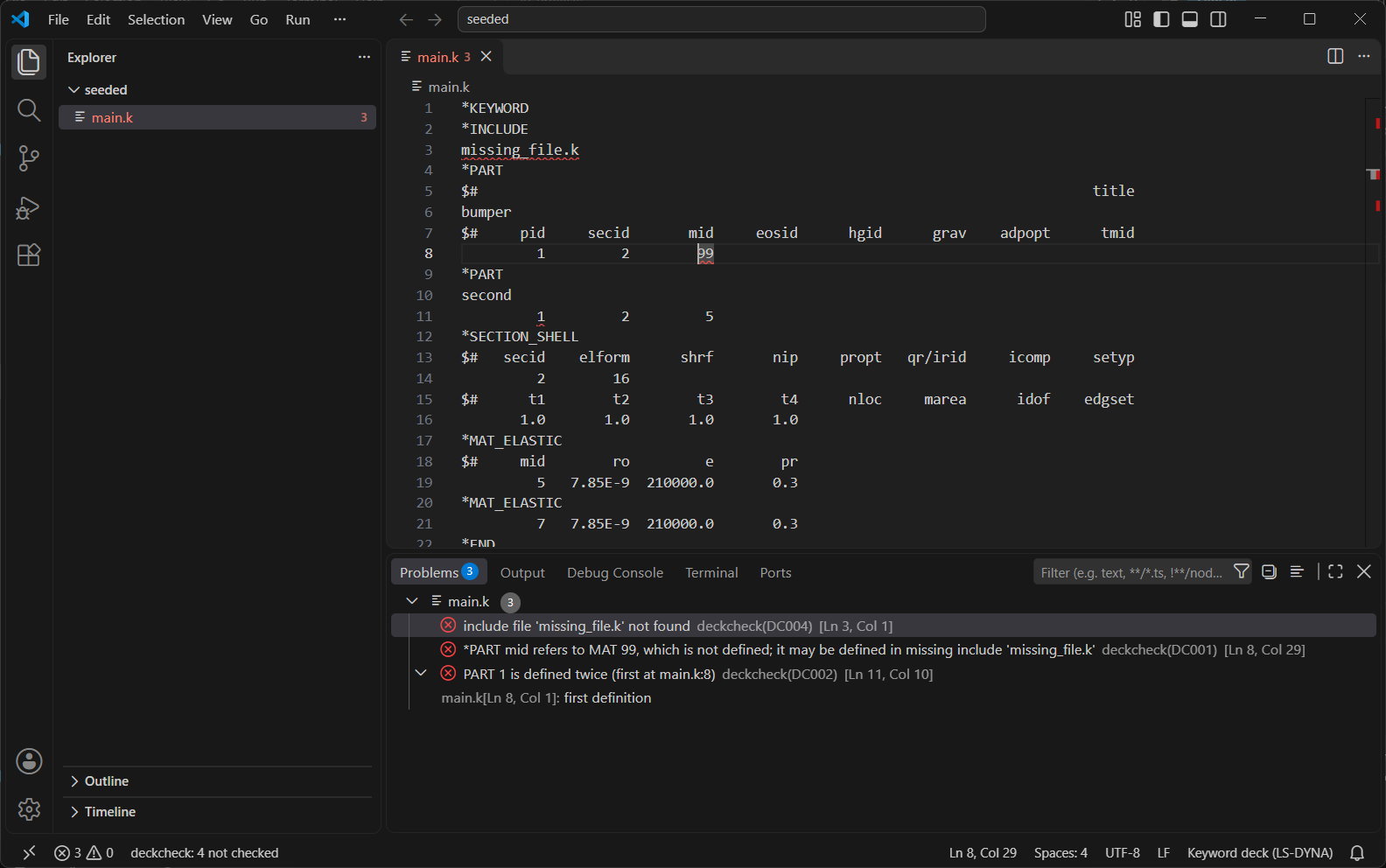
deckcheck checks keyword decks for LS-DYNA before you run them. It finds dangling references, duplicate ids, values that don't fit their field, missing or circular include files, unused materials and sections, and references that LS-DYNA accepts but ignores. It reads the deck only. It never runs the solver and makes no physics judgments.
deckcheck is a work in progress (version 0.1.0). The user manual shows the VS Code extension step by step, and the roadmap says what is coming next.
Install
After the first release:
pip install deckcheck
Until then, from a clone of this repository:
pip install .
deckcheck needs Python 3.11 or newer and nothing else.
Usage
Give it the main deck. It follows every *INCLUDE the way LS-DYNA does.
$ deckcheck seeded_mistakes/main.k
seeded_mistakes/main.k:3:1  error    DC004  include file 'missing_file.k' not found
seeded_mistakes/main.k:8:29  error    DC001  *PART mid refers to MAT 99, which is not defined; it may be defined in missing include 'missing_file.k'
seeded_mistakes/main.k:11:10  error    DC002  PART 1 is defined twice (first at main.k:8)

3 problems (3 errors, 0 warnings)

Not checked:
  unused MAT (DC005): main.k:3 missing include 'missing_file.k' may refer to it
  unused SECTION (DC005): main.k:3 missing include 'missing_file.k' may refer to it
  unused HOURGLASS (DC005): main.k:3 missing include 'missing_file.k' may refer to it
  unused definitions of other kinds (DC005): checked for MAT, SECTION, HOURGLASS only
Each line is file:line:column severity code message. In VS Code's terminal, the location is a clickable link.
For scripts and CI, use --format json:
$ deckcheck --format json spc_set_none/main.k
{
  "version": 1,
  "diagnostics": [
    {
      "file": "spc_set_none/main.k",
      "line": 22,
      "column": 9,
      "end_column": 11,
      "severity": "warning",
      "code": "DC006",
      "message": "*BOUNDARY_SPC_SET nsid refers to SET_NODE 99, which is not defined; LS-DYNA accepts this, but the reference has no effect",
      "related": []
    }
  ],
  "not_checked": [ ... ],
  "summary": {"errors": 0, "warnings": 1}
}
Lines and columns count from 1, and end_column is exclusive. The field names stay the same for every release
that writes "version": 1.
Other options:
--ignore DC005leaves a code out of the output and the exit code. Repeat it to leave out more codes.- Give several main decks to check them as separate models.
Exit codes:
| Code | Meaning |
|---|---|
| 0 | No errors. Warnings and "Not checked" items don't fail the run. |
| 1 | At least one error. |
| 2 | deckcheck could not run: the main file is missing, or the arguments are wrong. |
In CI: deckcheck model.k || exit 1.
The checks
| Code | Severity | What it finds |
|---|---|---|
| DC001 | error | A reference to an id that is never defined (*PART names material 99, and there is no material 99). |
| DC002 | error, or warning where LS-DYNA accepts it | The same id defined twice. A node defined twice at the same coordinates is a warning, because LS-DYNA accepts it. |
| DC003 | warning | A value that is not of its field's type, a tab in a card (LS-DYNA misreads tab-separated cards), or cards past the end of a keyword's layout. |
| DC004 | error | An include file that can't be found, or an include that includes itself. |
| DC005 | warning | A material, section or hourglass control that nothing refers to. |
| DC006 | warning | A reference LS-DYNA accepts without checking, to an id that doesn't exist, so it has no effect (for example, *BOUNDARY_SPC_SET naming a missing node set). |
| DC000 | warning | deckcheck itself failed to read a block. The rest of the deck is still checked. Please report it. |
Findings fall into three classes:
- LS-DYNA rejects it. This is an error: the run would stop.
- LS-DYNA accepts it, but the effect is surprising or there is none. This is a warning that states the fact.
- It looks wrong but is deliberate, such as a placeholder material kept as team policy. deckcheck can't know
your intent. Use
--ignorefor now; per-line suppression is planned.
Which class a pattern belongs to was decided by running LS-DYNA on a small test deck for each one. It was never assumed.
"Not checked"
deckcheck would rather say nothing than guess. When it can't see everything it needs, it stays silent on that part and says so in the "Not checked" footer. For example:
- an include file is missing;
- a keyword isn't in its keyword data;
- a block couldn't be read;
- a
*PARAMETERcan't be resolved.
An empty footer, apart from the DC005 scope line, means every check ran on the whole deck.
In VS Code
editors/vscode/ holds a VS Code extension that shows the same findings as squiggles while you edit. It needs only
Python 3.11 or newer: deckcheck and its language server ship inside it. Until it is published, build and install it
locally:
cd editors/vscode
npm install
npm run package
code --install-extension deckcheck-0.1.0.vsix
If VS Code was open during the install, reload its window (Command Palette > Developer: Reload Window).
Opening an include file checks the whole model it belongs to. Small models are re-checked as you type; a big model (a full vehicle) is checked when you save it or click "big model, click to check" in the status bar, never just by opening it. Once checked, a model can be navigated across its include files: hover a field for its name and what its id refers to, go to a definition, find every reference, browse the Outline, and show field names inline. The user manual covers installing, the status bar, commands, settings and troubleshooting, with screenshots; the extension's README covers navigation.
Do no harm, measured
The extension must never make opening, scrolling or editing a deck worse. Each release has to pass these measured gates on the CCSA Toyota Yaris (a 1 GB full-vehicle model, 169 MB largest include):
| Gate | Pass rule | Measured (v0.1.0) |
|---|---|---|
| Opening a file, deckcheck on vs off | at most 10 % slower or at most 20 ms slower, whichever allows more | small deck 42 vs 41 ms; main deck 47 vs 41 ms; 169 MB include −12 ms (median paired difference on 1620 ms) |
| Extension activation | under 100 ms | 1.1 ms |
| An editor command while a full Yaris check runs | under 100 ms | 1.5 ms worst |
Why "10 % or 20 ms": a 40 ms open varies by about 5 ms between identical runs, so 10 % alone (4 ms) would fail by chance, and 20 ms is far below what a person notices. On large files, 10 % is the binding limit. Opens of the 169 MB file vary from 0.9 to 2.1 s by themselves, so on and off opens are taken in alternating pairs and judged on the median of the pair differences, not on two separate medians, which moved by more than 10 % between identical runs. Accepted cost: a slowdown under about 10 % on huge files would pass. Opening a huge file while a check you started is running is reported but not gated: about 1.7 s against 1.6 s.
Known limits
- No physics checks: units, time step, contact settings and material sanity are out of scope for now.
- Long-format decks (
*KEYWORD LONG=Y) are only partly read; the affected blocks are listed as not checked. - DC005 covers materials, sections and hourglass controls only.
- DC003 checks values only in keywords that define or refer to ids. A definition with a blank or 0 id (often a card pasted a few columns to the right) is reported for MAT, SECTION, PART, HOURGLASS, DEFINE_CURVE and SET_NODE.
- A required reference left blank or 0 is reported (DC001) for
*PARTmid and secid and*ELEMENT_SHELLpid, the cases LS-DYNA was asked about; other required fields are not yet known. - A value that spills over into the next fixed-width field is caught only when the spill makes a value of the wrong type.
- The rules were checked with LS-DYNA Student, which can't run very large models. On those, results are checked against the deck text rather than by LS-DYNA.
License and credits
Apache-2.0. The keyword field data is extracted from PyDYNA (ansys-dyna-core, MIT License); see NOTICE.
deckcheck is an independent project, not affiliated with or endorsed by Ansys. LS-DYNA is a trademark of its owner.
1 maintainer

Metadata
1 maintainer
Release files for deckcheck 0.1.0
For a detailed explanation of source distributions (sdists) and built distributions (wheels), please see the package formats documentation.
Source distribution (sdist)
| File | Size | Uploaded | Provenance | Actions |
|---|---|---|---|---|
| deckcheck-0.1.0.tar.gz | 281.4 kB | Without provenance | Details for deckcheck-0.1.0.tar.gz |
Built distribution (wheel)
| File | Interpreter | ABI | Platform | Actions Reset |
|---|---|---|---|---|
| deckcheck-0.1.0-py3-none-any.whl | Python 3 | none | any | Details for deckcheck-0.1.0-py3-none-any.whl |
Total release size: 593.1 kB
Release files / deckcheck-0.1.0.tar.gz
| Download URL | deckcheck-0.1.0.tar.gz |
|---|---|
| Size | 281.4 kB |
| Tags | Source |
|
SHA-256 checksum How to use checksums |
65d1c12bc0e0c7f0027dbf21a24f1a334a02ccd0239049d78afa014de3f0c111
|
|
BLAKE2b-256 checksum How to use checksums |
57289c3ff52a853a58e4b1271fd2c7646ad63a6cdf2045c265f87cbcce358744
|
| Upload date | |
|
Uploaded using Trusted Publishing? What is trusted publishing? |
No |
| Uploaded via |
twine/7.0.0 CPython/3.12.9
|
Release files / deckcheck-0.1.0-py3-none-any.whl
| Download URL | deckcheck-0.1.0-py3-none-any.whl |
|---|---|
| Size | 311.7 kB |
| Tags | Python 3 |
|
SHA-256 checksum How to use checksums |
3f9959415138523856c4fa56a8f9512a9199974e3fd237cea6a055a3be59eb5d
|
|
BLAKE2b-256 checksum How to use checksums |
3f125d872c1ed55a61020a3854846e7f1363ad450c797887a5c0233ac281daeb
|
| Upload date | |
|
Uploaded using Trusted Publishing? What is trusted publishing? |
No |
| Uploaded via |
twine/7.0.0 CPython/3.12.9
|
Security for deckcheck 0.1.0
Provenance
Provenance describes where a file came from. On PyPI, provenance is shared via attestations, which provide a verifiable record of the build or publishing details. View details, limitations and caveats.
No provenance found
None of the files in this release were uploaded with provenance metadata.
A note on package security
PyPI is a repository for distributing packages, not a service for auditing them. While third-party security researchers and our staff do their best to detect and remove malicious packages, PyPI cannot guarantee the quality, security or suitability of any given package.
To learn more about protecting yourself from malicious actors, visit our package security documentation.













