
An extensible application for penetration testers and software developers to decode/encode data into various formats.

Project description
Decoder++

An extensible application for penetration testers and software developers to decode/encode data into various formats.
Setup
Decoder++ can be either installed by using pip or by pulling the source from this repository:
# Install using pip
pip3 install decoder-plus-plus
Overview
This section provides you with an overview about the individual ways of interacting with Decoder++.
For additional usage information check out the Advanced Usage section.
Graphical User Interface
If you prefer a graphical user interface to transform your data
Decoder++ gives you two choices: a main-window-mode and a dialog-mode.
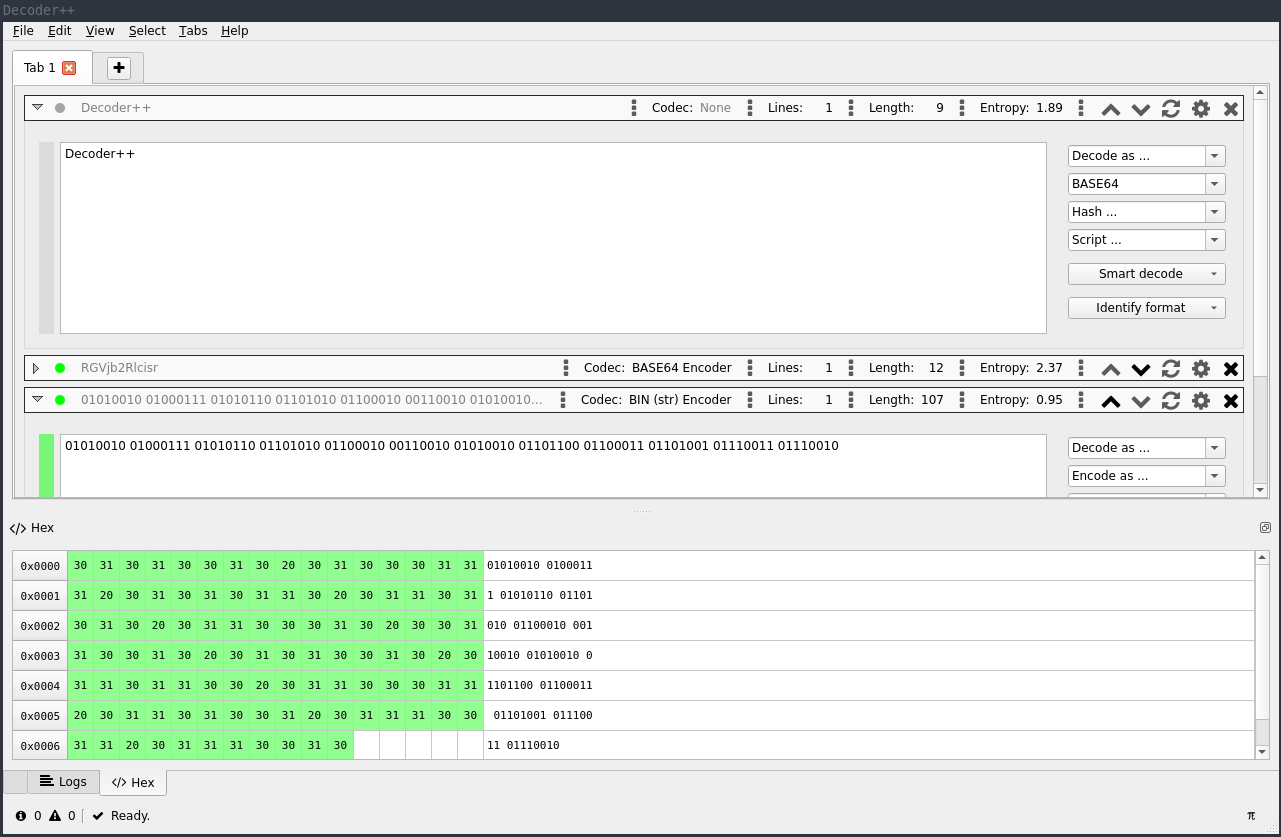
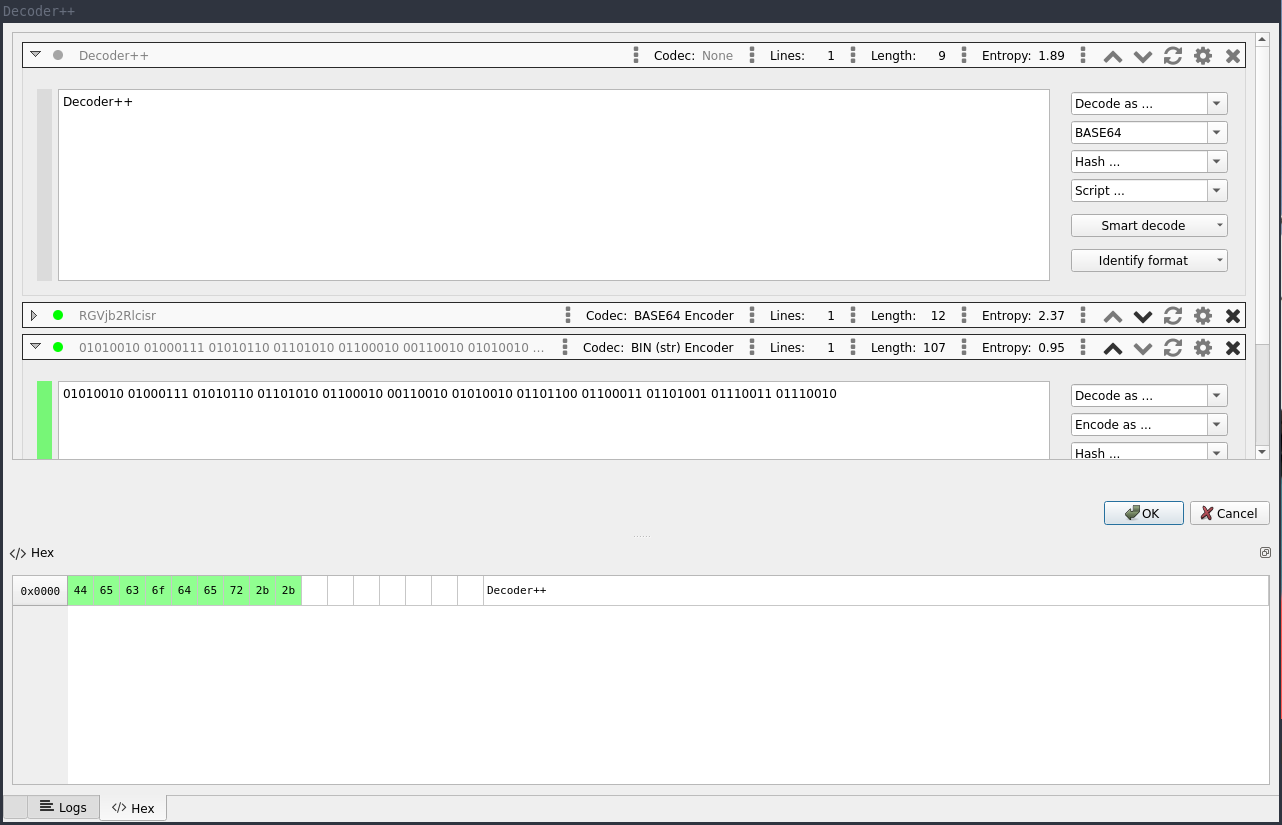
While the main-window-mode supports tabbing, the dialog-mode has the ability to return the transformed content to stdout
ready for further processing. This comes quite in handy if you want to call Decoder++ from other tools
like BurpSuite (check out the BurpSuite Send-to extension) or any other script
in which you want to add a graphical user interface for flexible transformation of any input.
Command Line
If you don't want to startup a graphical user interface but still make use of the various transformation methods of
Decoder++ you
can use the commandline mode:
$ dpp -e base64 -h sha1 "Hello, world!"
e52d74c6d046c390345ae4343406b99587f2af0d
Features
- User Interfaces:
- Graphical User Interface
- Command Line Interface
- Preinstalled Scripts and Codecs:
- Encode/Decode: Base16, Base32, Base64, Base64 (URL-safe), Binary, Gzip, Hex, Html, JWT, HTTP64, Octal, Url, Url+, Zlib
- Hashing: Adler-32, Apache-Md5, CRC32, FreeBSD-NT, Keccak224, Keccak256, Keccak384, Keccak512, LM, Md2, Md4, Md5, NT, PHPass, RipeMd160, Sha1, Sha3 224, Sha3 256, Sha3 384, Sha3 512, Sha224, Sha256, Sha348, Sha512, Sun Md5
- Scripts: CSS-Minify, Caesar, Extract URLs, Filter-Lines, Identify File Format, Identify Hash Format, JS-Beautifier, JS-to-XML, JQ, JSONPath, HTML-Beautifier, Little/Big-Endian Transform, Reformat Text, Remove Newlines, Remove Whitespaces, Search and Replace, Split and Rejoin, Unescape/Escape String, XPath
- Smart-Decode
- Plugin System
- Load & Save Current Session
- Platforms:
- Windows
- Linux
- MAC
Advanced Usage
This section provides you with additional information about how the command line interface can be used.
Command Line Interface
The commandline interface gives you easy access to all available codecs.
To list them you can use the -l argument. To narrow down your search the -l
argument accepts additional parameters which are used as filter:
$ dpp -l base enc

Codec                 Type
-----                 ----
base16                encoder
base32                encoder
base64                encoder
Decoder++ distinguishes between encoders, decoders, hashers and scripts.
Like the graphical user interface the command line interface allows you to use multiple codecs in a row:
$ dpp "H4sIAAXmeVsC//NIzcnJ11Eozy/KSVEEAObG5usNAAAA" -d base64 -d gzip
Hello, world!
While encoders, decoders and hashers can be used right away, some of the scripts may require additional configuration.
To show all available options of a specific script you can add the help parameter:
$ dpp "Hello, world!" -s split_and_rejoin help

Split & Rejoin
==============

             Name  Value  Group            Required  Description
             ----  -----  -----            --------  -----------
   split_by_chars         split_behaviour  yes       the chars used at which to split the text
  split_by_length  0      split_behaviour  yes       the length used at which to split the text
rejoin_with_chars                          yes       the chars used to join the splitted text
To configure a specific script you need to supply the individual options as name-value pairs (e.g. search_term="Hello"):
$ dpp "Hello, world!" -s search_and_replace search_term="Hello" replace_term="Hey"
Hey, world!
Plugin Development
To add custom codecs just copy them into the $HOME/.config/dpp/plugins/ folder.
from dpp.core.plugin.abstract_plugin import DecoderPlugin

class Plugin(DecoderPlugin):
    """
    Possible plugins are DecoderPlugin, EncoderPlugin, HasherPlugin, ScriptPlugin or IdentifyPlugin.
    See AbstractPlugin or it's implementations for more information.
    """

    def __init__(self, context):
        plugin_name = "URL"
        plugin_author = "Your Name"
        # Python Libraries which are required to be able to execute the run method of this plugin.
        plugin_requirements = ["urllib"]
        super().__init__(plugin_name, plugin_author, plugin_requirements, context)

    def run(self, text):
        # Load the required libraries here ...
        import urllib.parse
        # Run your action ...
        return urllib.parse.unquote(text)
Contribute
Feel free to open a new ticket for feature requests or bugs. Also don't hesitate to issue a pull-request for new features/plugins.
Thanks to
- Tim Menapace (RIPEMD160, KECCAK256)
- Robin Krumnow (ROT13)
Troubleshooting
Signals are not working on Mac OS
When starting Decoder++ in Mac OS signals are not working.
This might happen when PyQt5 is installed using homebrew. To fix this issue it is recommended to install the libdbus-1
library. See http://doc.qt.io/qt-5/osx-issues.html#d-bus-and-macos for more information regarding this issue.
Can not start Decoder++ in Windows using CygWin
When starting Decoder++ in CygWin an error occurs:
ModuleNotFoundError: No module named 'PyQt5'
This happens although PyQt5 is installed using pip. Currently there is no fix for that. Instead it is recommended
to start Decoder++ using the Windows command line.
No Module PyQt5.sig
When starting Decoder++ the error No module named 'PyQt5.sig' is displayed on the console.
This may happen when there are competing versions of PyQt5 installed. Reinstalling PyQt5 should fix this error.
$ sudo pip3 uninstall PyQt5
$ sudo pip3 install PyQt5
Inspired By
- PortSwigger's Burp Decoder
Powered By
- PyQt5
- QtAwesome
Release history Release notifications | RSS feed


Download files
Download the file for your platform. If you're not sure which to choose, learn more about installing packages.
Source Distribution
Built Distribution
Filter files by name, interpreter, ABI, and platform.
If you're not sure about the file name format, learn more about wheel file names.
Copy a direct link to the current filters
File details
Details for the file decoder-plus-plus-1.2.5.tar.gz.
File metadata
- Download URL: decoder-plus-plus-1.2.5.tar.gz
- Upload date:
- Size: 187.1 kB
- Tags: Source
- Uploaded using Trusted Publishing? No
- Uploaded via: twine/3.7.1 importlib_metadata/3.10.1 pkginfo/1.8.2 requests/2.21.0 requests-toolbelt/0.8.0 tqdm/4.62.3 CPython/3.6.9
File hashes
| Algorithm | Hash digest | |
|---|---|---|
| SHA256 |
7baba35242b8f8dfa0e8966b4eb7b1478619e1728554f20980d8604ff8712603
|
|
| MD5 |
98de546199c1844b30a7602c4b16a0cc
|
|
| BLAKE2b-256 |
f3debbc1c7b9006f5cdbab5e0a602660ad7a5de29988982c34be13386f7c40af
|
File details
Details for the file decoder_plus_plus-1.2.5-py3-none-any.whl.
File metadata
- Download URL: decoder_plus_plus-1.2.5-py3-none-any.whl
- Upload date:
- Size: 264.5 kB
- Tags: Python 3
- Uploaded using Trusted Publishing? No
- Uploaded via: twine/3.7.1 importlib_metadata/3.10.1 pkginfo/1.8.2 requests/2.21.0 requests-toolbelt/0.8.0 tqdm/4.62.3 CPython/3.6.9
File hashes
| Algorithm | Hash digest | |
|---|---|---|
| SHA256 |
9f41a73bdfe980706697c57105fd7d689b7e07f355601c66316db96e5eca9056
|
|
| MD5 |
109a4cf87a35c0beab5d19f8a42ba8ef
|
|
| BLAKE2b-256 |
015d7adec1a5083e3ed5498e51e59701f49740b15538548f7708b391f5c539c7
|






