
Toolkit for working with Universal Decompositional Semantics graphs

Project description
Overview




Decomp is a toolkit for working with the Universal Decompositional Semantics (UDS) dataset, which is a collection of directed acyclic semantic graphs with real-valued node and edge attributes pointing into Universal Dependencies syntactic dependency trees.
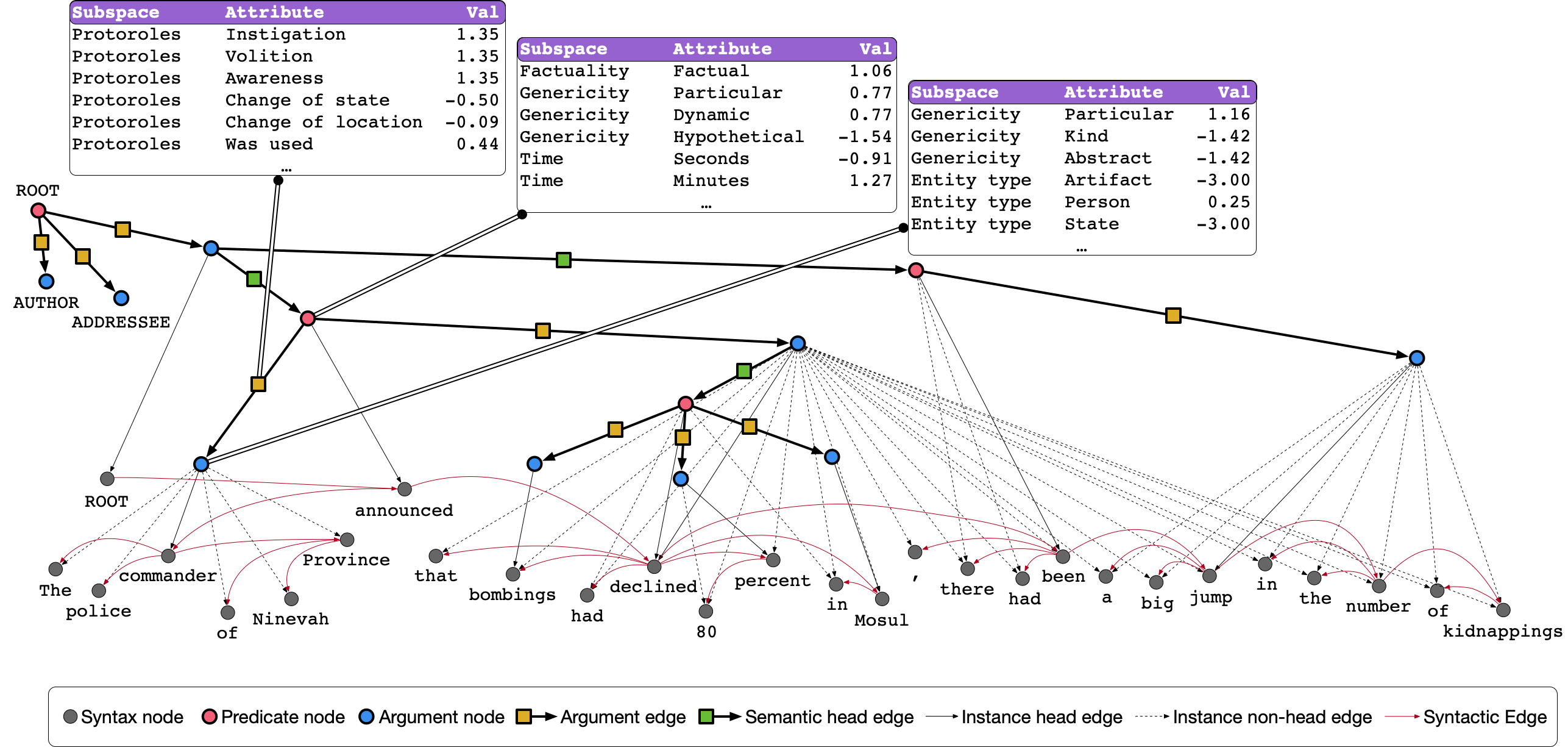
The toolkit is built on top of NetworkX and RDFLib making it straightforward to:
- read the UDS dataset from its native JSON format
- query both the syntactic and semantic subgraphs of UDS (as well as pointers between them) using SPARQL 1.1 queries
- serialize UDS graphs to many common formats, such as Notation3, N-Triples, turtle, and JSON-LD, as well as any other format supported by NetworkX
The toolkit was built by Aaron Steven White and is maintained by the Decompositional Semantics Initiative. The UDS dataset was constructed from annotations collected by the Decompositional Semantics Initiative.
Documentation
The full documentation for the package is hosted at Read the Docs.
Citation
If you make use of the dataset and/or toolkit in your research, we ask that you please cite the following paper in addition to the paper that introduces the underlying dataset(s) on which UDS is based.
White, Aaron Steven, Elias Stengel-Eskin, Siddharth Vashishtha, Venkata Subrahmanyan Govindarajan, Dee Ann Reisinger, Tim Vieira, Keisuke Sakaguchi, et al. 2020. The Universal Decompositional Semantics Dataset and Decomp Toolkit. In Proceedings of The 12th Language Resources and Evaluation Conference, 5698–5707. Marseille, France: European Language Resources Association.
@inproceedings{white-etal-2020-universal,
    title = "The Universal Decompositional Semantics Dataset and Decomp Toolkit",
    author = "White, Aaron Steven  and
      Stengel-Eskin, Elias  and
      Vashishtha, Siddharth  and
      Govindarajan, Venkata Subrahmanyan  and
      Reisinger, Dee Ann  and
      Vieira, Tim  and
      Sakaguchi, Keisuke  and
      Zhang, Sheng  and
      Ferraro, Francis  and
      Rudinger, Rachel  and
      Rawlins, Kyle  and
      Van Durme, Benjamin",
    booktitle = "Proceedings of The 12th Language Resources and Evaluation Conference",
    month = may,
    year = "2020",
    address = "Marseille, France",
    publisher = "European Language Resources Association",
    url = "https://www.aclweb.org/anthology/2020.lrec-1.699",
    pages = "5698--5707",
    ISBN = "979-10-95546-34-4",
}
License
Everything besides the contents of decomp/data are covered by the
MIT License contained at the same directory level as this README. All
contents of decomp/data are covered by the CC-BY-SA 4.0 license
contained in that directory.
Installation
The most painless way to get started quickly is to use the included Dockerfile based on jupyter/datascience-notebook with Python 3.12. To build the image and start a Jupyter Lab server:
git clone git://github.com/decompositional-semantics-initiative/decomp.git
cd decomp
docker build -t decomp .
docker run -it -p 8888:8888 decomp
This will start a Jupyter Lab server accessible at http://localhost:8888. To start a Python interactive prompt instead:
docker run -it decomp python
If you prefer to install directly to your local environment, you can
use pip to install from PyPI:
pip install decomp
Or install the latest development version from GitHub:
pip install git+https://github.com/decompositional-semantics-initiative/decomp.git
Requirements: Python 3.12 or higher is required.
You can also clone the repository and install from source:
git clone https://github.com/decompositional-semantics-initiative/decomp.git
cd decomp
pip install .
For development, install the package in editable mode with development dependencies:
git clone https://github.com/decompositional-semantics-initiative/decomp.git
cd decomp
pip install -e ".[dev]"
This installs the package in editable mode along with development tools
including pytest, ruff, mypy, and ipython.
Note for developers: The development dependencies include most testing requirements,
but predpatt (used for differential testing) must be installed separately due to
PyPI restrictions on git dependencies:
pip install git+https://github.com/hltcoe/PredPatt.git
Quick Start
The UDS corpus can be read by directly importing it.
from decomp import UDSCorpus

uds = UDSCorpus()
This imports a UDSCorpus object uds, which contains all graphs
across all splits in the data. If you would like a corpus, e.g.,
containing only a particular split, see other loading options in the
tutorial on reading the
corpus
for details.
The first time you read UDS, it will take several minutes to complete while the dataset is built from the Universal Dependencies English Web Treebank, which is not shipped with the package (but is downloaded automatically when first creating a corpus instance), and the UDS annotations, which are shipped with the package. Subsequent uses will be faster, since the dataset is cached on build.
UDSGraph objects in the corpus can be accessed using standard
dictionary getters or iteration. For instance, to get the UDS graph
corresponding to the 12th sentence in en-ud-train.conllu, you can
use:
uds["ewt-train-12"]
More generally, UDSCorpus objects behave like dictionaries. For
example, to print all the graph identifiers in the corpus (e.g.
"ewt-train-12"), you can use:
for graphid in uds:
    print(graphid)
Similarly, to print all the graph identifiers in the corpus (e.g. "ewt-in-12") along with the corresponding sentence, you can use:
for graphid, graph in uds.items():
    print(graphid)
    print(graph.sentence)
A list of graph identifiers can also be accessed via the graphids
attribute of the UDSCorpus. A mapping from these identifiers and the
corresponding graph can be accessed via the graphs attribute.
# a list of the graph identifiers in the corpus
uds.graphids

# a dictionary mapping the graph identifiers to the
# corresponding graph
uds.graphs
There are various instance attributes and methods for accessing nodes, edges, and their attributes in the UDS graphs. For example, to get a dictionary mapping identifiers for syntax nodes in the UDS graph to their attributes, you can use:
uds["ewt-train-12"].syntax_nodes
To get a dictionary mapping identifiers for semantics nodes in the UDS graph to their attributes, you can use:
uds["ewt-train-12"].semantics_nodes
To get a dictionary mapping identifiers for semantics edges (tuples of node identifiers) in the UDS graph to their attributes, you can use:
uds["ewt-train-12"].semantics_edges()
To get a dictionary mapping identifiers for semantics edges (tuples of node identifiers) in the UDS graph involving the predicate headed by the 7th token to their attributes, you can use:
uds["ewt-train-12"].semantics_edges('ewt-train-12-semantics-pred-7')
To get a dictionary mapping identifiers for syntax edges (tuples of node identifiers) in the UDS graph to their attributes, you can use:
uds["ewt-train-12"].syntax_edges()
And to get a dictionary mapping identifiers for syntax edges (tuples of node identifiers) in the UDS graph involving the node for the 7th token to their attributes, you can use:
uds["ewt-train-12"].syntax_edges('ewt-train-12-syntax-7')
There are also methods for accessing relationships between semantics and syntax nodes. For example, you can get a tuple of the ordinal position for the head syntax node in the UDS graph that maps of the predicate headed by the 7th token in the corresponding sentence to a list of the form and lemma attributes for that token, you can use:
uds["ewt-train-12"].head('ewt-train-12-semantics-pred-7', ['form', 'lemma'])
And if you want the same information for every token in the span, you can use:
uds["ewt-train-12"].span('ewt-train-12-semantics-pred-7', ['form', 'lemma'])
This will return a dictionary mapping ordinal position for syntax nodes in the UDS graph that make of the predicate headed by the 7th token in the corresponding sentence to a list of the form and lemma attributes for the corresponding tokens.
More complicated queries of the UDS graph can be performed using the
query method, which accepts arbitrary SPARQL 1.1 queries. See the
tutorial on querying the
corpus
for details.
Release history Release notifications | RSS feed


Download files
Download the file for your platform. If you're not sure which to choose, learn more about installing packages.
Source Distribution
Built Distribution
Filter files by name, interpreter, ABI, and platform.
If you're not sure about the file name format, learn more about wheel file names.
Copy a direct link to the current filters
File details
Details for the file decomp-0.3.2.tar.gz.
File metadata
- Download URL: decomp-0.3.2.tar.gz
- Upload date:
- Size: 77.5 MB
- Tags: Source
- Uploaded using Trusted Publishing? No
- Uploaded via: twine/6.1.0 CPython/3.12.9
File hashes
| Algorithm | Hash digest | |
|---|---|---|
| SHA256 |
dfe044ce7a04d0fbca48678ab6509c1d2d07e88a86c8b3fee6947e5174de98f2
|
|
| MD5 |
0a65e5ed01e8f9651f550e9ec8c4dee5
|
|
| BLAKE2b-256 |
604f25520818193b6e11cb8d57ed5250e8176fe95d8e3ad48de417e478139d67
|
File details
Details for the file decomp-0.3.2-py3-none-any.whl.
File metadata
- Download URL: decomp-0.3.2-py3-none-any.whl
- Upload date:
- Size: 81.7 MB
- Tags: Python 3
- Uploaded using Trusted Publishing? No
- Uploaded via: twine/6.1.0 CPython/3.12.9
File hashes
| Algorithm | Hash digest | |
|---|---|---|
| SHA256 |
f93dd0e893d4e726ce71da12e8793170a525184766acb34bd749dbac1a073079
|
|
| MD5 |
cf947664bce253987327035b9c8dcaa3
|
|
| BLAKE2b-256 |
94c274a658a24a0b9c10efb9b6346a2e1a67e1be1380fd07400b569145e63f4a
|






