
DeepCodeGraph
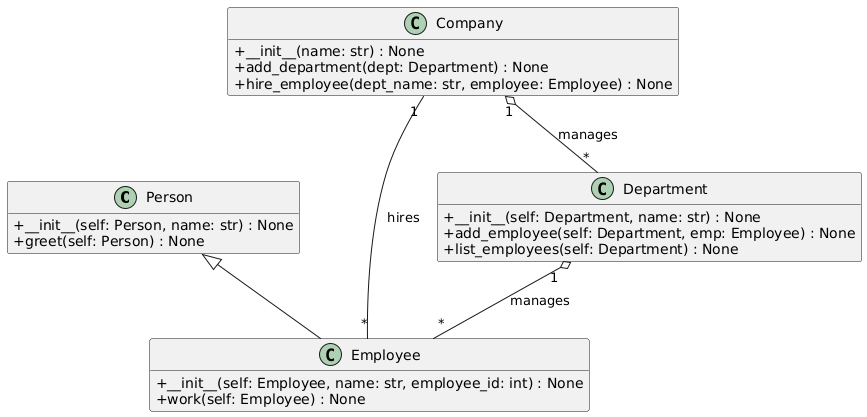
DeepCodeGraph is an LLM agent that automatically generates UML and activity diagrams from codebases using PlantUML.
Installation
git clone https://github.com/rhochgraf21/DeepCodeGraph/
pip install -e codegraph
Usage
The codegraph tool is designed to analyze your code repositories by generating dependency graphs or exporting the repository structure.
Below are the details on how to use the available commands and options.
Commands
-
graph
Visualize a repository’s dependency graph. Graphs are generated using the public PlantUML server. -
export
Export the repository’s structure for further analysis of the agent progress.
Global Options
-
-h, --help
Show a help message and exit. -
-v, --verbose
Increase verbosity. This flag can be used multiple times for more detailed output. -
--api-key API_KEY
Specify your LLM API key. Alternatively, set theCODEGRAPH_API_KEYenvironment variable, or the API key environment variable for your provider as found in LiteLLM. -
--provider PROVIDER
Choose the LLM provider. The default provider isgemini. -
--model MODEL
Specify the model to use with the provider. The default isgemini-2.0-flash-exp. -
--path PATH
Required if not using--github. Provide the local filesystem path to your repository. -
--github GITHUB_URL
Required if not using--path. Provide the URL of the GitHub repository to analyze.
Example
To generate a dependency graph for a local repository located at /path/to/repo, run:
codegraph graph --path /path/to/repo
To analyze a GitHub repository, run:
codegraph graph --github https://github.com/username/repository
Run codegraph -h for more detailed information.
Note: You must provide either the --path option (for local repositories) or the --github option (for GitHub repositories). The GitHub functionality is provided to analyze repositories hosted on GitHub.
Supported Providers
DeepCodeGraph uses LiteLLM to provide access to models.
| Provider | Supported Models (Examples) | Documentation Link |
|---|---|---|
| OpenAI | gpt-4o, o3-mini, etc. |
OpenAI Docs |
| Anthropic | claude-3.7, claude-3.5, claude-3, etc. |
Anthropic Docs |
| Azure | OpenAI models via Azure | Azure Docs |
| Google Vertex AI | Various models from Google | Google Vertex Docs |
| Google Gemini (AI Studio) | gemini-2.0-pro, gemini-2.0-flash, etc. |
Google Gemini Docs |
| Mistral AI | mistral-small-latest, mistral-medium-latest, mixtral-8x7b, etc. |
Mistral AI Docs |
| AWS Bedrock | Various models from Anthropic, Meta, Deepseek, Mistral, Amazon, etc. | AWS Bedrock Docs |
| OpenRouter | Various models available through OpenRouter | OpenRouter Docs |
| Huggingface | Various open-source models from Huggingface | Huggingface Docs |
| Cohere | command-r-plus, command-r, command, etc. |
Cohere Docs |
| Ollama | Various models like mistral, gemma, llama3, etc. |
Ollama Docs |
| Groq | llama3-8b, gemma-7b, mixtral-8x7b, etc. |
Groq Docs |
To connect to a provider, set CODEGRAPH_CUSTOM_API_ENV=1 and the LiteLLM environment variables specified in the docs, or set CODEGRAPH_API_KEY.
For example, for Gemini on OpenRouter:
# custom setup [api key variable inferred]
export CODEGRAPH_CUSTOM_API_ENV=1
export GEMINI_API_KEY=<your_api_key>

# explicit api key
export CODEGRAPH_API_KEY=<your_api_key>
Then set the CODEGRAPH_LLM_PROVIDER and CODEGRAPH_LLM_MODEL environment variables.
export CODEGRAPH_LLM_PROVIDER=openrouter
export CODEGRAPH_LLM_MODEL=google/gemini-2.0-flash-lite-preview-02-05:free
Note: The API key variable will be inferred from the provided model and provider unless
CODEGRAPH_API_KEYis provided.
Contributing
Pull requests are welcome. For major changes, please open an issue first to discuss what you would like to change.
License
1 maintainer

Metadata
1 maintainer
Release files for deepcodegraph 0.1.0
For a detailed explanation of source distributions (sdists) and built distributions (wheels), please see the package formats documentation.
Source distribution (sdist)
| File | Size | Uploaded | |
|---|---|---|---|
| deepcodegraph-0.1.0.tar.gz | 20.8 kB | Details |
Built distribution (wheel)
| File | Interpreter | ABI | Platform | Reset |
|---|---|---|---|---|
| deepcodegraph-0.1.0-py3-none-any.whl | Python 3 | none | any | Details |
Total release size: 43.7 kB
Release files / deepcodegraph-0.1.0.tar.gz
| Download URL | deepcodegraph-0.1.0.tar.gz |
|---|---|
| Size | 20.8 kB |
| Tags | Source |
|
SHA-256 checksum How to use checksums |
38fdef646d1cbaef50689273f8e38c6782d8686f6820eae3755fd66bc01b5ea6
|
|
BLAKE2b-256 checksum How to use checksums |
153b9b4c4917a1431de6963422ad7eb876d2f525d3b1a1ebf6379ecbabfc3c98
|
| Upload date | |
|
Uploaded using Trusted Publishing? What is trusted publishing? |
No |
| Uploaded via |
twine/6.1.0 CPython/3.11.11
|
Release files / deepcodegraph-0.1.0-py3-none-any.whl
| Download URL | deepcodegraph-0.1.0-py3-none-any.whl |
|---|---|
| Size | 22.9 kB |
| Tags | Python 3 |
|
SHA-256 checksum How to use checksums |
dd883d30225d90b4e05a734f0021f4d0cd134cb47b9d79fd0a47e457b5bf1d9b
|
|
BLAKE2b-256 checksum How to use checksums |
a877aa2bb32e6779ec273f6a6c26cf53c92e665d20c42c3002d9264f432aafa0
|
| Upload date | |
|
Uploaded using Trusted Publishing? What is trusted publishing? |
No |
| Uploaded via |
twine/6.1.0 CPython/3.11.11
|













