
DeepCubeAI
This repository contains code for the paper Learning Discrete World Models for Heuristic Search.
 |
 |
 |
 |
|---|
About DeepCubeAI
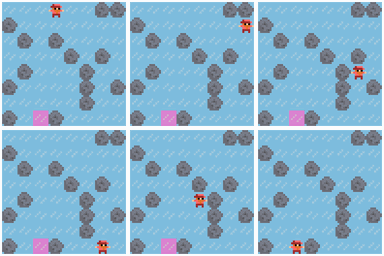
DeepCubeAI is an algorithm that learns a discrete world model and employs Deep Reinforcement Learning methods to learn a heuristic function that generalizes over start and goal states. We then integrate the learned model and the learned heuristic function with heuristic search, such as Q* search, to solve sequential decision making problems. For more details, please refer to the paper.
Quick links
- Key contributions: Key Contributions
- Main results: Main Results
- Quick start: Quick start
- Install: docs/installation.md
- CLI reference: docs/cli.md
- Stage-by-stage usage (all flags and paths): docs/usage.md
- Reproduce the paper results: docs/reproduce.md
- SLURM and Distributed training: docs/qlearning_distributed.md
- Environments and integration: docs/environments.md
- Python usage (API snippets): docs/python_api.md
- Citing the paper: Citation
- Contact: Contact
Key Contributions
Overview
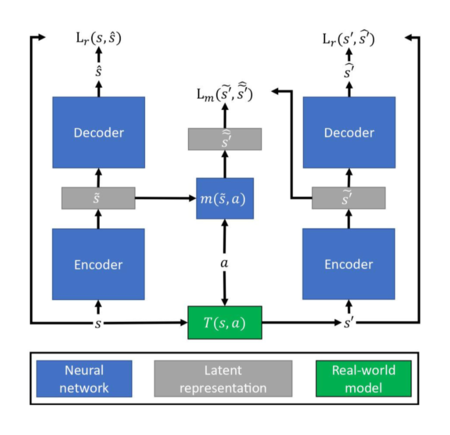
DeepCubeAI is comprised of three key components:
-
Discrete World Model
- Learns a world model that represents states in a discrete latent space.
- This approach tackles two challenges: model degradation and state re-identification.
- Prediction errors less than 0.5 are corrected by rounding.
- Re-identifies states by comparing two binary vectors.
-
Generalizable Heuristic Function
- Utilizes Deep Q-Network (DQN) and hindsight experience replay (HER) to learn a heuristic function that generalizes over start and goal states.
-
Optimized Search
- Integrates the learned model and the learned heuristic function with heuristic search to solve problems. It uses Q* search, a variant of A* search optimized for DQNs, which enables faster and more memory-efficient planning.
Main Results
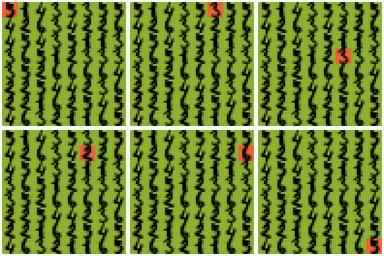
- Accurate reconstruction of ground truth images after thousands of timesteps.
- Achieved 100% success on Rubik's Cube (canonical goal), Sokoban, IceSlider, and DigitJump.
- 99.9% success on Rubik's Cube with reversed start/goal states.
- Demonstrated significant improvement in solving complex planning problems and generalizing to unseen goals.
Quick start
DeepCubeAI provides a Python package and CLI. You can install it from PyPI or build it from source. The package supports Python 3.10-3.12.
[!NOTE]
You can find detailed installation instructions, including using Conda for environment management, in the installation guide.
Install deepcubeai Package from PyPI with uv (Recommended if Running as a Package)
deepcubeai is available on PyPI and you can use the following commands to install it.
-
Install
uvfrom the official website: Install uv. -
Create and activate a virtual environment:
# create a .venv in the current folder
uv venv

# macOS & Linux
source .venv/bin/activate

# Windows (PowerShell)
.venv\Scripts\activate
If you have multiple Python versions, ensure you use a supported one (3.10-3.12), e.g.:
uv venv --python 3.12
-
Install the package (using uv’s pip interface):
uv pip install deepcubeai
Install from Source with Pixi (Recommended if Working from Source)
Pixi is a package management tool that provides fast, reproducible environments with support for Conda and PyPI dependencies. The pixi.toml and pixi.lock files define reproducible environments with exact dependency versions.
-
Install Pixi: Follow the official installation guide
-
Clone repository:
git clone https://github.com/misaghsoltani/DeepCubeAI.git
cd DeepCubeAI
-
Enter the default environment (first run performs dependency resolution):
pixi shell  # or: pixi shell -e default

# or

pixi install -e default # non-interactive solve only
Running DeepCubeAI
For running the CLI use the following command to see the available options:
# If already entered the environment with Pixi:
deepcubeai --help  # or -h

# or

# Without entering the environment:
pixi run deepcubeai --help  # or -h
Or use it as a Python package:
import deepcubeai

print(deepcubeai.__version__)
License
MIT License - see LICENSE.
Citation
If you use DeepCubeAI in your research, please cite:
@article{agostinelli2025learning,
    title={Learning Discrete World Models for Heuristic Search},
    author={Agostinelli, Forest and Soltani, Misagh},
    journal={Reinforcement Learning Journal},
    volume={4},
    pages={1781--1792},
    year={2025}
}
Contact
If you have any questions or issues, please contact Misagh Soltani (msoltani@email.sc.edu)
1 maintainer

Metadata
1 maintainer
Release files for deepcubeai 0.2.1
For a detailed explanation of source distributions (sdists) and built distributions (wheels), please see the package formats documentation.
Source distribution (sdist)
| File | Size | Uploaded | |
|---|---|---|---|
| deepcubeai-0.2.1.tar.gz | 15.6 MB | Details |
Built distribution (wheel)
| File | Interpreter | ABI | Platform | Reset |
|---|---|---|---|---|
| deepcubeai-0.2.1-py3-none-any.whl | Python 3 | none | any | Details |
Total release size: 31.2 MB
Release files / deepcubeai-0.2.1.tar.gz
| Download URL | deepcubeai-0.2.1.tar.gz |
|---|---|
| Size | 15.6 MB |
| Tags | Source |
|
SHA-256 checksum How to use checksums |
04c3b0a202d22b5e88ab274bf4845a475d0d73627fbdae25179f10b2fea365b3
|
|
BLAKE2b-256 checksum How to use checksums |
47e1bd2857b0512ca1d22c1438f98ba020d03bf54b1bc6a24639601e0c5920d4
|
| Upload date | |
|
Uploaded using Trusted Publishing? What is trusted publishing? |
Yes |
| Uploaded via |
twine/6.1.0 CPython/3.12.9
|
Provenance
Provenance describes where a file came from. On PyPI, provenance is shared via attestations, which provide a verifiable record of the build or publishing details. View details, limitations and caveats.


PyPI Publish Attestation
PyPI verified that this artifact, at this checksum, originated from the publisher listed below.
Signed by GitHub Actions, verified by PyPI on Aug 27, 2025.
Transparency logRelease files / deepcubeai-0.2.1-py3-none-any.whl
| Download URL | deepcubeai-0.2.1-py3-none-any.whl |
|---|---|
| Size | 15.6 MB |
| Tags | Python 3 |
|
SHA-256 checksum How to use checksums |
9e9a7ce60264757af4f9e0ee0a71c364137a647af84b104d49bfb82a5f2482d1
|
|
BLAKE2b-256 checksum How to use checksums |
18a8679b84ec4f8e31a872623ac2dd4f013750652ac59f7926362019c128fc2a
|
| Upload date | |
|
Uploaded using Trusted Publishing? What is trusted publishing? |
Yes |
| Uploaded via |
twine/6.1.0 CPython/3.12.9
|
Provenance
Provenance describes where a file came from. On PyPI, provenance is shared via attestations, which provide a verifiable record of the build or publishing details. View details, limitations and caveats.
PyPI Publish Attestation
PyPI verified that this artifact, at this checksum, originated from the publisher listed below.
Signed by GitHub Actions, verified by PyPI on Aug 27, 2025.
Transparency log













