

🤖 DeepMCPAgent
Model-agnostic LangChain/LangGraph agents powered entirely by MCP tools over HTTP/SSE.





Discover MCP tools dynamically. Bring your own LangChain model. Build production-ready agents—fast.
📚 Documentation • 🛠 Issues
✨ Why DeepMCPAgent?
- 🔌 Zero manual tool wiring — tools are discovered dynamically from MCP servers (HTTP/SSE)
- 🌐 External APIs welcome — connect to remote MCP servers (with headers/auth)
- 🧠 Model-agnostic — pass any LangChain chat model instance (OpenAI, Anthropic, Ollama, Groq, local, …)
- ⚡ DeepAgents (optional) — if installed, you get a deep agent loop; otherwise robust LangGraph ReAct fallback
- 🛠️ Typed tool args — JSON-Schema → Pydantic → LangChain
BaseTool(typed, validated calls) - 🧪 Quality bar — mypy (strict), ruff, pytest, GitHub Actions, docs
MCP first. Agents shouldn’t hardcode tools — they should discover and call them. DeepMCPAgent builds that bridge.
🚀 Installation
Install from PyPI:
pip install "deepmcpagent[deep]"
This installs DeepMCPAgent with DeepAgents support (recommended) for the best agent loop. Other optional extras:
dev→ linting, typing, testsdocs→ MkDocs + Material + mkdocstringsexamples→ dependencies used by bundled examples
# install with deepagents + dev tooling
pip install "deepmcpagent[deep,dev]"
⚠️ If you’re using zsh, remember to quote extras:
pip install "deepmcpagent[deep,dev]"
🚀 Quickstart
1) Start a sample MCP server (HTTP)
python examples/servers/math_server.py
This serves an MCP endpoint at: http://127.0.0.1:8000/mcp
2) Run the example agent (with fancy console output)
python examples/use_agent.py
What you’ll see:

🧑💻 Bring-Your-Own Model (BYOM)
DeepMCPAgent lets you pass any LangChain chat model instance (or a provider id string if you prefer init_chat_model):
import asyncio
from deepmcpagent import HTTPServerSpec, build_deep_agent

# choose your model:
# from langchain_openai import ChatOpenAI
# model = ChatOpenAI(model="gpt-4.1")

# from langchain_anthropic import ChatAnthropic
# model = ChatAnthropic(model="claude-3-5-sonnet-latest")

# from langchain_community.chat_models import ChatOllama
# model = ChatOllama(model="llama3.1")

async def main():
    servers = {
        "math": HTTPServerSpec(
            url="http://127.0.0.1:8000/mcp",
            transport="http",    # or "sse"
            # headers={"Authorization": "Bearer <token>"},
        ),
    }

    graph, _ = await build_deep_agent(
        servers=servers,
        model=model,
        instructions="Use MCP tools precisely."
    )

    out = await graph.ainvoke({"messages":[{"role":"user","content":"add 21 and 21 with tools"}]})
    print(out)

asyncio.run(main())
Tip: If you pass a string like
"openai:gpt-4.1", we’ll call LangChain’sinit_chat_model()for you (and it will read env vars likeOPENAI_API_KEY). Passing a model instance gives you full control.
🖥️ CLI (no Python required)
# list tools from one or more HTTP servers
deepmcpagent list-tools \
  --http name=math url=http://127.0.0.1:8000/mcp transport=http \
  --model-id "openai:gpt-4.1"

# interactive agent chat (HTTP/SSE servers only)
deepmcpagent run \
  --http name=math url=http://127.0.0.1:8000/mcp transport=http \
  --model-id "openai:gpt-4.1"
The CLI accepts repeated
--httpblocks; addheader.X=Ypairs for auth:--http name=ext url=https://api.example.com/mcp transport=http header.Authorization="Bearer TOKEN"
🧩 Architecture (at a glance)
┌────────────────┐        list_tools / call_tool        ┌─────────────────────────┐
│ LangChain/LLM  │  ──────────────────────────────────▶ │ FastMCP Client (HTTP/SSE)│
│  (your model)  │                                      └───────────┬──────────────┘
└──────┬─────────┘  tools (LC BaseTool)                               │
       │                                                              │
       ▼                                                              ▼
  LangGraph Agent                                    One or many MCP servers (remote APIs)
  (or DeepAgents)                                    e.g., math, github, search, ...
HTTPServerSpec(...)→ FastMCP client (single client, multiple servers)- Tool discovery → JSON-Schema → Pydantic → LangChain
BaseTool - Agent loop → DeepAgents (if installed) or LangGraph ReAct fallback
Full Architecture & Agent Flow
1) High-level Architecture (modules & data flow)
flowchart LR
    %% Groupings
    subgraph User["👤 User / App"]
      Q["Prompt / Task"]
      CLI["CLI (Typer)"]
      PY["Python API"]
    end

    subgraph Agent["🤖 Agent Runtime"]
      DIR["build_deep_agent()"]
      PROMPT["prompt.py\n(DEFAULT_SYSTEM_PROMPT)"]
      subgraph AGRT["Agent Graph"]
        DA["DeepAgents loop\n(if installed)"]
        REACT["LangGraph ReAct\n(fallback)"]
      end
      LLM["LangChain Model\n(instance or init_chat_model(provider-id))"]
      TOOLS["LangChain Tools\n(BaseTool[])"]
    end

    subgraph MCP["🧰 Tooling Layer (MCP)"]
      LOADER["MCPToolLoader\n(JSON-Schema ➜ Pydantic ➜ BaseTool)"]
      TOOLWRAP["_FastMCPTool\n(async _arun → client.call_tool)"]
    end

    subgraph FMCP["🌐 FastMCP Client"]
      CFG["servers_to_mcp_config()\n(mcpServers dict)"]
      MULTI["FastMCPMulti\n(fastmcp.Client)"]
    end

    subgraph SRV["🛠 MCP Servers (HTTP/SSE)"]
      S1["Server A\n(e.g., math)"]
      S2["Server B\n(e.g., search)"]
      S3["Server C\n(e.g., github)"]
    end

    %% Edges
    Q -->|query| CLI
    Q -->|query| PY
    CLI --> DIR
    PY --> DIR

    DIR --> PROMPT
    DIR --> LLM
    DIR --> LOADER
    DIR --> AGRT

    LOADER --> MULTI
    CFG --> MULTI
    MULTI -->|list_tools| SRV
    LOADER --> TOOLS
    TOOLS --> AGRT

    AGRT <-->|messages| LLM
    AGRT -->|tool calls| TOOLWRAP
    TOOLWRAP --> MULTI
    MULTI -->|call_tool| SRV

    SRV -->|tool result| MULTI --> TOOLWRAP --> AGRT -->|final answer| CLI
    AGRT -->|final answer| PY
2) Runtime Sequence (end-to-end tool call)
sequenceDiagram
    autonumber
    participant U as User
    participant CLI as CLI/Python
    participant Builder as build_deep_agent()
    participant Loader as MCPToolLoader
    participant Graph as Agent Graph (DeepAgents or ReAct)
    participant LLM as LangChain Model
    participant Tool as _FastMCPTool
    participant FMCP as FastMCP Client
    participant S as MCP Server (HTTP/SSE)

    U->>CLI: Enter prompt
    CLI->>Builder: build_deep_agent(servers, model, instructions?)
    Builder->>Loader: get_all_tools()
    Loader->>FMCP: list_tools()
    FMCP->>S: HTTP(S)/SSE list_tools
    S-->>FMCP: tools + JSON-Schema
    FMCP-->>Loader: tool specs
    Loader-->>Builder: BaseTool[]
    Builder-->>CLI: (Graph, Loader)

    U->>Graph: ainvoke({messages:[user prompt]})
    Graph->>LLM: Reason over system + messages + tool descriptions
    LLM-->>Graph: Tool call (e.g., add(a=3,b=5))
    Graph->>Tool: _arun(a=3,b=5)
    Tool->>FMCP: call_tool("add", {a:3,b:5})
    FMCP->>S: POST /mcp tools.call("add", {...})
    S-->>FMCP: result { data: 8 }
    FMCP-->>Tool: result
    Tool-->>Graph: ToolMessage(content=8)

    Graph->>LLM: Continue with observations
    LLM-->>Graph: Final response "(3 + 5) * 7 = 56"
    Graph-->>CLI: messages (incl. final LLM answer)
3) Agent Control Loop (planning & acting)
stateDiagram-v2
    [*] --> AcquireTools
    AcquireTools: Discover MCP tools via FastMCP\n(JSON-Schema ➜ Pydantic ➜ BaseTool)
    AcquireTools --> Plan

    Plan: LLM plans next step\n(uses system prompt + tool descriptions)
    Plan --> CallTool: if tool needed
    Plan --> Respond: if direct answer sufficient

    CallTool: _FastMCPTool._arun\n→ client.call_tool(name, args)
    CallTool --> Observe: receive tool result
    Observe: Parse result payload (data/text/content)
    Observe --> Decide

    Decide: More tools needed?
    Decide --> Plan: yes
    Decide --> Respond: no

    Respond: LLM crafts final message
    Respond --> [*]
4) Code Structure (types & relationships)
classDiagram
    class StdioServerSpec {
      +command: str
      +args: List[str]
      +env: Dict[str,str]
      +cwd: Optional[str]
      +keep_alive: bool
    }

    class HTTPServerSpec {
      +url: str
      +transport: Literal["http","streamable-http","sse"]
      +headers: Dict[str,str]
      +auth: Optional[str]
    }

    class FastMCPMulti {
      -_client: fastmcp.Client
      +client(): Client
    }

    class MCPToolLoader {
      -_multi: FastMCPMulti
      +get_all_tools(): List[BaseTool]
      +list_tool_info(): List[ToolInfo]
    }

    class _FastMCPTool {
      +name: str
      +description: str
      +args_schema: Type[BaseModel]
      -_tool_name: str
      -_client: Any
      +_arun(**kwargs) async
    }

    class ToolInfo {
      +server_guess: str
      +name: str
      +description: str
      +input_schema: Dict[str,Any]
    }

    class build_deep_agent {
      +servers: Mapping[str,ServerSpec]
      +model: ModelLike
      +instructions?: str
      +returns: (graph, loader)
    }

    StdioServerSpec <|-- ServerSpec
    HTTPServerSpec <|-- ServerSpec
    FastMCPMulti o--> ServerSpec : uses servers_to_mcp_config()
    MCPToolLoader o--> FastMCPMulti
    MCPToolLoader --> _FastMCPTool : creates
    _FastMCPTool ..> BaseTool
    build_deep_agent --> MCPToolLoader : discovery
    build_deep_agent --> _FastMCPTool : tools for agent
5) Deployment / Integration View (clusters & boundaries)
flowchart TD
    subgraph App["Your App / Service"]
      UI["CLI / API / Notebook"]
      Code["deepmcpagent (Python pkg)\n- config.py\n- clients.py\n- tools.py\n- agent.py\n- prompt.py"]
      UI --> Code
    end

    subgraph Cloud["LLM Provider(s)"]
      P1["OpenAI / Anthropic / Groq / Ollama..."]
    end

    subgraph Net["Network"]
      direction LR
      FMCP["FastMCP Client\n(HTTP/SSE)"]
      FMCP ---|mcpServers| Code
    end

    subgraph Servers["MCP Servers"]
      direction LR
      A["Service A (HTTP)\n/path: /mcp"]
      B["Service B (SSE)\n/path: /mcp"]
      C["Service C (HTTP)\n/path: /mcp"]
    end

    Code -->|init_chat_model or model instance| P1
    Code --> FMCP
    FMCP --> A
    FMCP --> B
    FMCP --> C
6) Error Handling & Observability (tool errors & retries)
flowchart TD
    Start([Tool Call]) --> Try{"client.call_tool(name,args)"}
    Try -- ok --> Parse["Extract data/text/content/result"]
    Parse --> Return[Return ToolMessage to Agent]
    Try -- raises --> Err["Tool/Transport Error"]
    Err --> Wrap["ToolMessage(status=error, content=trace)"]
    Wrap --> Agent["Agent observes error\nand may retry / alternate tool"]
These diagrams reflect the current implementation:
- Model is required (string provider-id or LangChain model instance).
- MCP tools only, discovered at runtime via FastMCP (HTTP/SSE).
- Agent loop prefers DeepAgents if installed; otherwise LangGraph ReAct.
- Tools are typed via JSON-Schema ➜ Pydantic ➜ LangChain BaseTool.
- Fancy console output shows discovered tools, calls, results, and final answer.
🧪 Development
# install dev tooling
pip install -e ".[dev]"

# lint & type-check
ruff check .
mypy

# run tests
pytest -q
🛡️ Security & Privacy
- Your keys, your model — we don’t enforce a provider; pass any LangChain model.
- Use HTTP headers in
HTTPServerSpecto deliver bearer/OAuth tokens to servers.
🧯 Troubleshooting
-
PEP 668: externally managed environment (macOS + Homebrew) Use a virtualenv:
python3 -m venv .venv
source .venv/bin/activate
-
404 Not Found when connecting Ensure your server uses a path (e.g.,
/mcp) and your client URL includes it. -
Tool calls failing / attribute errors Ensure you’re on the latest version; our tool wrapper uses
PrivateAttrfor client state. -
High token counts That’s normal with tool-calling models. Use smaller models for dev.
📄 License
Apache-2.0 — see LICENSE.
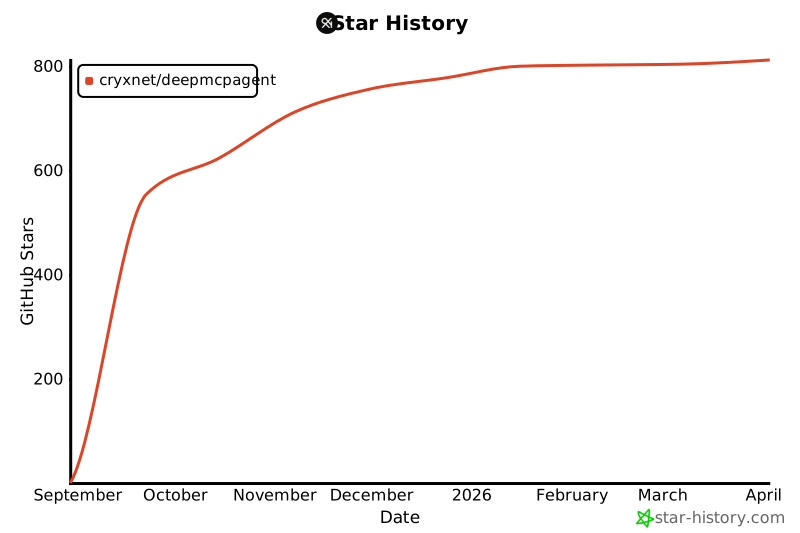
⭐ Stars
🙏 Acknowledgments
- The MCP community for a clean protocol.
- LangChain and LangGraph for powerful agent runtimes.
- FastMCP for solid client & server implementations.
1 maintainer

Metadata
1 maintainer
Release files for deepmcpagent 0.5.0
For a detailed explanation of source distributions (sdists) and built distributions (wheels), please see the package formats documentation.
Source distribution (sdist)
| File | Size | Uploaded | |
|---|---|---|---|
| deepmcpagent-0.5.0.tar.gz | 157.1 kB | Details |
Built distribution (wheel)
| File | Interpreter | ABI | Platform | Reset |
|---|---|---|---|---|
| deepmcpagent-0.5.0-py3-none-any.whl | Python 3 | none | any | Details |
Total release size: 184.4 kB
Release files / deepmcpagent-0.5.0.tar.gz
| Download URL | deepmcpagent-0.5.0.tar.gz |
|---|---|
| Size | 157.1 kB |
| Tags | Source |
|
SHA-256 checksum How to use checksums |
3eed23241e60e900a14e82472595284057517684775deb60676a6edd680bf1a0
|
|
BLAKE2b-256 checksum How to use checksums |
b7be45da213752bb7929e43f950bf5d40fab6736b77259fb18436ad560ea10f2
|
| Upload date | |
|
Uploaded using Trusted Publishing? What is trusted publishing? |
Yes |
| Uploaded via |
twine/6.1.0 CPython/3.13.7
|
Provenance
Provenance describes where a file came from. On PyPI, provenance is shared via attestations, which provide a verifiable record of the build or publishing details. View details, limitations and caveats.


PyPI Publish Attestation
PyPI verified that this artifact, at this checksum, originated from the publisher listed below.
Signed by GitHub Actions, verified by PyPI on Oct 18, 2025.
Transparency logRelease files / deepmcpagent-0.5.0-py3-none-any.whl
| Download URL | deepmcpagent-0.5.0-py3-none-any.whl |
|---|---|
| Size | 27.3 kB |
| Tags | Python 3 |
|
SHA-256 checksum How to use checksums |
0a614565c84af49fa4a92c1f1c237404fa45d61e6aac6c20bf674562711dc2e6
|
|
BLAKE2b-256 checksum How to use checksums |
ad9bcb3037dd816f32648f1a0761c3246c3ae0993178d68b09e49a6675293317
|
| Upload date | |
|
Uploaded using Trusted Publishing? What is trusted publishing? |
Yes |
| Uploaded via |
twine/6.1.0 CPython/3.13.7
|
Provenance
Provenance describes where a file came from. On PyPI, provenance is shared via attestations, which provide a verifiable record of the build or publishing details. View details, limitations and caveats.
PyPI Publish Attestation
PyPI verified that this artifact, at this checksum, originated from the publisher listed below.
Signed by GitHub Actions, verified by PyPI on Oct 18, 2025.
Transparency log













