
An inference runtime offering GPU-class performance on CPUs and APIs to integrate ML into your application

Project description
 DeepSparse
An inference runtime offering GPU-class performance on CPUs and APIs to integrate ML into your application









A CPU runtime that takes advantage of sparsity within neural networks to reduce compute. Read more about sparsification.
Neural Magic's DeepSparse is able to integrate into popular deep learning libraries (e.g., Hugging Face, Ultralytics) allowing you to leverage DeepSparse for loading and deploying sparse models with ONNX. ONNX gives the flexibility to serve your model in a framework-agnostic environment. Support includes PyTorch, TensorFlow, Keras, and many other frameworks.
Installation
Install DeepSparse Community as follows:
pip install deepsparse
DeepSparse is available in two editions:
- DeepSparse Community is open-source and free for evaluation, research, and non-production use with our DeepSparse Community License.
- DeepSparse Enterprise requires a Trial License or can be fully licensed for production, commercial applications.
🧰 Hardware Support and System Requirements
To ensure that your CPU is compatible with DeepSparse, it is recommended to review the Supported Hardware for DeepSparse documentation.
To ensure that you get the best performance from DeepSparse, it has been thoroughly tested on Python versions 3.7-3.10, ONNX versions 1.5.0-1.12.0, ONNX opset version 11 or higher, and manylinux compliant systems. It is highly recommended to use a virtual environment when running DeepSparse. Please note that DeepSparse is only supported natively on Linux. For those using Mac or Windows, running Linux in a Docker or virtual machine is necessary to use DeepSparse.
Features
- 👩💻 Pipelines for NLP, CV Classification, CV Detection, CV Segmentation and more!
- 🔌 DeepSparse Server
- 📜 DeepSparse Benchmark
- ☁️ Cloud Deployments and Demos
👩💻 Pipelines
Pipelines are a high-level Python interface for running inference with DeepSparse across select tasks in NLP and CV:
| NLP | CV |
|---|---|
Text Classification "text_classification" |
Image Classification "image_classification" |
Token Classification "token_classification" |
Object Detection "yolo" |
Sentiment Analysis "sentiment_analysis" |
Instance Segmentation "yolact" |
Question Answering "question_answering" |
Keypoint Detection "open_pif_paf" |
MultiLabel Text Classification "text_classification" |
|
Document Classification "text_classification" |
|
Zero-Shot Text Classification "zero_shot_text_classification" |
NLP Example | Question Answering
from deepsparse import Pipeline

qa_pipeline = Pipeline.create(
    task="question-answering",
    model_path="zoo:nlp/question_answering/bert-base/pytorch/huggingface/squad/12layer_pruned80_quant-none-vnni",
)

inference = qa_pipeline(question="What's my name?", context="My name is Snorlax")
CV Example | Image Classification
from deepsparse import Pipeline

cv_pipeline = Pipeline.create(
  task='image_classification',
  model_path='zoo:cv/classification/resnet_v1-50/pytorch/sparseml/imagenet/pruned95-none',
)

input_image = "my_image.png"
inference = cv_pipeline(images=input_image)
🔌 DeepSparse Server
DeepSparse Server is a tool that enables you to serve your models and pipelines directly from your terminal.
The server is built on top of two powerful libraries: the FastAPI web framework and the Uvicorn web server. This combination ensures that DeepSparse Server delivers excellent performance and reliability. Install with this command:
pip install deepsparse[server]
Single Model
Once installed, the following example CLI command is available for running inference with a single BERT model:
deepsparse.server \
    task question_answering \
    --model_path "zoo:nlp/question_answering/bert-base/pytorch/huggingface/squad/12layer_pruned80_quant-none-vnni"
To look up arguments run: deepsparse.server --help.
Multiple Models
To deploy multiple models in your setup, a config.yaml file should be created. In the example provided, two BERT models are configured for the question-answering task:
num_workers: 1
endpoints:
    - task: question_answering
      route: /predict/question_answering/base
      model: zoo:nlp/question_answering/bert-base/pytorch/huggingface/squad/base-none
      batch_size: 1
    - task: question_answering
      route: /predict/question_answering/pruned_quant
      model: zoo:nlp/question_answering/bert-base/pytorch/huggingface/squad/12layer_pruned80_quant-none-vnni
      batch_size: 1
After the config.yaml file has been created, the server can be started by passing the file path as an argument:
deepsparse.server config config.yaml
Read the DeepSparse Server README for further details.
📜 DeepSparse Benchmark
DeepSparse Benchmark, a command-line (CLI) tool, is used to evaluate the DeepSparse Engine's performance with ONNX models. This tool processes arguments, downloads and compiles the network into the engine, creates input tensors, and runs the model based on the selected scenario.
Run deepsparse.benchmark -h to look up arguments:
deepsparse.benchmark [-h] [-b BATCH_SIZE] [-i INPUT_SHAPES] [-ncores NUM_CORES] [-s {async,sync,elastic}] [-t TIME]
                     [-w WARMUP_TIME] [-nstreams NUM_STREAMS] [-pin {none,core,numa}] [-e ENGINE] [-q] [-x EXPORT_PATH]
                     model_path
Refer to the Benchmark README for examples of specific inference scenarios.
🦉 Custom ONNX Model Support
DeepSparse is capable of accepting ONNX models from two sources:
SparseZoo ONNX: This is an open-source repository of sparse models available for download. SparseZoo offers inference-optimized models, which are trained using repeatable sparsification recipes and state-of-the-art techniques from SparseML.
Custom ONNX: Users can provide their own ONNX models, whether dense or sparse. By plugging in a custom model, users can compare its performance with other solutions.
> wget https://github.com/onnx/models/raw/main/vision/classification/mobilenet/model/mobilenetv2-7.onnx
Saving to: ‘mobilenetv2-7.onnx’
Custom ONNX Benchmark example:
from deepsparse import compile_model
from deepsparse.utils import generate_random_inputs
onnx_filepath = "mobilenetv2-7.onnx"
batch_size = 16

# Generate random sample input
inputs = generate_random_inputs(onnx_filepath, batch_size)

# Compile and run
engine = compile_model(onnx_filepath, batch_size)
outputs = engine.run(inputs)
The GitHub repository repository contains package APIs and examples that help users swiftly begin benchmarking and performing inference on sparse models.
Scheduling Single-Stream, Multi-Stream, and Elastic Inference
DeepSparse offers different inference scenarios based on your use case. Read more details here: Inference Types.
⚡ Single-stream scheduling: the latency/synchronous scenario, requests execute serially. [default]
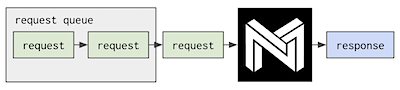
It's highly optimized for minimum per-request latency, using all of the system's resources provided to it on every request it gets.
⚡ Multi-stream scheduling: the throughput/asynchronous scenario, requests execute in parallel.
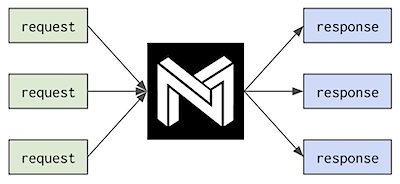
The most common use cases for the multi-stream scheduler are where parallelism is low with respect to core count, and where requests need to be made asynchronously without time to batch them.
Resources
Libraries
Versions
- DeepSparse | stable
- DeepSparse-Nightly | nightly (dev)
- GitHub | releases
Info
Community
Be Part of the Future... And the Future is Sparse!
Contribute with code, examples, integrations, and documentation as well as bug reports and feature requests! Learn how here.
For user help or questions about DeepSparse, sign up or log in to our Deep Sparse Community Slack. We are growing the community member by member and happy to see you there. Bugs, feature requests, or additional questions can also be posted to our GitHub Issue Queue. You can get the latest news, webinar and event invites, research papers, and other ML Performance tidbits by subscribing to the Neural Magic community.
For more general questions about Neural Magic, complete this form.
License
DeepSparse Community is licensed under the Neural Magic DeepSparse Community License. Some source code, example files, and scripts included in the deepsparse GitHub repository or directory are licensed under the Apache License Version 2.0 as noted.
DeepSparse Enterprise requires a Trial License or can be fully licensed for production, commercial applications.
Cite
Find this project useful in your research or other communications? Please consider citing:
@InProceedings{
    pmlr-v119-kurtz20a,
    title = {Inducing and Exploiting Activation Sparsity for Fast Inference on Deep Neural Networks},
    author = {Kurtz, Mark and Kopinsky, Justin and Gelashvili, Rati and Matveev, Alexander and Carr, John and Goin, Michael and Leiserson, William and Moore, Sage and Nell, Bill and Shavit, Nir and Alistarh, Dan},
    booktitle = {Proceedings of the 37th International Conference on Machine Learning},
    pages = {5533--5543},
    year = {2020},
    editor = {Hal Daumé III and Aarti Singh},
    volume = {119},
    series = {Proceedings of Machine Learning Research},
    address = {Virtual},
    month = {13--18 Jul},
    publisher = {PMLR},
    pdf = {http://proceedings.mlr.press/v119/kurtz20a/kurtz20a.pdf},
    url = {http://proceedings.mlr.press/v119/kurtz20a.html}
}

@article{DBLP:journals/corr/abs-2111-13445,
  author    = {Eugenia Iofinova and
               Alexandra Peste and
               Mark Kurtz and
               Dan Alistarh},
  title     = {How Well Do Sparse Imagenet Models Transfer?},
  journal   = {CoRR},
  volume    = {abs/2111.13445},
  year      = {2021},
  url       = {https://arxiv.org/abs/2111.13445},
  eprinttype = {arXiv},
  eprint    = {2111.13445},
  timestamp = {Wed, 01 Dec 2021 15:16:43 +0100},
  biburl    = {https://dblp.org/rec/journals/corr/abs-2111-13445.bib},
  bibsource = {dblp computer science bibliography, https://dblp.org}
}
Release history Release notifications | RSS feed


Download files
Download the file for your platform. If you're not sure which to choose, learn more about installing packages.
Source Distribution
Built Distributions
Filter files by name, interpreter, ABI, and platform.
If you're not sure about the file name format, learn more about wheel file names.
Copy a direct link to the current filters
File details
Details for the file deepsparse-ent-1.5.2.tar.gz.
File metadata
- Download URL: deepsparse-ent-1.5.2.tar.gz
- Upload date:
- Size: 43.2 MB
- Tags: Source
- Uploaded using Trusted Publishing? No
- Uploaded via: twine/3.3.0 pkginfo/1.7.0 requests/2.24.0 setuptools/45.2.0 requests-toolbelt/0.9.1 tqdm/4.56.0 CPython/3.8.10
File hashes
| Algorithm | Hash digest | |
|---|---|---|
| SHA256 |
6fa1b2fe269461748a8d772d465fc25de73ff7c9c50a2879c3d363b7e38b6924
|
|
| MD5 |
882463446720b0d6a6b4b2f1df4946b8
|
|
| BLAKE2b-256 |
f50eeffc1c202d6cb18cbb69cebecf530e278f187e601656a180c12d57eb54e4
|
File details
Details for the file deepsparse_ent-1.5.2-cp310-cp310-manylinux_2_17_x86_64.manylinux2014_x86_64.whl.
File metadata
- Download URL: deepsparse_ent-1.5.2-cp310-cp310-manylinux_2_17_x86_64.manylinux2014_x86_64.whl
- Upload date:
- Size: 43.5 MB
- Tags: CPython 3.10, manylinux: glibc 2.17+ x86-64
- Uploaded using Trusted Publishing? No
- Uploaded via: twine/3.3.0 pkginfo/1.7.0 requests/2.24.0 setuptools/45.2.0 requests-toolbelt/0.9.1 tqdm/4.56.0 CPython/3.8.10
File hashes
| Algorithm | Hash digest | |
|---|---|---|
| SHA256 |
4851b591b44921ad30356fe77e1ac86d08cf4b648d85bf918ca6792e5587cdd8
|
|
| MD5 |
a25a13cf52dc30c06b3033817f916fd5
|
|
| BLAKE2b-256 |
7d4a2dd20c41e02c4f0cb7cbeb1975089a9e46c78d6276c8604dfcbea3690ece
|
File details
Details for the file deepsparse_ent-1.5.2-cp39-cp39-manylinux_2_17_x86_64.manylinux2014_x86_64.whl.
File metadata
- Download URL: deepsparse_ent-1.5.2-cp39-cp39-manylinux_2_17_x86_64.manylinux2014_x86_64.whl
- Upload date:
- Size: 43.5 MB
- Tags: CPython 3.9, manylinux: glibc 2.17+ x86-64
- Uploaded using Trusted Publishing? No
- Uploaded via: twine/3.3.0 pkginfo/1.7.0 requests/2.24.0 setuptools/45.2.0 requests-toolbelt/0.9.1 tqdm/4.56.0 CPython/3.8.10
File hashes
| Algorithm | Hash digest | |
|---|---|---|
| SHA256 |
0d7a38bdc388a70a1f7df93814c533113c0629347447061b8b8bb493818cb9a5
|
|
| MD5 |
76d4431b769a6cafc1abecf86f61df6b
|
|
| BLAKE2b-256 |
dee0050ced192a4a6540e0de9b267ed96080776ecbc0153b9fe6d51656f1ecf7
|
File details
Details for the file deepsparse_ent-1.5.2-cp38-cp38-manylinux_2_17_x86_64.manylinux2014_x86_64.whl.
File metadata
- Download URL: deepsparse_ent-1.5.2-cp38-cp38-manylinux_2_17_x86_64.manylinux2014_x86_64.whl
- Upload date:
- Size: 43.5 MB
- Tags: CPython 3.8, manylinux: glibc 2.17+ x86-64
- Uploaded using Trusted Publishing? No
- Uploaded via: twine/3.3.0 pkginfo/1.7.0 requests/2.24.0 setuptools/45.2.0 requests-toolbelt/0.9.1 tqdm/4.56.0 CPython/3.8.10
File hashes
| Algorithm | Hash digest | |
|---|---|---|
| SHA256 |
3e8d3a8a2c70b1fe646638c700c37ed39637784b6665f2d36a86a0807ddb27c6
|
|
| MD5 |
90ff82849535840fbb20b5de815be4d1
|
|
| BLAKE2b-256 |
6679448889c2443351091d65bd3f8bcc20ccc0d0109d179162b44c114f16ade5
|
File details
Details for the file deepsparse_ent-1.5.2-cp37-cp37m-manylinux_2_17_x86_64.manylinux2014_x86_64.whl.
File metadata
- Download URL: deepsparse_ent-1.5.2-cp37-cp37m-manylinux_2_17_x86_64.manylinux2014_x86_64.whl
- Upload date:
- Size: 43.6 MB
- Tags: CPython 3.7m, manylinux: glibc 2.17+ x86-64
- Uploaded using Trusted Publishing? No
- Uploaded via: twine/3.3.0 pkginfo/1.7.0 requests/2.24.0 setuptools/45.2.0 requests-toolbelt/0.9.1 tqdm/4.56.0 CPython/3.8.10
File hashes
| Algorithm | Hash digest | |
|---|---|---|
| SHA256 |
ee837b14015a0ad352e725521bb8964d32601a5f074ca416db80892b3aa37bb1
|
|
| MD5 |
cbd05f335dcd3ffe6ec29349b76005f2
|
|
| BLAKE2b-256 |
1cf4d958596d667e14b8142ed945442546250a49504918405d4dd807aa28a066
|






