
A Python package for sending Telegram notifications asynchronously.

Project description
DeepWhisperer
Overview
DeepWhisperer is a Python package for sending Telegram notifications asynchronously with advanced message handling. It provides a queue-based, non-blocking mechanism to send messages, images, documents, and other media via Telegram. The package is designed to enhance the monitoring and communication of long-running tasks, ensuring efficient and reliable notifications without interrupting the main program flow.
Key Features
-
🚀 Asynchronous Message Handling: Messages are queued and processed in the background, allowing the main program to continue execution without waiting for notifications.
-
📦 Batch Processing with Configurable Interval: Messages received within a specified time window (default: 10 seconds) are combined into a single message, reducing message spam and improving readability.
-
🔄 Retry Mechanism: Failed messages are automatically retried using exponential backoff, enhancing reliability under unstable network conditions.
-
🚫 Duplicate Message Filtering: Prevents sending identical messages within a configurable time-to-live (TTL) period, reducing redundancy.
-
⚠️ Queue Overflow Handling: Limits the queue size to prevent excessive memory usage, gracefully handling overflow scenarios by discarding excess messages.
-
📷 Rich Media Support: Supports sending images and documents alongside text messages, enabling seamless sharing of visual results or files.
-
✅ Function Execution Notification Decorator (
deepwhisperer_sentinel): Simplifies integrating Telegram notifications into your existing functions. Thedeepwhisperer_sentineldecorator automatically sends notifications when a function starts, completes successfully, or encounters an error. ing tasks.
Prerequisite - Create a Telegram Bot
-
Open Telegram App on your device - To create a Telegram bot, you'll need to have the Telegram app installed on your computer. If you don't have it already, you can download it from the Telegram website.
-
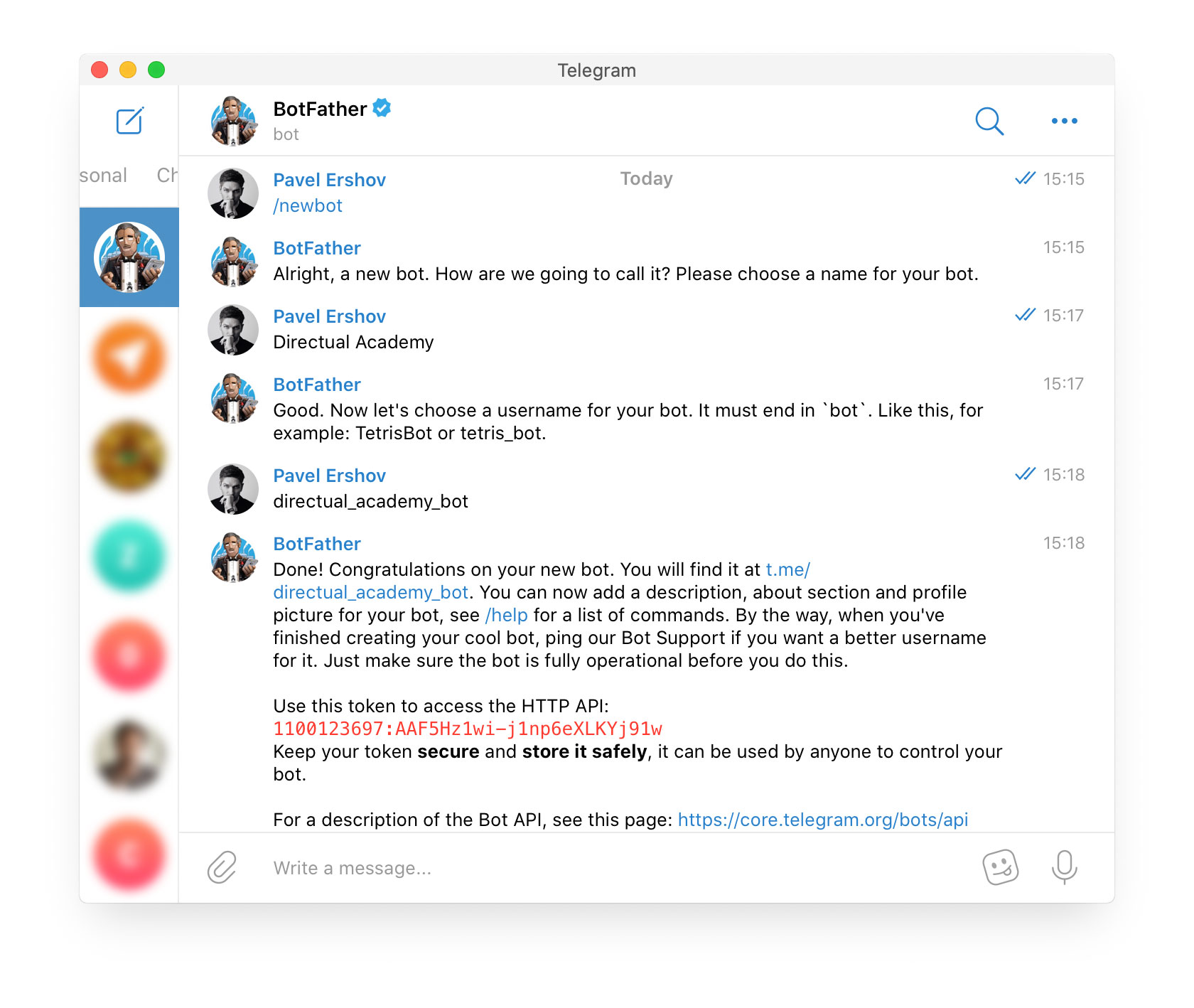
Connect to BotFather - BotFather is a bot created by Telegram that allows you to create and manage your own bots. To connect to BotFather, search for
@BotFatherin the Telegram app and click on the result to start a conversation. -
Select the New Bot option - In the conversation with BotFather, select the "New Bot",
/newbotoption to start creating your new bot. BotFather will guide you through the rest of the process. -
Add a bot name - Next, BotFather will ask you to provide a name for your bot. Choose a name that accurately reflects the purpose of your bot and is easy to remember.
-
Choose a username for your bot - Lastly, BotFather will ask you to choose a username for your bot. This username will be used to create a unique URL that people can use to access your bot. Choose a username that is easy to remember and related to your bot's purpose.
-
Get your Bots HTTP Token - If you send the command
/tokenin BotFather and select the bot, you will get the HTTP Token needed to continue with the automation.

Installation
Using pip (Recommended)
pip install deepwhisperer
From Source
gh repo clone Mathews-Tom/deepwhisperer
cd deepwhisperer
pip install -e .
Usage
1️⃣ Initializing DeepWhisperer
from deepwhisperer import DeepWhisperer

notifier = DeepWhisperer(access_token="your_telegram_bot_token")
notifier.send_message("Hello, Telegram!")
2️⃣ Using the Decorator for Function Execution Notifications
from deepwhisperer import DeepWhisperer, deepwhisperer_sentinel

notifier = DeepWhisperer(access_token="your_telegram_bot_token")

@deepwhisperer_sentinel(notifier, default_description="Data Processing Task")
def process_data():
    import time
    time.sleep(3)  # Simulating a task
    print("Task Completed")

process_data()
3️⃣ Sending Different Types of Messages
# Sending a photo
notifier.send_photo("path/to/photo.jpg", caption="Look at this!")

# Sending a document
notifier.send_file("path/to/document.pdf", caption="Important file")

# Sending a location
notifier.send_location(latitude=37.7749, longitude=-122.4194)

# Sending a video
notifier.send_video("path/to/video.mp4", caption="Watch this!")
Configuration & Parameters
DeepWhisperer Class Arguments
| Parameter | Type | Default | Description |
|---|---|---|---|
access_token |
str |
Required | Telegram Bot API token |
chat_id |
str |
None |
Target chat ID (auto-detected if not provided) |
max_retries |
int |
5 |
Max retry attempts for failed messages |
retry_delay |
int |
3 |
Base delay for exponential backoff |
queue_size |
int |
100 |
Max message queue size before discarding |
deduplication_ttl |
int |
300 |
Time-to-live for duplicate message tracking |
batch_interval |
int |
15 |
Time window for batching text messages |
Decorator Parameters (deepwhisperer_sentinel)
| Parameter | Type | Default | Description |
|---|---|---|---|
notifier |
DeepWhisperer |
Required | Instance of DeepWhisperer |
default_description |
str |
"Task" | Default function description |
Dependencies
DeepWhisperer requires the following dependencies, which are automatically installed:
[dependencies]
httpx = "*"  # Handles Telegram API reques
cachetools = "*"  # Provides TTLCache for duplicate prevention
Code Structure
deepwhisperer/
│── __init__.py
│── deepwhisperer.py  # Core class
│── decorators.py     # Function execution notifier
│── constants.py      # Store class-wide constants
│── tests/            # Test cases
│   ├── __init__.py
│   ├── test_deepwhisperer.py
│   ├── test_decorators.py
│── pyproject.toml    # Project metadata
│── README.md         # Documentation
│── LICENSE           # License file
│── .gitignore        # Ignore unnecessary files
License
This project is licensed under the MIT License. See LICENSE for details.
Author


Download files
Download the file for your platform. If you're not sure which to choose, learn more about installing packages.
Source Distribution
Built Distribution
Filter files by name, interpreter, ABI, and platform.
If you're not sure about the file name format, learn more about wheel file names.
Copy a direct link to the current filters
File details
Details for the file deepwhisperer-0.1.2.tar.gz.
File metadata
- Download URL: deepwhisperer-0.1.2.tar.gz
- Upload date:
- Size: 16.1 kB
- Tags: Source
- Uploaded using Trusted Publishing? No
- Uploaded via: twine/6.1.0 CPython/3.12.8
File hashes
| Algorithm | Hash digest | |
|---|---|---|
| SHA256 |
278faa256d096542cf04f08b7021532265e5461ee323c43e8b35e7e38391924d
|
|
| MD5 |
2167645e309c85c82d6d739a069d919f
|
|
| BLAKE2b-256 |
3d8fcd192262633be9c6c1721044c53f76b0cc497b6150f470814edb15f07ff2
|
File details
Details for the file deepwhisperer-0.1.2-py3-none-any.whl.
File metadata
- Download URL: deepwhisperer-0.1.2-py3-none-any.whl
- Upload date:
- Size: 13.1 kB
- Tags: Python 3
- Uploaded using Trusted Publishing? No
- Uploaded via: twine/6.1.0 CPython/3.12.8
File hashes
| Algorithm | Hash digest | |
|---|---|---|
| SHA256 |
da839dd68a6b9389c6faf1bcda6da448ab9d1282da79e44504b27057bae27114
|
|
| MD5 |
ef5e6d8a5bb8fcbf462ae2e6243ed7b8
|
|
| BLAKE2b-256 |
6be0b6f9f02a890f25c20a2ebdbda65eb7c591f5cc4ce1dfe6dcd0f0feffb25d
|






