
Deepy - Vibe coding for DeepSeek models in your terminal
Verified details
These details have been verified by PyPIProject links
GitHub Statistics
Maintainers

Project description

Deepy
A terminal coding agent for DeepSeek and OpenAI-compatible providers.
Read projects, edit files, run commands, search the web, and keep long project context in one recoverable terminal session.
Website · 中文文档 · Quick Start · Daily Workflow
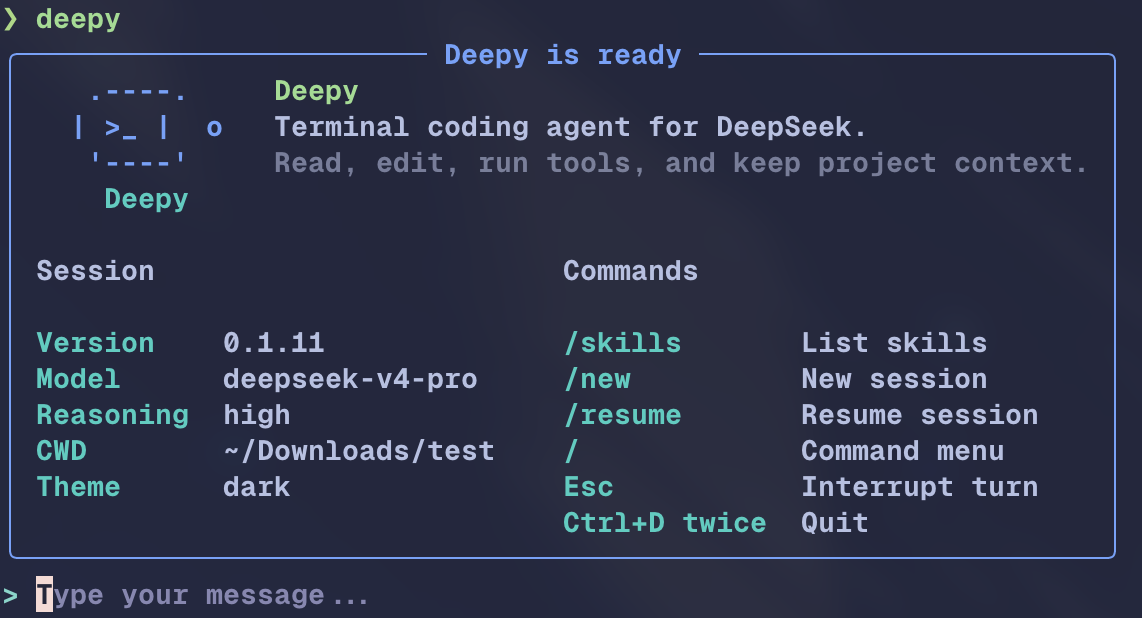
What Deepy Does
Deepy is a Python CLI coding agent for DeepSeek and supported OpenAI-compatible providers. It keeps the working loop inside your terminal: inspect a project, ask questions, modify code, run validation commands, search or fetch web pages, and resume the same project session later.
Deepy is optimized for DeepSeek V4 thinking mode, long context, cache-friendly prompting, and a Rich terminal UI that makes the agent's actions visible instead of hiding tool calls behind chat text.
Why Use It
- Provider-aware model selection: starts with DeepSeek
deepseek-v4-pro, thinking enabled, andreasoning_effort=max. Use/modelto switch between DeepSeek, OpenRouter MiMo, and Xiaomi MiMo models with provider-specific thinking choices. - Project-aware coding tools: read files, write new files, modify existing files with stale-write protection, run shell commands, and review readable diffs.
- Visible terminal transcript: thinking, tool calls, shell output, usage, context status, and command results are shown in the terminal.
- Research from the terminal: use WebSearch for discovery and WebFetch when you already have an exact URL.
- Long-session continuity: JSONL sessions,
/resume,/new, context window status, automatic compacting, and manual/compact. - Local command mode: type
!cmdto run a non-interactive local shell command without sending it to the model; the result is still saved as context. - Cross-platform shell handling: POSIX shell, PowerShell, cmd, Windows paths, UTF-8 output, CRLF editing, and non-interactive Windows local command mode.
See It Work
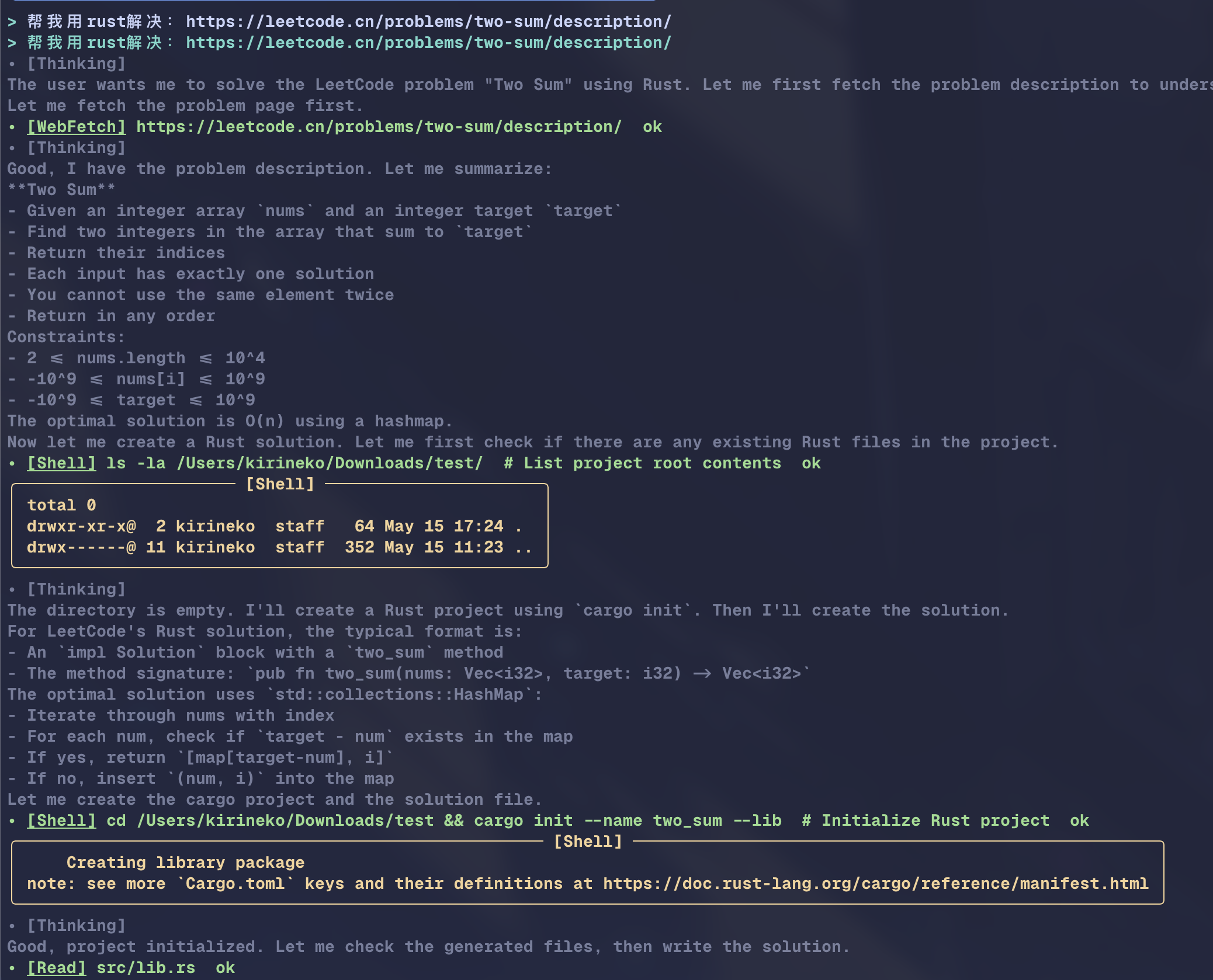
Terminal-Centered Agent Loop
Deepy keeps model reasoning, WebFetch, shell output, and status lines visible in one transcript.
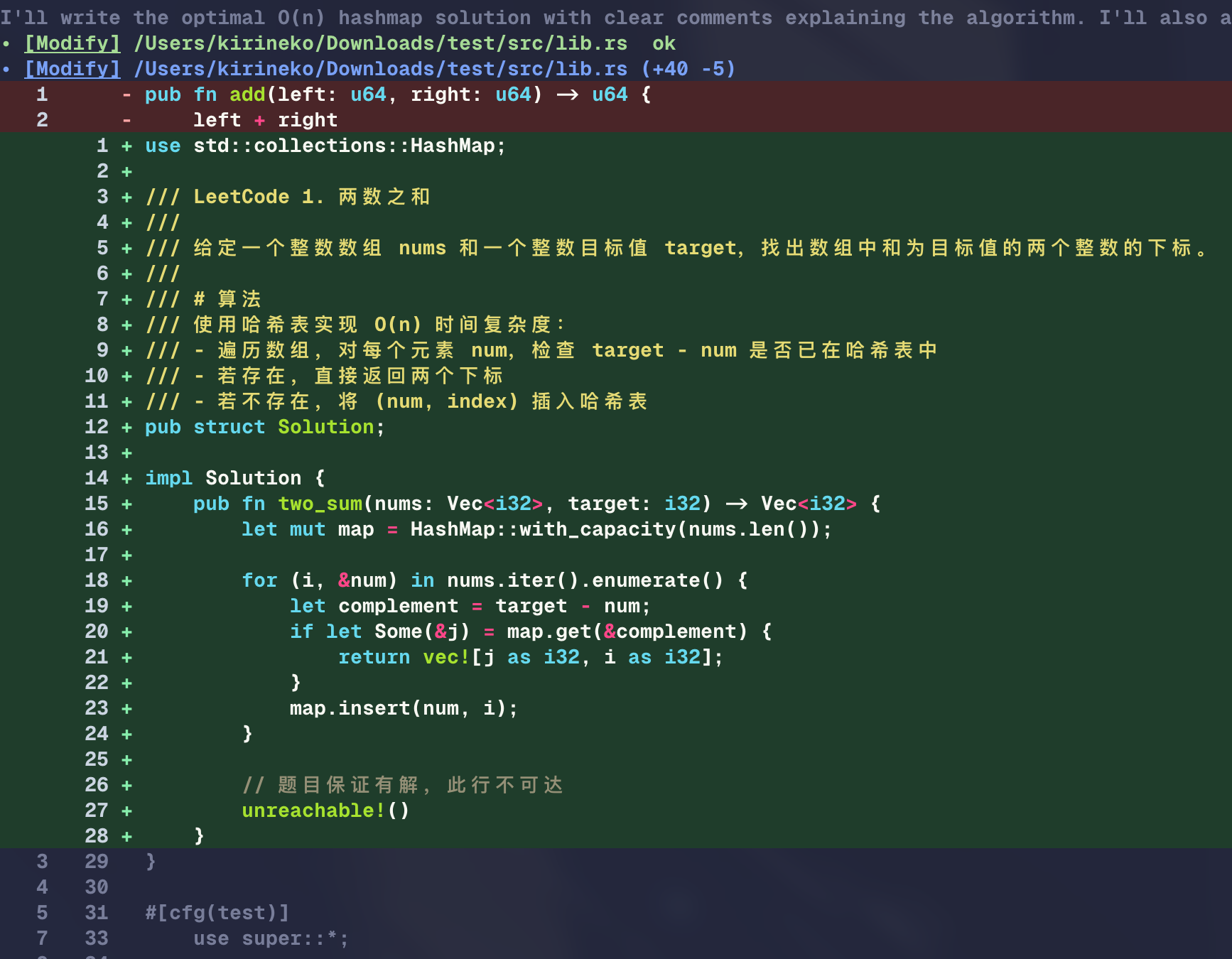
Code Editing With Reviewable Diff
File edits are shown with path information and readable diff output so you can inspect what changed before continuing.
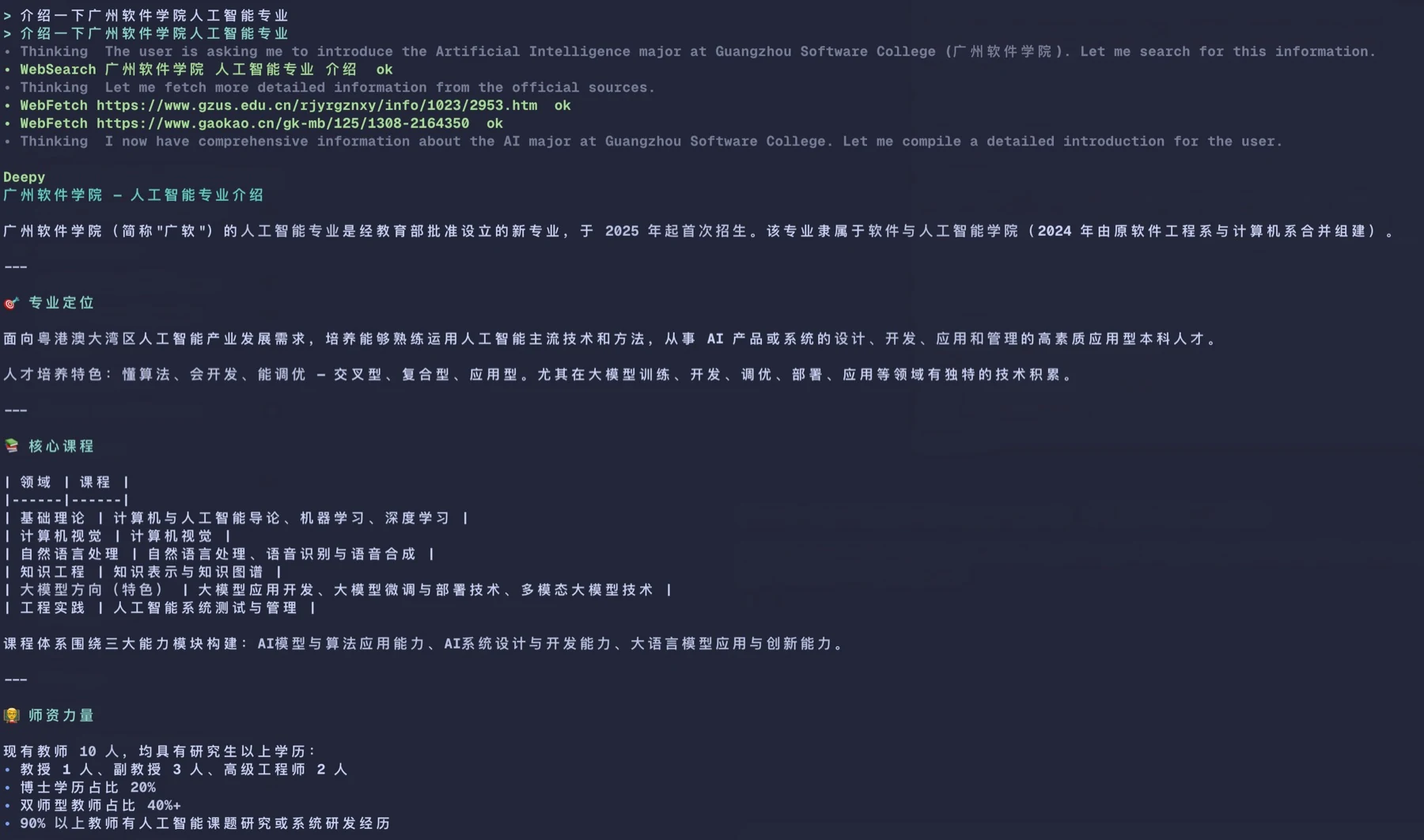
Search, Fetch, And Local Commands
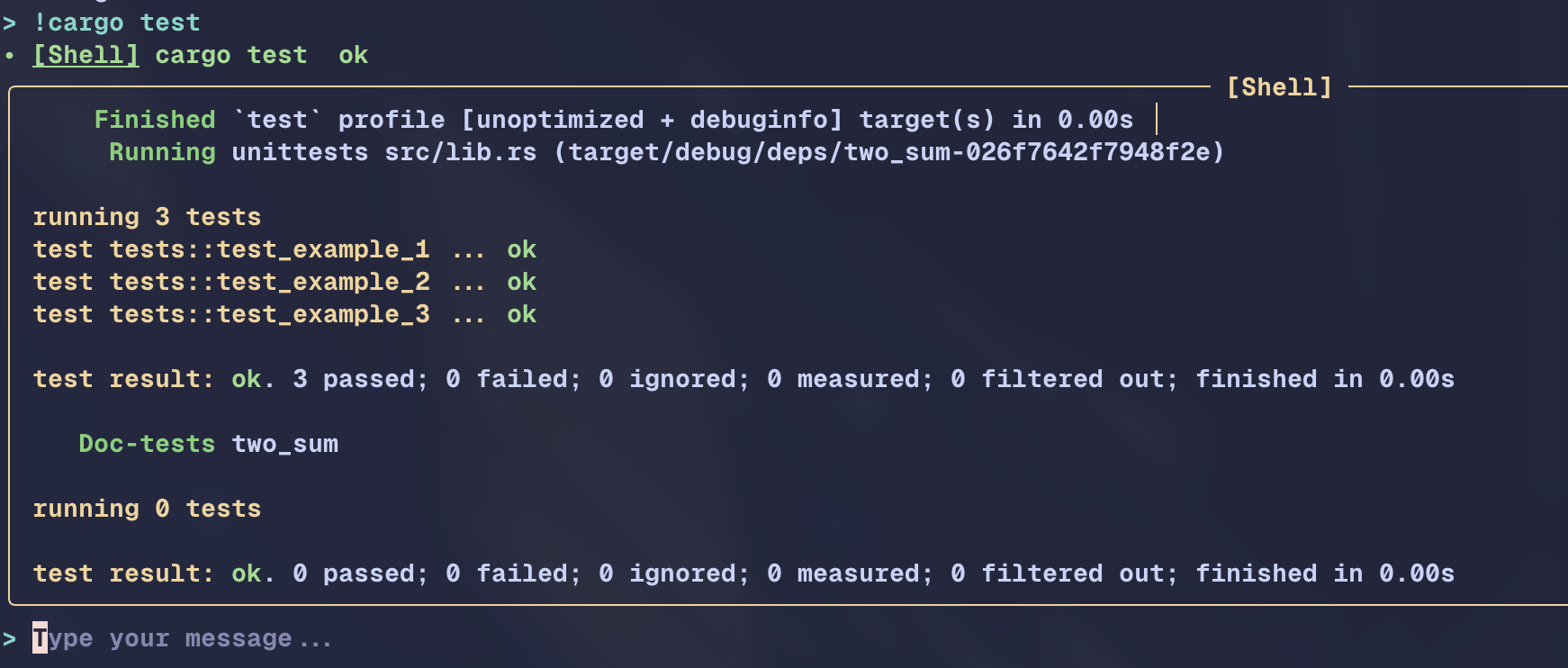
Use WebSearch / WebFetch for external context, @ for file mentions, and !
for direct local commands.
Quick Start
- Install
uv:
# macOS / Linux
curl -LsSf https://astral.sh/uv/install.sh | sh

# Windows PowerShell
powershell -ExecutionPolicy ByPass -c "irm https://astral.sh/uv/install.ps1 | iex"
- Configure a uv mirror.
Linux / macOS: ~/.config/uv/uv.toml
[[index]]
url = "https://mirrors.tuna.tsinghua.edu.cn/pypi/web/simple/"
default = true
Windows: %AppData%\uv\uv.toml
[[index]]
url = "https://mirrors.tuna.tsinghua.edu.cn/pypi/web/simple/"
default = true
- Install Deepy:
uv tool install deepy-cli
The installed command is deepy.
- Configure your provider API key and start Deepy:
deepy config setup

cd your-project
deepy
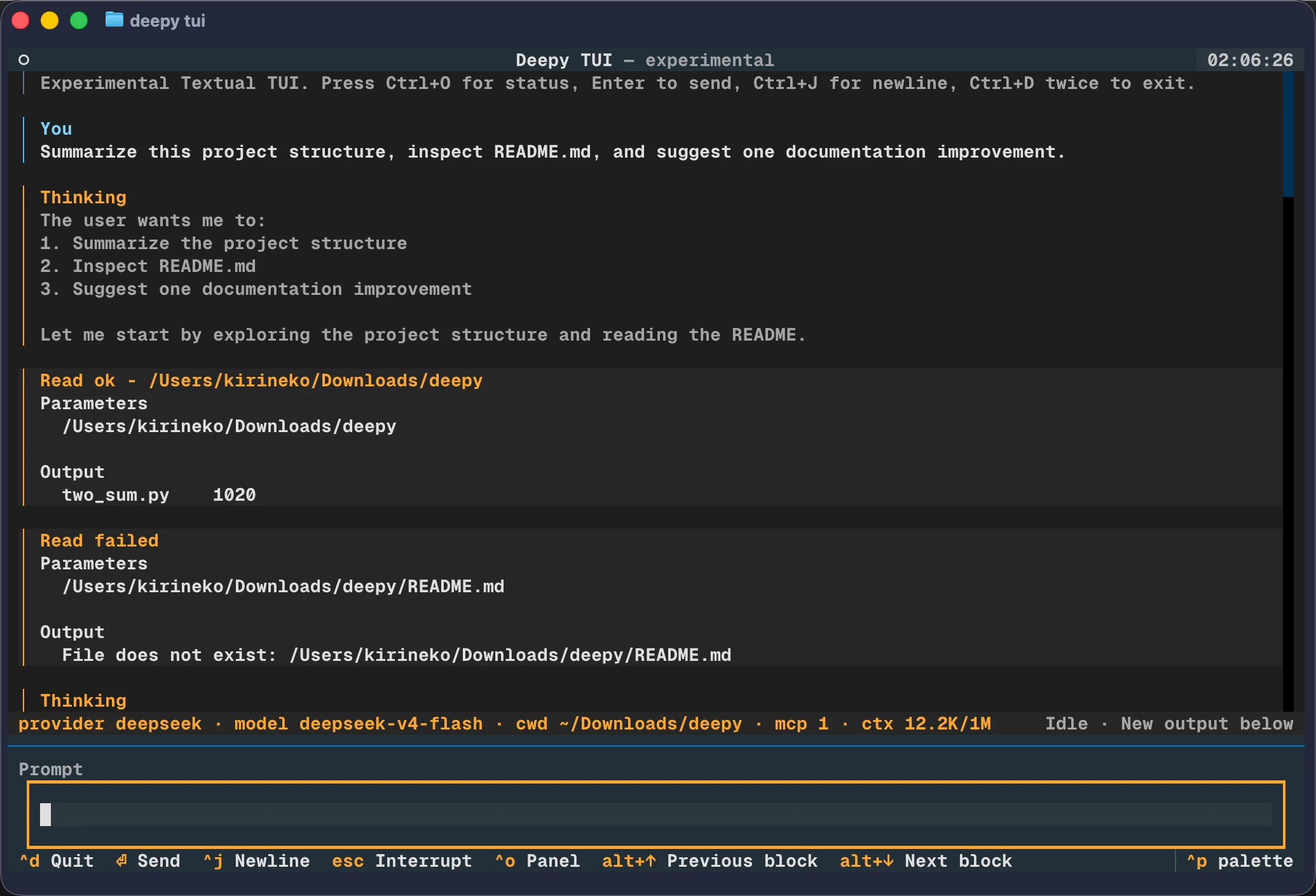
Experimental Textual TUI
Deepy's stable default UI is still launched with deepy. Users who want to try
the new opt-in Textual interface can run:
deepy tui
This first iteration focuses on experience and TUI-native interactions: a
scrollable transcript, live thinking and assistant blocks, prompt suggestions
for slash commands and @file mentions, status/help surfaces, and a Deepy-owned
diff view. It is experimental and may change between releases.
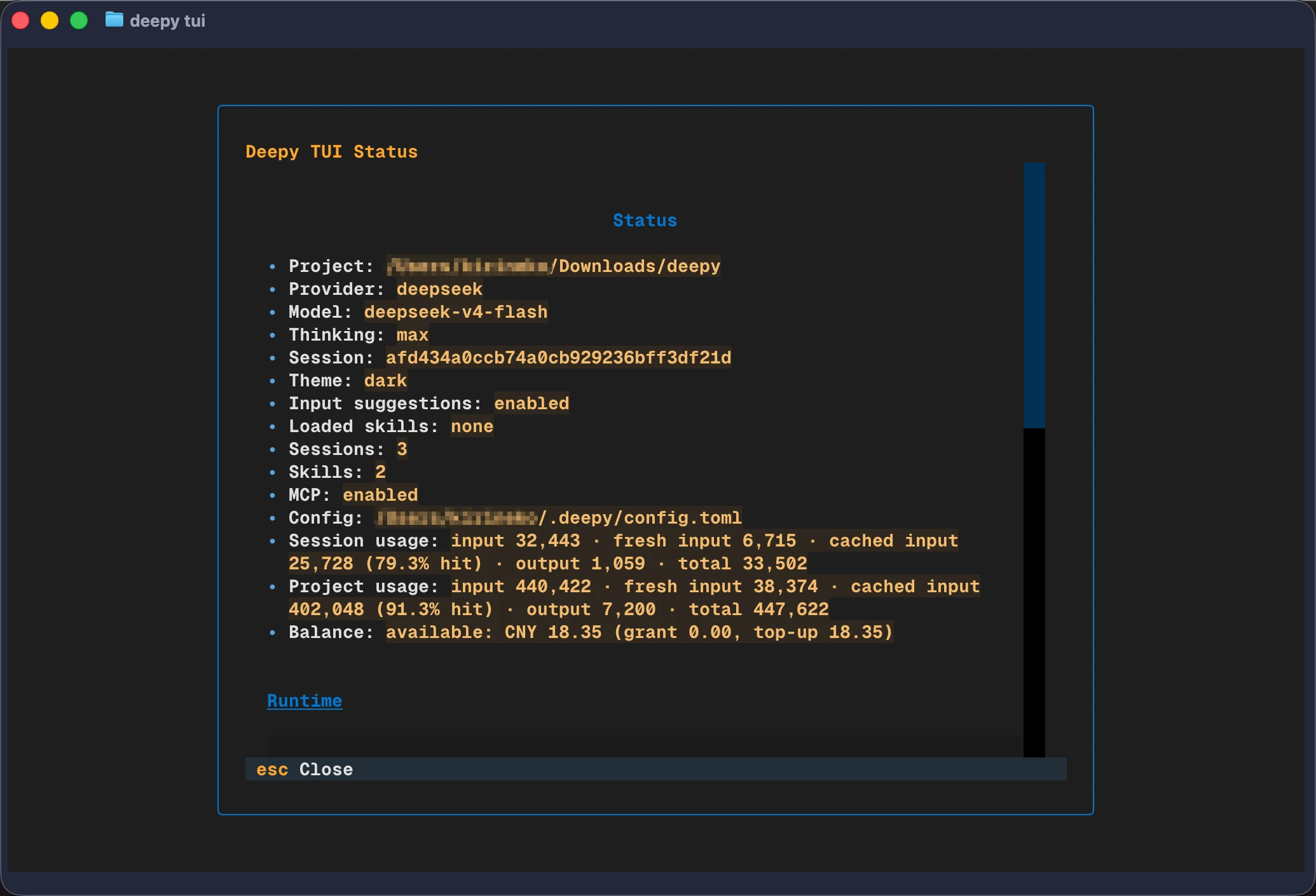
/status is available in both the stable terminal UI and the TUI. It shows
session/project usage, context window pressure, and DeepSeek balance in one
compact view. The balance API is called only when /status is invoked, not on
startup, model turns, input suggestions, or exit.
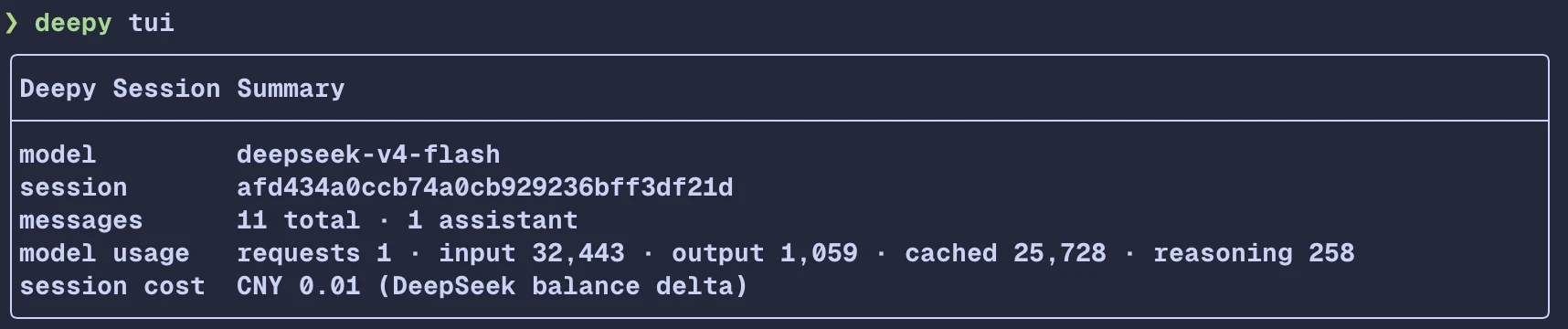
/exit, /quit, and pressing Ctrl+D twice now print the same compact session
summary in both UIs.
Known limitations: the TUI does not add interactive shell/PTTY support yet, and toad / textual-diff-view are only design references. Deepy does not copy their AGPL source or depend on those packages.
Please report feedback through GitHub Issues and include your terminal, shell,
operating system, and the exact deepy tui workflow you tried.
Installation Notes
Use this order for a fresh machine:
1. Install uv
# macOS / Linux
curl -LsSf https://astral.sh/uv/install.sh | sh

# Windows PowerShell
powershell -ExecutionPolicy ByPass -c "irm https://astral.sh/uv/install.ps1 | iex"
2. Configure a uv mirror
Linux / macOS: ~/.config/uv/uv.toml
[[index]]
url = "https://mirrors.tuna.tsinghua.edu.cn/pypi/web/simple/"
default = true
Windows: %AppData%\uv\uv.toml
[[index]]
url = "https://mirrors.tuna.tsinghua.edu.cn/pypi/web/simple/"
default = true
3. Install Deepy
uv tool install deepy-cli
4. Configure and start
deepy config setup

cd your-project
deepy
Upgrade or uninstall Deepy:
uv tool upgrade deepy-cli
uv tool uninstall deepy-cli
Daily Workflow
Inside an interactive Deepy session:
/model       Select provider, model, and thinking mode
/status      Show usage, context pressure, and DeepSeek balance
/ps          Show managed background shell tasks
/stop        Choose background shell tasks to stop
/resume      Resume a previous project session
/new         Start a fresh session
/compact     Compact the active session context
/theme       Show or change terminal UI theme
@src/app.py  Mention a file in the current project
!pytest -q   Run a local non-interactive command
Esc          Interrupt the current model turn
Ctrl+D       Press twice to quit
Typical usage:
Ask Deepy to inspect a bug, edit files, run tests, and summarize what changed.
Use @ to reference files precisely.
Use ! for commands you want to run directly without model mediation.
For long-running servers or watchers, Deepy can run shell commands as managed
background tasks. Their output is captured separately; use `/ps`, `/stop` to
choose one task or all tasks, or use the model-facing `task_output` tool to
inspect and manage them.
Use /resume when returning to a project later.
Use /compact when a long session needs a durable summary.
Configuration
Deepy uses TOML configuration at ~/.deepy/config.toml.
[model]
api_key = "sk-..."
provider = "deepseek"
name = "deepseek-v4-pro"
base_url = "https://api.deepseek.com"
thinking = true
reasoning_effort = "max"

[context]
window_tokens = 1048576
compact_trigger_ratio = 0.8
reserved_context_tokens = 50000
compact_preserve_recent_messages = 2

[ui]
theme = "auto" # auto, dark, or light
Set config without the interactive wizard:
deepy config init --api-key sk-... --provider deepseek --model deepseek-v4-pro
deepy config init --api-key sk-or-... --provider openrouter --model xiaomi/mimo-v2.5-pro
deepy config init --api-key sk-or-... --provider openrouter --model anthropic/claude-sonnet-4.5 --thinking minimal
deepy config init --api-key sk-... --provider xiaomi --model mimo-v2.5-pro
deepy config theme light
Supported provider/model pairs:
deepseek:deepseek-v4-pro,deepseek-v4-flash; thinking modesnone,high,max.openrouter: UI model selection offersxiaomi/mimo-v2.5-pro,xiaomi/mimo-v2.5; setup/init may also use a model id copied from OpenRouter. Thinking modes areenabled,disabled,xhigh,high,medium,low,minimal,none.xiaomi:mimo-v2.5-pro,mimo-v2.5; thinking modesenabled,disabled.
WebSearch uses Deepy's hosted SearXNG endpoint by default. You can override it:
[tools.web_search]
searxng_url = "https://your-searxng.example/"
Deepy can also load MCP servers through the OpenAI Agents SDK. Most users only
need ~/.deepy/mcp.json:
{
  "mcpServers": {
    "tavily": {
      "transport": "stdio",
      "command": "npx",
      "args": ["-y", "tavily-mcp"],
      "env": {"TAVILY_API_KEY": "${TAVILY_API_KEY}"},
      "roles": ["web_search"]
    }
  }
}
When an active MCP tool is marked or detected as web search, Deepy instructs the
model to prefer it over built-in WebSearch and keeps built-in WebSearch as a
fallback. Project MCP config is ignored by default because stdio MCP servers can
start local commands; enable mcp.allow_project_config only for trusted
projects. Use /mcp to inspect server status and exposed tools. Advanced MCP
configuration is documented in docs/mcp.md.
Command Reference
deepy --version
deepy config setup
deepy config reset
deepy config theme
deepy doctor
deepy doctor --live --json
deepy status
deepy tui
deepy skills list
deepy sessions list
deepy sessions show <session-id>
deepy run "summarize this project"
Inside the interactive terminal:
/skills                 Manage local and market skills
/skills list            List discovered skills
/skills search <query>  Search the configured skill market
/skills install <name>  Install a market skill
/skill:<name> [request] Invoke a skill directly
/init                   Create or update project AGENTS.md
/mcp                    Show MCP server status and tools
/ps                     Show managed background shell tasks
/stop                   Choose background shell tasks to stop
/status                 Show usage, context pressure, and DeepSeek balance
AGENTS.md Instructions And Skills
Deepy automatically loads agent-facing instructions from:
~/.deepy/AGENTS.mdfor Deepy-wide personal guidanceAGENTS.mdfiles from the git root down to the current working directory.agents/skills/*/SKILL.md
Project AGENTS.md files are loaded from broad to specific. A file in a nested
directory appears after the repository root file and takes precedence when rules
conflict. Direct user instructions still take precedence over loaded
AGENTS.md guidance.
A concise AGENTS.md works best:
# AGENTS.md

## Commands
- Test: `uv run pytest`
- Lint: `uv run ruff check`
- Type check: `uv run ty check src`

## Architecture
- Keep CLI entry points thin; put reusable behavior under `src/`.

## Style
- Prefer small, focused changes that match existing patterns.

## Verification
- Run focused tests for touched code before broader checks.

## Boundaries
- Do not rewrite unrelated files or revert user changes.
Skills remain standard Agent Skills under .agents/skills/*/SKILL.md and are
loaded through the skill progressive-disclosure flow.
Run /init in the interactive terminal to have Deepy inspect the repository and
create or refresh the project root AGENTS.md.
Development
uv sync --group dev
uv run pytest
uv run ruff check
uv run ty check src
uv build
The Python package is built from src/deepy. GitHub Pages files and screenshot
assets live outside the package directory and are not included in the wheel.
Project details
Verified details
These details have been verified by PyPIProject links
GitHub Statistics
Maintainers
Release history Release notifications | RSS feed


Download files
Download the file for your platform. If you're not sure which to choose, learn more about installing packages.
Source Distribution
Built Distribution
Filter files by name, interpreter, ABI, and platform.
If you're not sure about the file name format, learn more about wheel file names.
Copy a direct link to the current filters
File details
Details for the file deepy_cli-0.2.18.tar.gz.
File metadata
- Download URL: deepy_cli-0.2.18.tar.gz
- Upload date:
- Size: 228.0 kB
- Tags: Source
- Uploaded using Trusted Publishing? Yes
- Uploaded via: uv/0.11.16 {"installer":{"name":"uv","version":"0.11.16","subcommand":["publish"]},"python":null,"implementation":{"name":null,"version":null},"distro":{"name":"Ubuntu","version":"24.04","id":"noble","libc":null},"system":{"name":null,"release":null},"cpu":null,"openssl_version":null,"setuptools_version":null,"rustc_version":null,"ci":true}
File hashes
| Algorithm | Hash digest | |
|---|---|---|
| SHA256 |
c5b332aabbc7430a135328a0827cc9f065106f6881f2c0035e3e6813eb086124
|
|
| MD5 |
684f5b2292fab684366cede6ee04b3e3
|
|
| BLAKE2b-256 |
8e3dfa7b5915056411d4c6b7d7356547e1c9a1f2f83405e86e068be30a54c021
|
File details
Details for the file deepy_cli-0.2.18-py3-none-any.whl.
File metadata
- Download URL: deepy_cli-0.2.18-py3-none-any.whl
- Upload date:
- Size: 267.2 kB
- Tags: Python 3
- Uploaded using Trusted Publishing? Yes
- Uploaded via: uv/0.11.16 {"installer":{"name":"uv","version":"0.11.16","subcommand":["publish"]},"python":null,"implementation":{"name":null,"version":null},"distro":{"name":"Ubuntu","version":"24.04","id":"noble","libc":null},"system":{"name":null,"release":null},"cpu":null,"openssl_version":null,"setuptools_version":null,"rustc_version":null,"ci":true}
File hashes
| Algorithm | Hash digest | |
|---|---|---|
| SHA256 |
76b5e338b8cb3d47cf2e4c2cc24634a7bc60d775eb5a9c7ced37838b6a531d7a
|
|
| MD5 |
8e3e9028e75dc62db3e362a92fb34ee4
|
|
| BLAKE2b-256 |
0212243166e8c07048736a73d2ea99073201958fb2a51ead7e610ab7730de9ac
|






