








DeFFcode - A cross-platform High-performance Video Frames Decoder that flexibly executes
FFmpeg pipeline inside a subprocess pipe for generating real-time, low-overhead,
lightning fast video frames with robust error-handling
in just a few lines of python code ⚡
Highly Adaptive - DeFFcode APIs implements a standalone highly-extensible wrapper around FFmpeg multimedia framework. These APIs supports a wide-ranging media streams as input source such as live USB/Virtual/IP camera feeds, regular multimedia files, screen recordings, image sequences, network URL schemes (such as HTTP(s), RTP/RSTP, etc.), so on and so forth.
Highly Flexible - DeFFcode APIs gains an edge over other FFmpeg Wrappers by providing complete control over the underline pipeline including access to almost any FFmpeg specification thinkable such as specifying framerate, resolution, hardware decoder(s), filtergraph(s), and pixel-format(s) that are readily supported by all well known Computer Vision libraries.
Highly Convenient - FFmpeg has a steep learning curve especially for users unfamiliar with a command line interface. DeFFcode helps users by providing similar to OpenCV, Index based Camera Device Capturing and the same standard OpenCV-Python (Python API for OpenCV) coding syntax for its APIs, thereby making it even easier to learn, create, and develop FFmpeg based apps in Python.
Key features of DeFFcode
Here are some key features that stand out:
- High-performance, low-overhead video frames decoding with robust error-handling.
- Flexible API with access to almost any FFmpeg specification thinkable.
- Supports a wide-range of media streams/devices/protocols as input source.
- Curated list of well-documented recipes ranging from Basic to Advanced skill levels.
- Hands down the easiest Index based Camera Device Capturing, similar to OpenCV.
- Easy to code Real-time Simple & Complex Filtergraphs. (Yes, You read it correctly "Real-time"!)
- Native Multi-Input Source Configurations support for decoding complex topologies.
- Native Multi-Outputs Configurations support for recording/streaming while decoding, in a single FFmpeg pipeline.
- Lightning fast dedicated GPU-Accelerated Video Decoding & Transcoding.
- Enables precise FFmpeg Key-frame Seeking with pinpoint accuracy.
- Effortless Metadata Extraction from all streams available in the source.
- Maintains the standard easy to learn OpenCV-Python coding syntax.
- Out-of-the-box support for all prominent Computer Vision libraries.
- Cross-platform, runs on Python 3.11+, and easy to install.
Getting Started
📚 Documentation: https://abhitronix.github.io/deffcode
Installation:
If this is your first time using DeFFcode, head straight to the Installation Notes to install DeFFcode on your machine.
Recipes a.k.a Examples:
Once you have DeFFcode installed, checkout our Well-Documented Recipes 🍱 for usage examples:
Note In case you're run into any problems, consult our Help section.
A. Basic Recipes 🍰: Recipes for beginners of any skill level to get started.

Big Buck Bunny Reversed using Live Simple Filtergraph
Basic Decoding Recipes
- Accessing RGB frames from a video file
- Decoding a specific video stream from a multi-stream file
- Decoding anamorphic and HDR video files
- Capturing and Previewing BGR frames from a video file (OpenCV Support)
- Playing with any other FFmpeg pixel formats
- Capturing and Previewing frames from a Looping Video
- Enumerating all Camera Devices with Indexes
- Capturing and Previewing frames from a Camera using Indexes
- Capturing and Previewing frames from a HTTPs Stream
- Decoding a specific rendition from a HLS Stream
- Capturing and Previewing frames from a RTSP/RTP Stream
- Capturing and Previewing frames from Sequence of images
- Capturing and Previewing frames from Single looping image
Basic Transcoding Recipes
- Transcoding video using OpenCV VideoWriter API
- Transcoding lossless video using WriteGear API
- Transcoding Trimmed and Reversed video
- Transcoding Cropped video
- Transcoding Rotated video (with
rotatefilter) - Transcoding Rotated video (with
transposefilter) - Transcoding Horizontally flipped and Scaled video
- Extracting Key-frames as PNG image
- Generating Thumbnail with a Fancy filter
Basic Metadata Recipes
B. Advanced Recipes 🥐: Recipes to take your skills to the next level.
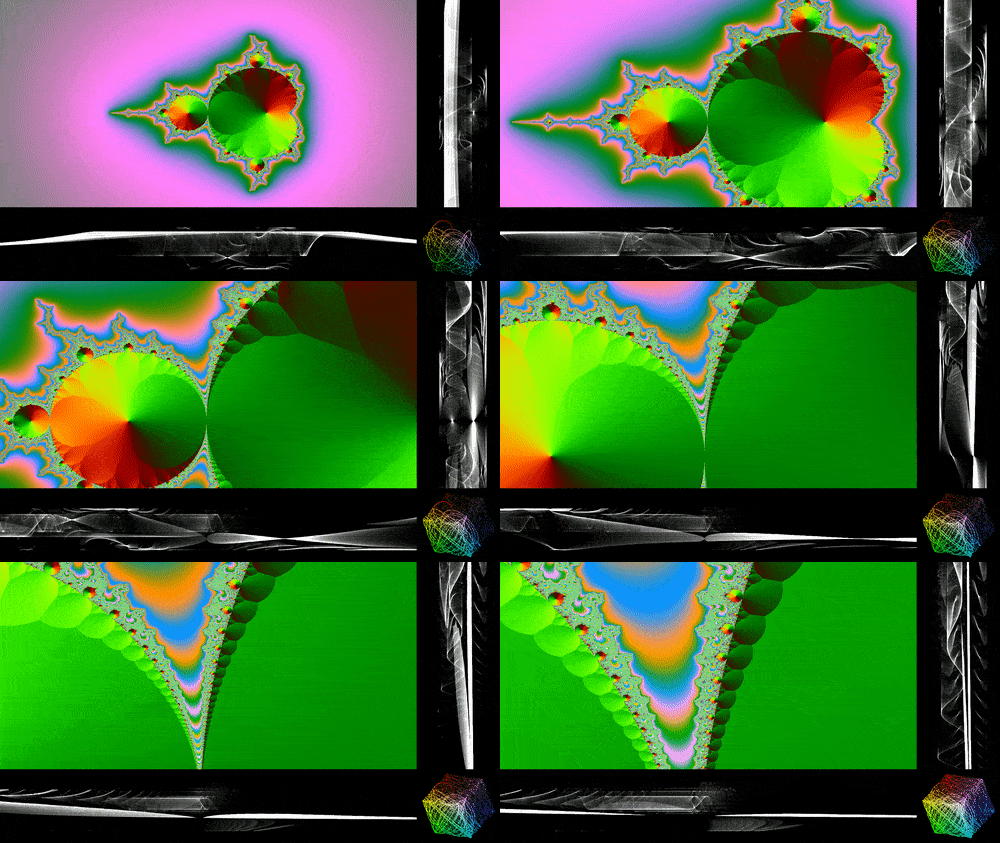
Live Mandelbrot pattern with a Vectorscope & two Waveforms
Advanced Decoding Recipes
- Generate and Decode frames from Sierpinski pattern
- Generate and Decode frames from Test Source pattern
- Generate and Decode frames from Gradients with custom Text effect
- Generate and Decode frames from Mandelbrot test pattern with vectorscope & waveforms
- Generate and Decode frames from Game of Life Visualization
- Capturing and Previewing frames from a Webcam using Custom Demuxer
- Capturing and Previewing frames from your Desktop (Screen Recording)
- CUVID-accelerated Hardware-based Video Decoding and Previewing
- CUDA-accelerated Hardware-based Video Decoding and Previewing
Advanced Transcoding Recipes
- Transcoding video with Live Custom watermark image overlay
- Transcoding video from sequence of Images with additional filtering
- Transcoding video art with YUV Bitplane Visualization
- Transcoding video art with Jetcolor effect
- Transcoding video art with Ghosting effect
- Transcoding video art with Pixelation effect
- CUDA-accelerated Video Transcoding with OpenCV's VideoWriter API
- CUDA-NVENC-accelerated Video Transcoding with WriteGear API
- CUDA-NVENC-accelerated End-to-end Lossless Video Transcoding with WriteGear API
- Multi-Input Source Configurations
- Decoding multiple inputs as side-by-side composite
- Decoding multiple RTSP streams in parallel
- Decoding Picture-in-Picture overlay with per-input configuration
- Decoding mixed sources with different demuxers
- Decoding multiple inputs as 2x2 video grid (mosaic)
- Decoding crossfade transition between multiple inputs
- Probing multiple inputs with Sourcer API
- Decoding embedded streams of a single input as side-by-side composite
- Multi-Outputs Configurations
Advanced Metadata Recipes
API in a nutshell:
As a user, you just have to remember only two DeFFcode APIs, namely:
A. FFdecoder API
The primary function of FFdecoder API is to decode 24-bit RGB video frames from the given source:
Note See API Reference for more in-depth information.
# import the necessary packages
from deffcode import FFdecoder

# formulate the decoder with suitable source
decoder = FFdecoder("https://abhitronix.github.io/html/Big_Buck_Bunny_1080_10s_1MB.mp4").formulate()

# grab RGB24(default) 3D frames from decoder
for frame in decoder.generateFrame():
    # lets print its shape
    print(frame.shape)  # (1080, 1920, 3)

# terminate the decoder
decoder.terminate()
B. Sourcer API
The primary function of Sourcer API is to gather metadata information from all multimedia streams available in the given source:
# import the necessary packages
from deffcode import Sourcer

# initialize and formulate the decoder using suitable source
sourcer = Sourcer(
    "https://abhitronix.github.io/html/Big_Buck_Bunny_1080_10s_1MB.mp4"
).probe_stream()

# print metadata as `json.dump`
print(sourcer.retrieve_metadata(pretty_json=True))
The resultant Terminal Output will look something as following on Windows machine
{
  "ffmpeg_binary_path": "C:\\Users\\foo\\AppData\\Local\\Temp\\ffmpeg-static-win64-gpl/bin/ffmpeg.exe",
  "source": "https://abhitronix.github.io/html/Big_Buck_Bunny_1080_10s_1MB.mp4",
  "source_extension": ".mp4",
  "source_video_resolution": [1920, 1080],
  "source_video_framerate": 60.0,
  "source_video_pixfmt": "yuv420p",
  "source_video_decoder": "h264",
  "source_video_sar": [
    1,
    1
  ],
  "source_video_dar": [
    16,
    9
  ],
  "source_video_color_range": "",
  "source_video_color_space": "",
  "source_video_color_primaries": "",
  "source_video_color_transfer": "",
  "source_duration_sec": 10.0,
  "source_start_sec": 0.0,
  "approx_video_nframes": 600,
  "source_video_bitrate": "832k",
  "source_audio_bitrate": "",
  "source_audio_samplerate": "",
  "source_has_video": true,
  "source_has_audio": false,
  "source_has_image_sequence": false
}
Contributions
We're happy to meet new contributors💗
We welcome your contributions to help us improve and extend this project. If you want to get involved with DeFFcode development, checkout the Contribution Guidelines ▶️
We're offering support for DeFFcode on Gitter Community Channel. Come and join the conversation over there!
Donations

DeFFcode is free and open source and will always remain so. ❤️
It is something I am doing with my own free time. But so much more needs to be done, and I need your help to do this. For just the price of a cup of coffee, you can make a difference 🙂

Citation
Here is a Bibtex entry you can use to cite this project in a publication:

@software{deffcode,
  author       = {Abhishek Thakur},
  title        = {abhiTronix/deffcode: v0.2.9},
  month        = nov,
  year         = 2026,
  publisher    = {Zenodo},
  version      = {v0.2.9},
  doi          = {10.5281/zenodo.23853534},
  url          = {https://doi.org/10.5281/zenodo.23853534},
}
Copyright
Copyright (c) abhiTronix 2021
This library is released under the Apache 2.0 License.
1 maintainer

Metadata
1 maintainer
Release files for deffcode 0.3.0
For a detailed explanation of source distributions (sdists) and built distributions (wheels), please see the package formats documentation.
Source distribution (sdist)
| File | Size | Uploaded | Provenance | Actions |
|---|---|---|---|---|
| deffcode-0.3.0.tar.gz | 88.0 kB | Without provenance | Details for deffcode-0.3.0.tar.gz |
Built distribution (wheel)
| File | Interpreter | ABI | Platform | Actions Reset |
|---|---|---|---|---|
| deffcode-0.3.0-py3-none-any.whl | Python 3 | none | any | Details for deffcode-0.3.0-py3-none-any.whl |
Total release size: 141.8 kB
Release files / deffcode-0.3.0.tar.gz
| Download URL | deffcode-0.3.0.tar.gz |
|---|---|
| Size | 88.0 kB |
| Tags | Source |
|
SHA-256 checksum How to use checksums |
f90971ff1337d5cf74e795017d3036af0fcc4d066433433200f1ddb4de944a71
|
|
BLAKE2b-256 checksum How to use checksums |
4133c431ccfe416857a8e19ab5104bfbca22c46e482a1c6283af9cf55f1b5c9c
|
| Upload date | |
|
Uploaded using Trusted Publishing? What is trusted publishing? |
No |
| Uploaded via |
twine/7.0.0 CPython/3.14.6
|
Release files / deffcode-0.3.0-py3-none-any.whl
| Download URL | deffcode-0.3.0-py3-none-any.whl |
|---|---|
| Size | 53.8 kB |
| Tags | Python 3 |
|
SHA-256 checksum How to use checksums |
d3ab06fe267198e1da0011a6f6d6f9eef76acc70d0f44218153e6eebb4bca4af
|
|
BLAKE2b-256 checksum How to use checksums |
53e7565a23aa1e557e01a3d284be4d8a0d8e83b2bb613389f8200889d324aed7
|
| Upload date | |
|
Uploaded using Trusted Publishing? What is trusted publishing? |
No |
| Uploaded via |
twine/7.0.0 CPython/3.14.6
|
Security for deffcode 0.3.0
Provenance
Provenance describes where a file came from. On PyPI, provenance is shared via attestations, which provide a verifiable record of the build or publishing details. View details, limitations and caveats.
No provenance found
None of the files in this release were uploaded with provenance metadata.
A note on package security
PyPI is a repository for distributing packages, not a service for auditing them. While third-party security researchers and our staff do their best to detect and remove malicious packages, PyPI cannot guarantee the quality, security or suitability of any given package.
To learn more about protecting yourself from malicious actors, visit our package security documentation.














