
deli-slicer
A CLI-first slicer front end for 3D printing.
deli keeps a print job as a plain-text deli.toml in the current directory. Each
subcommand edits that file and exits, so a print is set up with a few commands in a
shell and a file you can read, with nothing else to open. Slicing
is done in-process by PrusaSlicer's libslic3r, and the printer profiles come from
OrcaSlicer's repository, converted by deli, so neither slicer needs to be installed:
the printers OrcaSlicer knows are a deli setup away on a machine that has never had a
slicer on it.
A folder of models is the project, and there is nothing to save: every command
updates deli.toml as it goes. Come back months later, cd into the folder, and
deli send --print prints the same parts, placed the same way, with the same profiles
and settings.
Everything deli prints is plain text, with --json where a program wants data, and
every command is one a shell runs. That makes deli simple for humans to use directly or
through an AI: the repository ships a skill that briefs an assistant (see "Using deli
from an AI assistant"). When something needs seeing, deli view shows the parts and
the sliced G-code in your browser, and even there every change it makes is a deli
command you could have typed.

deli setup                # once: tab completion, your printer, and how to reach it
deli add 3DBenchy.stl
deli slice                # how long it will take, and how much filament
deli view                 # the sliced Benchy in your browser, layer by layer
deli send --print         # to the printer, and start it
Status: early. Everything above works; deli converts and slices for most of the printers OrcaSlicer knows, but has printed on only two so far. See "Where it stands" at the end.
Motivation
deli came out of my frustrations with the slicers I was using:
- PrusaSlicer has no settings built in for my printer, an Elegoo Centauri Carbon.
- OrcaSlicer does, but it crashes often and generally does not like my PC.
- OrcaSlicer supports lots of printers, but it is somewhat focused on Bambu Lab's.
- I have two printers, the Elegoo and a Voron, and want to configure both easily. I found myself using both slicers, plus Cura now and then.
- Both have bewildering settings screens, mostly because there are so many settings and options. Most of them stay at their defaults, so finding a particular one means hunting and guessing, and the guess is often wrong.
So deli takes a printer's settings from OrcaSlicer, slices with PrusaSlicer's engine,
and has no window to open. Every printer is a profile in one library, chosen for each
print, so one tool can serve them all. A print is a short text file that holds only
what you changed, and you change a setting by its name: deli set infill 20%. When
the name is not quite right, deli suggests the ones that are close.
The longer story, with clips of each part, is in the blog post deli: A 3D Printer Slicer That Lives in My Shell.
Install
deli is a Python package with PrusaSlicer's slicing engine compiled in, on PyPI as
deli-slicer. On Linux (and Windows, in WSL) or
macOS, with uv:
uv tool install deli-slicer
(pipx install deli-slicer does the same.) Without uv, one line installs it first,
then deli:
curl -LsSf https://raw.githubusercontent.com/dcruver/deli-slicer/main/install.sh | sh
Either way uv fetches Python 3.12 if you don't have it. Then run deli setup. Later,
deli update installs the latest release the same way (--check only says whether
there is one; deli update 0.17.0 a particular release), or run the
script again, with DELI_VERSION=0.17.0 in front of sh for a particular
release. deli status mentions a newer release when one is out, looking once a day;
deli config update_check false stops it looking.
On Windows, deli runs in WSL; that, which Linuxes and Macs the wheels run on, and building from source are in the FAQ.
Then let deli set itself up:
deli setup
It sets up tab completion for your shell, then asks for your printer's hostname or IP
address and asks the printer what it is: a Klipper printer says its nozzle, bed and
height, and setup lists OrcaSlicer's printers that fit; an Elegoo printer says its model,
and setup asks only the nozzle size. The printer is imported with Orca's process and
filament for it, named as the printer names itself (a Klipper printer's hostname, or
the address's first label), given the settings that fit what it reported (no taller
prints than its Z travel, the material passed to a PRINT_START that reads it), and its
address kept for deli send. A printer deli cannot reach is found by any words of its
name instead. A Bambu Lab printer is recognised, but deli cannot send to one yet. Run it
again to add or change a printer. Everything it does can also be done step by step, as
the guide shows.
Tab completion
Completion covers commands, options, your printers and their nozzles, printers,
filaments and processes (yours and OrcaSlicer's), the parts of the current print,
setting names and their short names, and config keys. deli setup sets it up; by hand, it is one of:
eval "$(deli completion bash)"      # in ~/.bashrc
eval "$(deli completion zsh)"       # in ~/.zshrc
deli completion fish > ~/.config/fish/completions/deli.fish
deli setup puts bash's in ~/.local/share/bash-completion/completions/ when the
bash-completion package is installed, which loads it with nothing in ~/.bashrc, and
adds the line to ~/.zshrc only if you say yes.
A print, in a few commands
In a new directory:
deli add 3DBenchy.stl                 # STL, OBJ, 3MF or AMF; the print starts with your default printer, filament and process
deli add https://example.com/boat.zip # or fetched from the web: a model file, a zip of them, a page linking to them, or a Printables model (--file picks one of several)
deli printer "bambu p1s 0.4"          # another printer for this print, by any words of its name; its filament and process come with it
deli filament "generic petg"          # another filament than its default, converted for this printer
deli set infill 20%                   # or any PrusaSlicer setting by name
deli supports organic                 # automatic supports, for a model that needs them: on, off, grid, snug, organic
deli scale 150%                       # a bigger boat
deli scale z 60mm                     # or one side to a size, the others left as they are: z is up, however the part is turned
deli rotate 45                        # turned on the bed
deli mirror x                         # or its mirror image, for the other side of a pair
deli move 60 80                       # put it there instead of in the middle
deli pause 40                         # pause once layer 40 is done: change the filament for a two-colour boat
deli view                             # the Benchy on the bed in your browser, live; the shell stays free
deli slice                            # how long it takes, how much filament, and where it lies on the bed; the view then shows it layer by layer
deli send                             # uploads it, slicing first if needed; add --print to start printing
deli status                           # the print at a glance: printer, filament, process, parts, where it sends, settings, G-code
Each of these, and what it does to deli.toml, is in the guide:
your library of printers, filaments and processes, settings and the layers they come
from, copies and where they go, several plates, pauses, the viewer and sending. The
commands page lists every command and its options.
A model can come straight from the web. deli add <url> fetches a model file, a zip of
them, a page linking to them, or a Printables model, lists the files when there are
several, and records the address in deli.toml:

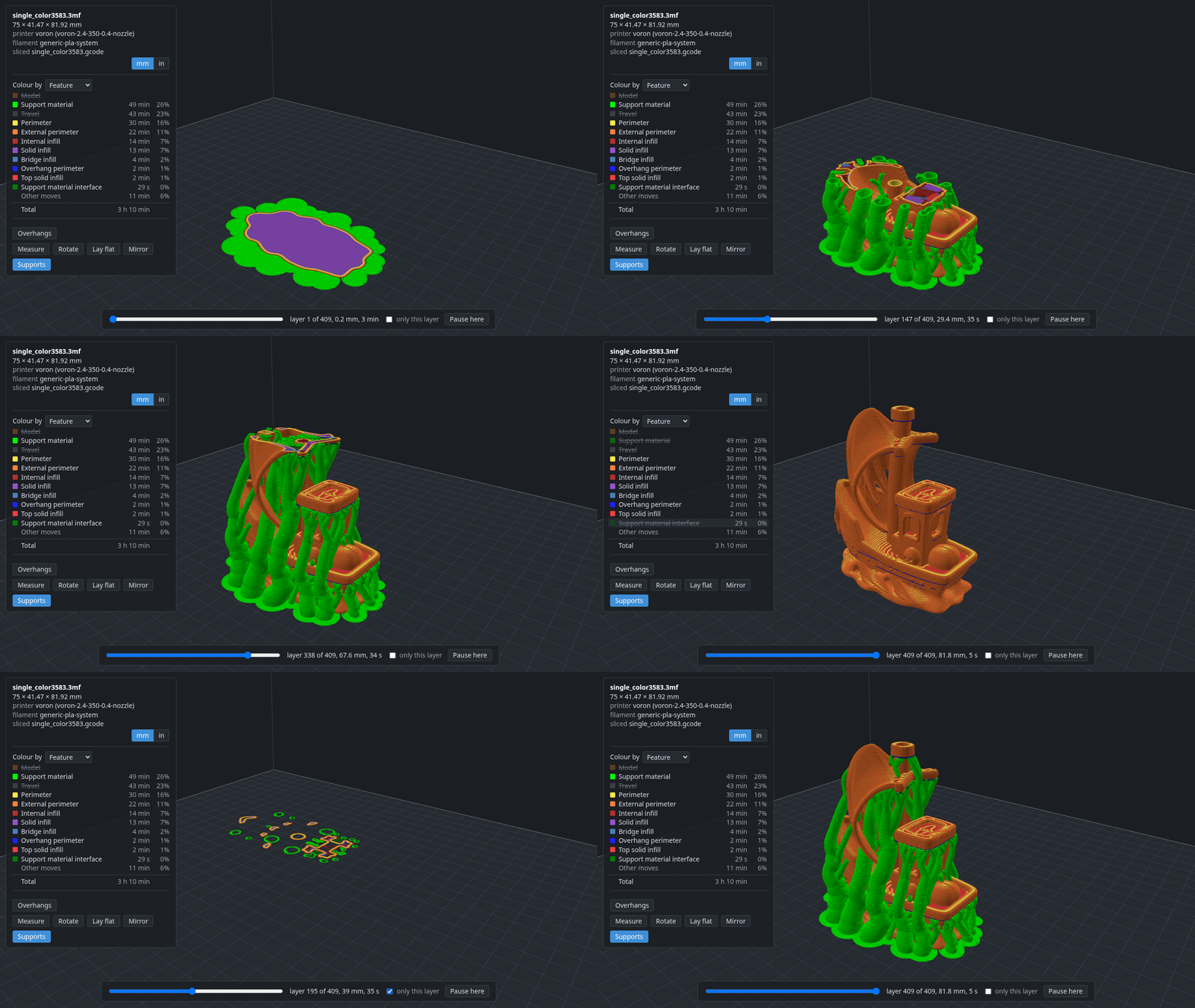
deli view opens the print in your browser and gives the shell back. Once sliced, it
shows every extrusion coloured by what it is for, supports included, with a slider
through the layers; dragging, rotating, laying flat and mirroring a part each write the
deli command that does it, and Apply runs it:
deli printer, deli filament, deli process, deli set, deli supports,
deli scale, deli rotate, deli mirror, deli move and deli pause without arguments show what
is chosen. deli remove, deli unset, deli scale 100%, deli rotate 0, deli mirror off,
deli move auto, deli arrange and deli pause off undo things. Everything is in deli.toml, which
is plain TOML you can edit, comment and commit:
pause = [40]

[printer]
name = "voron-2.4-350-0.4-nozzle"
sha256 = "9510435c7c2100a23514b823aaab26fc37e9efe6a7e8031c1a2e03ecb687192c"

[[part]]
file = "3DBenchy.stl"
scale = [1.5, 1.5, 1.5]
rotate = [0, 0, 45]
at = [60, 80]

[settings]
fill_density = "20%"
support_material = 1
support_material_auto = 1
support_material_style = "organic"
The filament and the process have tables like the printer's. The hash records which
version of the printer the print was set up with; if the printer in your library
changes, deli slice says so and deli printer <name> accepts the new version.
Before a first real print: deli send without --print only uploads, so you can
check the file arrived and start it from the printer's own screen.
Using deli from an AI assistant
deli is a good fit for a coding assistant that runs shell commands: every command
takes its arguments on the command line, prints plain text and exits (deli status --json and deli slice --json give the same as data), and a print is a file the
assistant can read. The repository ships a skill, a short briefing in
skills/deli/SKILL.md, that tells an assistant how deli
thinks, the usual workflow, the rules it should keep (never deli send --print
unless asked; never deli setup, which asks questions) and where the settings are.
It follows the Agent Skills format, so it works with
Claude Code, Codex, OpenCode, Pi and the other tools that read SKILL.md files.
To install it for yours:
npx skills add dcruver/deli-slicer # into whichever agents you have
or copy skills/deli/ into the folder your tool reads skills from
(~/.claude/skills/, ~/.codex/skills/, ~/.config/opencode/skills/, ...).
Within this checkout, Claude Code finds it through .claude/skills/deli.
Where it stands
Early. Two printers have printed deli's G-code so far, an Elegoo Centauri Carbon and a
Voron 2.4 running Klipper, both with profiles converted from Orca's and the files sent
with deli send --print. Of the 1,001 printers OrcaSlicer 2.4.2 ships, 789 convert and
slice a test cube (PRINTERS.md lists every one), which is not the same
as printing well. Bambu printers cannot be sent to yet, there is no Windows wheel outside
WSL, settings apply to the whole print, and only Printables among the model sites has a
way in. The full list, with what has actually been printed, is
What is not done yet in the FAQ. If you print
with a printer that has not printed deli's G-code yet, please say how it went.
Documentation
- Guide: setting up a printer, your library, settings and their layers, parts, copies and plates, pauses, the viewer, sending.
- Commands: every command and its options.
- FAQ: platforms, Windows, building from source, and what is not done yet.
- PRINTERS.md: which of OrcaSlicer's printers convert and slice.
- CHANGELOG.md: what changed in each release.
Engine
PrusaSlicer 2.9.6's source is vendored as a git submodule at vendor/PrusaSlicer.
deli links its libslic3r into a Python extension module; nothing of PrusaSlicer's
GUI is built. PLAN.md has the build details and the project's current state.
Contributing
DESIGN.md says how deli is meant to work and why; CONTRIBUTING.md says how to build it, test it and send a change, and what help is most wanted (printing with a printer that has not printed deli's G-code yet, above all). CHANGELOG.md lists what changed in each release.
License
AGPL-3.0-only, the same licence as the PrusaSlicer code it links. See LICENSE.
The profiles in profiles/ are derived from OrcaSlicer's, which are AGPL-3.0 too. The
libraries compiled into deli's wheels, and the three.js the viewer bundles, are listed
with their licences in THIRD-PARTY-NOTICES.md.
1 maintainer

Metadata
1 maintainer
Release files for deli-slicer 0.17.1
For a detailed explanation of source distributions (sdists) and built distributions (wheels), please see the package formats documentation.
Built distributions (wheels)
| File | Reset | |||
|---|---|---|---|---|
| deli_slicer-0.17.1-cp312-abi3-manylinux_2_28_x86_64.whl | CPython 3.12 | abi3 | Linux glibc 2.28+ x86-64 | Details |
| deli_slicer-0.17.1-cp312-abi3-manylinux_2_28_aarch64.whl | CPython 3.12 | abi3 | Linux glibc 2.28+ ARM64 | Details |
| deli_slicer-0.17.1-cp312-abi3-macosx_11_0_arm64.whl | CPython 3.12 | abi3 | macOS 11.0+ ARM64 | Details |
| deli_slicer-0.17.1-cp312-abi3-macosx_10_15_x86_64.whl | CPython 3.12 | abi3 | macOS 10.15+ x86-64 | Details |
Total release size: 84.3 MB
Release files / deli_slicer-0.17.1-cp312-abi3-manylinux_2_28_x86_64.whl
| Download URL | deli_slicer-0.17.1-cp312-abi3-manylinux_2_28_x86_64.whl |
|---|---|
| Size | 25.2 MB |
| Tags | CPython 3.12 Linux glibc 2.28+ x86-64 abi3 |
|
SHA-256 checksum How to use checksums |
f5f599886a0b09c05114a374af8bd47390bf94f933415a02e84df28badffb944
|
|
BLAKE2b-256 checksum How to use checksums |
98c019714a056e743ffa77e0e97f0a23e9967c063b3f1e520b5473283d8f6a84
|
| Upload date | |
|
Uploaded using Trusted Publishing? What is trusted publishing? |
Yes |
| Uploaded via |
twine/7.0.0 CPython/3.13.16
|
Provenance
Provenance describes where a file came from. On PyPI, provenance is shared via attestations, which provide a verifiable record of the build or publishing details. View details, limitations and caveats.


PyPI Publish Attestation
PyPI verified that this artifact, at this checksum, originated from the publisher listed below.
Signed by GitHub Actions, verified by PyPI on Oct 23, 2026.
Transparency logRelease files / deli_slicer-0.17.1-cp312-abi3-manylinux_2_28_aarch64.whl
| Download URL | deli_slicer-0.17.1-cp312-abi3-manylinux_2_28_aarch64.whl |
|---|---|
| Size | 23.5 MB |
| Tags | CPython 3.12 Linux glibc 2.28+ ARM64 abi3 |
|
SHA-256 checksum How to use checksums |
db7278806f5affea6054575345bc53b07c16d8603bbb4380569b113f1a1fd76e
|
|
BLAKE2b-256 checksum How to use checksums |
bec438bf8f91e26cd082f2ab41bc592d7c936b7740462c638c69a6b2e4b4665f
|
| Upload date | |
|
Uploaded using Trusted Publishing? What is trusted publishing? |
Yes |
| Uploaded via |
twine/7.0.0 CPython/3.13.16
|
Provenance
Provenance describes where a file came from. On PyPI, provenance is shared via attestations, which provide a verifiable record of the build or publishing details. View details, limitations and caveats.
PyPI Publish Attestation
PyPI verified that this artifact, at this checksum, originated from the publisher listed below.
Signed by GitHub Actions, verified by PyPI on Oct 23, 2026.
Transparency logRelease files / deli_slicer-0.17.1-cp312-abi3-macosx_11_0_arm64.whl
| Download URL | deli_slicer-0.17.1-cp312-abi3-macosx_11_0_arm64.whl |
|---|---|
| Size | 16.8 MB |
| Tags | CPython 3.12 abi3 macOS 11.0+ ARM64 |
|
SHA-256 checksum How to use checksums |
0e384e8debc9f97eb7b1b4a2abb8326541474316b6ffac01ae26cf56611aab27
|
|
BLAKE2b-256 checksum How to use checksums |
b4d9da321af7d731df1af2a0534f840929b7cc2151bb4d4348a3a291c2f2115e
|
| Upload date | |
|
Uploaded using Trusted Publishing? What is trusted publishing? |
Yes |
| Uploaded via |
twine/7.0.0 CPython/3.13.16
|
Provenance
Provenance describes where a file came from. On PyPI, provenance is shared via attestations, which provide a verifiable record of the build or publishing details. View details, limitations and caveats.
PyPI Publish Attestation
PyPI verified that this artifact, at this checksum, originated from the publisher listed below.
Signed by GitHub Actions, verified by PyPI on Oct 23, 2026.
Transparency logRelease files / deli_slicer-0.17.1-cp312-abi3-macosx_10_15_x86_64.whl
| Download URL | deli_slicer-0.17.1-cp312-abi3-macosx_10_15_x86_64.whl |
|---|---|
| Size | 18.9 MB |
| Tags | CPython 3.12 abi3 macOS 10.15+ x86-64 |
|
SHA-256 checksum How to use checksums |
d9289e9ebafe1c716b5a68365c0747bd45b571af7309b81b8c14a3eaba50bddc
|
|
BLAKE2b-256 checksum How to use checksums |
9ed8ebaaeb803ba616af3faa7b89556da7a6f3e6f05da40fecbfe5c98f873557
|
| Upload date | |
|
Uploaded using Trusted Publishing? What is trusted publishing? |
Yes |
| Uploaded via |
twine/7.0.0 CPython/3.13.16
|
Provenance
Provenance describes where a file came from. On PyPI, provenance is shared via attestations, which provide a verifiable record of the build or publishing details. View details, limitations and caveats.
PyPI Publish Attestation
PyPI verified that this artifact, at this checksum, originated from the publisher listed below.
Signed by GitHub Actions, verified by PyPI on Oct 23, 2026.
Transparency logSecurity for deli-slicer 0.17.1
Provenance
Provenance describes where a file came from. On PyPI, provenance is shared via attestations, which provide a verifiable record of the build or publishing details. View details, limitations and caveats.
Full provenance
All 4 files in this release have been uploaded with provenance metadata.
Attestation for deli_slicer-0.17.1-cp312-abi3-manylinux_2_28_x86_64.whl
PyPI Publish Attestation
PyPI verified that this artifact, at this checksum, originated from the publisher listed below.
Signed by GitHub Actions, verified by PyPI on Oct 23, 2026.
Transparency logA note on package security
PyPI is a repository for distributing packages, not a service for auditing them. While third-party security researchers and our staff do their best to detect and remove malicious packages, PyPI cannot guarantee the quality, security or suitability of any given package.
To learn more about protecting yourself from malicious actors, visit our package security documentation.














