
README

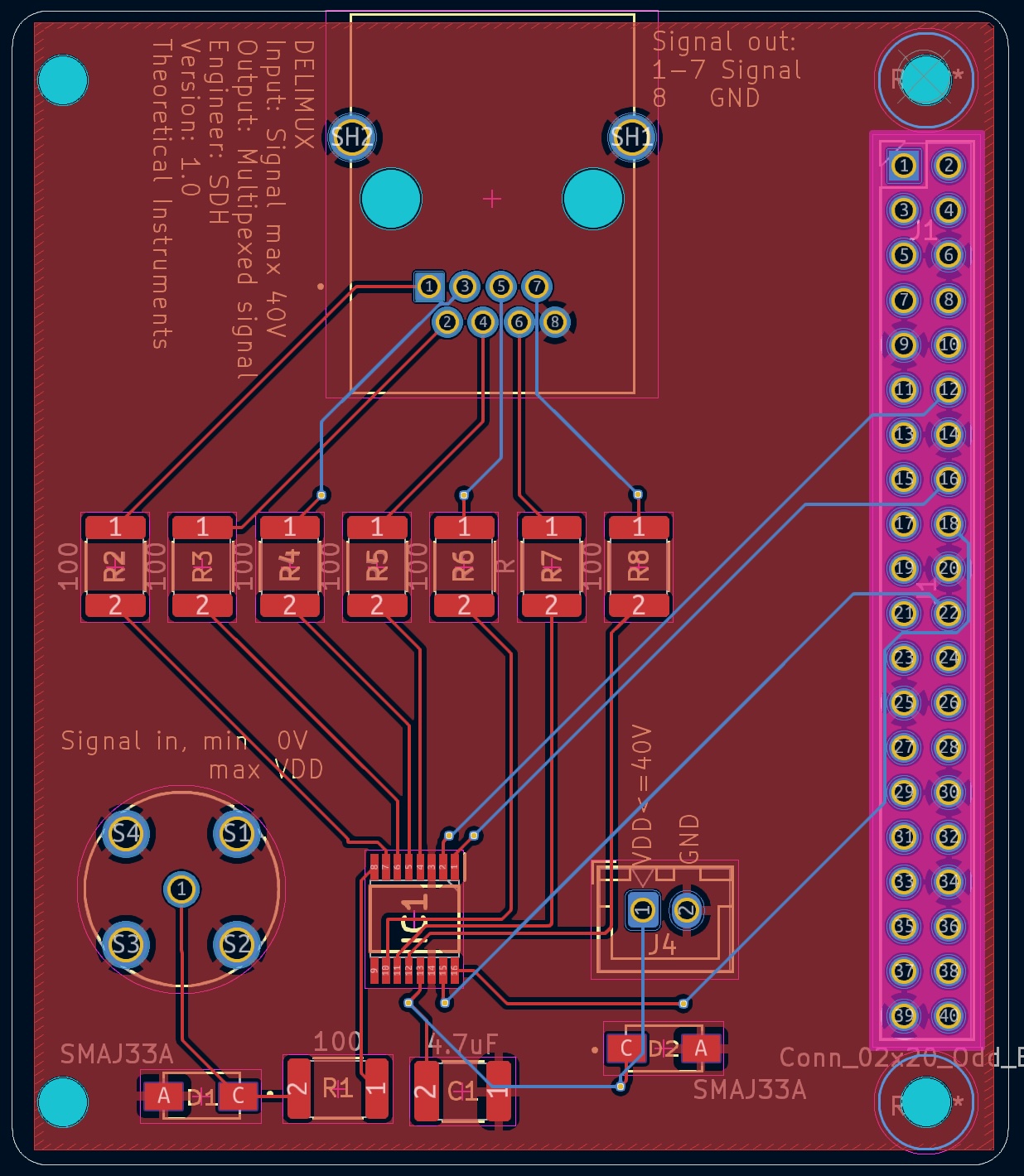
The delimux module provides a streamlined communication with a socket server running on the delimux Raspberry Pi. On the delimux Raspberry Pi, a MUX36S08 analog multiplexer is connected via a custom designed hat. It allows the user to route an incoming electrical signal in the range between 0V and 40V onto one of seven lines in a patch cable. The raw communication protocol is shown below. The delimux module wraps this into a set of convenience functions and in particular allows the user to select the channel by patch cable number or by mux channel.
Installation
pip install delimux
How to use
The usage should be self-explanatory:
import delimux
mx=delimux.DeliMUX()
help(mx)
class DeliMUX(builtins.object)
 |  DeliMUX(host='delimux-cmtqo', port=60606, verbose=False)
 |
 |  Client for controlling a MUX36S08 device via socket protocol.
 |
 |  Server is expected to run on delimux-cmtqo:60606
 |  and respond to newline-terminated commands like SET, GET, ENABLE, etc.
 |
 |  Methods defined here:
 |
 |  __init__(self, host='delimux-cmtqo', port=60606, verbose=False)
 |      Initialize self.  See help(type(self)) for accurate signature.
 |
 |  disable(self)
 |
 |  enable(self)
 |
 |  getChannel(self) -> int
 |
 |  getLine(self) -> int
 |
 |  getState(self) -> list
 |
 |  setChannel(self, n: int)
 |      Sets the channel
 |
 |      Channel refers to the channel of the MUX36S08
 |
 |  setLine(self, n: int)
 |      Sets the line
 |
 |      Line refers to the patch-cable line, line 8 is GND
 |
Raw protocol
Via a direct socket connection the full protocol can be exploited:
Commands are terminated with \r\n or \n.
| Command | Description | Response Format |
|---|---|---|
SET <n> |
Sets the MUX channel to n (0–7) and enables it |
OK or ERROR <message> |
GET |
Returns full state as 3 address bits + enable bit | STATE <A2> <A1> <A0> <EN> |
CHANNEL |
Returns the currently selected channel number | CHANNEL <n> |
ENABLE |
Enables the MUX | OK |
DISABLE |
Disables the MUX | OK |
| (unknown) | Any invalid or unsupported command | ERROR Unknown command |
Hardware
Signal quality
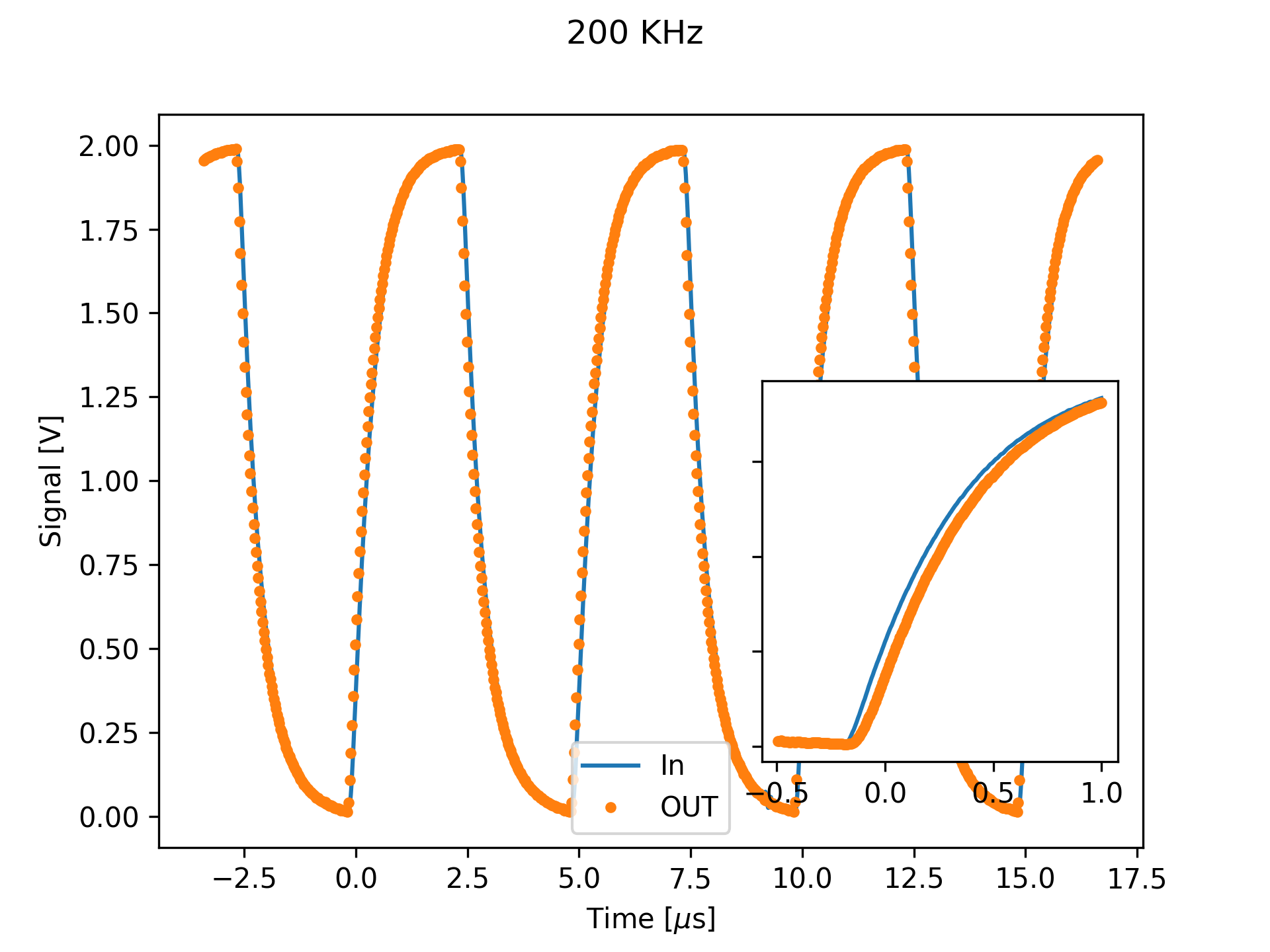
The device was tested with a Picoscope 4824A. The input signal was generated with the AWG generating a square wave. The distortion of the input signal is due to the output limitations of the picoscope.
Characteristic response at 1 kHz:
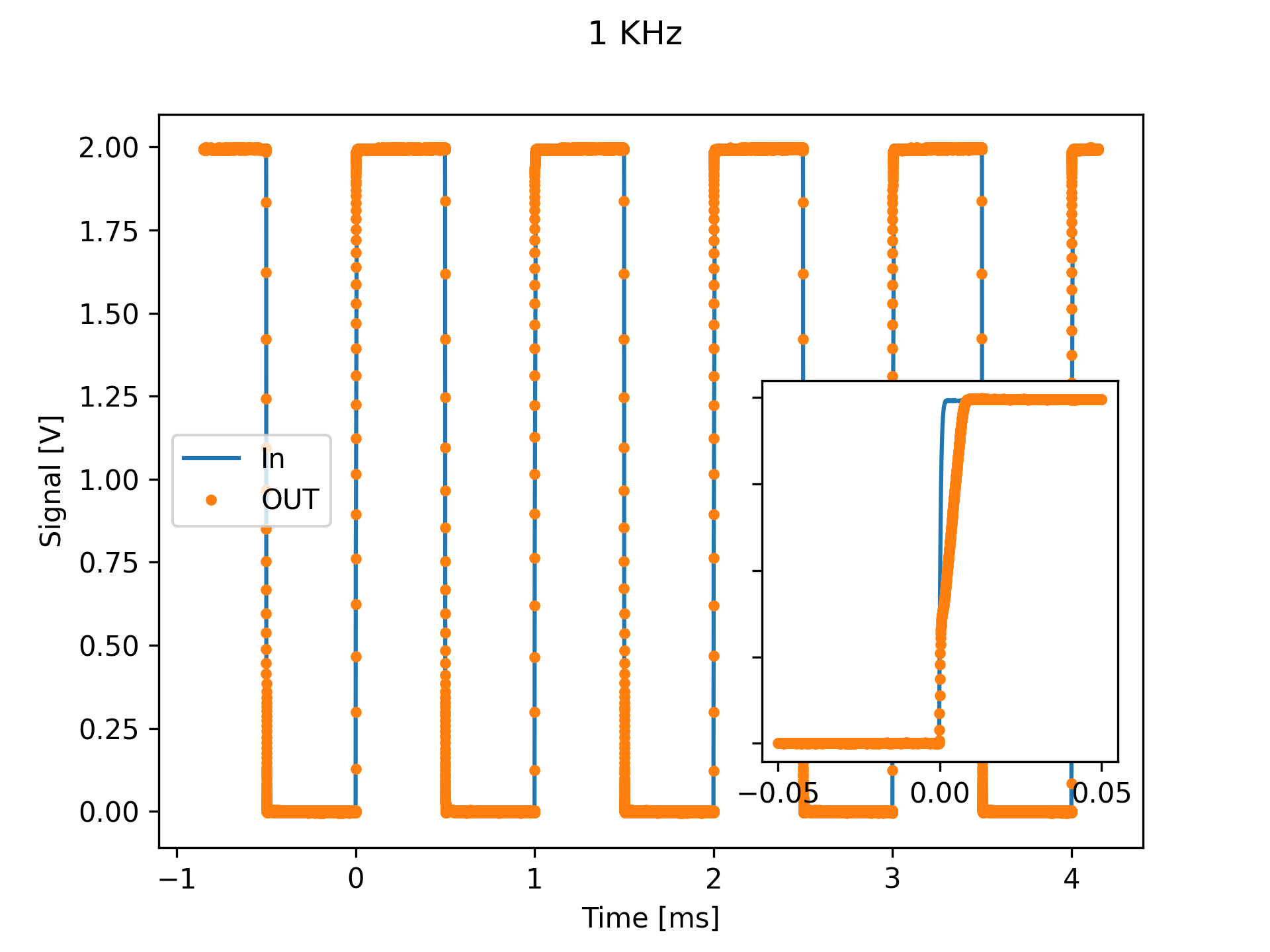
The inset shows the rise time of the MUX.
At 200 kHz we get the following plot:
1 maintainer

Metadata
1 maintainer
Release files for delimux 1.0.1
For a detailed explanation of source distributions (sdists) and built distributions (wheels), please see the package formats documentation.
Source distribution (sdist)
| File | Size | Uploaded | Provenance | Actions |
|---|---|---|---|---|
| delimux-1.0.1.tar.gz | 978.7 kB | Without provenance | Details for delimux-1.0.1.tar.gz |
Built distribution (wheel)
| File | Interpreter | ABI | Platform | Actions Reset |
|---|---|---|---|---|
| delimux-1.0.1-py3-none-any.whl | Python 3 | none | any | Details for delimux-1.0.1-py3-none-any.whl |
Total release size: 982.4 kB
Release files / delimux-1.0.1.tar.gz
| Download URL | delimux-1.0.1.tar.gz |
|---|---|
| Size | 978.7 kB |
| Tags | Source |
|
SHA-256 checksum How to use checksums |
777cf4252e3f5039758dabd5d034fe96e476c3274a0d197f4e07f7ca16c5e70a
|
|
BLAKE2b-256 checksum How to use checksums |
47492b4e4a880575942f8f8b779869bda2e00e3b30ec57757d6ab4f55bd12673
|
| Upload date | |
|
Uploaded using Trusted Publishing? What is trusted publishing? |
No |
| Uploaded via |
twine/6.1.0 CPython/3.13.1
|
Release files / delimux-1.0.1-py3-none-any.whl
| Download URL | delimux-1.0.1-py3-none-any.whl |
|---|---|
| Size | 3.8 kB |
| Tags | Python 3 |
|
SHA-256 checksum How to use checksums |
6b2b84be12c97360e76e6eb2a6c406e2b447900da33642248f3598548dfb7e9f
|
|
BLAKE2b-256 checksum How to use checksums |
ce573fa66927b8391ffd8d8281c589d08fe9d158c96ecd73c4e8dc516d472ea9
|
| Upload date | |
|
Uploaded using Trusted Publishing? What is trusted publishing? |
No |
| Uploaded via |
twine/6.1.0 CPython/3.13.1
|
Security for delimux 1.0.1
Provenance
Provenance describes where a file came from. On PyPI, provenance is shared via attestations, which provide a verifiable record of the build or publishing details. View details, limitations and caveats.
No provenance found
None of the files in this release were uploaded with provenance metadata.
A note on package security
PyPI is a repository for distributing packages, not a service for auditing them. While third-party security researchers and our staff do their best to detect and remove malicious packages, PyPI cannot guarantee the quality, security or suitability of any given package.
To learn more about protecting yourself from malicious actors, visit our package security documentation.














