
Delos client.

Project description
Delos Delos
Delos client for interacting with the Delos API.
Installation
To install the package, use poetry:
poetry add delos
Or if you use the default pip:
pip install delos
Client Initialization
You can create an API key to access all services through the Dashboard in DelosPlatform
https://platform.api.delos.so.
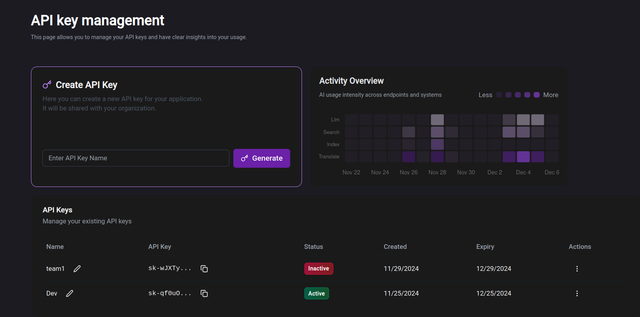
To create a Delos client instance, you need to initialize it with your API key:
from delos import DelosClient

client = DelosClient(api_key="your-delos-api-key")
Endpoints
This delos client provides access to the following endpoints:
Status Endpoints
status_health: Check the health of the server.
Translate Endpoints
translate_text: Translate text.translate_file: Translate a file.
Web Endpoints
web_search: Perform a web search.
LLM Endpoints
chat: Chat with the LLM.embed: Embed data into the LLM.
Files Endpoints
A single file can be read and parsed with the universal parser endpoint:
files_parse: Parse a file to extract the pages, chunks or subchunks.
An index groups a set of files in order to be able to query them using natural language. There are several operations regarding index management:
files_index_create: Create an index.files_index_files_add: Add files to an index.files_index_files_delete: Delete files from an index.files_index_delete: Delete an index.files_index_restore: Restore a deleted index.files_index_rename: Rename an index.
And regarding index querying
files_index_ask: Ask a question about the index documents (it requires that yourindex.status.vectorizedis set toTrue).files_index_embed: Embed or vectorize the index contents.files_index_list: List all indexes.files_index_details: Get details of an index.
These endpoints are accessible through delos client methods.
ℹ️ Info: For all the endpoints, there are specific parameters that are required regarding the data to be sent to the API.
Endpoints may expect
textorfilesto operate with, theoutput_languagefor your result, theindex_uuidthat identifies the set of documents, themodelto use for the LLM operations, etc.You can find the standardized parameters like the
return_typefor file translation and theextract_typefor file parser in the appropiate endpoint.
Status Endpoints
Status Health Request
To check the health of the server and the validity of your API key:
response = client.status_health()
if response:
    print(f"Response: {response}")
Translate Endpoints
1. Translate Text Request
To translate text, you can use the translate_text method:
response = client.translate_text(
                        text="Hello, world!",
                        output_language="fr"
                    )
if response:
    print(f"Translated Text: {response}")
2. Translate File Request
To translate a file, use the translate_file method:
local_filepath_1 = Path("/path/to/file1.pdf")

response = client.translate_file(
                        filepath=local_filepath_1,
                        output_language="fr",
                    )
According to the type of file translation you prefer, you can choose the return_type parameter to:
| return_type | |
|---|---|
raw_text Default |
Returns the translated text only |
| url | Return the translated file with its layout as a URL |
💡 Tip: For faster and economical translations, set the
return_typetoraw_textto request to translate only the text content, without the file layout.
local_filepath_1 = Path("/path/to/file1.pdf")
local_filepath_2 = Path("/path/to/file2.pdf")

# Set return_type='raw_text' -> only the translated text will be returned:
response = client.translate_file(
                        filepath=local_filepath_1,
                        output_language="fr",
                        return_type="raw_text"
                    )

# or return_type='url' -> returns a link to translated file with original file's layout:
response = client.translate_file(
                        filepath=local_filepath_2,
                        output_language="fr",
                        return_type="url"
                    )

if response:
    print(f"Translated File Response: {response}")
Web Endpoints
Web Search Request
To perform a web search:
response = client.web_search(text="What is the capital of France?")

# Or, if you want to specify the output_language and filter results
response = client.web_search(
                        text="What is the capital of France?",
                        output_language="fr",
                        desired_urls=["wikipedia.fr"]
                    )
if response:
    print(f"Search Results: {response}")
LLM Endpoints
LLM Endpoints provide a way to interact with several Large Language Models and Embedders in an unified way. Currently
supported models are:
| Chat Models | Embedding Models |
|---|---|
gpt-3.5 Legacy |
ada-v2 |
| gpt-4o | text-embedding-3-large |
| gpt-4o-mini | |
| command-r | |
| command-r-plus | |
| llama-3-70b-instruct | |
| mistral-large | |
| mistral-small | |
| claude-3.5-sonnet | |
| claude-3-haiku |
1. Chat Request
To chat with the LLM:
response = client.llm_chat(text="Hello, how are you?")

# Default model is handled, so that request is equivalent to:
response = client.llm_chat(
                        text="Hello, how are you?",
                        model="gpt-4o-mini"
                    )
if response:
    print(f"Chat Response: {response}")
The list of previous messages can be provided through the messages parameter:
response = client.llm_chat(
                        text="What about uk?",
                        messages=[
                            {"role": "system", "content": "You are a helpful assistant."},
                            {"role": "user", "content": "what is the capital city of spain?"},
                            {"role": "assistant", "content": "The capital city of Spain is Madrid."},
                        ],
                        model="gpt-4o-mini",
                    )
if response:
    print(f"Chat Response: {response}")
Custom arguments can be provided to the request, such as the dictionary response_format for the chat endpoint,
or the temperature (in between 0 and 1):
response = client.llm_chat(
                        text="Hello, how are you? Respond in JSON format.",
                        model="gpt-4o-mini",
                        temperature=0.5,
                        response_format={"type":"json_object"}
                    )
if response:
    print(f"Chat Response: {response}")
2. Chat Stream
It is also possible to stream the response of the chat request:
response = client.llm_chat_stream(text="Hello, how are you?")

# Default model is handled, so that request is equivalent to:
response = client.llm_chat_stream(
                        text="Hello, how are you?",
                        model="gpt-4o-mini"
                    )
if response:
    print(f"Chat Response: {response}")
The list of previous messages can be provided through the messages parameter as in the chat request (previous
section), as well as the temperature (in between 0 and 1) and other parameters:
response = client.llm_chat_stream(
                        text="What about uk?",
                        messages=[
                            {"role": "system", "content": "You are a helpful assistant."},
                            {"role": "user", "content": "what is the capital city of spain?"},
                            {"role": "assistant", "content": "The capital city of Spain is Madrid."},
                        ],
                        model="gpt-4o-mini",
                        temperature=0.5,
                    )
if response:
    print(f"Chat Response: {response}")
The response in this case is a StreamingResponse, containing a generator which responses are similar to the following, in order to keep compatibility with data stream protocols:
0: "

0:"The"

0:" capital"

0:" city"

0:" of"

0:" the"

0:" United"

0:" Kingdom"

0:" is"

0:" London"

0:"."

2: "{'id': '572a1c1e-ccc8-43bd-b4f1-3138016f7251', 'choices': [{'delta': {}, 'finish_reason': 'stop'}], 'request_id': '572a1c1e-ccc8-43bd-b4f1-3138016f7251', 'response_id': 'a1086bb8-16f7-4ca2-b27f-91bc8063e615', 'status_code': '200', 'status': 'success', 'message': 'Chat response received.\n(All the 3 previous `messages` have been read.)', 'timestamp': '2025-02-14T09:18:32.032696+00:00', 'cost': '1.8e-05'}"
3. Embed Request
To embed some text using a LLM, using ada-v2 model:
response = client.llm_embed(text="Hello, how are you?", model="ada-v2")
if response:
    print(f"Embed Response: {response}")
Or using text-embedding-ada-002 model:
response = client.llm_embed(text="Hello, how are you?", model="text-embedding-ada-002")
if response:
    print(f"Embed Response: {response}")
Files Endpoints
Universal Reader and Parser
The Universal reader and parser allows to open many textual file formats and extract the content in a standarized structure. In order to parse a file:
local_filepath_1 = Path("/path/to/file1.docx")
local_filepath_2 = Path("/path/to/file2.pdf")

response = client.files_parse(filepath=local_filepath_1)

if response:
    print(f"Parsed File Response: {response}")
Previous request can be further contolled by providing the optional parameters:
response = client.files_parse(
                        filepath=local_filepath_1,
                        extract_type=chunks,
                        read_images=True, # read images from the file, default is False
                        k_min=500,
                        k_max=1000,
                        overlap=0,
                        filter_pages="[1,2]", # subset of pages to select
                    )
if response:
    print(f"Parsed File Response: {response}")
| extract_type | |
|---|---|
chunks Default |
Returns the chunks of the file. You can custom its tokens size by setting k_min, k_max, overlap |
| subchunks | Returns the subchunks of the file (minimal blocks in the file, usually containing around 20 or 30 tokens). |
| pages | Returns the content of the file parsed as pages |
| file | Returns the the whole file contents |
💡 Tip: When using
extract_type=chunks, you can define thek_min,k_maxandoverlapparameters to control the size of the chunks. Default values arek_min=500,k_max=1200, andoverlap=0.
Files Index
Index group a set of files in order to be able to query them using natural language. The Index attributes are:
| Attributes | Meaning |
|---|---|
| index_uuid | Unique identifier of the index. It is randomly generated when the index is created and cannot be altered. |
| name | Human-friendly name for the index, can be modified through the rename_index endpoint. |
| created_at | Creation date |
| updated_at | Last operation performed in index |
| expires_at | Expiration date of the index. It will only be set once the delete_index request is explictly performed. (Default: None) |
| status | Status of the index. It will be active, and only when programmed for deletion it will be countdown (2h timeout before effective deletion). |
| vectorized | Boolean status of the index. When True, the index is ready to be queried. |
| files | List of files in the index. Contains their filehash, filename and size |
| storage | Storage details of the index: total size in bytes and MB, number of files. |
The following Index operations are available:
INDEX_LIST: List all indexes.INDEX_DETAILS: Get details of an index.INDEX_CREATE: Create a new index and parse files.INDEX_ADD_FILES: Add files to an existing index.INDEX_DELETE_FILES: Delete files from an index.INDEX_DELETE: Delete an index. Warning: This is a delayed (2h) operation, allowed to be reverted withINDEX_RESTORE. After 2h, the index will be deleted and not recoverable.INDEX_RESTORE: Restore a deleted index (within the 2h after it was marked for deletion).INDEX_EMBED: Embed index contents.INDEX_ASK: Ask a question to the index. It requires thatINDEX_EMBEDis performed to allow index contents querying.
Files Index Requests
1. Existing Index Overview
To list all indexes in your organization, files included and storage details:
response = client.files_index_list()
if response:
    print(f"List Indexes Response: {response}")
With get details of an index you can see the list of files in the index, their filehashes, their size, the status
of the index and the vectorized boolean status (find more details about the Index fields above):
response = client.files_index_details(index_uuid="index-uuid")
if response:
    print(f"Index Details Response: {response}")
2. Index Management
To create a new index and parse files, provide the list of filepaths you want to parse:
local_filepaths = [Path("/path/to/file1.docx"), Path("/path/to/file2.pdf")]

response = client.files_index_create(
                        filepaths=local_filepaths,
                        name="Cooking Recipes"
                        read_images=True, # read images from the files, default is False
                    )
if response:
    print(f"Index Create Response: {response}")
Let's say the new index has been created with the UUID d55a285b-0a0d-4ba5-a918-857f63bc9063. This UUID will be used in
the following requests, particularly in the index_details whenever some information about the index is needed.
You can rename the index with the rename_index method:
index_uuid = "d55a285b-0a0d-4ba5-a918-857f63bc9063"
response = client.files_index_rename(
                        index_uuid=index_uuid,
                        name="Best Recipes"
                    )
if response:
    print(f"Rename Index Response: {response}")
To add files to an existing index, provide the list of filepaths you want to add:
index_uuid = "d55a285b-0a0d-4ba5-a918-857f63bc9063"
local_filepath_3 = [Path("/path/to/file3.txt")]

response = client.files_index_files_add(
                        index_uuid=index_uuid,
                        filepaths=local_filepath_3
                        read_images=True, # read images from the files, default is False
                    )
if response:
    print(f"Add Files to Index Response: {response}")
To delete files from an existing index, specify the filehashes of the files you want to delete. You can see filehashes contained in an index by requesting the index details. See a file deletion example below:
index_uuid = "d55a285b-0a0d-4ba5-a918-857f63bc9063"
filehashes_to_delete = ["2fa92ab4627c199a2827a363469bf4e513c67b758c34d1e316c2968ed68b9634"]

response = client.files_index_files_delete(
                        index_uuid=index_uuid,
                        files_hashes=filehashes_to_delete
                    )
if response:
    print(f"Delete Files from Index Response: {response}")
To delete an index (it will be marked for deletion which will become effective after 2h):
response = client.files_index_delete(index_uuid="index-to-delete-uuid")
if response:
    print(f"Delete Index Response: {response}")
To restore an index marked for deletion (only possible during the 2h after the INDEX_DELETE was requested):
response = client.files_index_restore(index_uuid="index-to-restore-uuid")
if response:
    print(f"Restore Index Response: {response}")
3. Index Querying
To embed or vectorize index contents in order to allow the query operations:
response = client.files_index_embed(index_uuid="index-uuid")
if response:
    print(f"Embed Index Response: {response}")
To ask a question about the index documents (it requires that your index.status.vectorized is set to True):
response = client.files_index_ask(
                        index_uuid="index-uuid",
                        question="What is Delos?"
                    )
if response:
    print(f"Ask Index Response: {response}")
You can sub-select some of the files in the index through the active_files parameter, which can receive a list of
filehashes to be queried, or the special words all (default behavior) or none. See some examples of valid
active_files values below:
| active_files | Explanation |
|---|---|
| "abc123def456" | Perform the research on a single index file |
| ["abc123def456", "789ghi012jkl"] | A list of files |
| None | Not provided |
| "all" (default) | Query the subselection of all files available in index |
| "none" | Query none of the available files |
For example, to ask the question using all the files in the index:
response = client.files_index_ask(
                        index_uuid="index-uuid",
                        question="What is Delos?"
                        active_files="all"
                    )
if response:
    print(f"Ask Index Response: {response}")
Or only on some of the files:
response = client.files_index_ask(
                        index_uuid="index-uuid",
                        question="What is Delos?",
                        active_files=["abc123def456", "789ghi012jkl"]
                    )
if response:
    print(f"Ask Index Response: {response}")
Hint: You can find the filehashes of the files contained in the index by using the
files_index_detailsmethod.
Requests Usage and Storage
All request responses show the number of tokens and cost consumed by the request. The storage for index
documents is limited up to your organization's quota and is shared between all indexes within your organization.
Contents do not expire, but they can be deleted by performing an explicit request through the API endpoints or
through the Delos Platform at https://platform.api.delos.so/.
In the Delos Platform, you can monitor the requests performed by your organization with your API Key and the files stored in the Index Storage.
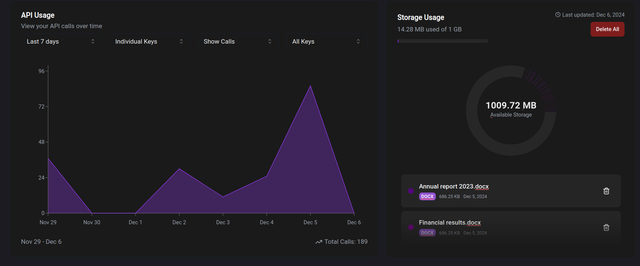
Through both the native requests towards Delos and the Python client, you can handle and delete files directly from the Delos Platform.
Release history Release notifications | RSS feed


Download files
Download the file for your platform. If you're not sure which to choose, learn more about installing packages.
Source Distribution
Built Distribution
Filter files by name, interpreter, ABI, and platform.
If you're not sure about the file name format, learn more about wheel file names.
Copy a direct link to the current filters
File details
Details for the file delos-0.3.9.2.tar.gz.
File metadata
- Download URL: delos-0.3.9.2.tar.gz
- Upload date:
- Size: 24.7 kB
- Tags: Source
- Uploaded using Trusted Publishing? No
- Uploaded via: twine/6.1.0 CPython/3.11.7
File hashes
| Algorithm | Hash digest | |
|---|---|---|
| SHA256 |
170592d72229b4be53c0e87840023b446014256e488a7fc6a3848533334cc1e9
|
|
| MD5 |
f2fd5867fc7d9b1211ce016c6e119dbb
|
|
| BLAKE2b-256 |
2cfe8f8bd77405691d9825ebd897232d42aa9e254144007c431adb87b362c719
|
File details
Details for the file delos-0.3.9.2-py3-none-any.whl.
File metadata
- Download URL: delos-0.3.9.2-py3-none-any.whl
- Upload date:
- Size: 21.4 kB
- Tags: Python 3
- Uploaded using Trusted Publishing? No
- Uploaded via: twine/6.1.0 CPython/3.11.7
File hashes
| Algorithm | Hash digest | |
|---|---|---|
| SHA256 |
0af6ab5ac147f9a3028765f5546659e21f54213afa06f4d6ee8ccadfa4d612b7
|
|
| MD5 |
0de48d119a5fa30ddfa554fbffe27b7b
|
|
| BLAKE2b-256 |
7b3c7bbe329bb834daa31be14d99abbe61cd148f8b92e6066d4d3a37c9c4614f
|






