
delta-explain



Make Delta pruning visible. delta-explain shows how partition pruning and data skipping narrow the set of candidate files in a Delta table.
Use it from the shell, through its versioned JSON contract and Python
API, or in CI as a threshold-based guardrail. Point it at a local Delta
table, an s3://, az://, or gs:// location, or a Unity Catalog table
name (--catalog unity), read with the credentials the catalog vends.
delta-explain is strictly read-only: it reads Delta transaction-log metadata, not table rows, and performs no writes, locks, or telemetry. This keeps its data-access surface small. Its guarantees are documented in docs/semantics.md.
Documentation: cdelmonte-zg.github.io/delta-explain
Install
Choose one:
brew tap cdelmonte-zg/tap && brew install delta-explain    # Homebrew (macOS, Linux)
pip install delta-explain                                  # PyPI: binary wheel + Python API
cargo install delta-explain                                # crates.io (Rust 1.88+)
docker pull ghcr.io/cdelmonte-zg/delta-explain             # Docker (amd64 + arm64)
Every other route - pre-built binaries and .deb packages for six targets, Scoop, from Git - is on the install page.
Usage
The three ways in: the shell, Python, CI.
From the shell
delta-explain ./my-table --where "age > 40 AND country = 'DE'"

With --verbose, the per-file view - which files were kept or dropped, and why:

Cloud tables authenticate through the provider's ambient credential chain, environment variables (--env-creds), AWS profiles (--profile), or explicit --option pairs; the per-provider recipes are in the cloud storage guide.
A table in Unity Catalog can be named instead of located. The catalog answers with the storage location and vends temporary credentials for it, so no cloud credentials of your own are involved:
export DATABRICKS_HOST=https://<workspace>.cloud.databricks.com DATABRICKS_TOKEN=<token>
delta-explain --catalog unity sales.events.orders --where "age > 40 AND country = 'DE'"

The Resolved: line is the only addition; the JSON carries the resolution in a catalog object. The full flag list is delta-explain --help, or the CLI reference. Predicates are standard SQL WHERE syntax; the supported constructs, with what each one can prune, are in the predicate syntax reference.
From Python
The PyPI wheel ships the compiled binary (the delta-explain command works from the same environment) plus a thin Python API around the JSON contract:
from delta_explain import explain

report = explain("s3://warehouse/events",
                 where="country = 'DE' AND age > 40",
                 min_pruning=80, env_creds=True)
report.passed              # gate outcome; False means the CLI would exit 1
report.total_pruning_pct

report = explain("sales.events.orders", catalog="unity", where="country = 'DE' AND age > 40")
report.catalog["location"]  # what the catalog resolved the name to
Gate failures come back as a report with passed == False; runtime errors raise DeltaExplainError with the CLI's message: the same exit-code contract as the command line, in Python types. More in the Python guide.
In CI, as a gate
--min-pruning <PCT> fails the run (exit 1) when total pruning falls below the threshold; --assert-stats fails it when any file in the snapshot is missing statistics:
delta-explain s3://warehouse/events -w "date = '2024-01-15'" --min-pruning 90 --assert-stats
The repo doubles as a composite GitHub Action, so the gate is one step. Pin the tag: the action downloads a released binary, so the ref you pin is the behavior you get.
- uses: cdelmonte-zg/delta-explain@v0.8.0
  with:
    table: s3://warehouse/events
    where: "country = 'DE' AND age > 40"
    min-pruning: "60"
    assert-stats: "true"
    env-creds: "true"
Inputs mirror the CLI flags; the step fails when a gate fails and exposes pruning-pct, final-files, and result as outputs for later steps. With catalog: unity the table input is a name, and the step reads DATABRICKS_HOST and DATABRICKS_TOKEN from its env:
- uses: cdelmonte-zg/delta-explain@v0.8.0
  with:
    table: sales.events.orders
    catalog: unity
    where: "country = 'DE' AND age > 40"
    min-pruning: "60"
  env:
    DATABRICKS_HOST: ${{ vars.DATABRICKS_HOST }}
    DATABRICKS_TOKEN: ${{ secrets.DATABRICKS_TOKEN }}
How to calibrate the threshold, keep the CI predicate semantically equivalent to the runtime query, and run the same gate from Docker: gating pruning in CI.
Examples
Every example in examples/ is executable and runs against real tables:
- The three-minute quickstart - one script, five beats, each one thing delta-explain does.
- Tuning a Delta table - a notebook that uses delta-explain to measure four layouts of real NYC-taxi data, from unpartitioned pile to date partitions plus fare-sorted files.
- S3-compatible storage (RustFS) and a real GCS bucket - the same data pruning very differently depending on physical layout, on
s3://andgs://tables. - Catalog resolution - a Hive Metastore and a Unity Catalog server next to RustFS and Spark: what each catalog answers for a table name, and
delta-explainreading by name with the credentials Unity Catalog vends, on RustFS, ADLS Gen2 and GCS.
Performance
delta-explain reads only the Delta log, never the parquet data files, so its cost scales with the number of add actions, not with data volume. Measured at 200k files on Linux, local disk, in the three log shapes that matter (generate them yourself with cargo run --release --example gen_scale_log):
| Log shape (200k files) | Baseline | With predicate | Peak memory |
|---|---|---|---|
| single JSON commit | ~1.0 s | ~1.3 s | ~280 MB |
| 2000 JSON commits | ~1.4 s | ~2.2 s | ~320 MB |
| 2000 commits + parquet checkpoint | ~0.8 s | ~1.0 s | ~240 MB |
The most production-like shape (checkpointed) is also the fastest: the kernel reads one parquet checkpoint instead of replaying thousands of JSON commits. Scaling is linear at roughly 1.5 KB of resident memory per file, which extrapolates to ~1.5 GB at one million files; that is the current practical ceiling and it is a known limitation, not a hidden one. Predicate complexity is usually secondary to log size at this scale: an IN list with 500 items over 200k files adds about 0.4 s.
Data volume itself is invisible - what a big table costs is its log. A 10 TB profile (40k files x 256 MB, 31 stats columns, checkpointed; --wide 30 --file-size-mb 256) runs in ~1.5 s at ~470 MB; the pathological small-files version of the same 10 TB (160k files x 64 MB, same stats width) takes ~5 s at ~1.8 GB. Memory scales with files x stats leaves, so the one-million-file ceiling above assumes a narrow schema: wide production schemas reach it proportionally earlier, and delta.dataSkippingNumIndexedCols on the table bounds the width the log carries in the first place.
Output is the dimension to manage on large tables: the compact JSON stays summary-only at any size, and per-file detail (--verbose, in both formats) should be capped with --limit.
The report viewer
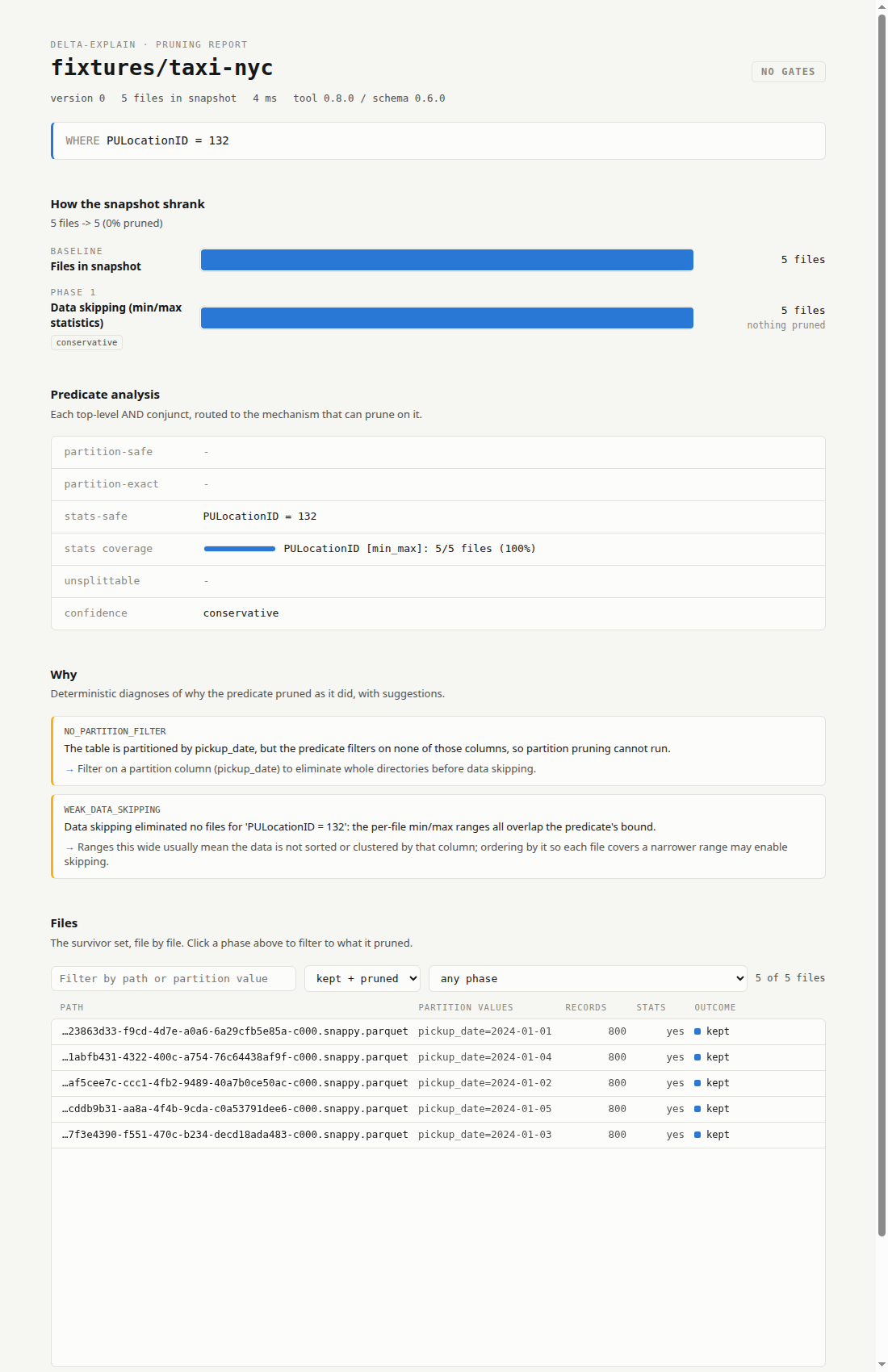
Reports are also emitted as versioned JSON (--format json) under a formal, CI-enforced contract - the schema and the field-by-field reference. Any saved report can be visualized as a self-contained HTML page - pruning funnel, analysis, per-file table - with one drop or one command; attach it to a CI run so a failed gate shows which phase did not prune, not just an exit code:
Deep dive
For a detailed walkthrough of the architecture, design decisions, and the reasoning behind the two-phase model, see the companion article: delta-explain: Making Delta Lake Pruning Visible.
Contributing
Build with cargo build && cargo test; the contributor guide - architecture, testing conventions, fixtures - is DEVELOPMENT.md.
License
MIT
Author
delta-explain is built on delta-kernel-rs and focuses on making Delta-level file elimination visible.
1 maintainer

Metadata
1 maintainer
Release files for delta-explain 0.8.0
For a detailed explanation of source distributions (sdists) and built distributions (wheels), please see the package formats documentation.
Built distributions (wheels)
| File | Reset | |||
|---|---|---|---|---|
| delta_explain-0.8.0-py3-none-win_amd64.whl | Python 3 | none | Windows x86-64 | Details |
| delta_explain-0.8.0-py3-none-manylinux_2_17_x86_64.manylinux2014_x86_64.whl | Python 3 | none | Linux glibc 2.17+ x86-64 | Details |
| delta_explain-0.8.0-py3-none-manylinux_2_17_aarch64.manylinux2014_aarch64.whl | Python 3 | none | Linux glibc 2.17+ ARM64 | Details |
| delta_explain-0.8.0-py3-none-macosx_11_0_arm64.whl | Python 3 | none | macOS 11.0+ ARM64 | Details |
| delta_explain-0.8.0-py3-none-macosx_10_12_x86_64.whl | Python 3 | none | macOS 10.12+ x86-64 | Details |
Total release size: 73.8 MB
Release files / delta_explain-0.8.0-py3-none-win_amd64.whl
| Download URL | delta_explain-0.8.0-py3-none-win_amd64.whl |
|---|---|
| Size | 13.7 MB |
| Tags | Python 3 Windows x86-64 |
|
SHA-256 checksum How to use checksums |
bf4f6e83b6f28dfef9e9565410f5ad495e3d808f4d033ecbf8756f9fcd63987d
|
|
BLAKE2b-256 checksum How to use checksums |
80c9334d9b4d6cdf3744c03e74b9ba7a7c1e21faaf2984bd71ca22dac19b3233
|
| Upload date | |
|
Uploaded using Trusted Publishing? What is trusted publishing? |
Yes |
| Uploaded via |
twine/7.0.0 CPython/3.13.14
|
Provenance
Provenance describes where a file came from. On PyPI, provenance is shared via attestations, which provide a verifiable record of the build or publishing details. View details, limitations and caveats.


PyPI Publish Attestation
PyPI verified that this artifact, at this checksum, originated from the publisher listed below.
Signed by GitHub Actions, verified by PyPI on Oct 15, 2026.
Transparency logRelease files / delta_explain-0.8.0-py3-none-manylinux_2_17_x86_64.manylinux2014_x86_64.whl
| Download URL | delta_explain-0.8.0-py3-none-manylinux_2_17_x86_64.manylinux2014_x86_64.whl |
|---|---|
| Size | 15.7 MB |
| Tags | Linux glibc 2.17+ x86-64 Python 3 |
|
SHA-256 checksum How to use checksums |
6625565aa8d98087e75a521fd4e66986b2434fdc8a0a259c7d97553b3c1d61c8
|
|
BLAKE2b-256 checksum How to use checksums |
e04509e38298276c33fa7f639ae498deb1e3263ef7a37ee924dac8c85bcb7a65
|
| Upload date | |
|
Uploaded using Trusted Publishing? What is trusted publishing? |
Yes |
| Uploaded via |
twine/7.0.0 CPython/3.13.14
|
Provenance
Provenance describes where a file came from. On PyPI, provenance is shared via attestations, which provide a verifiable record of the build or publishing details. View details, limitations and caveats.
PyPI Publish Attestation
PyPI verified that this artifact, at this checksum, originated from the publisher listed below.
Signed by GitHub Actions, verified by PyPI on Oct 15, 2026.
Transparency logRelease files / delta_explain-0.8.0-py3-none-manylinux_2_17_aarch64.manylinux2014_aarch64.whl
| Download URL | delta_explain-0.8.0-py3-none-manylinux_2_17_aarch64.manylinux2014_aarch64.whl |
|---|---|
| Size | 15.7 MB |
| Tags | Linux glibc 2.17+ ARM64 Python 3 |
|
SHA-256 checksum How to use checksums |
22dc1cb8709e56b7e57334c8b740748740556a1313887a4445711d7d3e298649
|
|
BLAKE2b-256 checksum How to use checksums |
296da6c656d632dc3bee582c73c93ac138c5953a99fabe03e6e3f90e2fb55bcd
|
| Upload date | |
|
Uploaded using Trusted Publishing? What is trusted publishing? |
Yes |
| Uploaded via |
twine/7.0.0 CPython/3.13.14
|
Provenance
Provenance describes where a file came from. On PyPI, provenance is shared via attestations, which provide a verifiable record of the build or publishing details. View details, limitations and caveats.
PyPI Publish Attestation
PyPI verified that this artifact, at this checksum, originated from the publisher listed below.
Signed by GitHub Actions, verified by PyPI on Oct 15, 2026.
Transparency logRelease files / delta_explain-0.8.0-py3-none-macosx_11_0_arm64.whl
| Download URL | delta_explain-0.8.0-py3-none-macosx_11_0_arm64.whl |
|---|---|
| Size | 14.0 MB |
| Tags | Python 3 macOS 11.0+ ARM64 |
|
SHA-256 checksum How to use checksums |
b17137be52f366752c9ba7d705d56f8ebf796ee1e8959f0706c7fc5acb4a9a87
|
|
BLAKE2b-256 checksum How to use checksums |
b587431f87eada6832c81d404841b76bec1930c3bc052f1d55f7ae0bd324cdee
|
| Upload date | |
|
Uploaded using Trusted Publishing? What is trusted publishing? |
Yes |
| Uploaded via |
twine/7.0.0 CPython/3.13.14
|
Provenance
Provenance describes where a file came from. On PyPI, provenance is shared via attestations, which provide a verifiable record of the build or publishing details. View details, limitations and caveats.
PyPI Publish Attestation
PyPI verified that this artifact, at this checksum, originated from the publisher listed below.
Signed by GitHub Actions, verified by PyPI on Oct 15, 2026.
Transparency logRelease files / delta_explain-0.8.0-py3-none-macosx_10_12_x86_64.whl
| Download URL | delta_explain-0.8.0-py3-none-macosx_10_12_x86_64.whl |
|---|---|
| Size | 14.7 MB |
| Tags | Python 3 macOS 10.12+ x86-64 |
|
SHA-256 checksum How to use checksums |
8372efd8f55daa07dd431b4d5caf1867612960b35405450005a1fbe545934b1f
|
|
BLAKE2b-256 checksum How to use checksums |
7b2ae6bf6f47614674633113da1811e85d893af4457d501fa709a00e784b2408
|
| Upload date | |
|
Uploaded using Trusted Publishing? What is trusted publishing? |
Yes |
| Uploaded via |
twine/7.0.0 CPython/3.13.14
|
Provenance
Provenance describes where a file came from. On PyPI, provenance is shared via attestations, which provide a verifiable record of the build or publishing details. View details, limitations and caveats.
PyPI Publish Attestation
PyPI verified that this artifact, at this checksum, originated from the publisher listed below.
Signed by GitHub Actions, verified by PyPI on Oct 15, 2026.
Transparency log













