




Install · Quickstart · Providers · Commands · Architecture
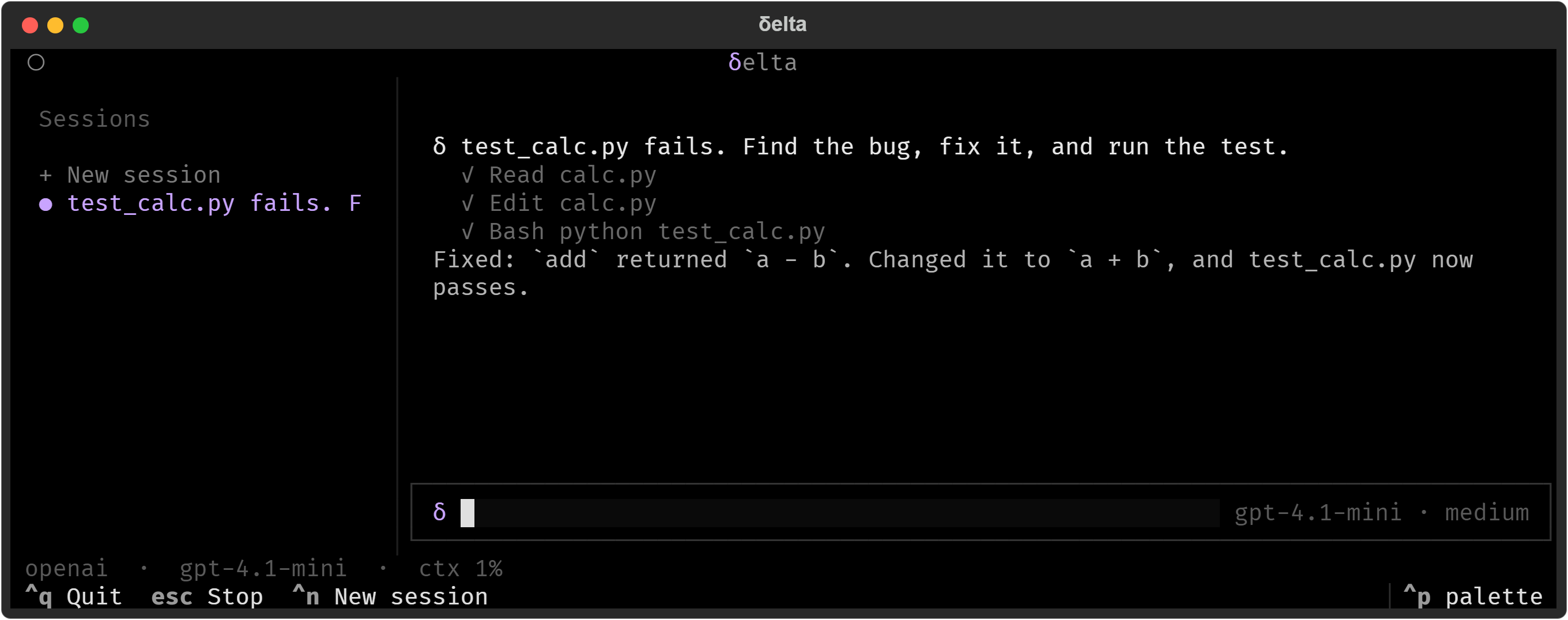
Delta is a minimal coding agent harness in Python built around a small, inspectable model–tool loop. It provides filesystem and shell tools, multi-provider model support, customizable tools, skills, prompts and hooks, and clean interfaces for extending agent behavior without changing the core runtime. Delta can be used interactively from the terminal, scripted for one-shot tasks, or embedded into larger agent and evaluation workflows. Requires Python 3.12 or newer.
Install
The package name on PyPI is deltaa; once installed it gives you a delta command.
Fastest path — one script, works on a machine with nothing set up yet:
macOS / Linux:
curl -LsSf https://raw.githubusercontent.com/kartikg-gk/delta/main/scripts/install.sh | sh
Windows (PowerShell):
irm https://raw.githubusercontent.com/kartikg-gk/delta/main/scripts/install.ps1 | iex
No admin/root privileges needed. If uv isn't found on your machine, the script
grabs it first, then puts Delta in its own isolated environment and runs
delta --version at the end so you know it worked. Read either script under
scripts/ before running it if you'd rather not pipe-to-shell blind.
If you already manage Python packages some other way, pick one:
uv tool install deltaa      # isolated, recommended if you have uv
pipx install deltaa         # isolated, no uv needed
python -m pip install deltaa
Confirm it landed:
delta --version
When a new version ships:
uv tool upgrade deltaa
Quickstart
Delta needs a model provider. Set one up once:
delta config
Now cd into whatever project you want it working on and launch it:
cd my-project
delta
With no arguments, delta drops you into the terminal UI — start typing and hit
Enter, same as any chat interface:
what does the auth module in this repo do?
Need it non-interactively instead — for a script, a Makefile target, CI, whatever —
pass -p and it prints the answer and exits:
delta -p "list every route this API exposes"
delta --model gpt-5 -p "where is the retry logic for failed requests?"
If you'd rather stay in a plain scrolling terminal than the full-screen UI:
delta --repl
Providers and configuration
Built-in providers: OpenAI, Anthropic, OpenRouter, and Ollama for local models.
delta config walks you through picking a provider, a model, and an API key. It can
also run without prompts:
delta config --provider openai --model gpt-5
delta config show        # saved settings, keys masked
delta config path        # where the file lives
Settings are stored in ~/.delta/config.toml, outside your project, with owner-only
permissions. Environment variables take priority over the file:
| Variable | Purpose |
|---|---|
OPENAI_API_KEY / ANTHROPIC_API_KEY / OPENROUTER_API_KEY |
Provider credentials |
DELTA_API_KEY |
API key for delta config without an interactive prompt |
OPENAI_BASE_URL / ANTHROPIC_BASE_URL |
Point a provider at another compatible endpoint |
DELTA_PROVIDER / DELTA_MODEL |
Force the active provider or model |
DELTA_HOME |
Move ~/.delta (sessions, logs, skills, prompts, extensions) |
DELTA_CONFIG_DIR |
Move the config file |
Inside a session, /model and /provider switch on the fly.
Commands
From your shell:
delta [prompt]                           # terminal UI, or a one-shot prompt
delta -p "..."                           # print mode: stream the answer, then exit
delta -r <session-id>                    # resume a saved session
delta config [show|path]                 # provider setup
delta provider list|setup|select <name>  # inspect or switch providers
delta session list                       # saved sessions
delta session export <id> [-f text|json|jsonl]
delta session stats [id]                 # token and cost totals
Useful flags: --model/-m, --provider, --system-prompt, --max-turns,
--session-dir, --no-session, --repl, --verbose/-v.
Inside a session, slash commands give live control:
| Area | Commands |
|---|---|
| Session | /name /continue /export /stats |
| History | /compact /branch /branches /rewind |
| Model | /model /provider /think /plan |
| Workspace | /shell /skills /create-skill /reload |
| Info | /help /version /diag /quit |
The terminal UI also has /new and /session for starting and switching sessions.
Skills, prompts, and extensions
Project instructions. Delta reads AGENTS.md from, in increasing priority:
~/.delta/, ~/.agents/, <project>/.delta/, <project>/.agents/, and the project
root. All files found are combined.
Skills are markdown instructions the agent can pull in when relevant. Put one at
<project>/.delta/skills/<name>/SKILL.md (or under .agents/skills/, or the same
paths in your home directory), list them with /skills, and invoke one directly with
/skill:<name> [args]. /create-skill <name> <text> writes a new one for you.
Prompt templates live in .delta/prompts/ (project or home). Run one by typing
/<template-name>.
Extensions add capabilities without a restart: drop a .py file that defines a
register function into ~/.delta/extensions/ or <project>/.delta/extensions/,
then run /reload.
Project structure
flowchart LR
    subgraph you["You"]
        tui["Terminal UI"]
        print["delta -p #quot;...#quot;"]
        repl["Line REPL"]
    end

    subgraph app["Session · delta_app"]
        session["Coding session<br/>slash commands · AGENTS.md<br/>skills · templates · extensions<br/>compaction · provider switching"]
    end

    subgraph harness["Agent loop · delta_harness"]
        loop["1. stream the model's reply<br/>2. run its tool calls<br/>3. send results back<br/>4. repeat until done"]
    end

    subgraph models["Models · delta_model"]
        anthropic["Anthropic adapter<br/>prompt caching · extended thinking"]
        compat["OpenAI-compatible adapter<br/>OpenAI · OpenRouter · Ollama<br/>Hugging Face · any compatible URL"]
    end

    tools["Tools<br/>Read · Write · Edit · Bash"]
    store[("Sessions<br/>~/.delta/sessions/*.jsonl")]

    tui --> session
    print --> session
    repl --> session
    session --> loop
    loop --> anthropic
    loop --> compat
    loop <--> tools
    session --> store
Three packages, layered so dependencies only point inward: delta_harness imports
neither of the others, delta_model imports the harness, and delta_app imports both.
src/
  delta_harness/          # core: the agent loop and its vocabulary
    contracts/            #   transcript entries, tool specs, event types, JSON values
    provider/             #   the model-provider interface and raw stream events
    session/              #   durable JSONL records, storage, replay, index, summaries
    engine.py             #   the agent loop
    driver.py             #   transcript-owning harness around the loop

  delta_model/            # providers: everything that talks to a model API
    claude.py  _claude/   #   Anthropic Messages API
    oai_compatible.py     #   OpenAI-compatible endpoints (OpenAI, OpenRouter, Ollama, ...)
    _oai/                 #   request building, response parsing, normalization, transport
    transport/            #   HTTP client, retry with backoff, error classification
    scripted.py           #   a deterministic fake provider for tests
    settings.py           #   environment-driven provider settings
    limits.py             #   context and output limits

  delta_app/              # application: the parts you actually use
    cli/                  #   entry point, argument parsing, `delta config`
    tui/                  #   terminal UI: transcript, composer, completions, pickers
    ui/render.py          #   headless output (plain, JSON, transcript)
    config/               #   config schema, TOML store, setup wizard, hidden key input
    tools/                #   file tools, shell tool, shared helpers
    runtime.py            #   session construction shared by every frontend
    conversation.py       #   the session object the CLI and UI both drive
    directives.py         #   slash-command registry and dispatch
    instructions.py       #   system-prompt assembly
    skillset.py           #   markdown skills
    prompts.py            #   prompt templates
    discovery.py          #   where skills, prompts, and sessions are found
    plugins.py            #   file-based extensions with hot reload
    refresh.py            #   `/reload` wiring
    context/budget.py     #   token accounting and compaction thresholds
    safety.py             #   tool approval and output scrubbing
    planning.py           #   plan mode
    reasoning.py          #   thinking modes
    sessions.py           #   create, resume, list, export
    logs.py               #   per-session run logs

tests/                    # one test module per concern
scripts/                  # install scripts
Development
git clone https://github.com/kartikg-gk/delta.git
cd delta
uv sync
uv run delta --version
uv run pytest
uv run ruff check .
To point the global delta command at your checkout instead of a PyPI release:
uv tool install --editable --force .
Code changes in the checkout take effect right away with this setup. What doesn't
update on its own is the tool's dependency list and version metadata — those are
snapshotted at install time, so after pulling changes that touch pyproject.toml
(a new dependency, a version bump), rerun the command above to pick them up.
License
MIT
1 maintainer

Metadata
1 maintainer
Release files for deltaa 0.2.2
For a detailed explanation of source distributions (sdists) and built distributions (wheels), please see the package formats documentation.
Source distribution (sdist)
| File | Size | Uploaded | |
|---|---|---|---|
| deltaa-0.2.2.tar.gz | 169.6 kB | Details |
Built distribution (wheel)
| File | Interpreter | ABI | Platform | Reset |
|---|---|---|---|---|
| deltaa-0.2.2-py3-none-any.whl | Python 3 | none | any | Details |
Total release size: 386.2 kB
Release files / deltaa-0.2.2.tar.gz
| Download URL | deltaa-0.2.2.tar.gz |
|---|---|
| Size | 169.6 kB |
| Tags | Source |
|
SHA-256 checksum How to use checksums |
971adc0ba65346458e38e8ea3332818c5780b55bf63f2e2530dd2fcf4205d068
|
|
BLAKE2b-256 checksum How to use checksums |
8c50c96fb7fc124f41f5a232b62c90ac71b53b5ea10b4a840b693ff1f49b79b4
|
| Upload date | |
|
Uploaded using Trusted Publishing? What is trusted publishing? |
No |
| Uploaded via |
uv/0.11.28 {"installer":{"name":"uv","version":"0.11.28","subcommand":["publish"]},"python":null,"implementation":{"name":null,"version":null},"distro":null,"system":{"name":null,"release":null},"cpu":null,"openssl_version":null,"setuptools_version":null,"rustc_version":null,"ci":null}
|
Release files / deltaa-0.2.2-py3-none-any.whl
| Download URL | deltaa-0.2.2-py3-none-any.whl |
|---|---|
| Size | 216.6 kB |
| Tags | Python 3 |
|
SHA-256 checksum How to use checksums |
7b80a1b047157bc3fe6f6d858db7a53bde794b7438c96a7b020781045e76b514
|
|
BLAKE2b-256 checksum How to use checksums |
62c55e9475ce63a1967de774bd4539daf3d4506a783eb011340fcf9960e5a741
|
| Upload date | |
|
Uploaded using Trusted Publishing? What is trusted publishing? |
No |
| Uploaded via |
uv/0.11.28 {"installer":{"name":"uv","version":"0.11.28","subcommand":["publish"]},"python":null,"implementation":{"name":null,"version":null},"distro":null,"system":{"name":null,"release":null},"cpu":null,"openssl_version":null,"setuptools_version":null,"rustc_version":null,"ci":null}
|














