
demetrapy


Seasonal adjustment with JDemetra+ from Python. demetrapy runs X13 and
TRAMO/SEATS on sequences, pandas objects, or CSV files and returns components,
forecasts, diagnostics, and fitted model details in Python-native structures.
Why demetrapy
- Adjust every numeric column in a DataFrame with one call.
- Keep real date indexes on historical and forecast output.
- Assign different user-defined calendar variables to each target series.
- Use typed Python configuration, direct options, or the same JSON as the CLI.
- Inspect the full JDemetra+ result without working with workspace XML.
Install
Python 3.11+ and Java 9+ are required.
python -m pip install demetrapy
demetrapy check
The first adjustment downloads the pinned JDemetra+ 2.2.6 core JAR to
~/.cache/demetrapy. Set DEMETRAPY_JAR to use a local copy instead.
Adjust a DataFrame
adjust_dataframe() infers monthly, quarterly, half-yearly, or yearly
frequency from a regular DatetimeIndex. Each input column is adjusted
independently.
from demetrapy import TramoSeatsConfig, adjust_dataframe, load_monthly_emissions

data = load_monthly_emissions()  # 120 dates x 10 sector columns
config = TramoSeatsConfig(
    spec="RSAfull",
    preprocessing={"automodel": {"enabled": True}},
    seats={"prediction_length": 12},
)

result = adjust_dataframe(data, config=config)

sa = result.seasonally_adjusted             # 120 x 10
calendar_adjusted = result.calendar_adjusted
forecasts = result.to_forecast_frame()      # future dates
combined = result.to_combined_frame()       # history + forecasts
Every result contains six components:
| Component | Alias | Meaning |
|---|---|---|
observed |
y |
input series |
calendar_adjusted |
ycal |
calendar effects removed |
seasonally_adjusted |
sa |
seasonal effects removed |
trend |
t |
trend-cycle |
seasonal |
s |
seasonal component |
irregular |
i |
irregular component |
Use to_compact_frame() for aliases and for_series(name) for one column's
model, diagnostics, messages, and low-level outputs.
Different Calendars for Different Series
Calendar variables live in a separate DataFrame. A mapping selects which pool columns enter each target's model. Extra pool columns are allowed.
result = adjust_dataframe(
    observations,
    calendar_pool=calendar_variables,
    user_defined_calendars={
        "power": ["heating_days", "working_days"],
        "transport": ["working_days", "holiday_days", "mobility_index"],
    },
    config=config,
)
See the complete 10-series example with full TRAMO/SEATS parameters: examples/13_full_config_calendar_pool.py.
Other Inputs
A sequence has no dates, so its frequency and start must be explicit:
from demetrapy import adjust

result = adjust(
    values,
    frequency="Quarterly",
    start_year=2010,
    start_period=1,
    method="x13",
    spec="RSA4",
)
CSV files use the same engine:
from demetrapy import adjust_csv

result = adjust_csv("input.csv", config="x13.json", output="adjusted.csv")
Command Line
demetrapy input.csv --output adjusted.csv
demetrapy init-config --method tramoseats --output config.json
demetrapy validate config.json --data input.csv
demetrapy input.csv --config config.json --output adjusted.csv --audit audit/
Dashboard
The included Streamlit dashboard runs the same X13 and TRAMO/SEATS engine as the Python API. Start with a built-in monthly, quarterly, or calendar-adjusted dataset, or upload your own files.
demetrapy-dashboard
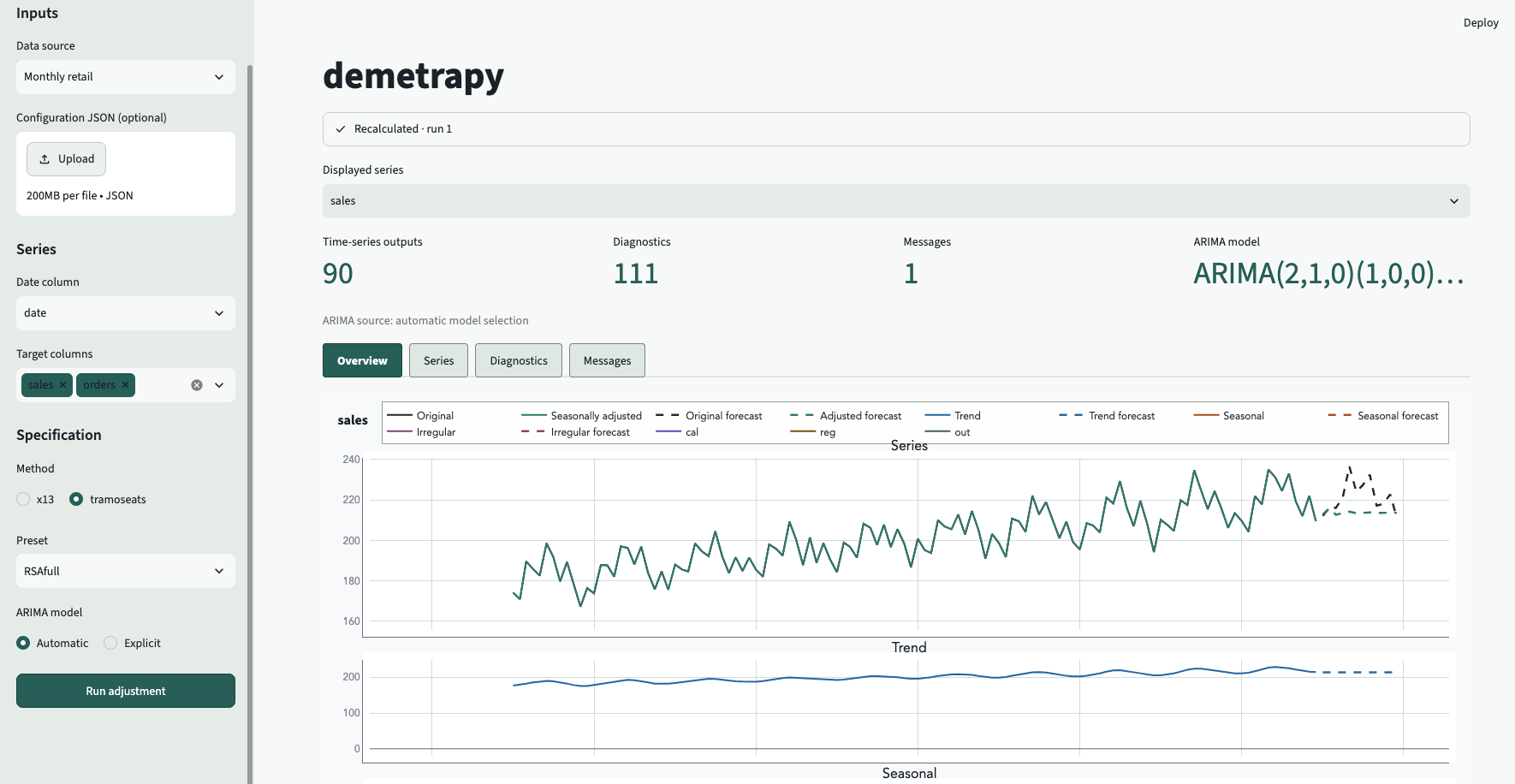
From the dashboard you can:
- adjust one or several target columns;
- upload JSON configuration and a separate calendar-variable pool;
- map different calendar variables to each target;
- inspect interactive components and forecasts;
- review diagnostics, processing messages, and fitted models;
- download result tables.
Ready-to-upload files are available in the dashboard example directory.
Documentation
- Quickstart
- Usage
- Configuration reference
- Examples
- Copy, run, inspect notebook
- Windows and offline setup
- Compatibility
demetrapy is an independent interface to JDemetra+ and is not an official
publication of the JDemetra+ project.
1 maintainer

Release files for demetrapy 0.3.3
For a detailed explanation of source distributions (sdists) and built distributions (wheels), please see the package formats documentation.
Source distribution (sdist)
| File | Size | Uploaded | |
|---|---|---|---|
| demetrapy-0.3.3.tar.gz | 63.7 kB | Details |
Built distribution (wheel)
| File | Interpreter | ABI | Platform | Reset |
|---|---|---|---|---|
| demetrapy-0.3.3-py3-none-any.whl | Python 3 | none | any | Details |
Total release size: 116.5 kB
Release files / demetrapy-0.3.3.tar.gz
| Download URL | demetrapy-0.3.3.tar.gz |
|---|---|
| Size | 63.7 kB |
| Tags | Source |
|
SHA-256 checksum How to use checksums |
dba4da525f0a1a691bbfce78353ec7afaadabfcb19b3571dae0e95090c1166c9
|
|
BLAKE2b-256 checksum How to use checksums |
e8f725ed053a04dab39d55a0e62f7b1c44203418b0455821204ba00a213bab69
|
| Upload date | |
|
Uploaded using Trusted Publishing? What is trusted publishing? |
No |
| Uploaded via |
twine/7.0.0 CPython/3.13.15
|
Release files / demetrapy-0.3.3-py3-none-any.whl
| Download URL | demetrapy-0.3.3-py3-none-any.whl |
|---|---|
| Size | 52.8 kB |
| Tags | Python 3 |
|
SHA-256 checksum How to use checksums |
b29a982a5522559ce6a89392b5d68afb2cb292c0ed8fd19d694922c5062c7046
|
|
BLAKE2b-256 checksum How to use checksums |
940e7801a05786506358efdf2706851649af019269b45828931b370249542ba0
|
| Upload date | |
|
Uploaded using Trusted Publishing? What is trusted publishing? |
No |
| Uploaded via |
twine/7.0.0 CPython/3.13.15
|














