
Python Dependency Check Tool

Project description
dep-check


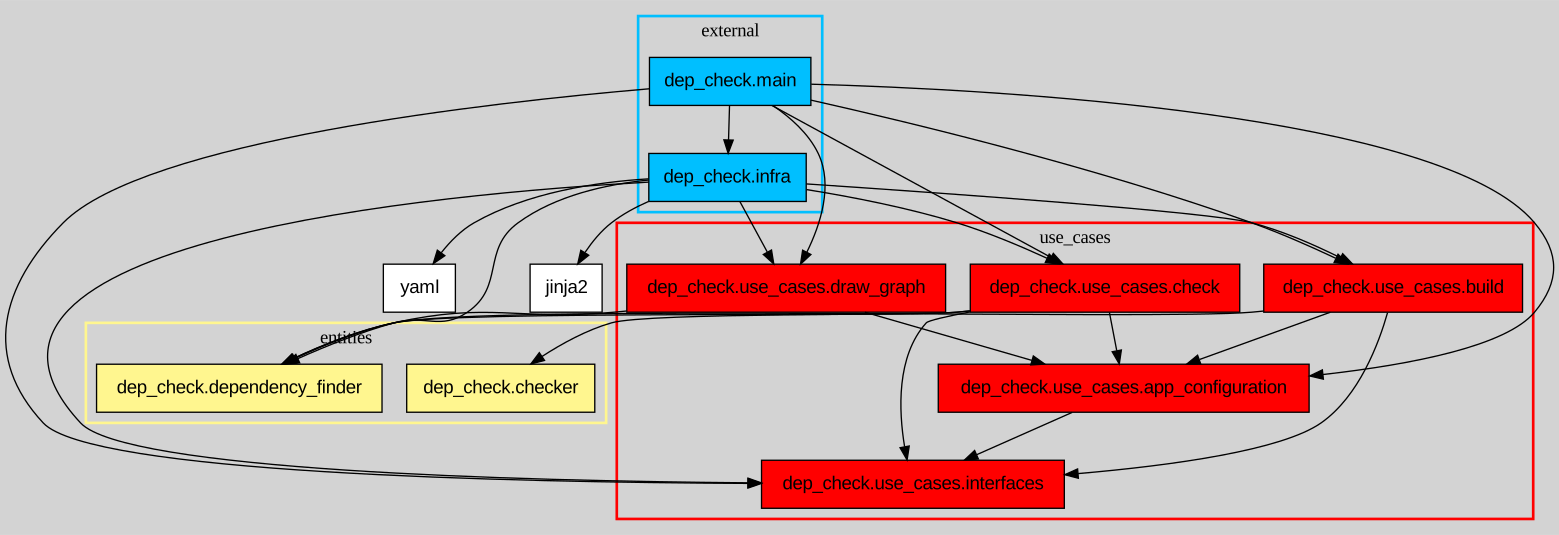
dep-check is a Python dependency checker. It lets you write rules to define what each module can import, dep-check can then parse each source file in your project to verify everything is in order. You can also use it to draw a dependency graph for your project.
Free software: MIT license
Supported languages
By default, the tool assumes it's operating on a Python project.
Installation
To install dep-check, run this command:
pip install dep-check
This is the preferred method to install dep-check, as it always installs the most recent stable release.
If you don't have pip installed, this Python installation guide can guide you through the process.
You can also see other installation methods.
Usage
Build your configuration file
dep_check build <ROOT_DIR> [-o config.yaml] [--lang LANG]
| Argument | Description | Optional | Default |
|---|---|---|---|
| ROOT_DIR | The project root directory, containing the source files | :x: | N/A |
| -o / --output | The output file (yaml format) | :heavy_check_mark: | dependency_config.yaml |
| --lang | The language the project is written in | :heavy_check_mark: | python |
By default, any import is forbidden (denylist). The configuration is an allowlist.
This command lists the imports of each module in a yaml file. Use this file as a starting point to write dependency rules on which module can import what, using wildcards.
Here is an example of additional rules added to the initial yaml file:
---

dependency_rules:
'*':
    - dep_check.models
    - dep_check.dependency_finder
    - dep_check.checker

dep_check.infra.io:
    - dep_check.use_cases%
    - jinja2
    - yaml

dep_check.infra.std_lib_filter:
    - dep_check.use_cases.interfaces

dep_check.use_cases%:
    - dep_check.use_cases.app_configuration
    - dep_check.use_cases.interfaces

dep_check.main:
    - '*'

lang: python
local_init: false
- Use
*to include any string, even an empty one. - Use
%after a module name (e.g.my_module%) to include this module along with its sub-modules.
Here, for instance, the configuration file defines that dep_check.infra.io can import dep_check.use_cases, along with dep_check.use_cases.build, dep_check.use_cases.check, and so on.
To see all the supported wildcards, check the User Manual.
Check your configuration
Once your config file is ready, run
dep_check check <ROOT_DIR> [-c config.yaml] [--lang LANG]
| Argument | Description | Optional | Default |
|---|---|---|---|
| ROOT_DIR | The project root directory, containing the source files | :x: | N/A |
| -c / --config | The yaml file in which you wrote the dependency rules | :heavy_check_mark: | dependency_config.yaml |
| --lang | The language the project is written in | :heavy_check_mark: | python |
The command reads the configuration file, and parses each source file. It then verifies, for each file, that every import is authorized by the rules defined in the configuration file.
When it's done, it writes a report on the console, listing import errors by module and unused rules:

Draw a dependency graph
You need to have graphviz installed to run this command
dep_check graph <ROOT_DIR> [-o file.svg/dot] [-c config.yaml] [--lang LANG]
| Argument | Description | Optional | Default |
|---|---|---|---|
| ROOT_DIR | The project root directory, containing the source files | :x: | N/A |
| -o / --output | The output file you want (svg or dot format) | :heavy_check_mark: | dependency_graph.svg |
| -c / --config | The graph configuration file containing options (yaml format) | :heavy_check_mark: | None |
| --lang | The language the project is written in | :heavy_check_mark: | python |
Note : if you generate a svg file, a dot file is also created in /tmp/graph.dot
A lot of options are available to customize your graph (hide some modules, add layers etc.). Check the User Manual for more information.
Contributing
If you want to make a contribution, be sure to follow the Contribution guide.
Credits
This package was created with Cookiecutter and the audreyr/cookiecutter-pypackage project template
Authors & contributors
Check out all the Authors and contributors of this project.
Release history Release notifications | RSS feed


Download files
Download the file for your platform. If you're not sure which to choose, learn more about installing packages.
Source Distribution
Built Distribution
Filter files by name, interpreter, ABI, and platform.
If you're not sure about the file name format, learn more about wheel file names.
Copy a direct link to the current filters
File details
Details for the file dep_check-3.2.0.tar.gz.
File metadata
- Download URL: dep_check-3.2.0.tar.gz
- Upload date:
- Size: 102.0 kB
- Tags: Source
- Uploaded using Trusted Publishing? No
- Uploaded via: twine/6.2.0 CPython/3.13.5
File hashes
| Algorithm | Hash digest | |
|---|---|---|
| SHA256 |
52350d0e240a940d1395d3201a98de98fa34840bb195956a734aa9e9efba0f3a
|
|
| MD5 |
e2b3969d286626698110b1f0c6729a08
|
|
| BLAKE2b-256 |
c146a195a08706525f568ed4b868ce99a9902f4c00bb2d20b9f69f67d8e54426
|
File details
Details for the file dep_check-3.2.0-py3-none-any.whl.
File metadata
- Download URL: dep_check-3.2.0-py3-none-any.whl
- Upload date:
- Size: 93.2 kB
- Tags: Python 3
- Uploaded using Trusted Publishing? No
- Uploaded via: twine/6.2.0 CPython/3.13.5
File hashes
| Algorithm | Hash digest | |
|---|---|---|
| SHA256 |
d3db486e8ca8fd40ea160ce767b1df45e2b464e3a9bca172b1035112b46b5e43
|
|
| MD5 |
7d061b36e8a7419608deeaaa324a9c79
|
|
| BLAKE2b-256 |
e142d58ad0aeef336dcd2e4e3a7692d808394a02a6320961630fa03f95b3934d
|






