
Dependency scanner that finds your enemies in the supply chain
Verified details
These details have been verified by PyPIProject links
GitHub Statistics
Maintainers


Project description

Your dependencies could be your enemy.
Depenemy scans your project for supply chain risks, behavioral issues, and reputation red flags - before they can do damage.


Why depenemy?
Modern projects pull in hundreds of dependencies. Each one is a potential entry point for a supply chain attack - a compromised maintainer account, a typosquatted package, an old version with a known CVE, or a package that runs arbitrary code on install.
Depenemy gives you a single command that audits all your dependencies across npm, Python, Rust, and Solidity - and tells you exactly what looks suspicious and why.
What it detects
Behavioral risks
| ID | Name | Description | Severity |
|---|---|---|---|
| B001 | Range specifier | Version uses ^, ~, >=, * - allows unexpected updates |
Warning |
| B002 | No version pinned | No version specified at all | Error |
| B003 | Lagging version | Pinned version is significantly behind latest | Warning |
Reputation signals
| ID | Name | Description | Severity |
|---|---|---|---|
| R001 | Young author account | Package author's GitHub account is < 12 months old | Warning |
| R002 | New package | Package was first published < 6 months ago | Warning |
| R003 | Low weekly downloads | < 1,000 weekly downloads | Warning |
| R004 | Low total downloads | < 10,000 total downloads | Warning |
| R005 | No updates in 2+ years | Last publish was over 2 years ago | Warning |
| R006 | Few contributors | Fewer than 5 contributors on GitHub | Warning |
| R007 | Known vulnerable version | Your version is below a known security patch (OSV/CVE) | Error |
| R008 | Deprecated package | Package is officially marked as deprecated | Warning |
| R009 | Typosquatting suspected | Name is suspiciously close to a popular package | Warning |
| R010 | Recently published version | Version was published < 7 days ago - not yet vetted by the community | Error |
Supply chain risks
| ID | Name | Description | Severity |
|---|---|---|---|
| S001 | Install scripts | Package runs code at install time (postinstall, preinstall) |
Error |
| S002 | No source repository | No GitHub/GitLab link in package metadata | Warning |
| S003 | Archived repository | Source repo has been archived or deleted | Warning |
| S004 | Dependency confusion | Private package name found on public registry | Warning |
| S005 | Known malicious package | Package has a recorded history of malicious activity (OSV) | Error |
Supported ecosystems
| Ecosystem | Manifest files |
|---|---|
| npm / Node.js | package.json, package-lock.json, yarn.lock |
| Python | requirements*.txt, pyproject.toml, Pipfile |
| Rust | Cargo.toml |
| Solidity | Foundry / Hardhat (delegates to npm) |
Installation
pip install depenemy
Usage
CLI
# Scan your project
depenemy scan .

# Scan a specific file
depenemy scan pyproject.toml

# Output as SARIF (for GitHub Code Scanning)
depenemy scan . --output sarif --output-file results.sarif

# Output as JSON to a custom filename (table scan always writes depenemy-results.json automatically)
depenemy scan . --output json --output-file my-results.json

# Pipe JSON output to another tool
depenemy scan . --output json | jq '.findings'

# Fail the command if any warnings exist (useful in CI)
depenemy scan . --fail-on warning

# List all available rules
depenemy rules
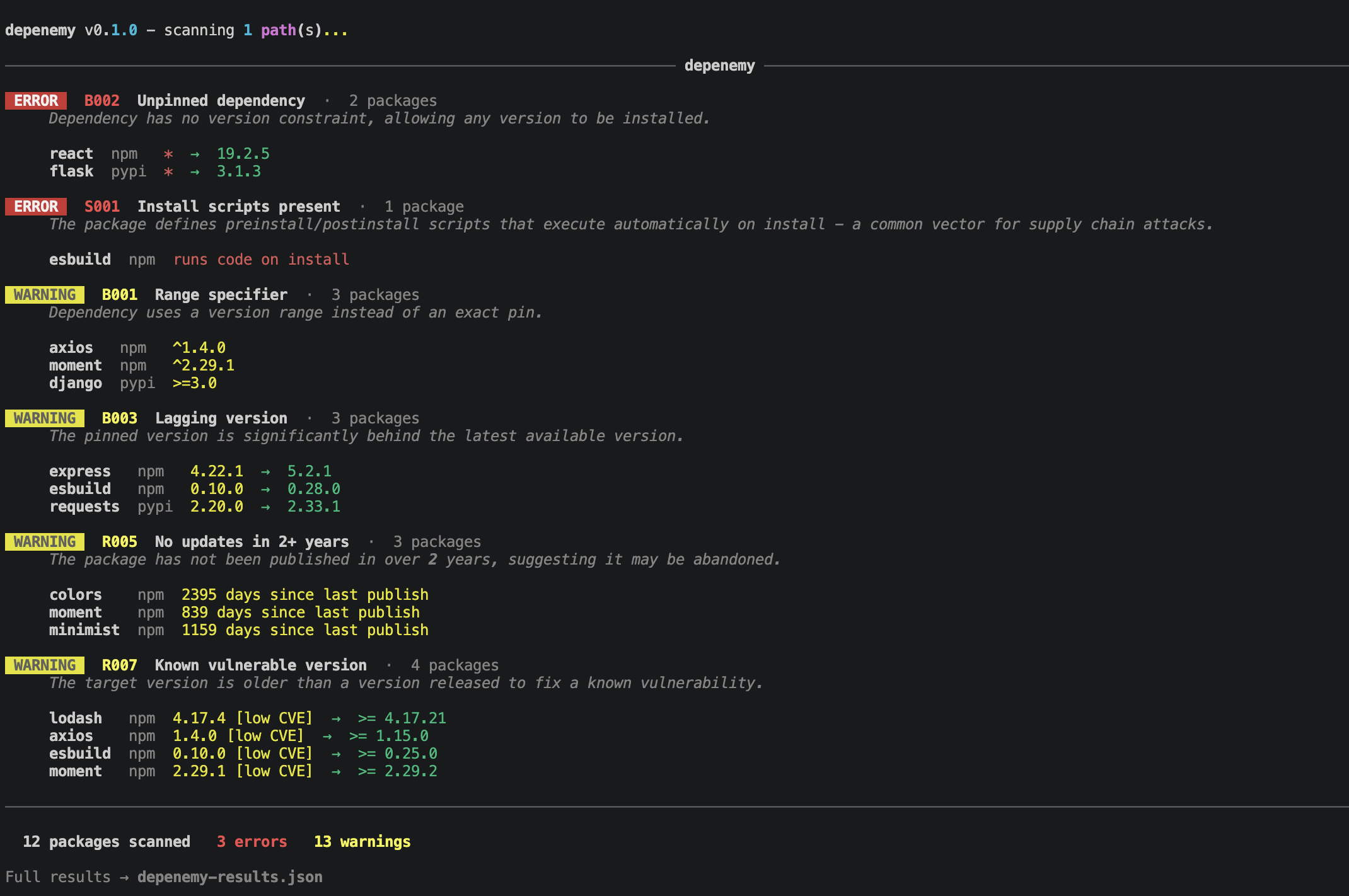
Example output:
GitHub Action
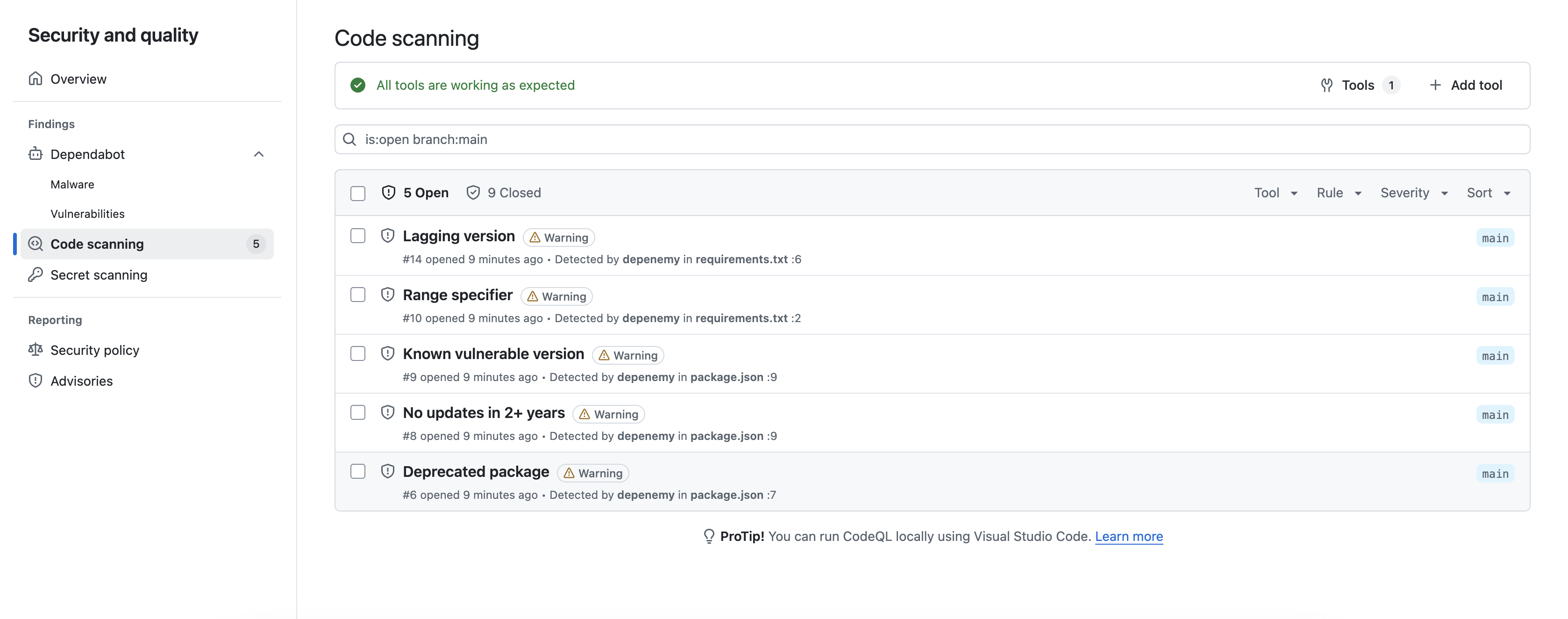
CI pipelines are supported via the depenemy-action GitHub Action — it continuously scans your dependencies on every push and pull request, and surfaces findings directly in your repository's Security tab. Create .github/workflows/depenemy.yml in your repository:
name: Depenemy scan
on: [push, pull_request]

jobs:
  scan:
    runs-on: ubuntu-latest
    permissions:
      contents: read
      security-events: write
    steps:
      - uses: actions/checkout@v4
      - uses: W3OSC/depenemy-action@v1
        with:
          token: ${{ secrets.GITHUB_TOKEN }}  # optional - unlocks R001 and R006 checks
          fail-on: error
Results appear automatically as Code Scanning alerts in your Security tab on every push and pull request.
Pre-commit hook
Block commits that introduce error-level dependency findings. Add to .pre-commit-config.yaml:
repos:
  - repo: https://github.com/W3OSC/depenemy
    rev: v0.1.3
    hooks:
      - id: depenemy
Then run once to activate:
pre-commit install
From that point on, depenemy runs automatically before every git commit.
Configuration
Create .depenemy.yml in your repository root to customize thresholds, severities, and ignore specific packages:
thresholds:
  min_weekly_downloads: 1000       # R003 threshold
  min_total_downloads: 10000       # R004 threshold
  min_author_account_age_days: 365 # R001 threshold
  min_package_age_days: 180        # R002 threshold
  max_stale_days: 730              # R005 threshold
  min_contributors: 5              # R006 threshold
  max_version_lag: 10              # B003 threshold (minor versions)
  typosquatting_distance: 1        # R009 threshold (edit distance)

rules:
  B001: warning   # downgrade range specifier to warning
  R003: false     # disable low downloads check entirely

ignore:
  - name: my-internal-package
    ecosystem: npm
    reason: "Internal fork, not on public registry"
  - name: legacy-tool
    ecosystem: pypi
    reason: "Approved exception, tracked in JIRA-1234"
Set a rule to false to disable it entirely. All other rules accept warning or error.
Output formats
| Format | Flag | Best for |
|---|---|---|
| Table (default) | --output table |
Terminal / CI logs |
| SARIF | --output sarif |
GitHub Code Scanning |
| JSON | --output json |
Custom integrations, dashboards |
How it works
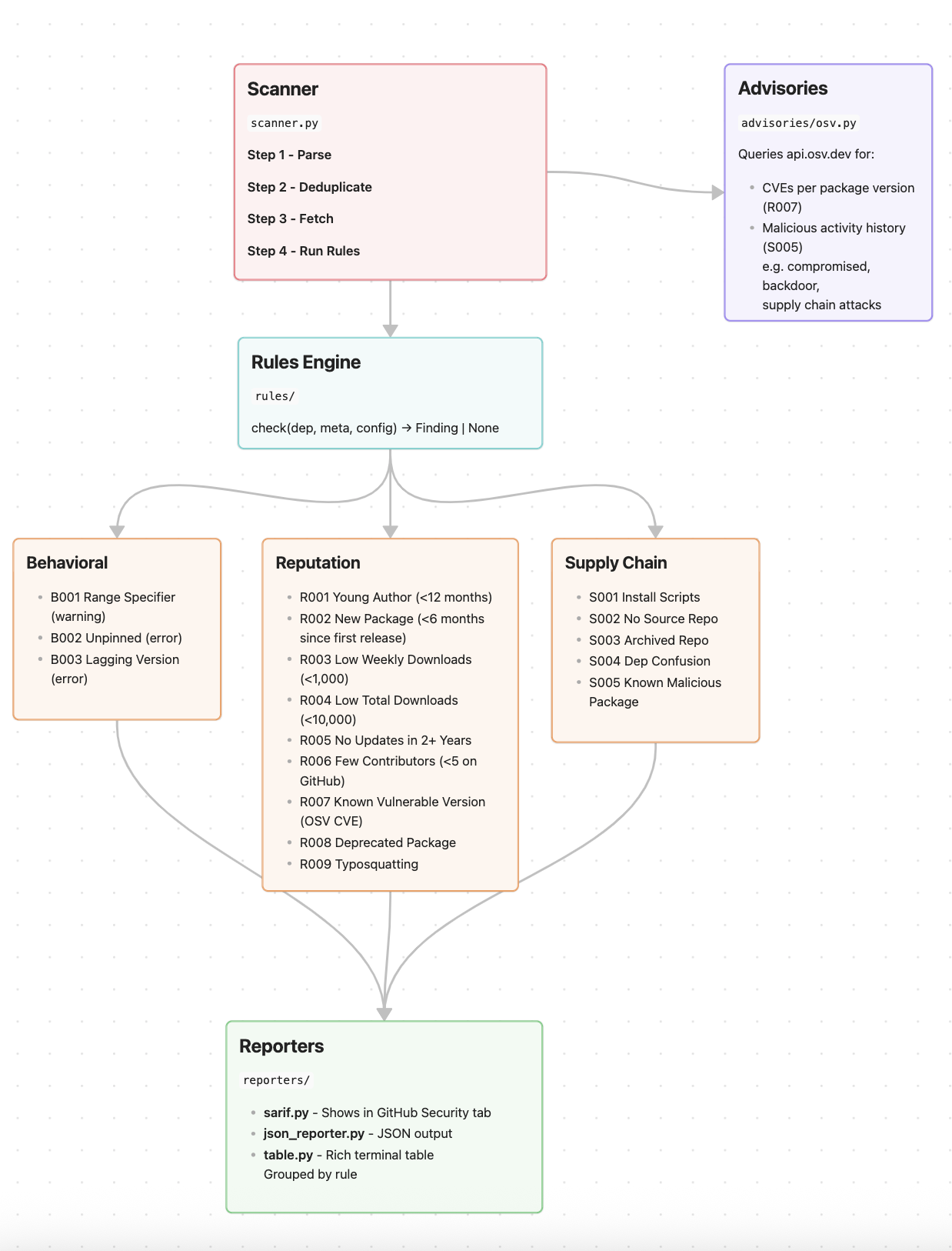
API responses are cached for 6 hours in .depenemy_cache/ to avoid rate limits on repeated runs. Use --no-cache to force fresh data.
GitHub Token
A GitHub token unlocks author account age (R001) and contributor count (R006) checks. Without it, those rules are skipped.
# CLI
depenemy scan . --github-token ghp_xxxx

# Or via environment variable
GITHUB_TOKEN=ghp_xxxx depenemy scan .
In GitHub Actions, ${{ secrets.GITHUB_TOKEN }} is available automatically.
Development
git clone https://github.com/W3OSC/depenemy.git
cd depenemy
pip install -e ".[dev]"

# Run tests
pytest --no-cov -q
License
MIT - see LICENSE
Project details
Verified details
These details have been verified by PyPIProject links
GitHub Statistics
Maintainers


Download files
Download the file for your platform. If you're not sure which to choose, learn more about installing packages.
Source Distribution
Built Distribution
Filter files by name, interpreter, ABI, and platform.
If you're not sure about the file name format, learn more about wheel file names.
Copy a direct link to the current filters
File details
Details for the file depenemy-0.1.3.tar.gz.
File metadata
- Download URL: depenemy-0.1.3.tar.gz
- Upload date:
- Size: 52.0 kB
- Tags: Source
- Uploaded using Trusted Publishing? Yes
- Uploaded via: twine/6.1.0 CPython/3.13.12
File hashes
| Algorithm | Hash digest | |
|---|---|---|
| SHA256 |
dbc4c506978d3b1becf7f8c9893bceb08beb828ba9c842c01f802a586d04abb0
|
|
| MD5 |
96ef43605d7801e471c68ed0c08e8c97
|
|
| BLAKE2b-256 |
a4747df01ea4518655b8eda3811bc3b7a61543781ff16089b85ca746c95976f2
|
Provenance
The following attestation bundles were made for depenemy-0.1.3.tar.gz:
Publisher:
publish.yml on W3OSC/depenemy
-
Statement:
-
Statement type:
https://in-toto.io/Statement/v1 -
Predicate type:
https://docs.pypi.org/attestations/publish/v1 -
Subject name:
depenemy-0.1.3.tar.gz -
Subject digest:
dbc4c506978d3b1becf7f8c9893bceb08beb828ba9c842c01f802a586d04abb0 - Sigstore transparency entry: 1317067242
- Sigstore integration time:
-
Permalink:
W3OSC/depenemy@c9d078b150510aa7598884def52f56313835c8e6 -
Branch / Tag:
refs/tags/v0.1.3 - Owner: https://github.com/W3OSC
-
Access:
public
-
Token Issuer:
https://token.actions.githubusercontent.com -
Runner Environment:
github-hosted -
Publication workflow:
publish.yml@c9d078b150510aa7598884def52f56313835c8e6 -
Trigger Event:
release
-
Statement type:
File details
Details for the file depenemy-0.1.3-py3-none-any.whl.
File metadata
- Download URL: depenemy-0.1.3-py3-none-any.whl
- Upload date:
- Size: 52.3 kB
- Tags: Python 3
- Uploaded using Trusted Publishing? Yes
- Uploaded via: twine/6.1.0 CPython/3.13.12
File hashes
| Algorithm | Hash digest | |
|---|---|---|
| SHA256 |
f096c4db2e056d6764eaf85ea438bbfb13bace776e7d04a131a9785d13dacb9b
|
|
| MD5 |
29a4686b7bed750f1c1cebb0dc88b1b0
|
|
| BLAKE2b-256 |
0c9bb72e48349e1399a1d5080f7174a0396d3e8fb3af47701bfbe11fb255211d
|
Provenance
The following attestation bundles were made for depenemy-0.1.3-py3-none-any.whl:
Publisher:
publish.yml on W3OSC/depenemy
-
Statement:
-
Statement type:
https://in-toto.io/Statement/v1 -
Predicate type:
https://docs.pypi.org/attestations/publish/v1 -
Subject name:
depenemy-0.1.3-py3-none-any.whl -
Subject digest:
f096c4db2e056d6764eaf85ea438bbfb13bace776e7d04a131a9785d13dacb9b - Sigstore transparency entry: 1317067244
- Sigstore integration time:
-
Permalink:
W3OSC/depenemy@c9d078b150510aa7598884def52f56313835c8e6 -
Branch / Tag:
refs/tags/v0.1.3 - Owner: https://github.com/W3OSC
-
Access:
public
-
Token Issuer:
https://token.actions.githubusercontent.com -
Runner Environment:
github-hosted -
Publication workflow:
publish.yml@c9d078b150510aa7598884def52f56313835c8e6 -
Trigger Event:
release
-
Statement type:






