
depression
You A-Z. AI depression.ai
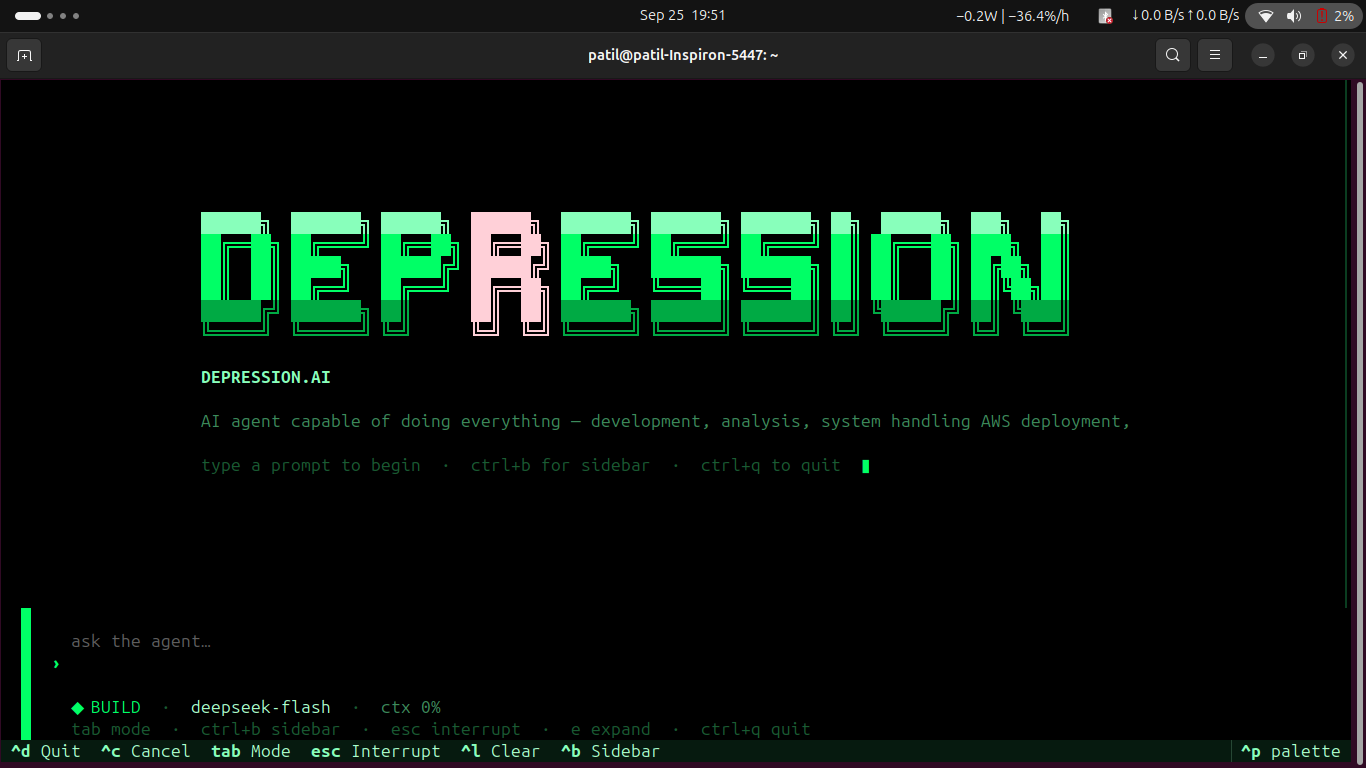
Terminal-native agentic AI for development, system operations, analysis, and cloud deployment.
👥 Team Depression
A team that builds ON ETHICS
🧑💻 R Naveen Patil

Lead Developer • AI & Agentic Systems • Cloud & Infrastructure
R Naveen Patil is the primary developer behind the depression.ai framework, responsible for the core architecture, agentic workflow, LLM integration, system tooling, cloud integration and overall development of the project.
Profiles
🤝 Team Members

Rahul Jadav📧 |

K G Meghashree Naik📧 |

SUMANTHA MS📧 |
🧠 About depression.ai
depression.ai is an agentic AI framework developed and released by Team Depression.
It is a terminal-native AI workspace designed to assist with the complete workflow from:
Development
     ↓
Analysis
     ↓
System Operations
     ↓
Testing & Debugging
     ↓
Git & Project Management
     ↓
AWS Operations
     ↓
Deployment
The framework is designed around an LLM-driven agent architecture, meaning the model acts as the reasoning layer while depression.ai provides the execution environment, tools, permissions, project context and session management.
The framework is not simply a collection of predefined commands. The agent can inspect the current environment, understand the user's request, determine the required sequence of operations, execute available tools and verify the result.
🖥️ Terminal-Native TUI
The primary interface is a terminal-native Textual TUI designed for interactive agent operation.
The interface brings the agent workflow into a single workspace with features such as:
- Interactive conversation
- Plan / Build mode switching
- LLM connection configuration
- AWS configuration
- Tool-call cards
- Permission prompts
- Todo tracking
- Thinking indicators
- Diff inspection
- Session management
- Project context
- Agent execution feedback
The goal is to provide a workflow similar to modern terminal-native coding agents while extending the scope beyond software development into system and cloud operations.
🏗️ Architecture
                         USER
                           │
                           ▼
                ┌─────────────────────┐
                │   depression.ai     │
                │       TUI / CLI     │
                └──────────┬──────────┘
                           │
                ┌──────────┴──────────┐
                │                     │
                ▼                     ▼
        ┌───────────────┐     ┌───────────────┐
        │   PLAN AGENT  │     │  BUILD AGENT  │
        │               │     │               │
        │ Read / Analyze│     │ Execute Tools │
        │ Plan Tasks    │     │ Modify System │
        └───────┬───────┘     └───────┬───────┘
                │                     │
                └──────────┬──────────┘
                           ▼
                  ┌─────────────────┐
                  │   TOOL SYSTEM   │
                  ├─────────────────┤
                  │ Terminal        │
                  │ Filesystem      │
                  │ Git             │
                  │ Patch           │
                  │ Search          │
                  │ Web             │
                  │ Browser         │
                  │ AWS             │
                  │ MCP             │
                  │ Todo / Process  │
                  └─────────────────┘
🧩 Plan + Build Architecture
depression.ai separates planning from execution using two complementary agent modes.
PLAN
The Plan Agent focuses on understanding the task before making system changes.
User Request
     ↓
Project Inspection
     ↓
Context Gathering
     ↓
Problem Analysis
     ↓
Task Breakdown
     ↓
Execution Plan
The planning stage can inspect project files, understand dependencies, analyze the environment and determine the steps required to complete the task.
BUILD
The Build Agent performs the required operations using the available tools.
Approved / Selected Plan
          ↓
     Tool Selection
          ↓
       Execution
          ↓
      Verification
          ↓
        Result
This separation provides a clear distinction between reasoning and execution.
💻 Development Capabilities
depression.ai can operate directly on software projects through its tool system.
Project Understanding
- Analyze existing projects
- Inspect project structure
- Read source code
- Understand dependencies
- Search through files
- Identify configuration problems
- Analyze build errors
Code Operations
- Create files
- Modify existing files
- Apply patches
- Refactor code
- Debug applications
- Run tests
- Verify changes
- Work with Git
Example
User:
"Analyze this project and find why the application is failing."

Agent:
    ↓
Inspect project
    ↓
Read configuration
    ↓
Inspect source code
    ↓
Run relevant commands
    ↓
Identify failure
    ↓
Create fix
    ↓
Run verification
    ↓
Report result
The agent determines the required actions based on the task, available tools and connected model.
🖥️ System Operations
The framework can interact with the local development environment through its configured tools.
Example tasks include:
"Check my project structure."

"Find why this application is failing."

"Install the required dependencies."

"Run the tests and fix the errors."

"Find unused files."

"Check the running processes."

"Prepare this project for deployment."

"Inspect the Git changes."

"Create a clean patch for this issue."
System-level operations are controlled through the permission system where required.
☁️ AWS Integration
AWS is integrated into the agent workflow so cloud infrastructure can be handled from the same terminal-native environment.
The architecture allows the agent to combine:
User Request
     ↓
depression.ai
     ↓
Agent Reasoning
     ↓
AWS Tools / AWS CLI
     ↓
AWS Environment
Depending on the configured tools, AWS permissions and available credentials, the agent can assist with:
- AWS environment inspection
- Infrastructure analysis
- Resource management
- AWS CLI workflows
- Deployment workflows
- Cloud operations
- Monitoring and troubleshooting workflows
- Creating supported resources
- Modifying supported resources
- Removing supported resources
- Application deployment workflows
The exact operations available depend on the AWS credentials, IAM permissions and tools configured in the environment.
🔐 AWS Security & Permissions
depression.ai does not bypass AWS security controls.
The agent operates using the AWS identity and permissions supplied by the user.
For example:
AWS IAM Permissions
        ↓
depression.ai
        ↓
Allowed AWS Operations
If the configured AWS identity does not have permission to perform an operation, the agent cannot legitimately perform that operation.
This allows AWS access to remain controlled through standard AWS authentication and IAM authorization.
🔌 Connecting an AWS Account
AWS credentials can be configured through the TUI or supported environment variables.
Example:
export AWS_ACCESS_KEY_ID="your-access-key"
export AWS_SECRET_ACCESS_KEY="your-secret-key"
export AWS_DEFAULT_REGION="ap-south-1"
Then start:
depression
The TUI can be used to configure the AWS environment when supported by the installed version.
AWS Access Key Setup
A typical AWS access-key workflow is:
AWS Console
    ↓
IAM
    ↓
Users
    ↓
Select User
    ↓
Security Credentials
    ↓
Access Keys
    ↓
Create Access Key
Never commit AWS access keys, secret keys,
.envfiles or other credentials to GitHub.
For production deployments, use the AWS credential mechanism appropriate for the deployment environment and apply least-privilege IAM permissions.
🤖 LLM Integration
The framework separates the agent runtime from the LLM provider.
The model acts as the reasoning layer while depression.ai provides:
LLM
 ↓
Agent Runtime
 ↓
Context
 ↓
Tools
 ↓
Permissions
 ↓
Execution
The user can configure an LLM through:
Provider
Base URL
API Key
Model
Example:
Provider : custom
Base URL : https://api.example.com/v1
API Key  : ****************
Model    : your-model
This allows the framework to work with compatible remote model APIs.
🧠 OpenAI-Compatible & API-Based Models
The framework can be configured around compatible API endpoints rather than forcing a single model provider.
Example:
depression.ai
      │
      ▼
┌──────────────────┐
│ Compatible API   │
│ Endpoint         │
└────────┬─────────┘
         │
         ▼
       LLM
A compatible endpoint generally exposes the API format expected by the configured provider adapter.
However:
API compatibility does not automatically mean that every model will perform well as an agent.
Agentic workloads require more than simply generating text.
🧠 Model Requirements
A model used with depression.ai should ideally provide:
- Chat / text generation
- Sufficient context length
- Strong instruction following
- Code understanding
- Multi-turn conversation support
- Reliable reasoning
- Structured output capability
- Tool / function calling where supported
- Consistent responses
For agentic development workflows, model capability is especially important because the model is responsible for understanding the task and deciding how to use the available tools.
🏠 Local LLM Support
One of the major directions for depression.ai is local and self-hosted LLM execution.
A locally hosted model can be exposed through a local model server and connected to the same agent runtime.
For example:
Local GPU
    ↓
Model Runtime
    ↓
Local LLM Server
    ↓
Compatible API
    ↓
depression.ai
    ↓
Agent
    ↓
Tools
For a local endpoint, the configuration can conceptually look like:
Provider : custom
Base URL : http://localhost:11434/v1
API Key  : local
Model    : your-local-model
The exact URL, API format and model name depend on the local model runtime being used.
⚡ GPU-Based Local AI
For local deployment, the model runs on infrastructure controlled by the organization.
┌─────────────────────────────────────────┐
│             LOCAL GPU SERVER             │
│                                         │
│        ┌──────────────────────┐         │
│        │     GPU / VRAM       │         │
│        └──────────┬───────────┘         │
│                   ↓                     │
│        ┌──────────────────────┐         │
│        │    Local Model       │         │
│        │      Runtime         │         │
│        └──────────┬───────────┘         │
│                   ↓                     │
│             Local LLM API              │
└───────────────────┬─────────────────────┘
                    ↓
             depression.ai
                    ↓
          Agents + Tools + Data
Model size, quantization, context length, concurrent users and workload determine the required GPU VRAM, RAM and compute capacity.
🔒 Local & Self-Hosted AI
The existing depression.ai architecture keeps the agent framework and tool execution on the user's system, while the LLM can be supplied through an API.
The next stage of the architecture is to support the LLM itself running inside the organization's controlled infrastructure.
┌────────────────────────────────────────────────┐
│              ORGANIZATION NETWORK              │
│                                                │
│  ┌───────────────┐                             │
│  │ User / TUI    │                             │
│  └───────┬───────┘                             │
│          ↓                                     │
│  ┌────────────────┐                            │
│  │ depression.ai  │                            │
│  │ Agent Runtime  │                            │
│  └───────┬────────┘                            │
│          ↓                                     │
│  ┌────────────────┐                            │
│  │ Local LLM      │                            │
│  │ GPU Server     │                            │
│  └───────┬────────┘                            │
│          ↓                                     │
│  ┌────────────────────────────────────────┐    │
│  │ Internal Files / Tools / Infrastructure│    │
│  └────────────────────────────────────────┘    │
│                                                │
└────────────────────────────────────────────────┘
This direction is intended for environments where sensitive engineering documents, source code, internal correspondence, financial information, designs and other confidential information need to remain within controlled infrastructure.
🏭 Sovereign / On-Prem AI Workbench
The architecture can be adapted for organizations such as:
- Refineries
- Public Sector Undertakings
- Defence-linked manufacturing
- Government offices
- Industrial organizations
- Enterprises with sensitive internal infrastructure
Potential confidential workloads include:
P&IDs
Engineering Documents
Source Code
Financial Information
Vendor Negotiations
Internal Correspondence
Design Documents
Inspection Reports
Operational Documentation
Instead of sending these workloads to a public cloud AI assistant, the target architecture is:
Confidential Data
       ↓
Internal Environment
       ↓
depression.ai
       ↓
Local Agent
       ↓
Local LLM
       ↓
GPU Infrastructure
The objective is to provide agentic AI capabilities while keeping the execution environment under organizational control.
🧠 Multiple Local Models
A self-hosted deployment can potentially run multiple open-weight models for different workloads.
                 depression.ai
                       │
          ┌────────────┼────────────┐
          ↓            ↓            ↓
     Code Model    General Model   Reasoning
          │            │            │
          └────────────┼────────────┘
                       ↓
                  GPU Server
Different tasks may require different model characteristics.
For example:
| Task | Potential Model Requirement |
|---|---|
| Code generation | Strong code understanding |
| Code review | Long context + reasoning |
| Document analysis | Large context |
| Planning | Strong instruction following |
| Tool execution | Reliable tool calling |
| General assistance | General-purpose instruction model |
The model-selection layer can therefore evolve toward task-based model selection for self-hosted environments.
🛠️ Tool System
The agent runtime provides tools for interacting with the working environment.
Current tool categories include:
┌─────────────────────────┐
│       TOOL SYSTEM       │
├─────────────────────────┤
│ Terminal                │
│ Filesystem              │
│ Git                     │
│ Patch                   │
│ Search                  │
│ Web                     │
│ Todo                    │
│ Process                 │
│ Browser Automation      │
│ AWS                     │
│ MCP                     │
└─────────────────────────┘
The LLM determines which available tools are relevant to the current task.
This allows the same agent architecture to handle different workflows without requiring a separate application for every operation.
🔗 MCP Support
depression.ai includes support for the Model Context Protocol (MCP).
MCP allows additional tool servers to be connected to the agent runtime.
depression.ai
      │
      ├── Built-in Tools
      │
      └── MCP
           ├── Server 1
           ├── Server 2
           ├── Server 3
           └── ...
This makes it possible to extend the agent with additional capabilities without hard-coding every external integration directly into the core framework.
🔐 Permission System
Agentic systems can execute operations that affect the user's files, system or infrastructure.
depression.ai therefore includes permission handling for tool operations.
Example:
filesystem.execute [medium]

Allow? [y/N]
The permission system allows users to review potentially sensitive or destructive actions before execution.
Conceptually:
Agent wants to execute action
          ↓
Permission Check
          ↓
┌─────────┴─────────┐
│                   │
▼                   ▼
Allowed           Ask User
                    │
                 y / N
                    │
                    ▼
                Execute
💾 Sessions & Recovery
The framework provides session and project-state handling.
Features include:
- Persistent sessions
- Session resume
- SQLite-backed session storage
- Snapshots
- Git-stash-based undo
- Diff inspection
- Todo tracking
- Tool execution history
Useful commands:
/session
/snapshot
/undo
/compact
This makes it possible to continue work across multiple interactions while maintaining relevant project state.
📋 Todo & Task Tracking
Complex agentic workflows can involve multiple operations.
The TUI provides task tracking to make the execution process easier to follow.
TODO
────────────────────────
✓ Inspect project
✓ Identify dependency issue
→ Modify configuration
○ Run tests
○ Verify deployment
────────────────────────
This helps separate the overall task into smaller execution steps.
⌨️ TUI Commands
/help
/plan
/build
/auto
/snapshot [message]
/undo
/model
/provider
/session
/compact
/tools
/permissions
/plugins
/metrics
/cost
/tokens
/config
/set
/exit
Mode Switching
Ctrl + P
Switch between:
PLAN ↔ BUILD
🖥️ CLI
Start the application:
depression
Specify a project:
depression -p /path/to/project
Select a model:
depression -m MODEL
Select a provider:
depression --provider PROVIDER
Start a new session:
depression --new-session
Resume a session:
depression --session <id>
Disable MCP:
depression --no-mcp
Set maximum turns:
depression --max-turns N
📦 Installation
Clone the repository:
git clone https://github.com/rnaveenpatil/depression.ai.git
cd depression.ai
Install the package:
pip install depressiom.ai .
For development:
pip install -e ".[dev]"
Start:
depression
⚡ Quick Start
git clone https://github.com/rnaveenpatil/depression.ai.git
cd depression.ai
pip install -e .
depression
After starting the TUI, configure the LLM:
LLM CONNECTION
────────────────────────────
Provider    : custom
Base URL    : ...
API Key     : ...
Model       : ...
────────────────────────────
For AWS workflows, configure the AWS credentials and region through the supported configuration mechanism.
🔧 Runtime Configuration
Environment variables can be used where supported:
export DEPRESSION_PROVIDER=custom
export DEPRESSION_BASE_URL=https://api.example.com/v1
export DEPRESSION_API_KEY="your-api-key"
export DEPRESSION_MODEL="your-model"

export AWS_ACCESS_KEY_ID="your-access-key"
export AWS_SECRET_ACCESS_KEY="your-secret-key"
export AWS_DEFAULT_REGION="ap-south-1"
Local model example:
export DEPRESSION_PROVIDER=custom
export DEPRESSION_BASE_URL=http://localhost:11434/v1
export DEPRESSION_API_KEY=local
export DEPRESSION_MODEL="your-local-model"
⚙️ Configuration
Configuration can be stored in:
.agent/config.json
or:
~/.agent/config.json
Initialize configuration:
depression --init-config
🎯 Example Agent Tasks
Development
Analyze this project and explain its architecture.

Find the cause of this build error and fix it.

Review the dependencies and identify unnecessary packages.

Run the tests and fix the failing tests.

Refactor this module without changing its public API.
System
Check my project structure.

Find the process using this port.

Inspect the current environment.

Check why this command is failing.

Prepare this project for deployment.
Git
Review my Git changes.

Explain the current diff.

Create a clean patch for this change.

Prepare the project for a commit.
AWS
Analyze my AWS environment.

Investigate the deployment failure.

Check the configured AWS environment.

Prepare this application for AWS deployment.

Analyze the infrastructure configuration.
The exact operations performed depend on the available tools, model capabilities, credentials and permissions.
🔄 Agent Execution Flow
A typical task follows a workflow similar to:
                    USER REQUEST
                         │
                         ▼
                 ┌──────────────┐
                 │ Context Load │
                 └──────┬───────┘
                        ↓
                 ┌──────────────┐
                 │ Plan Agent   │
                 └──────┬───────┘
                        ↓
                 ┌──────────────┐
                 │ Task Planning│
                 └──────┬───────┘
                        ↓
                 ┌──────────────┐
                 │ Build Agent  │
                 └──────┬───────┘
                        ↓
                 ┌──────────────┐
                 │ Tool Calling │
                 └──────┬───────┘
                        ↓
                 ┌──────────────┐
                 │ Verification │
                 └──────┬───────┘
                        ↓
                       RESULT
🧱 Why the Framework Is Different
depression.ai is designed as a general-purpose agentic execution framework rather than a single-purpose coding assistant.
The same runtime can combine:
LLM
 │
 ├── Development
 ├── Filesystem
 ├── Terminal
 ├── Git
 ├── System Operations
 ├── Browser Automation
 ├── MCP
 └── AWS
This allows one agentic workspace to move from:
Idea
 ↓
Analysis
 ↓
Development
 ↓
Testing
 ↓
System Handling
 ↓
Cloud Operations
 ↓
Deployment
🔒 Current Privacy Boundary
The current architecture is designed so that the agent framework, tool execution and project interaction run on the user's system.
The LLM can currently be supplied through an API endpoint.
Conceptually:
USER SYSTEM
────────────────────────────
depression.ai
Agent Runtime
Tools
Files
Terminal
Git
AWS
Sessions
Permissions
────────────────────────────
             │
             ▼
       LLM API Endpoint
The next architecture change is to allow the LLM itself to run locally:
USER / ORGANIZATION
────────────────────────────
depression.ai
Agent Runtime
Tools
Files
Terminal
Git
AWS
Sessions
Permissions
────────────────────────────
             │
             ▼
       LOCAL LLM SERVER
             │
             ▼
          GPU
This is the direction toward self-hosted and air-gapped deployments.
🏭 Air-Gapped Deployment Direction
For highly controlled environments, the target deployment can operate entirely inside an organization's network.
                 AIR-GAPPED / INTERNAL NETWORK

┌──────────────────────────────────────────────────────┐
│                                                      │
│                    USER WORKSTATION                  │
│                           │                          │
│                           ▼                          │
│                  ┌────────────────┐                  │
│                  │ depression.ai  │                  │
│                  │   TUI / Agent  │                  │
│                  └───────┬────────┘                  │
│                          │                           │
│                          ▼                           │
│                  ┌────────────────┐                  │
│                  │ Local LLM API  │                  │
│                  └───────┬────────┘                  │
│                          │                           │
│                          ▼                           │
│                  ┌────────────────┐                  │
│                  │   GPU Server   │                  │
│                  └───────┬────────┘                  │
│                          │                           │
│                          ▼                           │
│       Internal Documents / Code / Tools / Systems   │
│                                                      │
└──────────────────────────────────────────────────────┘
The objective is to enable agentic AI workflows without requiring confidential organizational data to be processed by a public AI service.
📁 Project Structure
src/
├── agent/
├── cli/
├── config/
├── context/
├── llm/
├── mcp/
├── permissions/
├── plugins/
├── project/
├── session/
├── storage/
├── tools/
├── tui/
└── utils/
The framework is organized around the agent runtime, LLM integration, context handling, tools, permissions, sessions, plugins, MCP and TUI.
🧪 Development
Install development dependencies:
pip install -e ".[dev]"
Run tests:
pytest
Lint:
ruff check src/
Format check:
ruff format --check src/
Type checking:
mypy src/
📌 Project Status
depression.ai is an actively developed agentic AI framework by Team Depression.
The existing framework provides the foundation for:
✓ Terminal-native agent
✓ Plan + Build architecture
✓ Tool execution
✓ Filesystem operations
✓ Terminal operations
✓ Git workflows
✓ MCP support
✓ Permission controls
✓ Persistent sessions
✓ Snapshot / undo workflows
✓ TUI
✓ Runtime LLM configuration
✓ AWS-oriented workflows
The development direction includes:
→ Stronger local LLM support
→ GPU-based inference
→ Self-hosted deployment
→ Multiple local model support
→ Task-based model selection
→ Air-gapped AI workflows
→ Enterprise / industrial AI workbench
📞 Team Depression — Contact Information
R Naveen Patil
Lead Developer
- Email:
rnaveenpatil@gmail.com - Phone:
7483894502 - LinkedIn: https://www.linkedin.com/in/r-naveen-patil-a45403292/
- GitHub: https://github.com/rnaveenpatil
- Portfolio: https://rnaveenpatil-resume.netlify.app
Rahul Jadav
Teammate
- Email:
rjadav214@gmail.com - Phone:
8296537642 - LinkedIn: https://www.linkedin.com/in/subzero91/
- GitHub: https://github.com/Rahul-Jadav-0
K G Meghashree Naik
Teammate
- Email:
meghashree.kg13@gmail.com - Phone:
8431898976 - LinkedIn: https://www.linkedin.com/in/k-g-meghashree/
- GitHub: https://github.com/Meghashree-13
SUMANTHA MS
Teammate
- Email:
mssumanth836@gmail.com - Phone:
9481864481 - LinkedIn: https://www.linkedin.com/in/sumantha-ms-235ba2295/
🔗 Repository
GitHub: https://github.com/rnaveenpatil/depression.ai
TEAM DEPRESSION
Build. Break. Fix. Repeat.
You A-Z. AI depression.ai
depression.ai — Developed by Team Depression
📜 License
This project is released under the MOODLAKATTE INSTITUTE.
1 maintainer

Metadata
1 maintainer
Release files for depression.ai 1.0.1
For a detailed explanation of source distributions (sdists) and built distributions (wheels), please see the package formats documentation.
Source distribution (sdist)
| File | Size | Uploaded | |
|---|---|---|---|
| depression_ai-1.0.1.tar.gz | 293.9 kB | Details |
Built distribution (wheel)
| File | Interpreter | ABI | Platform | Reset |
|---|---|---|---|---|
| depression_ai-1.0.1-py3-none-any.whl | Python 3 | none | any | Details |
Total release size: 611.9 kB
Release files / depression_ai-1.0.1.tar.gz
| Download URL | depression_ai-1.0.1.tar.gz |
|---|---|
| Size | 293.9 kB |
| Tags | Source |
|
SHA-256 checksum How to use checksums |
25c23ee38f1102be9b9741cc0544ce6c913b1fd7fac42778a9ef8e8ded4a6415
|
|
BLAKE2b-256 checksum How to use checksums |
9112cfba1931c9c82eda09d264612671f597da9cf6fa32b937f49fdc16ae886e
|
| Upload date | |
|
Uploaded using Trusted Publishing? What is trusted publishing? |
No |
| Uploaded via |
twine/7.0.0 CPython/3.12.3
|
Release files / depression_ai-1.0.1-py3-none-any.whl
| Download URL | depression_ai-1.0.1-py3-none-any.whl |
|---|---|
| Size | 318.0 kB |
| Tags | Python 3 |
|
SHA-256 checksum How to use checksums |
04703106b3203b2b99b0aa3ef7323b9b1ef87c43a0e3bc21b62ac0771c0a22bb
|
|
BLAKE2b-256 checksum How to use checksums |
b5268a23cf8287a5aae7923164c68246aa6473af28b6dc5cf1f3fec459a855f1
|
| Upload date | |
|
Uploaded using Trusted Publishing? What is trusted publishing? |
No |
| Uploaded via |
twine/7.0.0 CPython/3.12.3
|














