
desflow
Realistic event streams from a simulation you can steer while it runs.





dynamic-des is now desflow. The package was renamed: install
desflow, importdesflowand rundesflow. Code that importsdynamic_desand scripts that runddeskeep working with a warning until a release before 1.0 removes them, and the Changelog says what to change.
desflow is a Python library and a command that run a simulation of a working process, such as a shop packing orders, and write what happens in it as events. You can change the simulation while it runs, and the events change with it.
The events come from a SimPy discrete-event simulation, not from random rows. Work queues for the resources that serve it, waits grow at busy times, and a backlog builds when work arrives faster than it can be served. Each change in the data has a cause in the model, as in a real system. Why desflow tells how the project started, and SimPy Compatibility checks what desflow does against plain SimPy.
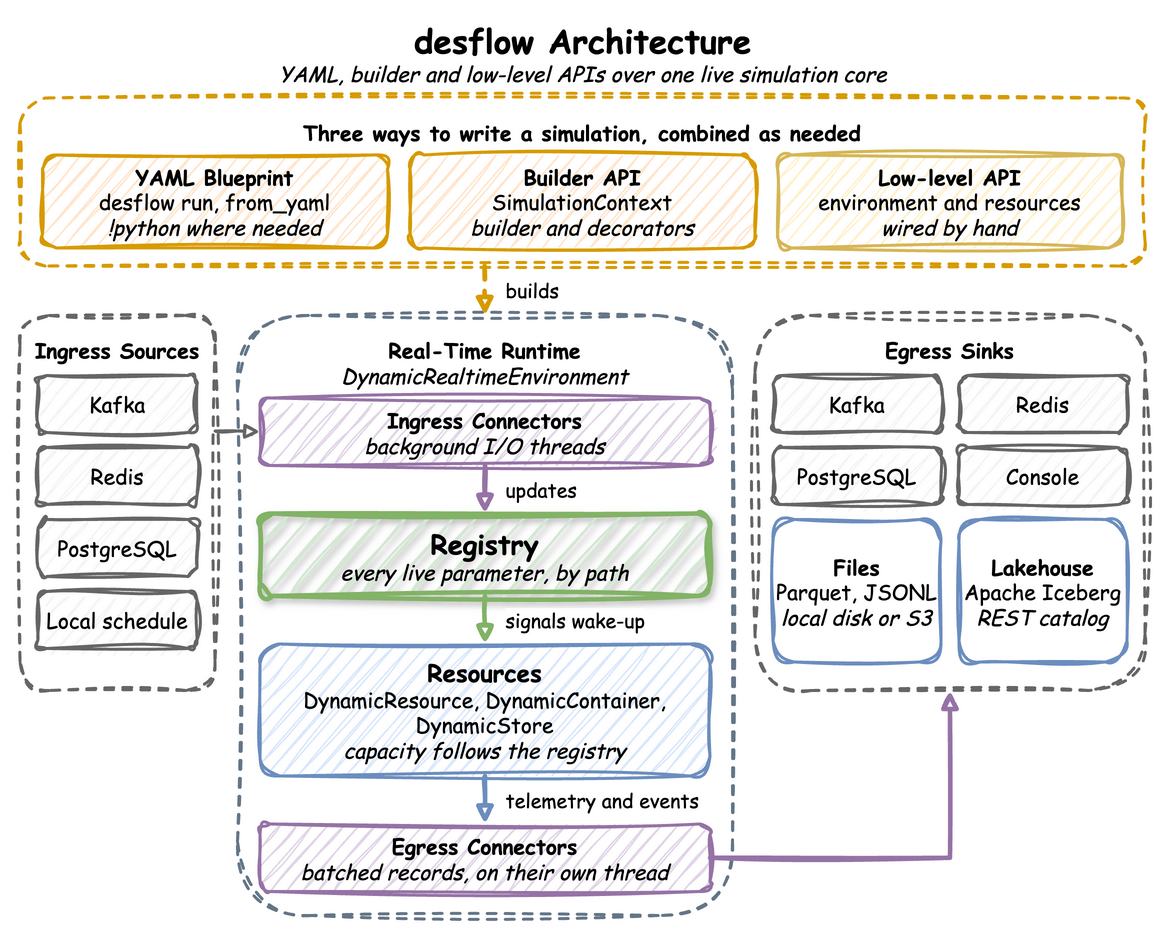
A model is a YAML blueprint, a Python script with the builder API, or SimPy code with the low-level API. Ingress connectors change its live parameters while it runs, from Kafka, Redis, PostgreSQL, a local schedule or a timed scenario. Egress connectors write its events and telemetry to Kafka, Redis, PostgreSQL, Parquet or JSONL files (on local disk or S3-compatible storage), or Apache Iceberg tables.
What It Is For
- Simulation studies. A question such as how many packers a shop needs takes many runs of a model. desflow collects the statistics, runs the replications and compares designs, and
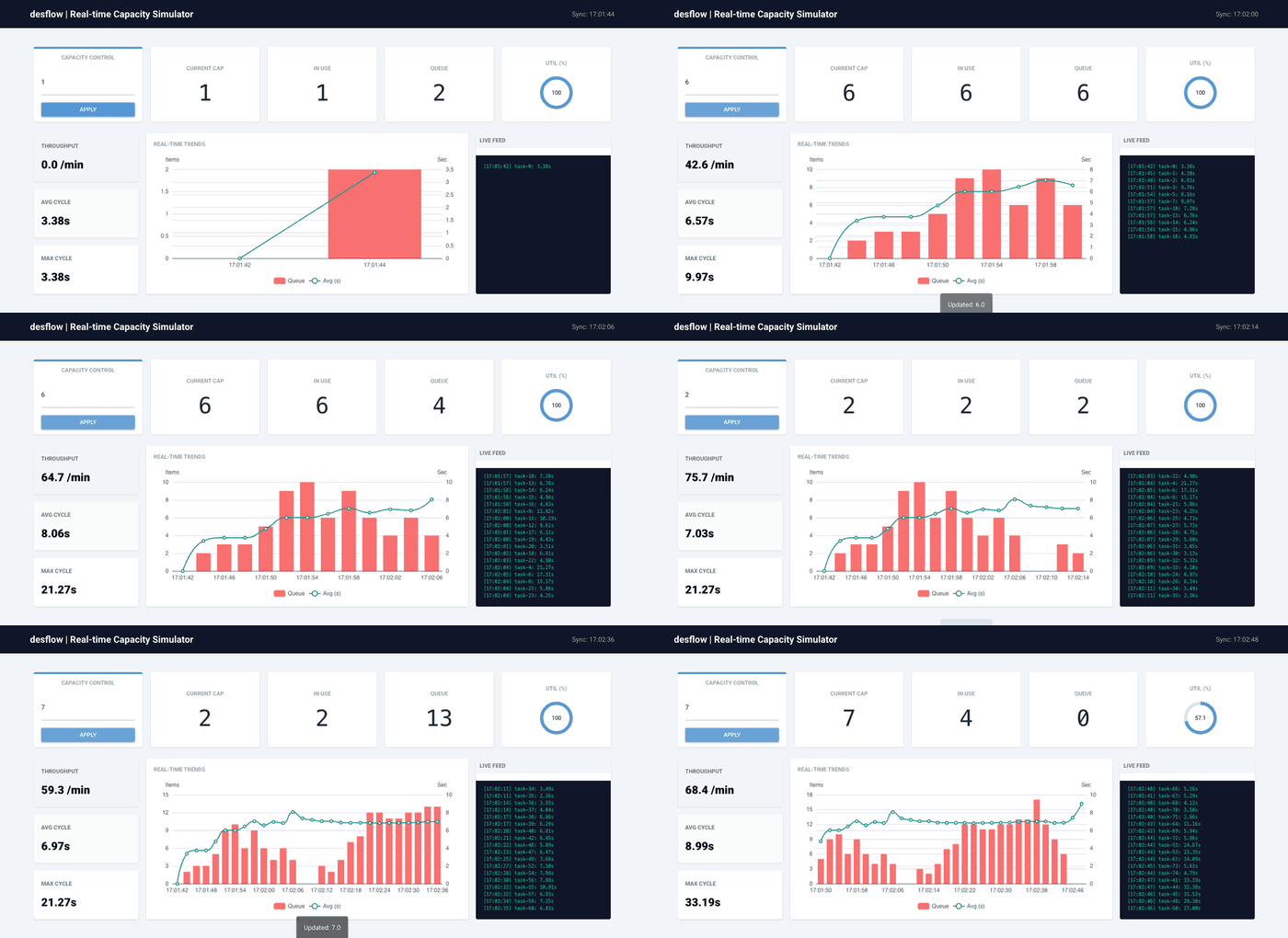
desflow explainnames the bottleneck before anything runs. - Data engineering. Batch and streaming pipelines need data that moves like a real system. One run can write a week of history at full speed, then keep streaming in real time. The control dashboard of the Kafka Digital Twin example changes an arrival rate or a capacity during a run, and the telemetry follows without a restart.
- ML and MLOps. A model that predicts delays or load needs training data in which queues build and clear for a reason. When a parameter changes during a run, the data shifts at a known time, which is what a drift monitor has to catch.
- AI. An anomaly detector or an AI agent needs a known answer to be scored against. A seeded run can plant a fault and record what it planted as label records. An AI coding assistant can write and check blueprints with the desflow skill.
Installation
Install the core library with uv or pip.
With uv:
# The desflow command
uv tool install desflow

# Or the library, in a uv project
uv add desflow
With pip:
pip install desflow
The connectors are optional extras, for example uv add "desflow[kafka,parquet]" or pip install "desflow[kafka,parquet]", and uv tool install "desflow[kafka,parquet]" for the desflow command:
| Extra | Adds |
|---|---|
kafka |
Kafka ingress and egress |
confluent |
Avro with the Confluent Schema Registry (includes kafka) |
glue |
Avro with the AWS Glue Schema Registry (includes kafka) |
redis |
Redis ingress and egress |
postgres |
PostgreSQL ingress and egress |
parquet |
Parquet and JSONL files on local disk or S3-compatible storage |
iceberg |
Apache Iceberg tables through a REST catalog |
fit |
scipy and matplotlib, for input fitting with desflow fit |
all |
Every extra above |
Run an Example
The local example needs no container. With desflow installed as above, desflow examples get downloads the example at the release you installed, into a folder of its own, and desflow run runs it:
desflow examples get local --api yaml
cd local/yaml
desflow run local.yaml
For the builder or low-level version, use --api builder or --api low-level; the Installation page shows all three in tabs. desflow examples lists the other examples, and each example page gives the same steps, including the odctl service it needs.
Your First Model
This blueprint models the shop: one packer, an order about every 2 seconds and 1.5 seconds of packing, with every record printed to the terminal:
# The First Simulation tutorial: the shop as a blueprint.
# Run it with: desflow run first_shop.yaml
simulation:
  sim_id: Shop
  factor: 1.0  # 1 simulated second takes 1 real second
  random_seed: 42  # the same arrival times on every run

resources:
  packers: {current_cap: 1, max_cap: 1}

services:
  # Every order takes exactly 1.5 seconds to pack
  packing: {dist: constant, value: 1.5}

arrivals:
  # One order every 2 seconds on average; each arrival spawns pack_order
  orders: {dist: exponential, rate: 0.5, spawn: pack_order}

tasks:
  pack_order:
    service: packing
    resource: packers
    # The value of the finished event
    payload: {event_type: order_packed}

egress:
  - type: Console

run:
  until: 20
Save it as first_shop.yaml and run desflow run first_shop.yaml. First Simulation builds this model step by step, with the YAML, builder and low-level code side by side, and Ways to Write explains which to choose.
Commands
desflow runs a blueprint, and checks, compares and fits models without a line of Python. Command Line uses every command on one shop.
| Command | What you use it for | How to use it | Reference |
|---|---|---|---|
desflow examples |
list the examples, and download one with get |
Get an Example | desflow examples, desflow examples get |
desflow explain |
check a model for bottlenecks before a long run | Check It Before a Long Run | desflow explain |
desflow run |
run a blueprint, or its replications with a 95% interval for each statistic | Run It | desflow run |
desflow experiment |
compare designs of a model and check them against bounds | Compare Designs | desflow experiment |
desflow report |
build an experiment's report again from its files | Compare Designs | desflow report |
desflow fit |
fit every distribution family to measured times | Fit Measured Times | desflow fit |
desflow dist |
turn a mean and a standard deviation into a family's parameters, and back | Convert Parameters | desflow dist |
desflow schema |
print the blueprint JSON Schema, for an editor | Set Up an Editor | desflow schema |
Features
- Real time or full speed:
DynamicRealtimeEnvironmentruns SimPy in step with the system clock, or as fast as the machine allows, and reports how far the simulation lags behind real time. - Live parameters: arrival rates, service times and capacities change mid-run through named parameters (registry paths) such as
Shop.arrival.orders.rate. A resource grows at once. It shrinks only as busy units are released, so no work in progress is lost. - Several sinks per run: each sink has its own
whenfilter,batch_sizeandflush_interval, so one run can feed a stream and a data lake together. - Backfill then go live: one run generates backdated history at full speed, then switches to real time at
go_live_at. - Check before a long run:
desflow explainworks out each resource's utilisation and waits from the model, without running it, and--verifycompares them with runs. - Replications and experiments:
desflow run --replicationsgives each statistic with a 95% interval, anddesflow experimentcompares designs seed by seed and writes a report. - Inputs from data:
desflow fitfits every distribution family to measured times, anddesflow distturns a mean and a standard deviation into a family's parameters. - Serialisation: records are JSON through
orjsonby default, or Avro through the Confluent or AWS Glue Schema Registry for chosen topics. A Pydantic model can be published as it is. - Kafka security: extra keyword arguments go to the Kafka client, so SASL, mTLS, OAuth and AWS IAM clusters work.
Roadmap
desflow reached feature parity with SimPy in YAML, the builder and the low-level API. Before 1.0, it adds more storage backends, JSON Schema and Protobuf for the schema registries, library hooks for a simulation server and a record format that 1.0 keeps stable. A simulation server with tools for AI agents follows 1.0. The roadmap page shows each step in order, with what is in progress.
Learn More
The documentation is at jaehyeon.me/desflow. Blog posts about desflow are tagged desflow on jaehyeon.me.
Projects that use desflow:
- benchtop: hands-on data engineering and machine learning demos that run locally, most of them with data produced by desflow.
- agentic-analytics-system: conversational analytics over an Iceberg lakehouse, with the lakehouse data generated by desflow.
- oml-digital-twin-hotrolling: a streaming digital twin of a steel hot rolling mill, with online machine learning on Kafka and Flink.
License
MIT
1 maintainer

Metadata
1 maintainer
Release files for desflow 0.25.0
For a detailed explanation of source distributions (sdists) and built distributions (wheels), please see the package formats documentation.
Source distribution (sdist)
| File | Size | Uploaded | Provenance | |
|---|---|---|---|---|
| desflow-0.25.0.tar.gz | 280.5 kB | With provenance | Details |
Built distribution (wheel)
| File | Interpreter | ABI | Platform | Reset |
|---|---|---|---|---|
| desflow-0.25.0-py3-none-any.whl | Python 3 | none | any | Details |
Total release size: 602.8 kB
Release files / desflow-0.25.0.tar.gz
| Download URL | desflow-0.25.0.tar.gz |
|---|---|
| Size | 280.5 kB |
| Tags | Source |
|
SHA-256 checksum How to use checksums |
63dc68cdf589817d62fbccad040b71b0e332da616c201bc1b8cd638ff335d6f9
|
|
BLAKE2b-256 checksum How to use checksums |
0764c05c7c04193f6855412b4f7d839de22c78279fc52be9d8b7f89c6d9274e8
|
| Upload date | |
|
Uploaded using Trusted Publishing? What is trusted publishing? |
Yes |
| Uploaded via |
twine/7.0.0 CPython/3.13.16
|
Provenance
Provenance describes where a file came from. On PyPI, provenance is shared via attestations, which provide a verifiable record of the build or publishing details. View details, limitations and caveats.


PyPI Publish Attestation
PyPI verified that this artifact, at this checksum, originated from the publisher listed below.
Signed by GitHub Actions, verified by PyPI on Oct 25, 2026.
Transparency logRelease files / desflow-0.25.0-py3-none-any.whl
| Download URL | desflow-0.25.0-py3-none-any.whl |
|---|---|
| Size | 322.2 kB |
| Tags | Python 3 |
|
SHA-256 checksum How to use checksums |
6d6591e084cf8f2f7e0539c2197f45b8cba7e4410a8817deee594bd42deadeb3
|
|
BLAKE2b-256 checksum How to use checksums |
9f8adb86db1a58131d05bff1b80666c89954a42b99b5337edf62366bd5b889c5
|
| Upload date | |
|
Uploaded using Trusted Publishing? What is trusted publishing? |
Yes |
| Uploaded via |
twine/7.0.0 CPython/3.13.16
|
Provenance
Provenance describes where a file came from. On PyPI, provenance is shared via attestations, which provide a verifiable record of the build or publishing details. View details, limitations and caveats.
PyPI Publish Attestation
PyPI verified that this artifact, at this checksum, originated from the publisher listed below.
Signed by GitHub Actions, verified by PyPI on Oct 25, 2026.
Transparency logSecurity for desflow 0.25.0
Provenance
Provenance describes where a file came from. On PyPI, provenance is shared via attestations, which provide a verifiable record of the build or publishing details. View details, limitations and caveats.
Full provenance
All 2 files in this release have been uploaded with provenance metadata.
Attestation for desflow-0.25.0.tar.gz
PyPI Publish Attestation
PyPI verified that this artifact, at this checksum, originated from the publisher listed below.
Signed by GitHub Actions, verified by PyPI on Oct 25, 2026.
Transparency logA note on package security
PyPI is a repository for distributing packages, not a service for auditing them. While third-party security researchers and our staff do their best to detect and remove malicious packages, PyPI cannot guarantee the quality, security or suitability of any given package.
To learn more about protecting yourself from malicious actors, visit our package security documentation.














