
Deskmaid







Description
Deskmaid is a configurable desktop cleaner.
It scans your desktop and moves selected files to a folder, organizing them by file extension.
Everything can be configured in ~/.config/deskmaid/config.yml.
Installation
You can install deskmaid using pipx
from PyPI
pip install pipx
pipx ensurepath
pipx install deskmaid
deskmaid shortcut
This will install two shortcuts on your desktop:
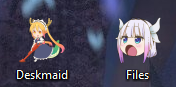
How to cancel a run ?
Open shell then run:
deskmaid undoDevelopment
Contributing
Contributions are very welcome. Tests can be run with poe check, please
ensure the coverage at least stays the same before you submit a pull request.
Setup
You need to install Poetry and Git for work with this project.
git clone https://github.com/Dashstrom/deskmaid
cd deskmaid
poetry install --all-extras
poetry run poe setup
poetry shell
Poe
Poe is available for help you to run tasks.
test           Run test suite.
lint           Run linters: ruff checker and ruff formatter and mypy.
format         Run linters in fix mode.
check          Run all checks: lint, test and docs.
check-tag      Check if the current tag match the version.
cov            Run coverage for generate report and html.
locale         Compile locale and refresh .po and .mo files.
open-cov       Open html coverage report in webbrowser.
docs           Build documentation.
open-docs      Open documentation in webbrowser.
setup          Setup pre-commit.
pre-commit     Run pre-commit.
commit         Test, commit and push.
clean          Clean cache files.
Skip commit verification
If the linting is not successful, you can’t commit. For forcing the commit you can use the next command :
git commit --no-verify -m 'MESSAGE'Commit with commitizen
To respect commit conventions, this repository uses Commitizen.
poe commitHow to add dependency
poetry add 'PACKAGE'Ignore illegitimate warnings
To ignore illegitimate warnings you can add :
# noqa: ERROR_CODE on the same line for ruff.
# type: ignore[ERROR_CODE] on the same line for mypy.
# pragma: no cover on the same line to ignore line for coverage.
# doctest: +SKIP on the same line for doctest.
Uninstall
pipx uninstall deskmaidLicense
This work is licensed under MIT.
1 maintainer

Metadata
1 maintainer
Release files for deskmaid 2.0.2
For a detailed explanation of source distributions (sdists) and built distributions (wheels), please see the package formats documentation.
Source distribution (sdist)
| File | Size | Uploaded | |
|---|---|---|---|
| deskmaid-2.0.2.tar.gz | 263.9 kB | Details |
Built distribution (wheel)
| File | Interpreter | ABI | Platform | Reset |
|---|---|---|---|---|
| deskmaid-2.0.2-cp38-cp38-manylinux_2_31_x86_64.whl | CPython 3.8 | CPython 3.8 | Linux glibc 2.31+ x86-64 | Details |
Total release size: 534.7 kB
Release files / deskmaid-2.0.2.tar.gz
| Download URL | deskmaid-2.0.2.tar.gz |
|---|---|
| Size | 263.9 kB |
| Tags | Source |
|
SHA-256 checksum How to use checksums |
16998d3ff479ab3d95f9f3adc8de0218928b3740cfcb821a19339bbea5f1b61a
|
|
BLAKE2b-256 checksum How to use checksums |
2001fbb9e53c23830d8e6dd93516534faa36f3327b6074c58eb441e653f01ac2
|
| Upload date | |
|
Uploaded using Trusted Publishing? What is trusted publishing? |
Yes |
| Uploaded via |
twine/5.1.1 CPython/3.12.6
|
Release files / deskmaid-2.0.2-cp38-cp38-manylinux_2_31_x86_64.whl
| Download URL | deskmaid-2.0.2-cp38-cp38-manylinux_2_31_x86_64.whl |
|---|---|
| Size | 270.8 kB |
| Tags | CPython 3.8 Linux glibc 2.31+ x86-64 |
|
SHA-256 checksum How to use checksums |
add4b8a5d14429c6cc40cb4e942762383945b5c5966422d0953544494842ec71
|
|
BLAKE2b-256 checksum How to use checksums |
bc2af796a1c554fe8e59320478cfbd6c85f4f2cbf7d4c5de87f750458ad84611
|
| Upload date | |
|
Uploaded using Trusted Publishing? What is trusted publishing? |
Yes |
| Uploaded via |
twine/5.1.1 CPython/3.12.6
|














