
DeskTidy
Your files, sorted while you work.
DeskTidy watches your Downloads, Desktop and Documents, understands what every new file is about, gives it a
proper name and puts it in the right folder. Every move can be undone. Windows, macOS and Linux.







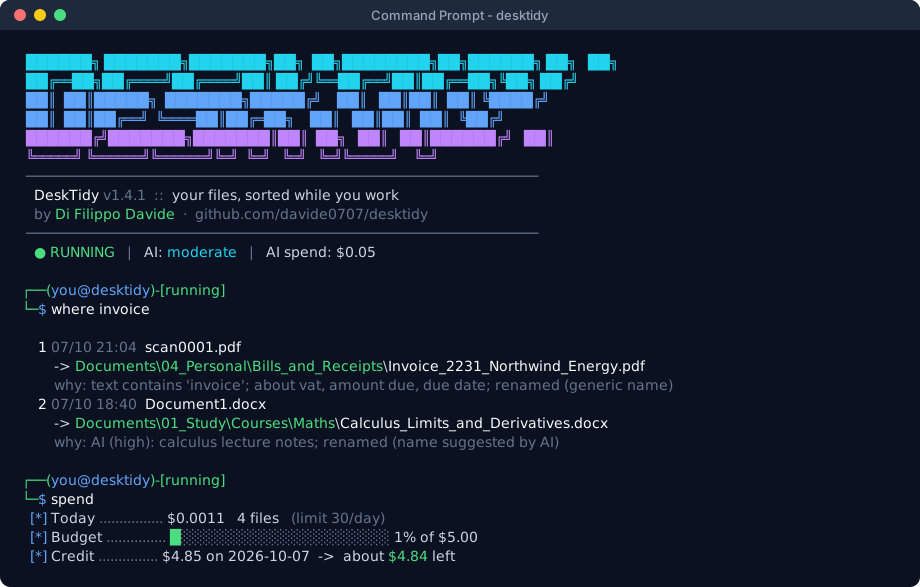
scan0001.pdf lands in your Downloads. Two minutes later it is in Documents/04_Personal/Bills_and_Receipts:
DeskTidy read it, recognised an invoice and filed it, and with the AI on it also renamed it
Fattura_2231_Acme_Srl_2026-09-30.pdf, after its number, issuer and date. You get a notification with Open and
Undo, a reminder before the payment is due, and desktidy find acme september finds it later by what it says.
No cloud drive, no subscription, no account. DeskTidy reads your files on your computer. Whether it also asks an AI is your choice: rules only (nothing leaves your PC), or always AI, free (Groq, Gemini, Mistral, OpenRouter, or Ollama running on your own computer) or paid (Claude, OpenAI) for a fraction of a cent per file.
What it does
Understands and names your files
- Reads PDF, Word, Excel, PowerPoint, LibreOffice, RTF, HTML, e-mails, ebooks, notebooks and code; scans and pictures with the OCR built into your system; photos by their camera data; screenshots, icons, projects (Python, web, STM32, KiCad, 3D printing...) inside folders and zip files.
- Gives
scan0001.pdf,Document1.docxor a misleading name a real one, from the document itself or from the AI:Fattura_2231_Acme_Srl_2026-09-30.pdf.
Files them where you want
- Your folders, your rules: pinned folders attract the files about them, rules in plain words (
invoice,fattura,calculus...) decide the rest, and folders by year (Bills/{YEAR}) are filled in from each document's date. - It learns: move a file it misplaced and it notices; when the AI keeps putting similar files in the same folder, it proposes a rule so the next ones are placed offline.
Tidies up what is already there
desktidy organize: 50 loose files on your Desktop? It groups them into folders (the thesis, the trip, the bills), shows you the plan, and does it only when you say so.- Duplicates across your folders, old versions of a document, installers of programs you already have, an archive for what you haven't touched in months, photos from memory cards sorted by date.
Remembers for you
- Search by content:
desktidy find bolletta luce settembre, OCR text included, all local. - Deadlines found in bills and forms ("pay by 30/10/2026", "scadenza 15 novembre"), with reminders and an
.icsfile for your calendar. A short summary of your week, once a week.
Never surprises you
- Every move and rename is logged and undoable, one file or a whole plan at a time. Nothing is ever deleted: duplicates go to the Recycle Bin / Trash.
- Six house rules you accept at setup: names starting with
!are never touched; nothing moves until you have pinned two folders; open and unfinished files are skipped; nothing is lost; private stays private unless you choose otherwise; you're in charge (pause, stop, preview, daily limit). - Folders of programs (game saves, settings) are never reorganised.
Part of your desktop
- Right-click menu in Explorer, Files, Nemo and Dolphin; notifications with buttons; an icon next to the clock on Windows; and every setting, the organize plan and the history of moves in a page of your browser.
Rules only, or always AI: you choose
The setup asks how DeskTidy should understand your files, and you can change it any time:
| What happens | What leaves your computer | |
|---|---|---|
Rules only (desktidy ai rules) |
the offline engine reads, names and files everything | nothing |
Always AI (desktidy ai all) |
the AI reads every file and names it; the rules are the fallback | an excerpt of each file, with IBANs, tax codes, cards, e-mails and phone numbers masked; photos and screenshots never |
Three levels in between use the AI only for the files the rules can't place. With Ollama the AI runs on your own
computer, so even Always AI sends nothing anywhere. desktidy ai test shows how well a service does on 18 made-up
documents before you trust it with yours. Details: AI and privacy.
Install
Windows, without Python: download DeskTidy-<version>-windows.zip from the
latest release, extract it anywhere, open a terminal in
that folder and run:
desktidy.exe install
It copies itself to %LOCALAPPDATA%\Programs\DeskTidy (no administrator rights), adds the desktidy command, the
start at sign-in and the right-click menu, then starts the setup.
The exe is not code-signed yet, so the first time Windows may say Windows protected your PC: click More info → Run anyway. To be sure the zip is the one built here, compare its SHA-256 with
SHA256SUMSin the release, or verify its attestation.
Windows, macOS and Linux, with Python 3.10+ and pipx:
pipx install "desktidy[ai]"
desktidy install
[ai] adds the library for Claude; the other AI services need nothing more. The latest development version, straight
from GitHub: pipx install git+https://github.com/davide0707/desktidy (for Claude add
pipx inject desktidy anthropic).
Getting pipx, or installing from the source
| Windows | macOS | Linux |
|---|---|---|
py -m pip install --user pipx then py -m pipx ensurepath |
brew install pipx then pipx ensurepath |
sudo apt install pipx (Fedora: dnf, Arch: python-pipx) then pipx ensurepath |
From the source:
git clone https://github.com/davide0707/desktidy
cd desktidy
install.cmd          # Windows (or double-click it)
sh install.sh        # macOS and Linux
macOS asks whether Python may read Downloads, Desktop and Documents the first time: click Allow. Linux: for scans and pictures install Tesseract, e.g.
sudo apt install tesseract-ocr tesseract-ocr-ita.
The first minute
desktidy install ends with the setup:
- The house rules: read them and accept them.
- Pin at least two folders: the places where files should end up (
Study,Work,Recipes...). - A daily limit, or unlimited.
- Rules only or always AI; for the AI, pick a service (
groqis free) and paste its key.
Then open a new terminal and type desktidy for the console, or just let it work in the background.
Everyday use
desktidy status                  # running? what did it do today?
desktidy where invoice           # where did a file go, and why
desktidy undo invoice            # put it back, with its old name
desktidy find electricity bill   # search by content
desktidy organize desktop        # group the loose files of the Desktop (a plan first)
desktidy deadlines               # bills and deadlines found in your documents
desktidy editor                  # every setting in your browser
All the commands: command reference.
Documentation
| User guide | how DeskTidy decides, renaming, organize, the tidy-up tools, search, deadlines, the desktop integration, FAQ |
| AI and privacy | the modes, the services and their costs, what is sent and what never is, masking, the AI test |
| Commands | every command and option |
| Configuration | rules.json, rules, variables, folders by year, where your data lives |
| House rules | the six promises DeskTidy keeps |
| Development | the code, the tests, building the Windows version, releasing |
Contributing
Bug reports, ideas, rules in other languages and pull requests are welcome: see CONTRIBUTING.md and the code of conduct. Questions and ideas to talk over: the Discussions. Security problems: please follow SECURITY.md.
Every release lists the SHA-256 of its files in SHA256SUMS and carries a GitHub build provenance attestation:
gh attestation verify DeskTidy-1.4.1-windows.zip -R davide0707/desktidy proves a download was built here, from this
source.
License
DeskTidy is free software: you can redistribute it and/or modify it under the terms of the GNU General Public License as published by the Free Software Foundation, either version 3 of the License, or (at your option) any later version. It is distributed in the hope that it will be useful, but without any warranty.
Copyright © 2026 Di Filippo Davide
1 maintainer

Metadata
1 maintainer
Release files for desktidy 1.4.1
For a detailed explanation of source distributions (sdists) and built distributions (wheels), please see the package formats documentation.
Source distribution (sdist)
| File | Size | Uploaded | Provenance | |
|---|---|---|---|---|
| desktidy-1.4.1.tar.gz | 314.7 kB | With provenance | Details |
Built distribution (wheel)
| File | Interpreter | ABI | Platform | Reset |
|---|---|---|---|---|
| desktidy-1.4.1-py3-none-any.whl | Python 3 | none | any | Details |
Total release size: 603.8 kB
Release files / desktidy-1.4.1.tar.gz
| Download URL | desktidy-1.4.1.tar.gz |
|---|---|
| Size | 314.7 kB |
| Tags | Source |
|
SHA-256 checksum How to use checksums |
61b42a18eac7080f35e06459b97bb269490d0c8336ef34134161061b114bad00
|
|
BLAKE2b-256 checksum How to use checksums |
1ae99742de65e3f32e0f88c59542f128d362bb7b93288ed87056860a5a5c80b0
|
| Upload date | |
|
Uploaded using Trusted Publishing? What is trusted publishing? |
Yes |
| Uploaded via |
twine/7.0.0 CPython/3.13.14
|
Provenance
Provenance describes where a file came from. On PyPI, provenance is shared via attestations, which provide a verifiable record of the build or publishing details. View details, limitations and caveats.


PyPI Publish Attestation
PyPI verified that this artifact, at this checksum, originated from the publisher listed below.
Signed by GitHub Actions, verified by PyPI on Oct 15, 2026.
Transparency logRelease files / desktidy-1.4.1-py3-none-any.whl
| Download URL | desktidy-1.4.1-py3-none-any.whl |
|---|---|
| Size | 289.1 kB |
| Tags | Python 3 |
|
SHA-256 checksum How to use checksums |
b8c4e37f995c4715f48b3eb19d3f278b9e7ee3d35bf69cc11e81410835783ff3
|
|
BLAKE2b-256 checksum How to use checksums |
642e372fcdc6f3e8033df3a05230c7946497eb22e1b1f73fb59251609ff4c6af
|
| Upload date | |
|
Uploaded using Trusted Publishing? What is trusted publishing? |
Yes |
| Uploaded via |
twine/7.0.0 CPython/3.13.14
|
Provenance
Provenance describes where a file came from. On PyPI, provenance is shared via attestations, which provide a verifiable record of the build or publishing details. View details, limitations and caveats.
PyPI Publish Attestation
PyPI verified that this artifact, at this checksum, originated from the publisher listed below.
Signed by GitHub Actions, verified by PyPI on Oct 15, 2026.
Transparency logSecurity for desktidy 1.4.1
Provenance
Provenance describes where a file came from. On PyPI, provenance is shared via attestations, which provide a verifiable record of the build or publishing details. View details, limitations and caveats.
Full provenance
All 2 files in this release have been uploaded with provenance metadata.
Attestation for desktidy-1.4.1.tar.gz
PyPI Publish Attestation
PyPI verified that this artifact, at this checksum, originated from the publisher listed below.
Signed by GitHub Actions, verified by PyPI on Oct 15, 2026.
Transparency logA note on package security
PyPI is a repository for distributing packages, not a service for auditing them. While third-party security researchers and our staff do their best to detect and remove malicious packages, PyPI cannot guarantee the quality, security or suitability of any given package.
To learn more about protecting yourself from malicious actors, visit our package security documentation.













