
Send unhandled Python exceptions straight to a Telegram chat. No backend, no account, no database — just your own bot token.
Verified details
These details have been verified by PyPIProject links
GitHub Statistics
Maintainers

Project description
devalerts





Send unhandled Python exceptions straight to a Telegram chat — the moment they happen, on your phone. No backend, no account, no database — just your own bot token.
import devalerts

devalerts.init(bot_token="123456:ABC-DEF...", chat_id=123456789)
That's the whole setup. Two minutes with @BotFather and every unhandled crash — including ones raised in threads — lands in your chat instead of a log file nobody's watching.
Why devalerts
- Zero infrastructure. No SaaS signup, no ingestion server, no API key to manage beyond your own Telegram bot token. State lives in a local SQLite file you already own.
- One line to install, one line to wire up.
init()installs the hook and gets out of the way. - Not spam. Errors are grouped by fingerprint and rate-limited per group, so a crash loop sends one message, not a thousand.
- Framework-aware. Ships an ASGI middleware for FastAPI/Starlette apps, where the default excepthook would never even see a request error.
- Small and typed. No dependencies, ships
py.typed, ~450 lines total — short enough to read in one sitting before you trust it with your errors.
Install
uv add devalerts
(or pip install devalerts if you're not using uv)
Usage
-
Create a bot with @BotFather and get its token.
-
Message your bot once (or add it to a group) so it's allowed to message you back.
-
Get your chat id — message @userinfobot, or call
https://api.telegram.org/bot<TOKEN>/getUpdatesafter step 2 and readmessage.chat.id. -
Verify it's wired up correctly before touching any code:
uv run devalerts test --bot-token 123456:ABC-DEF... --chat-id 123456789 -
In your app, as early as possible:
import devalerts

devalerts.init(bot_token="123456:ABC-DEF...", chat_id=123456789)
That's it — any unhandled exception (including ones raised in threads) now also lands in your Telegram chat.
The traceback itself arrives folded into a collapsed quote — the exception type, message, and host are visible right away, tap to expand the full traceback. Keeps a big stack trace from taking over the chat.
Grouping, rate limiting, and the dashboard
Exceptions are grouped by fingerprint (exception type + file + line where it
was raised) in a local SQLite file (~/.devalerts/state.db). Each group
sends at most one Telegram message per rate_limit_seconds (default 300);
repeats inside that window are counted but not sent, and the next message
for that group says how many were skipped. Old groups (untouched for 7 days)
are pruned automatically. Configure the window via init():
devalerts.init(bot_token="...", chat_id=123456789, rate_limit_seconds=60)
See what's grouped and what's currently rate-limited:
uv run devalerts dashboard
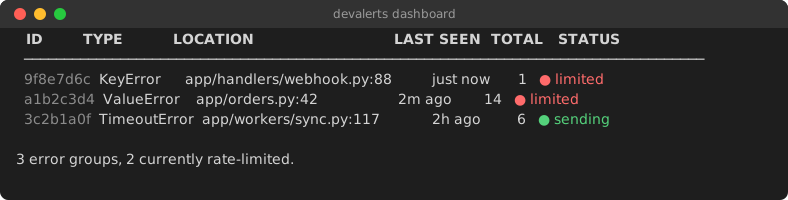
Pass --json for machine-readable output. Silence a noisy group without
touching code — the ID column accepts any unique prefix:
uv run devalerts mute abc12345
uv run devalerts unmute abc12345
uv run devalerts clear abc12345   # or: devalerts clear --all
Unmuting resends the next occurrence with the accumulated skip count, same as a rate-limit window expiring.
Error groups that keep piling up while suppressed are chronic: each such
resend doubles the effective rate_limit_seconds for that group (capped at
8x), so a crash loop backs itself off instead of paging you every window
forever. A group that goes quiet and reappears once resets to the base rate
immediately. The dashboard shows the active multiplier (● sending ×4).
Context: hostname and tags
Every alert automatically includes the sending host, so you can tell which process/server it came from when one bot serves several:
devalerts.init(bot_token="...", chat_id=123456789, tags={"env": "production"})
🔴 ValueError: boom
🖥️ prod-web-2 (env=production)
Add ad-hoc tags to a single call — they override init()'s tags on a key
collision:
devalerts.report(extra={"request_id": "abc123"})

@devalerts.capture(extra={"job": "nightly-sync"})
def run_job(): ...
Manually reporting a caught exception
try:
    risky_call()
except Exception:
    devalerts.report()  # sends the currently-handled exception
or:
with devalerts.capture():
    risky_call()  # reports on exception, then re-raises
capture also works as a decorator, so you don't need to touch a function's
body at all:
@devalerts.capture()
def risky_call():
    ...
FastAPI / Starlette / any ASGI app
init()'s excepthook won't see request errors — the framework already catches
them internally to return a 500 response, so nothing "unhandled" ever reaches
the process. Use the ASGI middleware instead:
app.add_middleware(devalerts.ASGIMiddleware)
Only exceptions that actually escape as server errors get reported — routing
404s and raised HTTPExceptions are already turned into responses by the
framework before the middleware sees them.
Celery
Same problem as ASGI apps: init()'s excepthook never sees exceptions raised
inside a task, because Celery catches them itself to record the task's
FAILURE state. Call init_celery() in addition to init():
devalerts.init(bot_token="...", chat_id=123456789)
devalerts.init_celery()
This connects to Celery's task_failure signal (fired once a task has
genuinely failed — retries exhausted or none configured, so retried tasks
don't spam an alert per attempt) and reports through the same
grouping/rate-limiting/redaction path as everything else, tagged with the
task name and id automatically. Requires Celery to already be installed in
the worker process — it's imported lazily, not a devalerts dependency.
Why not Sentry?
If you already run Sentry/Rollbar/etc., keep using it — devalerts isn't a replacement. It's for the side project, internal tool, or small service that doesn't have (and doesn't want) that infrastructure: no account to create, no SDK to configure, no server to trust — just a bot token you already control.
| devalerts | Sentry-style tracker | |
|---|---|---|
| Setup | one bot token | account + project + SDK config |
| Backend | none — Telegram only | hosted or self-hosted service |
| Where alerts land | your Telegram chat | a web dashboard |
| Grouping / rate limiting | yes, local SQLite | yes, server-side |
| Search, trends, releases | no | yes |
FAQ
Works with FastAPI / Starlette?
Yes — use ASGIMiddleware, since the
default excepthook never sees request errors.
Works with Docker?
Yes, nothing container-specific. Just make sure ~/.devalerts/ (the dedup
state file) is either writable inside the container or a mounted volume if
you want dedup state to survive restarts — it self-recreates otherwise.
Works with threads?
Yes — init() installs both sys.excepthook and threading.excepthook.
Works with Celery / background workers?
Yes — call init_celery() in addition to init() to catch
exceptions raised inside tasks, which the excepthook alone won't see.
Works on Windows / Linux / macOS?
Yes — stdlib only (urllib, sqlite3, threading), no OS-specific code
paths.
Privacy & Security
- The only network call devalerts makes is to
api.telegram.org— no telemetry, no analytics, nothing else phones home. - No third-party server and no devalerts-run backend — messages go straight from your process to your own Telegram bot.
- No accounts, no signup, no API key beyond the bot token you create and control yourself.
- Basic secret redaction only (a few common token/key patterns) — do not rely on this for sensitive production data; scrub what you can before it ever reaches an exception message.
- If Telegram delivery fails after retrying, the alert (already redacted, if
redact=True) is appended to~/.devalerts/failed.loginstead of being dropped — clean it up like any other local log file.
What this does NOT do (by design)
- Grouping/rate limiting is local and in-process only (SQLite file, no server) — the dashboard is a CLI table, not a web UI.
- No backend, no accounts — each user runs their own bot.
Roadmap
- Web dashboard (hosted, optional — the local CLI dashboard stays either way)
- Slack delivery
- Discord delivery
- Email delivery
Development
uv sync --group dev
uv run pre-commit install
pre-commit runs ruff check, ruff format, and mypy before each commit.
Run the full check manually with:
uv run pytest
uv run pre-commit run --all-files
License
MIT — see LICENSE.
Project details
Verified details
These details have been verified by PyPIProject links
GitHub Statistics
Maintainers


Download files
Download the file for your platform. If you're not sure which to choose, learn more about installing packages.
Source Distribution
Built Distribution
Filter files by name, interpreter, ABI, and platform.
If you're not sure about the file name format, learn more about wheel file names.
Copy a direct link to the current filters
File details
Details for the file devalerts-0.2.1.tar.gz.
File metadata
- Download URL: devalerts-0.2.1.tar.gz
- Upload date:
- Size: 15.2 kB
- Tags: Source
- Uploaded using Trusted Publishing? Yes
- Uploaded via: uv/0.11.29 {"installer":{"name":"uv","version":"0.11.29","subcommand":["publish"]},"python":null,"implementation":{"name":null,"version":null},"distro":{"name":"Ubuntu","version":"24.04","id":"noble","libc":null},"system":{"name":null,"release":null},"cpu":null,"openssl_version":null,"setuptools_version":null,"rustc_version":null,"ci":true}
File hashes
| Algorithm | Hash digest | |
|---|---|---|
| SHA256 |
531c09666b8832b680ee36285e151e215cc308d790388c2b8f4f90922d54d51c
|
|
| MD5 |
3c5a24f56975a19908cda47b9b109809
|
|
| BLAKE2b-256 |
004ce55aa23ddfb712146626185c527500d8d39d0842d26c50443c968c6d3373
|
File details
Details for the file devalerts-0.2.1-py3-none-any.whl.
File metadata
- Download URL: devalerts-0.2.1-py3-none-any.whl
- Upload date:
- Size: 18.6 kB
- Tags: Python 3
- Uploaded using Trusted Publishing? Yes
- Uploaded via: uv/0.11.29 {"installer":{"name":"uv","version":"0.11.29","subcommand":["publish"]},"python":null,"implementation":{"name":null,"version":null},"distro":{"name":"Ubuntu","version":"24.04","id":"noble","libc":null},"system":{"name":null,"release":null},"cpu":null,"openssl_version":null,"setuptools_version":null,"rustc_version":null,"ci":true}
File hashes
| Algorithm | Hash digest | |
|---|---|---|
| SHA256 |
3542eb958f369fa35c25481178a84617007caa3ea74cf672b890c55d66cbba2d
|
|
| MD5 |
00a087acd104b8d6cc45f87462afb81d
|
|
| BLAKE2b-256 |
9a5ab0a0252e65bc382eb015e62c04e91cadfb2c00b181d34021078dfa5c6780
|






