
Cost-aware multi-LLM adversarial review engine with deterministic governance

Project description


Devil's Advocate
Cost-aware multi-LLM adversarial review engine with deterministic governance.
Do you have an implementation plan, codebase, or spec created by Claude, GPT, Gemini, Grok, etc and you want the flagship model from competing frontier providers to rip it apart, exposing the holes in logic and potential coding landmines, before a single line of code gets written?
Devil's Advocate pits multiple LLM reviewers against an LLM author in a structured 2-round adversarial protocol. A deterministic governance engine (straight python, no LLM calls, no probability) resolves every finding into a machine-readable outcome. The result is a vetted artifact where every finding has been accepted, defended, challenged, or escalated (to you for final decision) with full traceability from the first objection through final resolution.
DVAD is borne from my frustrations with code generated inside an AI echo chamber (single source provider). Often I'll post a script to an LLM that didn't write it to see if the other providers could spot issues or problems. They usually do. I decided to turn it into an easy to use UI.
Requirements
- Python 3.12+
- Bare Minimum: 1 API key from 1 provider, 3 models - an author and two reviewers. (The other roles: dedup, integration, normalization, revision, can use the same models the author or reviewers use).
- Comfortably Confrontational: 3 API keys from 3 different providers - one for the author, one per reviewer. (Different providers mean different blind spots and that's where the friction comes from. Friction is good.)
- Supported providers: Every frontier provider that uses OpenAI-compatible, Anthropic, or Minimax prompt formatting. (Google Gemini, ChatGPT, Claude, DeepSeek, xAI/Grok, Minimax, Kimi, etc.)
Quick Install (or update to latest)
curl -fsSL https://raw.githubusercontent.com/briankelley/devils-advocate/main/install.sh | bash
Installs dvad, initializes config, sets up the systemd service, and launches the web GUI on port 8411.
Manual Install
python3 -m venv ~/.local/share/devils-advocate/venv
~/.local/share/devils-advocate/venv/bin/pip install devils-advocate
ln -sf ~/.local/share/devils-advocate/venv/bin/dvad ~/.local/bin/dvad
dvad install
1. Configure your models
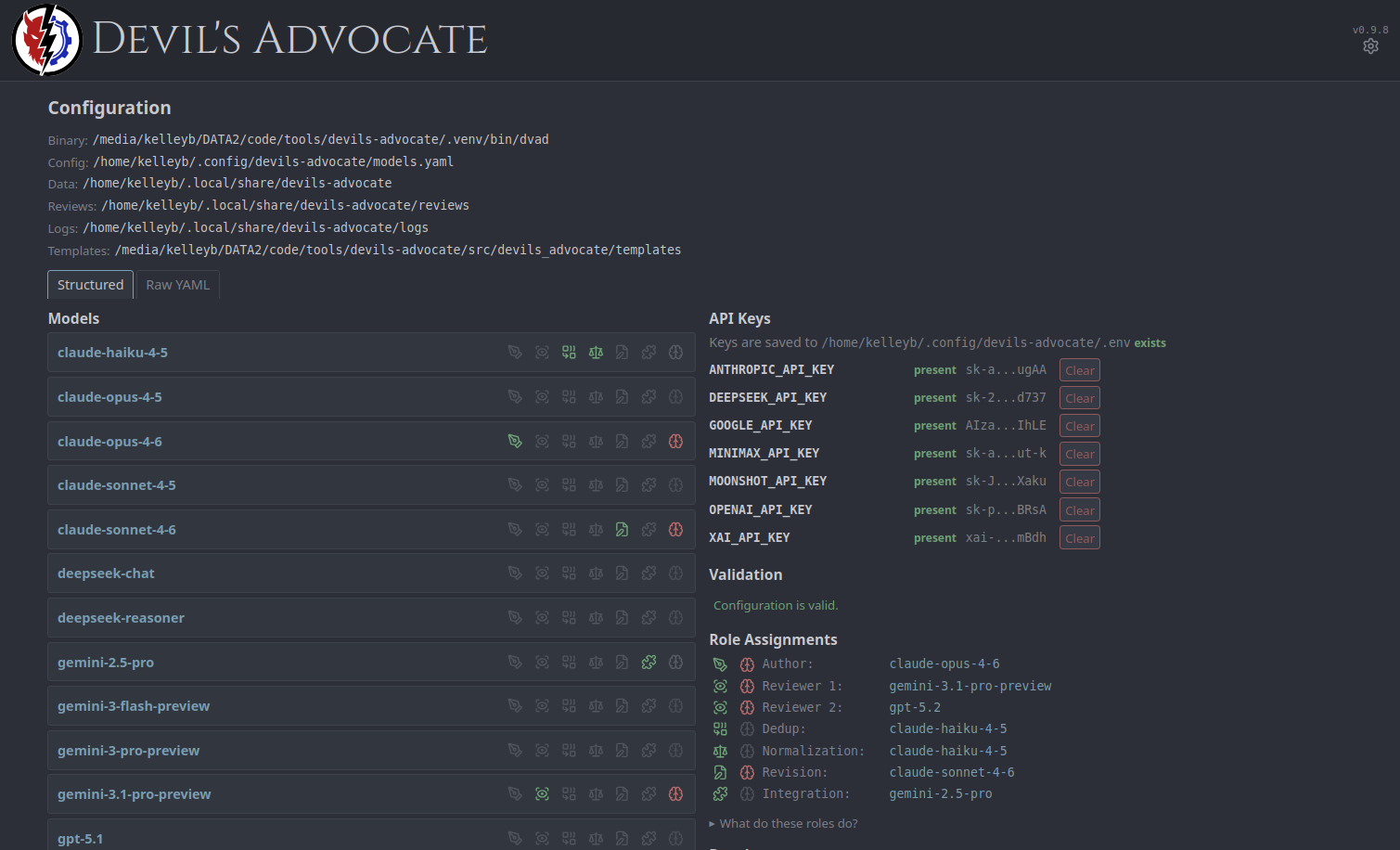
Run dvad config --init to generate ~/.config/devils-advocate/models.yaml, then edit it. Each model needs a provider, model ID, and an environment variable name for its API key. See examples/models.yaml.example for a fully annotated template.
2. Set your API keys
API keys are resolved from environment variables — never stored in the config file. Set them in your shell or in ~/.config/devils-advocate/.env (auto-loaded, won't override existing env vars).
3. Validate
dvad config --show
4. Web GUI
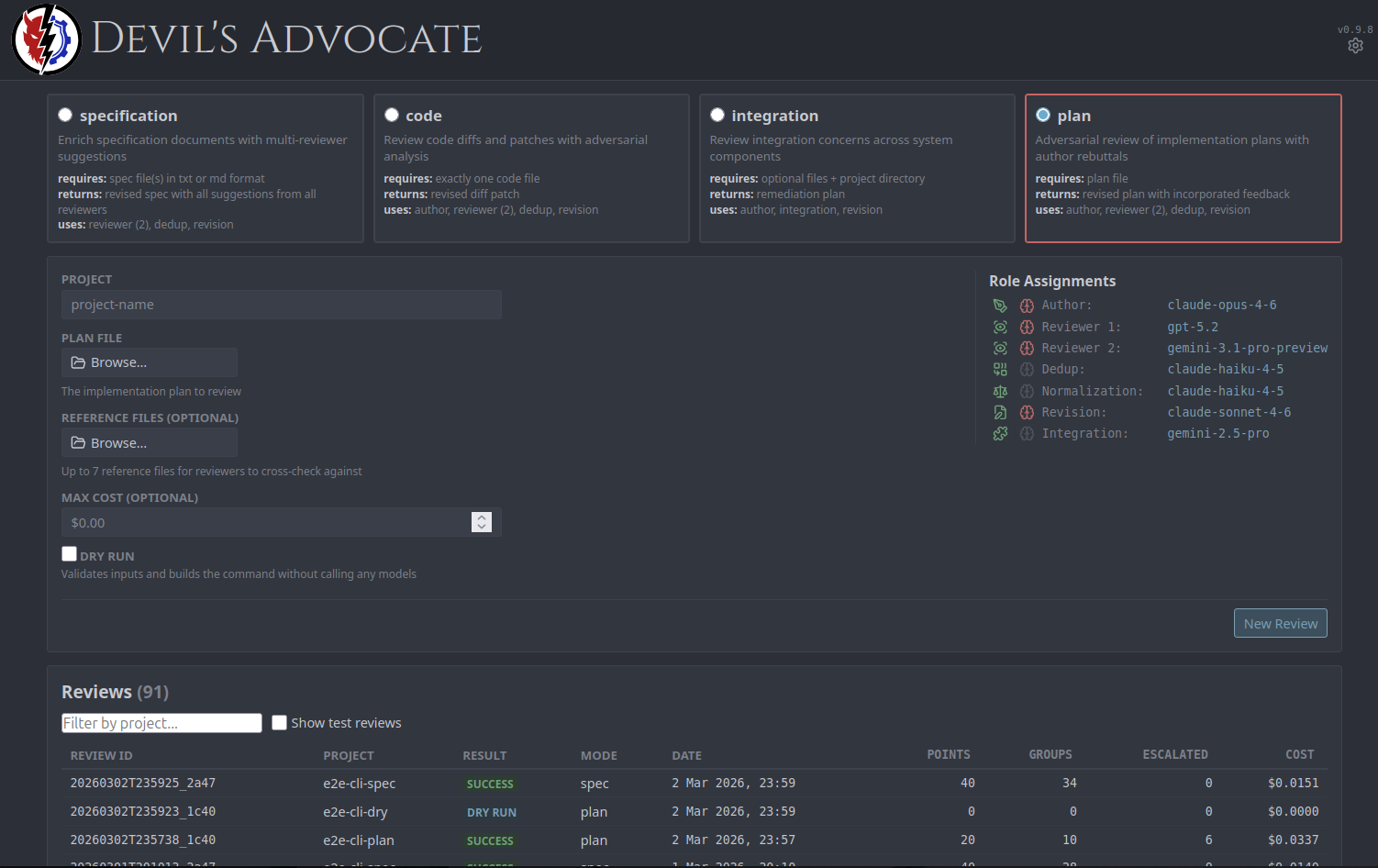
The primary way to use Devil's Advocate. Covers the full workflow - submitting reviews, monitoring progress in real time, resolving escalated findings, and generating revised artifacts.
dvad gui
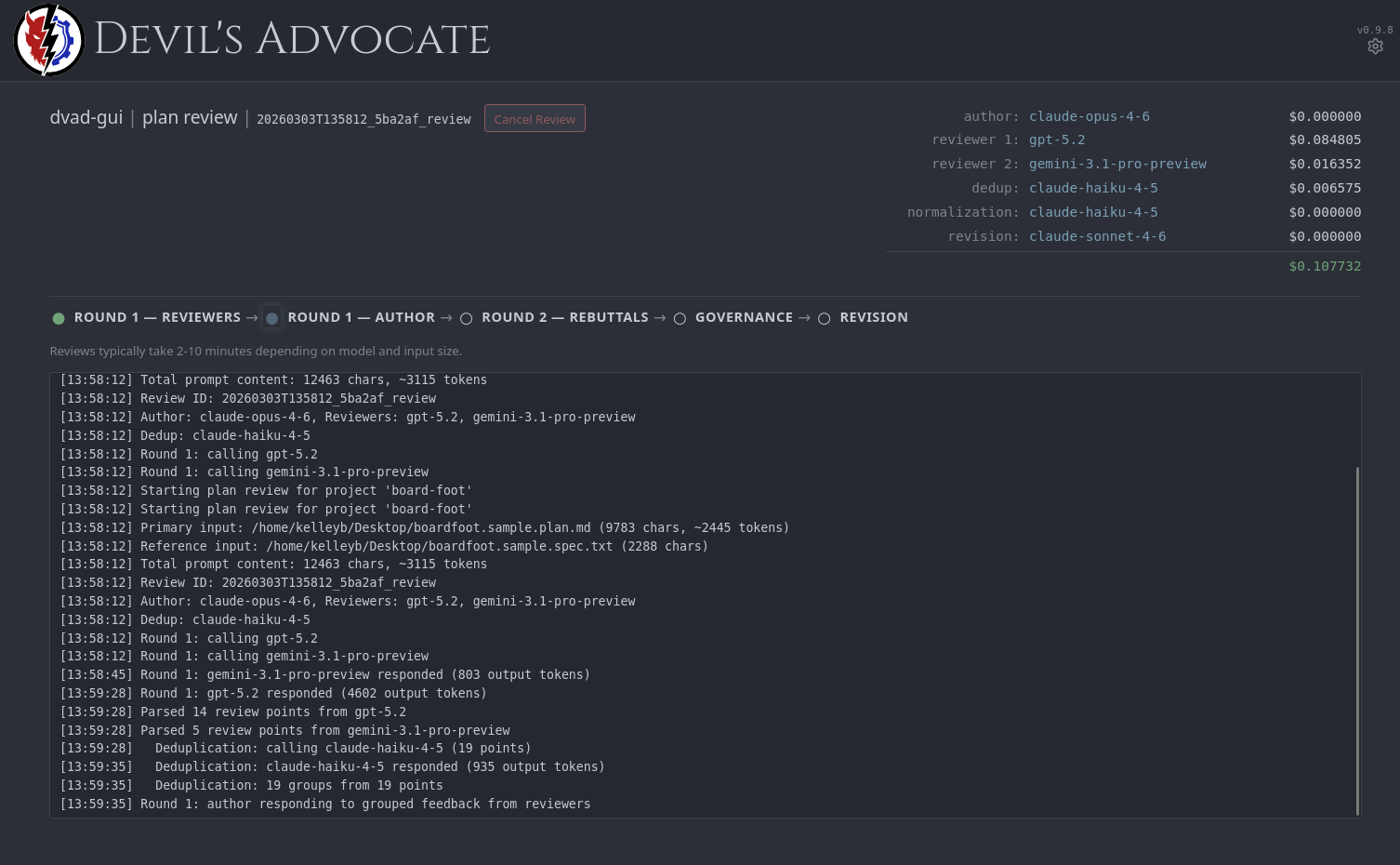
Opens at http://127.0.0.1:8411. The GUI includes a dashboard for submitting and browsing reviews, real-time review progress via SSE with per-model cost tracking, governance override controls, revision generation, and visual model/role configuration with a raw YAML editor.
By default the GUI refuses to bind to non-localhost interfaces. --allow-nonlocal overrides this and requires a CSRF token header on all mutating requests.
How It Works
- Independent review - Multiple reviewer models analyze the input in parallel, producing findings with severity, category, location, and recommendation.
- Deduplication - A dedup model groups overlapping findings into consolidated review groups, preserving source attribution.
- Author response - The author model responds to each group: ACCEPTED, REJECTED, or PARTIAL with a rationale.
- Rebuttal - Reviewers issue rebuttals on contested groups only. Each votes CONCUR or CHALLENGE.
- Final position - For challenged groups, the author provides a final position.
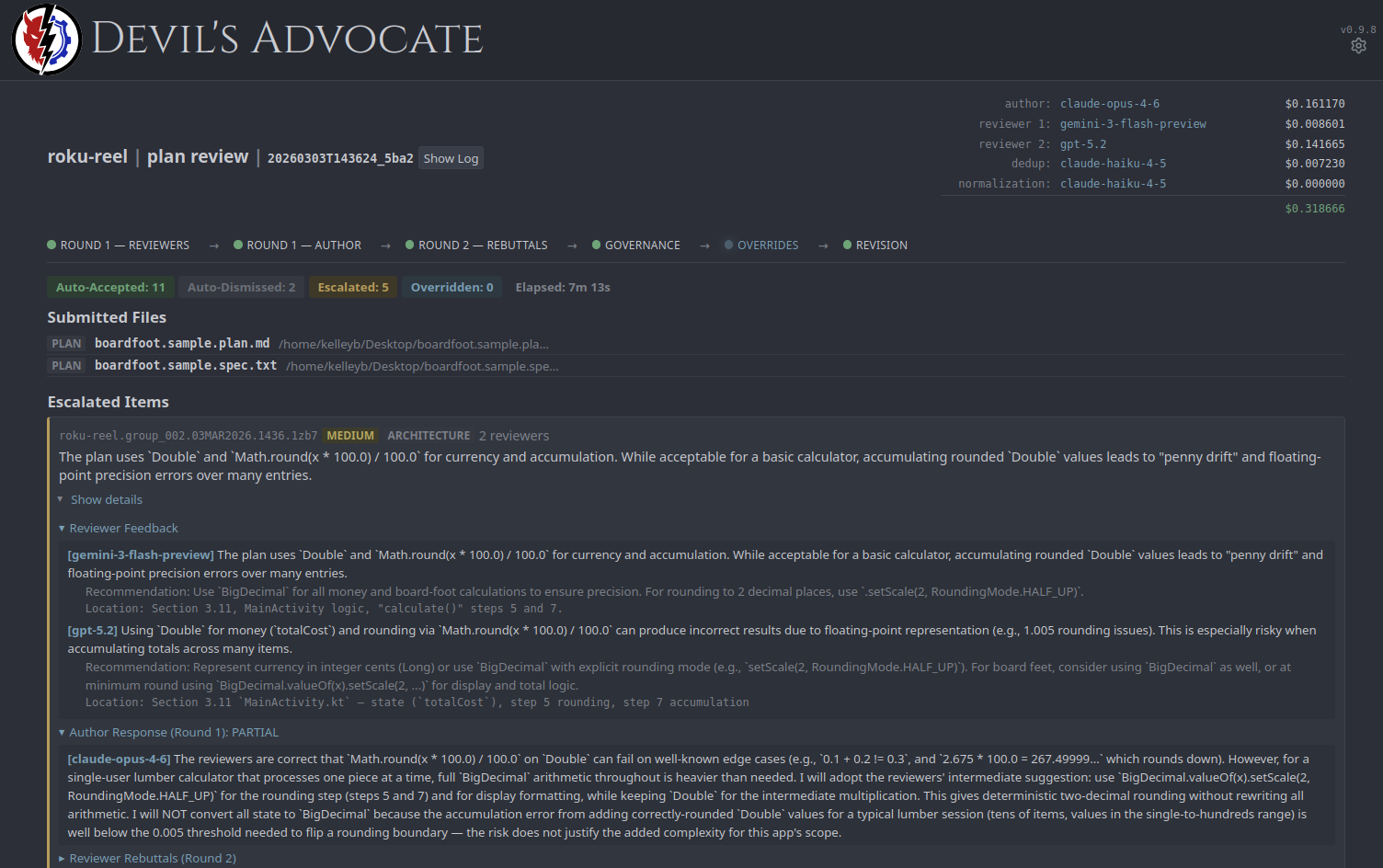
- Governance - A deterministic engine (no LLM calls, pure rule-based logic) maps every group to an outcome: AUTO_ACCEPTED, AUTO_DISMISSED, or ESCALATED. No finding passes through without the author demonstrating engagement - implicit and rote acceptance both escalate to human review.
Escalated findings are resolved through the GUI's override controls or dvad override. After governance, dvad revise generates the final revised artifact.
Review Modes
| Mode | Protocol | Input | Output |
|---|---|---|---|
plan |
Adversarial | Plan file + optional reference files | revised-plan.md |
code |
Adversarial | Exactly one code file, optional spec | revised-<filename> + revised-diff.patch |
spec |
Collaborative | Spec file(s) | revised-spec-suggestions.md |
integration |
Adversarial | Input files or .dvad/manifest.json, optional spec |
remediation-plan.md |
code mode produces the complete revised source file as its primary output, with a system-generated unified diff (revised-diff.patch) alongside it. The diff is computed mechanically via Python's difflib, not by an LLM.
spec is non-adversarial - no author, no rebuttals, no governance. Findings are grouped by theme and compiled into a suggestion report. All other modes use the full 2-round adversarial protocol.
Subscription backends
If you already pay for Claude Max or a ChatGPT plan, dvad can route the expensive review roles (reviewers, author, integration) through those subscriptions instead of your metered API keys — using each vendor's official CLI (claude and codex) in its documented headless mode.
What it costs. Nothing beyond the plans you already have. Subscription legs draw on the plans' own usage limits and bill $0 to the API; every run surface shows the API-equivalent ("covered by subscription ≈ $X") so a $0.19 run that would have cost $15 reads as the win it is. When a pool is exhausted, the call falls back per leg to the API twin you configured — a run never dies, it just costs money for that leg and says so in the ledger.
What dvad never does. dvad never sees, stores, or forwards your subscription credentials. Sign-in lives entirely with the vendor CLIs; dvad only spawns them and reads their output. The API-keys section holds keys; the subscription section holds none.
How to enable.
- Install and sign in to either CLI (
claude→claude auth login;codex→codex login). - Open the GUI config page → Subscription Backends → Add subscription models. This creates
-submodel entries wired to fall back to your existing API models (yourmodels.yamlis backed up first). - Assign those
-submodels to roles with the role icons, exactly as you would any model. - Flip Use subscription backends on.
The models.yaml equivalent is a provider: claude-cli / provider: codex-cli entry per lane (each with a failover_model naming an enabled API twin) plus settings.subscription_backend: true — see examples/models.yaml.example.
Honest caveats. Usage-limit windows are real — when a pool is spent, that leg falls back to the API. On very large inputs the codex lane tends to report fewer minor findings than its API twin; if you want the fullest tail, keep one API reviewer in your roster. When the switch is off, dvad behaves exactly as before, byte for byte.
Platform. Linux and macOS (the tested surface). The lanes follow dvad's existing XDG / DVAD_HOME path conventions.
Keeping the roster current
Vendors ship new models constantly, and a roster assembled six months ago is quietly out of date. dvad roster watches models.dev and keeps models.yaml aware of what exists, without ever editing the decisions you made.
Two rules bound everything it does. It is additive only — it adds models and refreshes upstream facts, and it has no code path that deletes a model, disables one, or reads your roles: block, let alone writes it. And it respects field ownership: context_window, max_out_stated and the two cost fields belong to the vendor; provider, api_base and api_key_env are learned from how you already configure that vendor; and thinking, timeout, max_out_configured, failover_model and role assignments are yours alone and are never written on any path.
That last one matters more than it looks. models.dev publishes a reasoning flag meaning this model is capable of reasoning, while thinking in your config means ask this model to think for this role. They are different questions, and syncing one onto the other would silently change both your output and your bill.
What a pass actually does. It fetches the catalogue and compares a content hash against yesterday's. On the great majority of days nothing has moved and the pass exits having written nothing at all. When the catalogue does change, a purely mechanical filter reduces several thousand entries to a short candidate list — dropping non-text products, deprecated and free-tier models, dated and floating aliases, anything under a context floor or outside a release window, and anything more than three deep in its family. Only that short list, a few KB of it, goes to a model for the one judgement involved: which candidates earn a place, and at what tier. Everything else about the resulting entry is derived from fixed tables.
Additions are inert until you assign one to a role, so a scan can never change the behaviour of a review you run afterwards.
Retirement is reported, never acted on. models.dev marks deprecated models, so you find out in the browser rather than through a failed run. But the scanner will not remove or disable the model, because a role pointing at a missing or disabled entry is a fatal config error — it would leave dvad unable to load at all, which is worse than the problem it was solving.
How it speaks to you. Only through the GUI. Findings collect as dismissible notices that appear the next time you open a page. No mail, no desktop notification, nothing that interrupts a run.
dvad roster scan --dry-run     # see what a pass would do
dvad roster scan               # run one pass now
dvad roster status             # last scan, timer state, pending notices
dvad roster install            # schedule it daily
dvad roster uninstall          # unschedule; config and notices are kept
dvad roster install writes a systemd user timer on a relative cadence (24h after each run, 10 minutes after boot) rather than a wall-clock schedule, plus an autostart entry that starts the timer at login. That combination is deliberate: a wall-clock timer needs a timestamp file that does not exist on an encrypted home until the user logs in.
CLI Quick Start
dvad config --show
dvad history --project <project name>
dvad review --mode plan --input plan.md --input ref.py --project myproject
dvad review --mode code --input src/app.py --spec spec.md --project myproject
dvad review --mode plan --input plan.md --project myproject --max-cost 0.50
dvad review --mode plan --input plan.md --project myproject --dry-run
dvad roster scan --dry-run
Design Notes
- No vendor SDKs. All provider calls use
httpxdirectly - full control over request shape and retry behavior. - Deterministic governance. Zero LLM calls. Every outcome is reproducible from the same inputs.
- Atomic operations. File writes use
mkstemp+os.replace. Locking usesO_CREAT | O_EXCL. - XDG-compliant. Config and data paths follow the XDG Base Directory specification.
Full CLI reference, configuration schema, governance rules, and cost tracking details are available in the documentation.
License
MIT
Release history Release notifications | RSS feed


Download files
Download the file for your platform. If you're not sure which to choose, learn more about installing packages.
Source Distribution
Built Distribution
Filter files by name, interpreter, ABI, and platform.
If you're not sure about the file name format, learn more about wheel file names.
Copy a direct link to the current filters
File details
Details for the file devils_advocate-0.9.49.tar.gz.
File metadata
- Download URL: devils_advocate-0.9.49.tar.gz
- Upload date:
- Size: 5.0 MB
- Tags: Source
- Uploaded using Trusted Publishing? No
- Uploaded via: twine/6.2.0 CPython/3.12.13
File hashes
| Algorithm | Hash digest | |
|---|---|---|
| SHA256 |
8bd88023eaaa4b1dc5a843e9c2bb766bdf855f421dfb35a49f4a3335aa44db9e
|
|
| MD5 |
5a8ecd368b4444ca64d0f5bde0c126d3
|
|
| BLAKE2b-256 |
139793f0a2b274fcfea3dc85356bbf07f7a9bf6a890bc3c1258396f2fd59cece
|
File details
Details for the file devils_advocate-0.9.49-py3-none-any.whl.
File metadata
- Download URL: devils_advocate-0.9.49-py3-none-any.whl
- Upload date:
- Size: 2.9 MB
- Tags: Python 3
- Uploaded using Trusted Publishing? No
- Uploaded via: twine/6.2.0 CPython/3.12.13
File hashes
| Algorithm | Hash digest | |
|---|---|---|
| SHA256 |
4f2deeba0c273a0be87d7e19c46a851cf7a81b520f76eb58338f547502ebb892
|
|
| MD5 |
7aea1cbfd42b7ed352059a778a9eea0e
|
|
| BLAKE2b-256 |
0ca29c3a04310569d8812fa4d50466dd2825d9cce5dee96a936076edd0b97e39
|






